
前言
在上篇中,我们使用Cpp在UE编辑器环境下基于自定义输入的样条生成了道路和交汇路口,本文在此基础上更进一步完成街区生成。在IPCC(Interactive Procedural City Generator)中,街区生成需要选择包围的道路,然后使用ScriptableTool触发创建,需要人为逐步点击。本篇中希望以前文中生成的道路、交汇路口形成的空间自动分割生成街区,完成动态城市基础底板生成的最后一块任务。
本文对应的[项目GitHub](https://github.com/jiadevr/PCGDemo)使用5.6.1源码编译版本创建,需要C++编译环境。
道路生成完善
在生成街区前,我想首先对上文中提到的和街区生成强相关的一些不足的地方进行完善。
交汇路口错位问题
在上文中我们提到交汇路口和道路的错位问题,如下图所示:
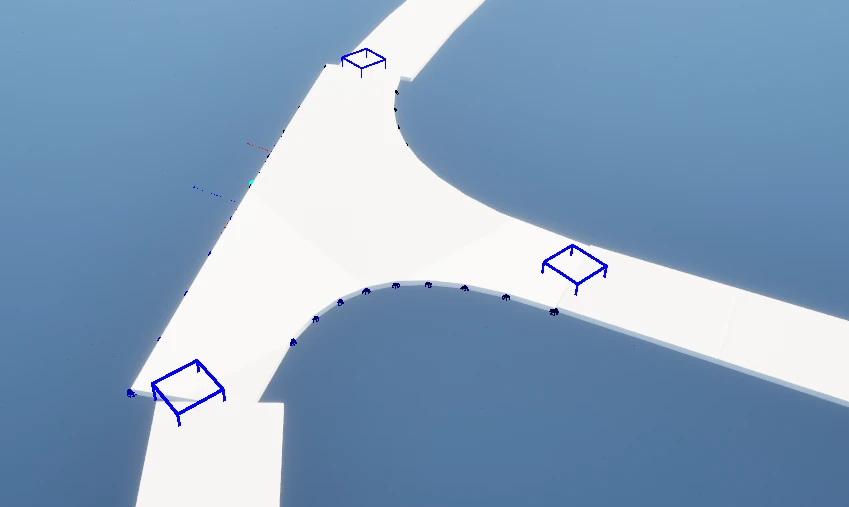
道路接口和道路错位
这中现象是因为交汇路口末端以直线方式进行了延申,但延申部分没有采样样条,无法和样条结尾部分进行衔接。这个问题同时涉及到Segment长度设置、样条生成终点调节、甚至可能需要改用户输入的曲线,大量的修改会导致整体生成和用户的设计不符。在苦于解决方案时,我又翻出了我们的好样板IPCC,这才发现我在截取参考图时给相邻分段(图中右侧无高亮边缘)也点了预览,而实际的路口仅有一小部分(橘色高亮边缘)。
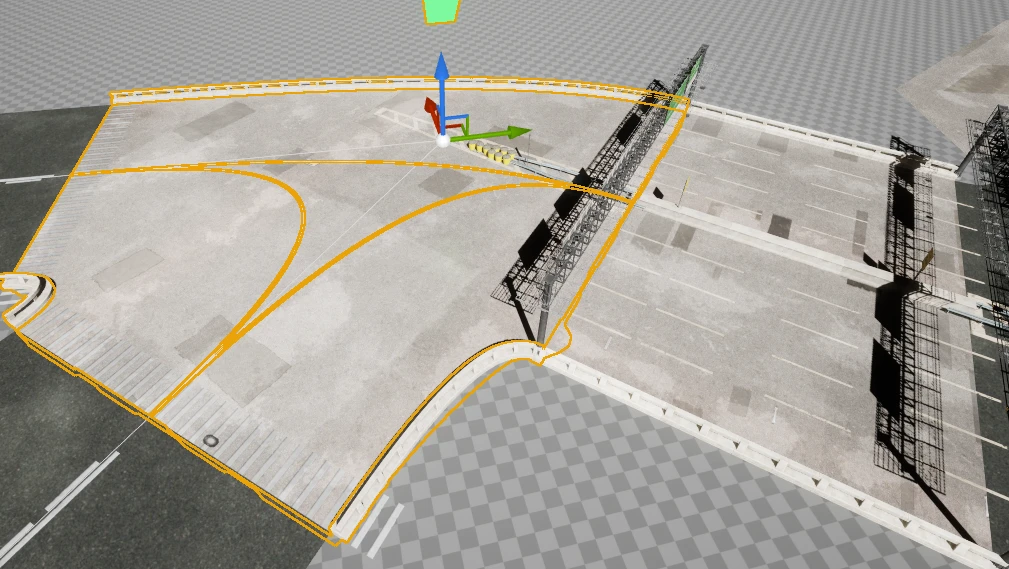
IPCC交汇路口参考(橘色高亮边缘)
有了正确的参考,我们可以获知那么问题就很好解决了,既然我们是因为延申区域直线和Spline不符,那么我们可以缩短(删除)交汇路口延伸的距离,然后调整汇入路口末端的位置和朝向实现道路衔接,从而改善这一问题。这涉及到下面几方面更改:
缩短(删除)延申直线。
在UIntersectionMeshGenerator::CreateExtrudeShape()中我们定义了延申背离Intersection交点的SegmentEndpoint的部位为Start,经过测试这部分完全可以不延申,直接使用SegmentEndpoint作为Start依然可以获得比较好的衔接效果。因此我们直接使用RightMid/LeftMid作为新的Start。
在获取交汇路口连接点的时候同时传入衔接点的位置和旋转。
在FIntersectionSegment结构体中添加一个FRotation数据段,用于记录在相交点位的Spline旋转值。
URoadGeneratorSubsystem::TearIntersectionToSegments()构造OutSegments数组时读取样条的Rotation和Location一同写入OutSegments数组对应元素。OutSegments的值会通过UIntersectionMeshGenerator::SetIntersectionSegmentsData()传入UIntersectionMeshGenerator。
在UIntersectionMeshGenerator::CreateExtrudeShape()中构造RoadInterfaceSegments的部分把世界空间旋转值写入ConnectionLocations数组,在调用UIntersectionMeshGenerator::GetRoadConnectionPoint()时传递给Subsystem,再由Subsystem处理后传递给RoadMeshGenerator。
在生成道路时读取衔接点的位置和朝向组成开头/末尾Segment。
在URoadGeneratorSubsystem::GenerateRoads()中读取IntersectionSegment中的旋转值并设置为ConnectionTransform元素的Rotation值
对于有衔接问题的CornerCase,可以设置道路采样延申。这类似IPCC中的Shrink的反向操作,通过修改UIntersectionMeshGenerator对外接口修改交汇点实现部分穿插。或者在生成最终静态模型之后使用UE内的模型调整工具进行细节调整。
因为如果需要可以在计算交点的时候将衔接点向内缩20cm,由于我们生成交汇路口和传给Road生成的数据相互分离,可以在互不影响的情况下完成穿插生成。
道路衔接点完善效果如下:
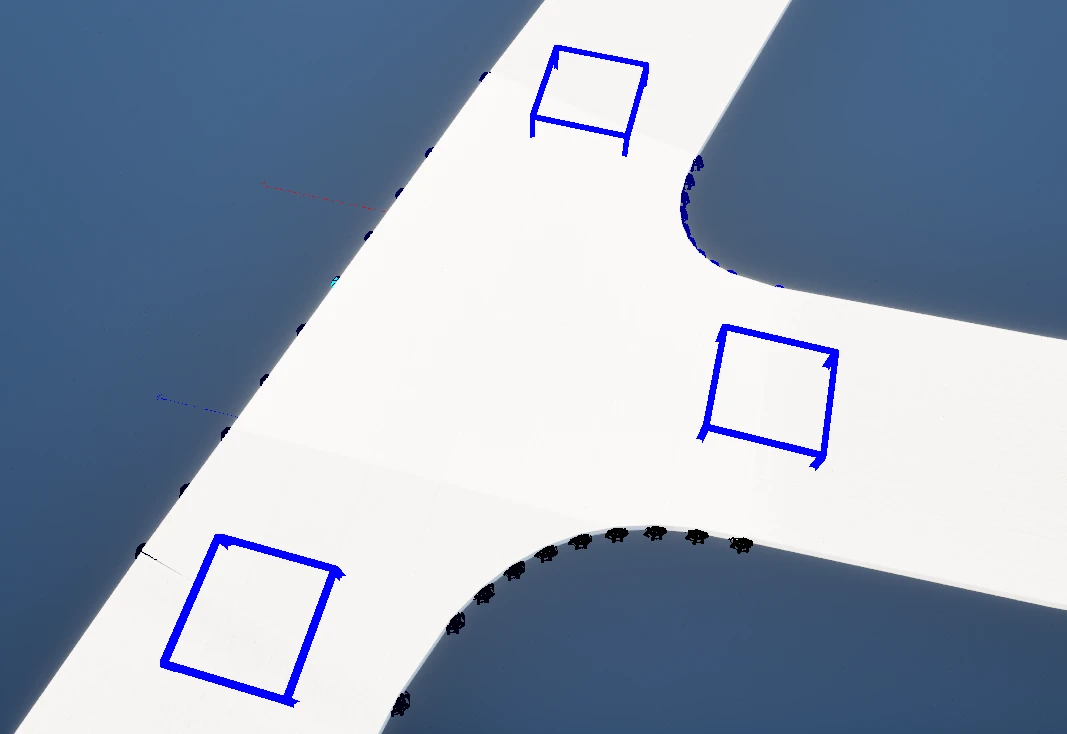
衔接点完善效果
环形道路首尾衔接问题
在前文的构建流程中,对于环形道路(USplineComponent::IsClosedLoop=true)的首尾连接部分是作为两条路分别构建的。这种方式虽然不会产生接口问题,但它会导致我们的路网描述模型出现漏洞,即“两条不同的道路通过交汇路口相接”出现特例。在实际场景中表现如下:
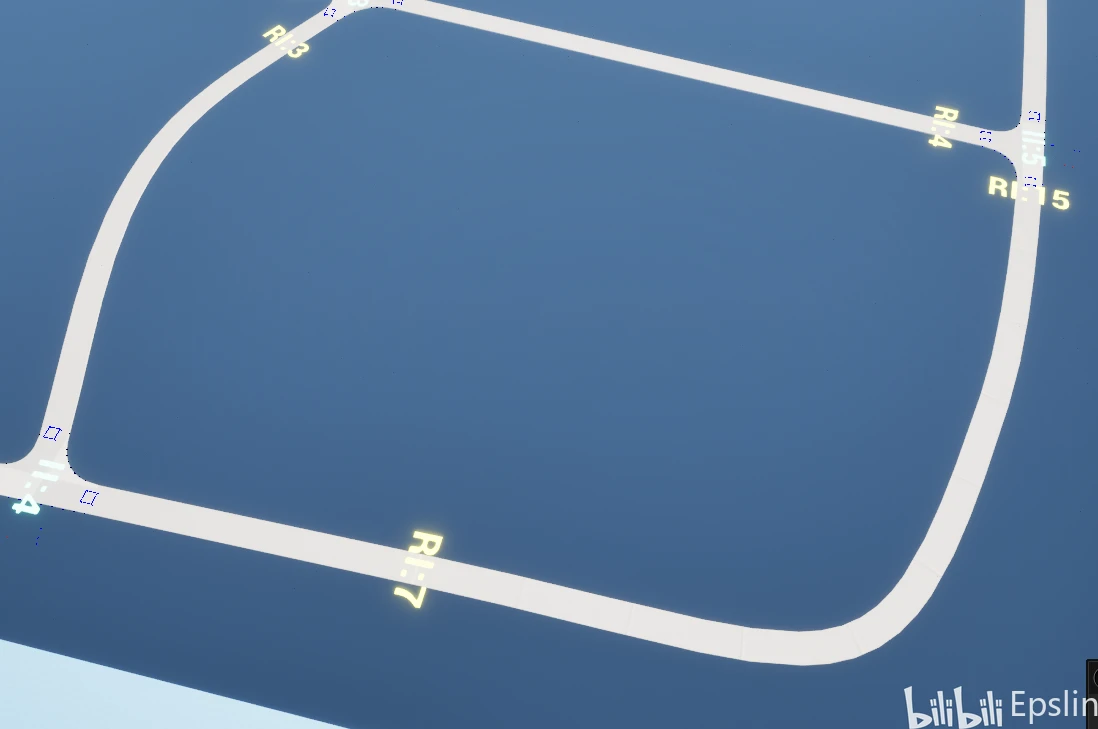
RI15和RI17在样条闭合点直接相接
为了让后续街区建模过程能够统一,我们需要将两条道路合并为一段,也就是将两段道路的连续Segments信息拼在一起。确定了目标,下一步就是确定在哪里插入代码。道路构建所使用的连续Segments信息生成过程中主要依赖:
URoadGeneratorSubsystem::GetContinuousIndexSeries()函数通过传入的交汇路口Segments将所有道路Segments切成连续数组。
URoadGeneratorSubsystem::FindInsertIndexInExistedContinuousSegments()判断衔接点分段应该插入到连续数组的哪个分段组位置。
URoadMeshGenerator::SetRoadInfo()接收衔接点分段和连续分段信息,用于实际构建道路。
在上一篇文章中我们讨论了为什么单独设立函数再次遍历交汇路口的连续数组,另存衔接点信息。到了这里我们在前文的基础上还需要考虑这种分段的合并是否会对衔接点分段的定位造成影响。
在衔接点信息构建的过程中,或者说在我们道路构建的过程中,我们许多算法能高效完成任务存在一个前提,即传入分段数据组内的有序性(类似线段树思想)。在数据有序的前提下,我们只需要比较首尾就可以完成整段信息的比较,避免了逐元素遍历。具体到衔接点信息插入位置中,我们算法的假设是数组元素连续递增,这样我们只需要将插入点和分段首尾比较即可。如果我们在衔接点插入位置确定前就将连续分段数组合并,势必会导致首段内容不符合这一假设,算法就需要重新判断每段的情况,造成算法性能下降。
考虑到一条样条线上交汇路口分段总数比道路分段数总数要小,我们保持这种算法显然能减少遍历的元素数量,获得更大收益。那么可选的方式显然是在衔接点信息构建完成后、在信息传入URoadMeshGenerator前进行处理。在这里我们还有一个特性可以利用,如果头尾能够相接,那么首尾相接处一定不存在交汇口,也就是说连续数组的中首个子数组的首个元素前端和最后一个子数组的尾元素末端一定不存在衔接点信息,在修改衔接点数组时我们可以利用这一特性减少数组变动。代码片段如下:
//void URoadGeneratorSubsystem::GenerateRoads()
//2.判断十字路口端点位于哪个Segment、将其作为附加信息与连续Segments封装到FConnectionInsertInfo结构体部分
//...
//如果是闭合曲线把Segments合并
		if (SingleSpline->IsClosedLoop())
		{
			if (ContinuousSegmentsGroups.Num() > 1)
			{
				bool bCanMerge = (AllSegmentOnSpline[0].GetGlobalIndex() == ContinuousSegmentsGroups[0][0]);
				bCanMerge &= (AllSegmentOnSpline.Last(0).GetGlobalIndex() == ContinuousSegmentsGroups.Last(0).Last(0));

				if (bCanMerge)
				{
					//合并到第一组,可以避免后续组的去除
					TArray NewFirstGroup;
					int32 LastGroupLength = ContinuousSegmentsGroups.Last(0).Num();
					NewFirstGroup.SetNum(ContinuousSegmentsGroups[0].Num() + ContinuousSegmentsGroups.Last(0).Num());
					FMemory::Memcpy(NewFirstGroup.GetData(), ContinuousSegmentsGroups.Last(0).GetData(),
					                LastGroupLength * sizeof(uint32));
					FMemory::Memcpy(NewFirstGroup.GetData() + LastGroupLength,
					                ContinuousSegmentsGroups[0].GetData(),
					                ContinuousSegmentsGroups[0].Num() * sizeof(uint32));
					ContinuousSegmentsGroups[0] = NewFirstGroup;
					//调整衔接内容,能衔接的情况必然是第一组元素去除尾部或最后一组元素去除头部;因为是把最后一组元素合并到头部,所以只需要移动一组
					if (SegmentGroupToConnectionToHead.Contains(ContinuousSegmentsGroups.Num() - 1))
					{
						TArray HeadInsertsOfLastGroup;
						SegmentGroupToConnectionToHead.MultiFind(ContinuousSegmentsGroups.Num() - 1,
						                                         HeadInsertsOfLastGroup);
						//插入元素必然在头部,理论上应该只有一个元素
						for (auto& Insert : HeadInsertsOfLastGroup)
						{
							Insert.GroupIndex = 0;
							SegmentGroupToConnectionToHead.Emplace(0, Insert);
							ensureAlwaysMsgf(Insert.bConnectToGroupHead==true, TEXT("Error Insert Place,Please Check"));
						}
						SegmentGroupToConnectionToHead.Remove(ContinuousSegmentsGroups.Num() - 1);
					}
					//移除最后一组
					ContinuousSegmentsGroups.RemoveAt(ContinuousSegmentsGroups.Num() - 1);
				}
			}
		}
//3.创建Actor负载信息
//...完成数据调整之后,再次构建道路,就可以发现封闭样条的首尾段已经被我们合并为一条了。
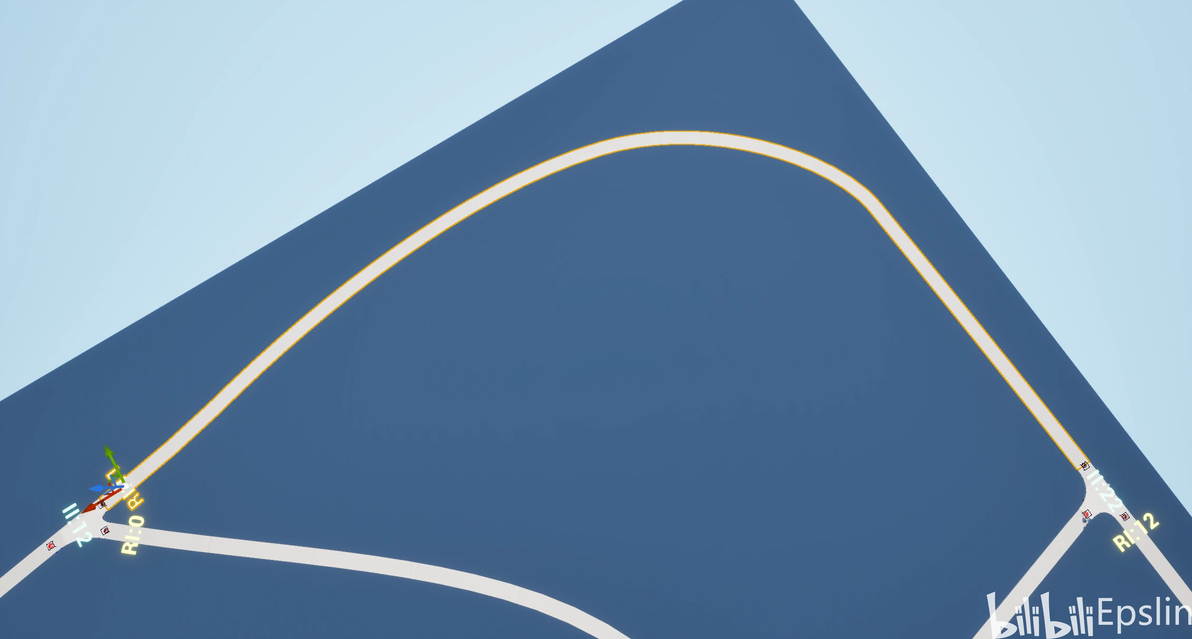
封闭样条首尾段合并效果
交汇路口排序问题
另外在构建有向图的时候需要交汇路口(作为图节点)连接道路(作为图边)有序,我们在构造路口时候已经进行了排序,但当时文章说时“逆时针”排布。在本文Debug的时候发现实际是顺时针排序,对应专栏内容已经提交了修改,请大家注意。我们这里配合代码和图示再看一下:
	//根据顺时针顺序排序,X正方向为0,Y正方向为正
	FVector IntersectionPoint = InIntersectionInfo.WorldLocation;
	UE_LOG(LogTemp, Display, TEXT("Begin Sort"));
	OutSegments.Sort([&IntersectionPoint](const FIntersectionSegment& A, const FIntersectionSegment& B)
	{
		FVector ProjectedA = FVector::VectorPlaneProject((A.IntersectionEndPointWS - IntersectionPoint),
		                                                 FVector::UnitZ());
		FVector2D RelA(ProjectedA);
		FVector ProjectedB = FVector::VectorPlaneProject((B.IntersectionEndPointWS - IntersectionPoint),
		                                                 FVector::UnitZ());
		FVector2D RelB(ProjectedB);

		float AngleA = FMath::Atan2(RelA.Y, RelA.X);
		float AngleB = FMath::Atan2(RelB.Y, RelB.X);

		UE_LOG(LogTemp, Display, TEXT("AngleA: %f,AngleB: %f"), AngleA, AngleB);
		// Atan2返回范围为[-π,π)转换为[0, 2π)范围
		if (AngleA < 0) AngleA += 2 * PI;
		if (AngleB < 0) AngleB += 2 * PI;

		if (AngleA != AngleB)
		{
			float AngleAInDegree = FMath::RadiansToDegrees(AngleA);
			float AngleBInDegree = FMath::RadiansToDegrees(AngleB);
			UE_LOG(LogTemp, Display, TEXT("AngleA: %f FromLoc:%s,AngleB: %f FromLoc:%s"), AngleAInDegree,
			       *A.IntersectionEndPointWS.ToString(), AngleBInDegree, *B.IntersectionEndPointWS.ToString());
			return AngleA < AngleB; // 极角小的排在前面
		}
		else
		{
			// 角度相同,按距离排序(近的在前)
			return RelA.SizeSquared() < RelB.SizeSquared();
		}
	});
	UE_LOG(LogTemp, Display, TEXT("End Sort"));
	return true;
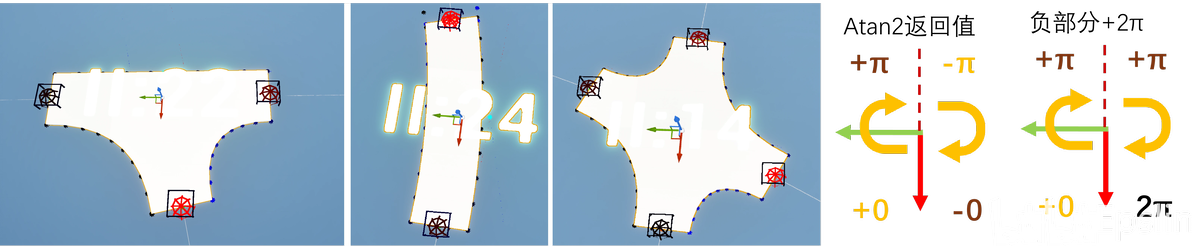
衔接点顺时针排布结果
FMath::Atan2返回的是弧度制,范围在(-pi,pi],上部不连续。代码中为其负轴部分+2pi使其变为整个值域连续的[0,2pi]范围,随后根据各点和交点构成的边与X轴正方向夹角顺时针排序。图中左侧代表上文中提到的三种基本道路模型衔接点可视化,均为X轴正方向朝视口下部,Y轴正方向朝向视口左侧,其中点排序为从低位到高位颜色逐渐变鲜艳(黑色R=0->红色R=255)。请务必注意这个顺序,在后面有向图构建时会多次用到。
街区图中的环/面提取
在这里我们首先定义如何划分街区:在我们的常识和IPCC街区构建的步骤中我们都可以看出:街区是由道路、交汇路口围成的面(环),街区不能跨过道路。因此我们可以有如下推断,当街区由超过一条路组成时:
两条不同的道路通过交汇路口相接。
构成街区的道路两端均连接到交汇路口。
构成街区的交汇路口都至少连接两条道路。
根据以上推断,我们需要在其中找到道路、交汇路口构成的环。具体来说,这个问题更接近平面嵌入问题,我们可以从Github找到相关项目
[Lorenzovagliano/GraphFacesFinder-Cpp实现](https://github.com/Lorenzovagliano/GraphFacesFinder);[ammanvedi/planar-face-discovery-TS实现](https://github.com/ammanvedi/planar-face-discovery);[abol-karimi/polygons: Calculating interior faces of a planar graph-JS实现](https://github.com/abol-karimi/polygons)。总体来说是使用经典的双连接边找面思想,即“从一条边出发,到达节点时选择作为入边相邻左侧的边作为下一条边,直到回到起点,遍历路径即为一个面”,在具体查找中使用类似DFS+备忘录的方法。结合我们的实际情况,需要完成下面的步骤:
对交汇路口、道路建立编号映射,创建图容器和边结构。
将交汇路口的每个路口衔接点以顺时针\逆时针排序。
根据排序创建有向图。
使用上面的遍历思想查找面。
查找面算法测试。
对找到的面集合进行进一步处理。
下面对这些的步骤进行详细分析。
建立图结构
图结构文件名为RoadGraphForBlock,声明URoadGeneratorSubsystem和测试类RoadGraphTest为其友元。
首先对于路网这种稀疏图,我们使用邻接表存储可以节省存储空间、便于遍历。邻接表的一维表示有向图中边的出发节点序号,二维有序地存储边结构。边结构需要包括道路序号和有向图中边到达节点序号。邻接表我们直接使用二维数组表示为TArray>。
确定储存形式后,我们对UIntersectionMeshGenerator和URoadMeshGenerator添加静态变量GlobalIndex,在对象构造的时候对成员变量赋值并++。这里有两个注意点:
在编辑器启动构造CDO对象的时候构造函数会第一次运行,也就是说如果我们初始值设置为0,那么第一个实例化的交汇路口、道路对象GlobalIndex为1。
uint32不能直接用于索引数组,TArray默认需要搭配int32作为数组索引。
基于上面两点考虑,我们在UIntersectionMeshGenerator和URoadMeshGenerator的GlobalIndex声明时使用int32类型,分别使用-1作为初始值,在公共接口中添加GetGlobalIndex接口用于返回。
除了图结构常规的增删查改接口之外,我们这里有两个特定的需求:
边在加入邻接表的时候需要符合特定顺序,即在第二维度指定序号插入。对应函数AddEdgeInGivenSlot()。
能够根据这个顺序,传入当前进入的边返回相邻的下一条出边。对应函数FindNextEdge()。
有对应的接口需求之后,我们颠倒一下顺序,先看创建有向图的部分,这样方便确定我们应该把值传到哪里,上面两个核心接口的实现也会一同给出。
创建有向图
上小节中我们已经确定了需要的API,我们准备从已经构建的Intersection中提取道路排序,因此不需要在图中额外传入节点和边的位置,使得我们的图结构可以更精炼。图结构代码段如下:
//RoadGraphForBlock.h
UCLASS()
class URoadGraph final : public UObject
{
	GENERATED_BODY()
	friend class URoadGeneratorSubsystem;
	friend class RoadGraphTest;

public:
	URoadGraph()
	{
	}

	virtual ~URoadGraph() override;

protected:
	struct FRoadEdge
	{
		int32 ToNodeIndex;
		int32 RoadIndex;

		FRoadEdge()
		{
			ToNodeIndex = INT32_ERROR;
			RoadIndex = INT32_ERROR;
		}

		FRoadEdge(int32 InToNodeIndex, int32 InRoadIndex) :
			ToNodeIndex(InToNodeIndex), RoadIndex(InRoadIndex)
		{
		};
	};

	/**
	 * 为了利用之前的保序数据提供的特殊接口,直接添加对应边到给定邻接表位置
	 * 由于图中没有保存坐标,无法直接进行空间排序,使用该接口作为输入直接将之前已排序数据放入邻接表
	 * @param FromNodeIndex 起始节点序号
	 * @param ToNodeIndex 终止节点序号
	 * @param EdgeIndex 边序号
	 * @param SlotIndexOfFromNode 要插入的邻接表位置、对应排序后的元素编号
	 */
	void AddEdgeInGivenSlot(int32 FromNodeIndex, int32 ToNodeIndex, int32 EdgeIndex, int32 SlotIndexOfFromNode);


	/**
	 * 为节点添加有向边,用于TestClass;
	 * 类内不提供空间排序,在插入边时需要按照固定顺序
	 * @param FromNodeIndex 起始节点序号
	 * @param ToNodeIndex 终止节点序号
	 * @param EdgeIndex 边序号
	 */
	void AddEdge(int32 FromNodeIndex, int32 ToNodeIndex, int32 EdgeIndex);

	//DOF-
	/*void AddUndirectedEdge(int32 NodeAIndex, int32 NodeBIndex, int32 EdgeIndex);*/


	/**
	 * 去除给定编号的单向边,当RoadIndex保持默认时去除FromNode到ToNode中所有单向边;移除将内容置为无效值,避免引起图顺序变化
	 * @param FromNodeIndex 起始节点序号
	 * @param ToNodeIndex 终止节点序号
	 * @param RoadIndex 道路编号,当RoadIndex保持默认(INT32_ERROR)时去除FromNode到ToNode中所有单向边
	 */
	void RemoveEdge(int32 FromNodeIndex, int32 ToNodeIndex, int32 RoadIndex = INT32_ERROR);

	/**
	 * 移除所有边
	 */
	void RemoveAllEdges();

	/**
	 * 判定两个节点直接存在单向边
	 * @param FromNodeIndex 起始节点序号
	 * @param ToNodeIndex 终止节点序号
	 * @return 是否包含从From到To的单向边
	 */
	bool HasEdge(int32 FromNodeIndex, int32 ToNodeIndex) const;

	/**
	 * 返回两个节点中第一个单向边的序号,不存在时返回INT32_ERROR
	 * @param FromNodeIndex 起始节点序号
	 * @param ToNodeIndex 终止节点序号
	 * @return 第一个单向边的序号
	 */
	int32 GetRoadIndex(int32 FromNodeIndex, int32 ToNodeIndex);

	/**
	 * 打印邻接表,以[FromNodeIndex]-(RoadIndex)-[ToNodeIndex]格式逐条打印
	 */
	void PrintConnectionToLog();

	/**
	 * 稀疏图,使用邻接表实现
	 */
	TArray> Graph;

	/**
	 * 返回邻接表中相邻的下一条边,当传入最后一条边时返回首条边
	 * @param NodeIndex 当前节点序号
	 * @param CurrentEdgeIndex 当前边信息
	 * @return 相邻的下一条边
	 */
	FRoadEdge* FindNextEdge(int32 NodeIndex, const FRoadEdge& CurrentEdgeIndex);

	int32 FindEdgeOrderInGraph(int32 FromNodeInex, int32 ToNodeIndex, int32 RoadIndex) const;

	/**
	 * 图中边总计算
	 */
	int32 EdgeCount = 0;
};
//RoadGraphForBlock.cpp
#include "Road/RoadGraphForBlock.h"


URoadGraph::~URoadGraph()
{
	Graph.Empty();
}

void URoadGraph::AddEdge(int32 FromNodeIndex, int32 ToNodeIndex, int32 EdgeIndex)
{
	if (FromNodeIndex == INT32_ERROR || ToNodeIndex == INT32_ERROR)
	{
		return;
	}

	if (!Graph.IsValidIndex(FromNodeIndex))
	{
		if (FromNodeIndex > Graph.Num() - 1)
		{
			Graph.SetNum(FromNodeIndex + 1);
		}
	}
	Graph[FromNodeIndex].Emplace(FRoadEdge(ToNodeIndex, EdgeIndex));
	EdgeCount++;
}

void URoadGraph::AddEdgeInGivenSlot(int32 FromNodeIndex, int32 ToNodeIndex, int32 EdgeIndex, int32 SlotIndexOfFromNode)
{
	if (FromNodeIndex == INT32_ERROR || ToNodeIndex == INT32_ERROR || SlotIndexOfFromNode < 0)
	{
		return;
	}

	if (!Graph.IsValidIndex(FromNodeIndex))
	{
		if (FromNodeIndex > Graph.Num() - 1)
		{
			Graph.SetNum(FromNodeIndex + 1);
		}
	}
	if (!Graph[FromNodeIndex].IsValidIndex(SlotIndexOfFromNode))
	{
		Graph[FromNodeIndex].SetNum(SlotIndexOfFromNode + 1);
	}
	Graph[FromNodeIndex][SlotIndexOfFromNode] = FRoadEdge(ToNodeIndex, EdgeIndex);
	EdgeCount++;
}

void URoadGraph::RemoveEdge(int32 FromNodeIndex, int32 ToNodeIndex, int32 RoadIndex)
{
	TArray& AllConnectedNodes = Graph[FromNodeIndex];
	for (int32 i = 0; i < AllConnectedNodes.Num(); ++i)
	{
		if (AllConnectedNodes[i].ToNodeIndex == ToNodeIndex)
		{
			if (RoadIndex == INT32_ERROR)
			{
				AllConnectedNodes[i].ToNodeIndex = INT32_ERROR;
				AllConnectedNodes[i].RoadIndex = INT32_ERROR;
				EdgeCount--;
			}
			else if (AllConnectedNodes[i].RoadIndex == RoadIndex)
			{
				AllConnectedNodes[i].ToNodeIndex = INT32_ERROR;
				AllConnectedNodes[i].RoadIndex = INT32_ERROR;
				EdgeCount--;
				break;
			}
		}
	}
	bool bAllInvalid = true;
	for (int32 i = 0; i < AllConnectedNodes.Num(); ++i)
	{
		bAllInvalid &= AllConnectedNodes[i].ToNodeIndex == INT32_ERROR;
	}
	if (bAllInvalid)
	{
		AllConnectedNodes.Empty();
	}
}

void URoadGraph::RemoveAllEdges()
{
	for (TArray& NeighborOfNode : Graph)
	{
		NeighborOfNode.Empty();
	}
}

bool URoadGraph::HasEdge(int32 FromNodeIndex, int32 ToNodeIndex) const
{
	const TArray& AllConnectedNodes = Graph[FromNodeIndex];
	for (int32 i = 0; i < AllConnectedNodes.Num(); ++i)
	{
		if (AllConnectedNodes[i].ToNodeIndex == ToNodeIndex && AllConnectedNodes[i].RoadIndex != INT32_ERROR)
		{
			return true;
		}
	}
	return false;
}

int32 URoadGraph::GetRoadIndex(int32 FromNodeIndex, int32 ToNodeIndex)
{
	int32 RoadIndex = INT32_ERROR;
	if (HasEdge(FromNodeIndex, ToNodeIndex))
	{
		RoadIndex = Graph[FromNodeIndex][ToNodeIndex].RoadIndex;
	}
	return RoadIndex;
}

void URoadGraph::PrintConnectionToLog()
{
	if (Graph.IsEmpty())
	{
		UE_LOG(LogTemp, Display, TEXT("Graph is empty"));
		return;
	}
	UE_LOG(LogTemp, Display, TEXT("Begin To Print Graph Connections"));
	for (int32 i = 0; i < Graph.Num(); i++)
	{
		for (int j = 0; j < Graph[i].Num(); ++j)
		{
			int32 ToNode = Graph[i][j].ToNodeIndex;
			int32 ByEdge = Graph[i][j].RoadIndex;
			FString SinglePath = FString::Printf(TEXT("[%d]-(%d)-[%d],"), i, ByEdge, ToNode);
			UE_LOG(LogTemp, Display, TEXT("%s"), *SinglePath);
		}
	}
	UE_LOG(LogTemp, Display, TEXT("Print Graph Connections Finished"));
}


URoadGraph::FRoadEdge* URoadGraph::FindNextEdge(int32 NodeIndex, const FRoadEdge& CurrentEdgeIndex)
{
	const int32 NeighboursCount = Graph[NodeIndex].Num();
	int32 i = 0;
	for (; i < NeighboursCount; ++i)
	{
		if (Graph[NodeIndex][i].RoadIndex == CurrentEdgeIndex.RoadIndex)
		{
			break;
		}
	}
	return &Graph[NodeIndex][(i + 1) % NeighboursCount];
}

int32 URoadGraph::FindEdgeOrderInGraph(int32 FromNodeInex, int32 ToNodeIndex, int32 RoadIndex) const
{
	if (!Graph.IsValidIndex(FromNodeInex))
	{
		return INT32_ERROR;
	}
	for (int i = 0; i < Graph[FromNodeInex].Num(); ++i)
	{
		if (Graph[FromNodeInex][i].RoadIndex == RoadIndex && Graph[FromNodeInex][i].ToNodeIndex == ToNodeIndex)
		{
			return i;
		}
	}
	return INT32_ERROR;
}

}
我们需要以固定的顺序在邻接表中放置边,因此我们在设置API的时候取消了无向图同时创建双边的接口。又考虑到后续为了便于测试,保留了添加单向有向边的接口。在插入边时的依赖条件是边序号、边出发节点序号、边进入节点序号。所以我们需要一个位置可以拿到连接的两个Intersection的编号。
这时我们很自然的可以想到在衔接点的位置。在为道路分配衔接点时,正好在处理到交汇路口的头尾信息SegmentGroupToConnectionToHead,因为数据同样需要传出处理部分,我们可以在RoadWithConnectInfo相邻的位置创建两个长度为2的数组,在提取头部和尾部时分别获取两个交汇路口的GlobalIndex和衔接ID。在SegmentGroupToConnectionToHead的Value结构FConnectionInsertInfo结构体中额外加入连接道路的ID和具体衔接点的ID,代码片段如下:
/**
 * 交点插入到连续分段的信息
 */
struct FConnectionInsertInfo
{
	FConnectionInsertInfo()
	{
	};
	/**
	 * 插入到二维数组ContinuousSegmentsGroups中一维的哪一个元素,即作为哪个连续SegmentsGroup的头或尾
	 */
	int32 GroupIndex = -1;
	/**
	 * 插入到连续SegmentsGroup的头部(true)或尾部(false),同时决定了插入位置,头部一定在原有元素之前,尾部一定在原有元素之后
	 */
	bool bConnectToGroupHead = true;
	/**
	* 连接点Transform
	*/
	FTransform ConnectionTrans;

	/**
	 * 连接的交汇路口全局ID
	 */
	int32 IntersectionGlobalIndex = INT32_ERROR;

	/**
	 * 连接的交汇路口的具体入口局部ID
	 */
	int32 EntryLocalIndex = INT32_ERROR;
};然后在路生成第3部分创建URoadMeshGenerator之后调用AddEdgeInGivenSlot()添加边。
已经有了插入模式,下一步就是考虑怎么把数据嵌入到SegmentGroupToConnectionToHead的Value值中。
交汇路口的排序
交汇路口的排序是后续面查找算法的基础,也是本文的核心内容。
在本文第二节中我们提到了道路排序问题,当时的排序主要是为了应对交汇路口的点生成,同样使用了遍历衔接点元素和它相邻的衔接点进行交点计算获得平滑过渡(上篇-交汇路口轮廓生成)。因此我们在先前的代码中已经完成了衔接点的顺时针排序。为了我们的代码后期更易于维护,这里选择直接提取、不重复计算的方式实现。
首先我们需要整理一下信息的传递过程:
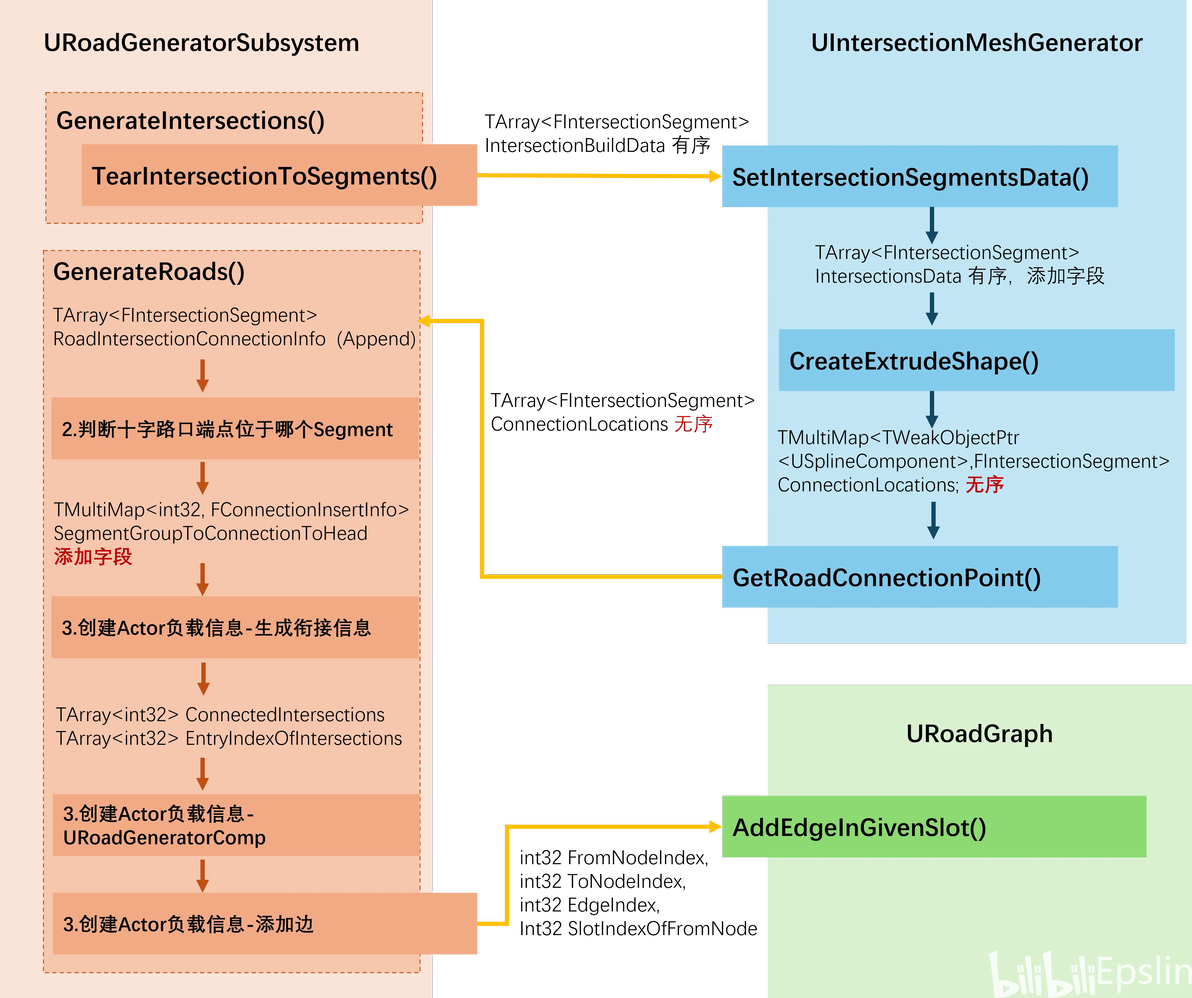
交汇路口衔接点顺序传递过程
从图中我们可以看出,由URoadGeneratorSubsystem生成的IntersectionBuildData是数据的源头,该数据符合顺序要求。但在UIntersectionMeshGenerator创建挤出图形的过程中保存到了MultiMap中,Map容器无法保证顺序,可能会导致数据被打乱。随后URoadGeneratorSubsystem调用GetRoadConnectionPoint传出数据时,可能无法通过数组序号获得正确的顺序。
那么在UIntersectionMeshGenerator一侧,我们需要为FIntersectionSegment添加两个成员变量来记录自己的GlobalIndex(OwnerGlobalIndex)和衔接口ID(EntryLocalIndex),避免TMultiMap在数据变更过程中的失序,代码片段如下:
/**
 * 交点处提取出的Segments信息,这结构体描述一个汇集于交叉点的Spline片段
 */
USTRUCT(BlueprintType)
struct FIntersectionSegment
{
	GENERATED_BODY()

public:
	FIntersectionSegment()
	{
	};

	FIntersectionSegment(TWeakObjectPtr& InOwnerSplines, const FVector& InIntersectionEndPointWS,
	                     const FRotator& InIntersectionEndRotWS, bool bInIsFlowIn,
	                     float InRoadWidth) : OwnerSpline(InOwnerSplines),
	                                          IntersectionEndPointWS(InIntersectionEndPointWS),
	                                          IntersectionEndRotWS(InIntersectionEndRotWS),
	                                          bIsFlowIn(bInIsFlowIn), RoadWidth(InRoadWidth)
	{
	}

	~FIntersectionSegment()
	{
		OwnerSpline = nullptr;
	};

	/**
	 * 所属的SplineComponent
	 */
	UPROPERTY(VisibleInstanceOnly)
	TWeakObjectPtr OwnerSpline;
	/**
	 * 沿样条线方向的端点(交点为另一端点)
	 */
	UPROPERTY(BlueprintReadWrite, EditInstanceOnly)
	FVector IntersectionEndPointWS = FVector::Zero();

	/**
	 * 交点处的Rotation,用于将路口和道路最后一段相接
	 */
	UPROPERTY(BlueprintReadWrite, EditInstanceOnly)
	FRotator IntersectionEndRotWS = FRotator::ZeroRotator;
	/**
	 * 方向(驶入驶出),以Distance判定
	 */
	UPROPERTY(BlueprintReadWrite, EditInstanceOnly)
	bool bIsFlowIn = true;
	/**
	 * 道路宽度
	 */
	UPROPERTY(BlueprintReadWrite, EditInstanceOnly)
	float RoadWidth = 0;

	/**
	 * 所属Intersection的全局ID,在UIntersectionMeshGenerator::SetIntersectionSegmentsData中设定
	 */
	uint32 OwnerGlobalIndex = UINT32_ERROR;

	/**
	 * 所属道路连接到Intersection的哪个一个路口衔接点,局部编号每个交汇路口独立
	 * 在UIntersectionMeshGenerator::SetIntersectionSegmentsData中设定
	 */
	int32 EntryLocalIndex = INT32_ERROR;
};URoadGeneratorSubsystem在GeneratorRoads()中获取ConnectionLocations后直接附加到RoadIntersectionConnectionInfo数组中,随后在判断衔接点Segment时遍历RoadIntersectionConnectionInfo,又使用数组内元素构造了FConnectionInsertInfo类型的InsertInfo。
在上面添加IntersectionGlobalIndex和EntryLocalIndex字段后,在这里提取RoadIntersectionConnectionInfo的遍历元素中对应值进行填充。
//所属Segment保存在0位置
FConnectionInsertInfo InsertInfo = FindInsertIndexInExistedContinuousSegments(
	ContinuousSegmentsGroups, AllSegmentOnSpline,
	PotentialConnection[0].GetGlobalIndex(), IntersectionSegment.IntersectionEndPointWS);
InsertInfo.IntersectionGlobalIndex = IntersectionSegment.OwnerGlobalIndex;
//传递顺时针排序给建图用
InsertInfo.EntryLocalIndex = IntersectionSegment.EntryLocalIndex;最后是信息最终提取部分,在衔接信息RoadWithConnectInfo生成部分对SegmentGroupToConnectionToHead遍历,过程中把数据写入ConnectedIntersections和EntryIndexOfIntersections中。此时我们已经获得了对应的数据,可以在创建完URoadGeneratorComp调用图的AddEdgeInGivenSlot()有序添加边。
//生成衔接位置信息,用Transform初始化结构体
FRoadSegmentsGroup RoadWithConnectInfo(RoadSegmentTransforms);
TArray ConnectedIntersections;
ConnectedIntersections.Init(INT32_ERROR, 2);
//连接到Intersection的路口序号,用于图邻接表构建
TArray EntryIndexOfIntersections;
EntryIndexOfIntersections.Init(INT32_ERROR, 2);
if (SegmentGroupToConnectionToHead.Contains(i))
{
	TArray Connections;
	SegmentGroupToConnectionToHead.MultiFind(i, Connections);
	if (!Connections.IsEmpty())
	{
		for (const auto& Connection : Connections)
		{
			if (Connection.bConnectToGroupHead == true)
			{
				RoadWithConnectInfo.bHasHeadConnection = true;
				RoadWithConnectInfo.HeadConnectionTrans = Connection.ConnectionTrans;
				ConnectedIntersections[0] = Connection.IntersectionGlobalIndex;
				EntryIndexOfIntersections[0] = Connection.EntryLocalIndex;
			}
			else
			{
				RoadWithConnectInfo.bHasTailConnection = true;
				RoadWithConnectInfo.TailConnectionTrans = Connection.ConnectionTrans;
				ConnectedIntersections[1] = Connection.IntersectionGlobalIndex;
				EntryIndexOfIntersections[1] = Connection.EntryLocalIndex;
			}
		}
	}
}
//创建Actor部分省略
}
//把对道路和附属节点加入图
if (nullptr != RoadGraph)
{
	RoadGraph->AddEdgeInGivenSlot(ConnectedIntersections[0], ConnectedIntersections[1],
	GeneratorComp->GetGlobalIndex(), EntryIndexOfIntersections[0]);
	RoadGraph->AddEdgeInGivenSlot(ConnectedIntersections[1], ConnectedIntersections[0],
	GeneratorComp->GetGlobalIndex(), EntryIndexOfIntersections[1]);
}由此我们提取出了边排序,查找面的基础已经具备,下面进行面的查找。
查找面
遍历图的过程中,我们需要一个数组bVisited用于记录已经已经遍历过的有向边。在我们道路的生成中,双向道路只指定了一个ID道路编号,因此我们需要一种方式将双向边进行区分,以对应不同的bVisited序号。
这里有两种区分方法:记录总的边数目,用最大值进行偏移,即假设总边数为N,那么Index为x的道路两条边的数组序号为x和x+N;或者将两条边相邻排列,即编号为Index为x的道路数组序号为2x和2x+1。
本文选用第二种方式,仿照交汇路口建立时的标记方式,利用交汇路口序号递增的特性,设置当边起点交汇路口序号小于终点交汇路口信号时数组序号为2x,反之为2x+1,在Graph中添加如下函数:
//RoadGraphForBlock.h
int32 GetDirectionalEdgeIndex(int32 FromNodeIndex, int32 ToNodeIndex, int32 RoadIndex);
//RoadGraphForBlock.cpp
int32 URoadGraph::GetDirectionalEdgeIndex(int32 FromNodeIndex, int32 ToNodeIndex, int32 RoadIndex)
{
	if (FromNodeIndex < ToNodeIndex)
	{
		return 2 * RoadIndex;
	}
	return 2 * RoadIndex + 1;
}
其次我们还需要一个返回类型,按顺序包含遍历时经过的边和顶点。这里定义了结构体包含两个数组成员变量,在遍历时依次记录边和节点。
USTRUCT()
struct FBlockLinkInfo
{
	GENERATED_BODY()
	TArray RoadIndexes;
	TArray IntersectionIndexes;
};至此,我们已经有了排序好的图、双向边索引、返回结构,下面可以正式开始遍历图查找其中的面了。根据“从一条边出发,到达节点时选择作为入边相邻左侧的边作为下一条边,直到回到起点,遍历路径即为一个面”的思想,我们可以编写如下代码:
//RoadGraphForBlock.h
TArray GetSurfaceInGraph();
//RoadGraphForBlock.cpp
TArray URoadGraph::GetSurfaceInGraph()
{
	TArray Results;
	if (Graph.IsEmpty())
	{
		return Results;
	}

	//二维表转一维表用于和bVisited形成对应;但因为RoadIndex可以删除数组可能不连贯
	//不能直接使用RoadIndex作为数组ID,可能开头不为0、可能不连贯、双向无法区分
	//设计一个编码算法节点A->B,当AB时返回2I+1,为了能拿到节点需要从节点开始遍历
	TArray AllEdges;
	TMap bVisited;
	bVisited.Reserve(EdgeCount);
	//因为边数据中没有保存FromVertex,利用数组有序特性先记录这个值
	int32 FromVertex = INT32_ERROR;
	for (int32 i = 0; i < Graph.Num(); ++i)
	{
		for (auto& Edge : Graph[i])
		{
			if (FromVertex == INT32_ERROR)
			{
				FromVertex = i;
			}
			bVisited.Emplace(GetDirectionalEdgeIndex(i, Edge.ToNodeIndex, Edge.RoadIndex), false);
			AllEdges.Emplace(&Edge);
		}
	}
	//DFS搜索,备忘录剪枝
	for (int i = 0; i < AllEdges.Num(); ++i)
	{
		int32 TargetEdgeIndex = GetDirectionalEdgeIndex(FromVertex, AllEdges[i]->ToNodeIndex, AllEdges[i]->RoadIndex);
		if (bVisited[TargetEdgeIndex])
		{
			continue;
		}
		bVisited[TargetEdgeIndex] = true;
		FBlockLinkInfo Surface;
		Surface.RoadIndexes.Emplace(AllEdges[i]->RoadIndex);
		const FRoadEdge* CurrentRoad = AllEdges[i];
		const FRoadEdge* NextRoad = nullptr;
		while (NextRoad != AllEdges[i])
		{
			if (nullptr != NextRoad)
			{
				Surface.RoadIndexes.Emplace(NextRoad->RoadIndex);
				TargetEdgeIndex = GetDirectionalEdgeIndex(FromVertex, NextRoad->ToNodeIndex, NextRoad->RoadIndex);
				bVisited[TargetEdgeIndex] = true;
			}
			int32 NextVertex = CurrentRoad->ToNodeIndex;
			Surface.IntersectionIndexes.Emplace(NextVertex);
			NextRoad = FindNextEdge(NextVertex, *CurrentRoad);
			CurrentRoad = NextRoad;
			FromVertex = NextVertex;
		}
		if (Surface.RoadIndexes.Num() >= 2)
		{
			Results.Emplace(Surface);
		}
	}
	return Results;
}至此我们完成了街区生成中最难的部分,下面我们可以创建测试用例对上面的算法进行测试。
查找面测试
在上一篇文章的结尾我们提到了使用UE的自动化测试可以帮助我们测试需要视觉渲染的复杂逻辑,创建了FRoadGeneratorSubsystemTest类对连续Segment划分和衔接点Segment插入算法进行了测试。这里我们可以继续以这种方式对我们的面查找算法进行测试。
这里我选取了以下两个测试用例,其中橙色代表节点,紫色代表边:
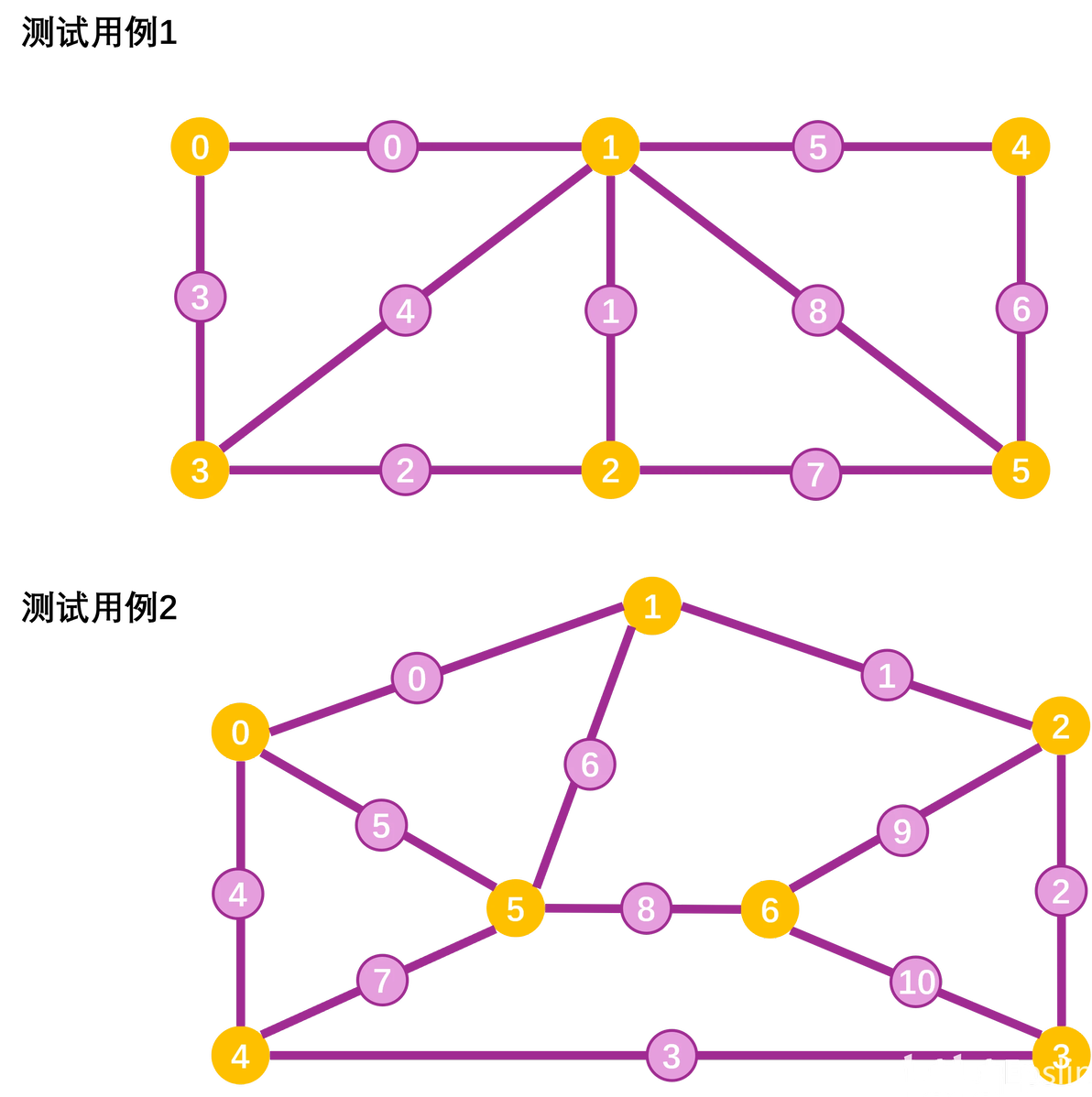
查找面测试用例
由于我们的图结构中不带有几何信息,我们通过直接输入测试用例顺序的方式调用AddEdge,生成结果使用打印Log方式人工判断,测试类代码及输出如下:
//RoadGraphTest.cpp
#include "Misc/AutomationTest.h"
#include "Road/RoadGraphForBlock.h"

IMPLEMENT_SIMPLE_AUTOMATION_TEST(RoadGraphTest,
                                 "PCGDemo.JIAPCGAidTool.Source.CityGenerator.UnitTestClass.RoadGraphTest",
                                 EAutomationTestFlags::EditorContext | EAutomationTestFlags::EngineFilter)

bool DetectResultsElemNum(const TArray& InLoopsArray)
{
	for (const auto& Loop : InLoopsArray)
	{
		if (Loop.RoadIndexes.Num() != Loop.IntersectionIndexes.Num())
		{
			UE_LOG(LogTemp, Error, TEXT("Unmatch num Between Vertex %d & Edge %d"), Loop.RoadIndexes.Num(),
			       Loop.IntersectionIndexes.Num());
			return false;
		}
	}
	return true;
}

void PrintResults(const TArray& InLoopsArray)
{
	for (const auto& Loop : InLoopsArray)
	{
		FString PrintLog;
		PrintLog += FString::Printf(TEXT("[%d]"), Loop.IntersectionIndexes.Last());
		for (int i = 0; i < Loop.RoadIndexes.Num(); ++i)
		{
			PrintLog += FString::Printf(TEXT("-(%d)-"), Loop.RoadIndexes[i]);
			PrintLog += FString::Printf(TEXT("[%d]"), Loop.IntersectionIndexes[i]);
		}
		UE_LOG(LogTemp, Display, TEXT("%s"), *PrintLog);
	}
}

bool RoadGraphTest::RunTest(const FString& Parameters)
{
	URoadGraph* Graph = NewObject();
	//逆时针单边添加
	//测试用例1
	UE_LOG(LogTemp, Display, TEXT("________________________Case1________________________"))
	Graph->AddEdge(0, 3, 3);
	Graph->AddEdge(0, 1, 0);
	Graph->AddEdge(1, 0, 0);
	Graph->AddEdge(1, 3, 4);
	Graph->AddEdge(1, 2, 1);
	Graph->AddEdge(1, 5, 8);
	Graph->AddEdge(1, 4, 5);
	Graph->AddEdge(4, 1, 5);
	Graph->AddEdge(4, 5, 6);
	Graph->AddEdge(3, 2, 2);
	Graph->AddEdge(3, 1, 4);
	Graph->AddEdge(3, 0, 3);
	Graph->AddEdge(2, 5, 7);
	Graph->AddEdge(2, 1, 1);
	Graph->AddEdge(2, 3, 2);
	Graph->AddEdge(5, 4, 6);
	Graph->AddEdge(5, 1, 8);
	Graph->AddEdge(5, 2, 7);
	TArray Loops = Graph->GetSurfaceInGraph();
	if (!DetectResultsElemNum(Loops))
	{
		AddError("Results Has Error Num");
		return false;
	}
	PrintResults(Loops);
	Graph->RemoveAllEdges();
	UE_LOG(LogTemp, Display, TEXT("________________________Case2________________________"))
	//测试用例2
	Graph->AddEdge(0, 4, 4);
	Graph->AddEdge(0, 5, 5);
	Graph->AddEdge(0, 1, 0);
	Graph->AddEdge(1, 0, 0);
	Graph->AddEdge(1, 5, 6);
	Graph->AddEdge(1, 2, 1);
	Graph->AddEdge(2, 1, 1);
	Graph->AddEdge(2, 6, 9);
	Graph->AddEdge(2, 3, 2);
	Graph->AddEdge(3, 2, 2);
	Graph->AddEdge(3, 6, 10);
	Graph->AddEdge(3, 4, 3);
	Graph->AddEdge(4, 3, 3);
	Graph->AddEdge(4, 5, 7);
	Graph->AddEdge(4, 0, 4);
	Graph->AddEdge(5, 6, 8);
	Graph->AddEdge(5, 1, 6);
	Graph->AddEdge(5, 0, 5);
	Graph->AddEdge(5, 4, 7);
	Graph->AddEdge(6, 3, 10);
	Graph->AddEdge(6, 2, 9);
	Graph->AddEdge(6, 5, 8);
	Loops = Graph->GetSurfaceInGraph();
	Graph->RemoveAllEdges();
	if (!DetectResultsElemNum(Loops))
	{
		AddError("Results Has Error Num");
		return false;
	}
	PrintResults(Loops);
	Graph = nullptr;
	return true;
}
//输出,其中[x]表示节点,(y)表示边,首个节点为为了便于对应额外添加;函数实际输出以第一个边为起始
________________________Case1________________________
[0]-(3)-[3]-(2)-[2]-(7)-[5]-(6)-[4]-(5)-[1]-(0)-[0]
[0]-(0)-[1]-(4)-[3]-(3)-[0]
[1]-(1)-[2]-(2)-[3]-(4)-[1]
[1]-(8)-[5]-(7)-[2]-(1)-[1]
[1]-(5)-[4]-(6)-[5]-(8)-[1]
________________________Case2________________________
[0]-(4)-[4]-(3)-[3]-(2)-[2]-(1)-[1]-(0)-[0]
[0]-(5)-[5]-(7)-[4]-(4)-[0]
[0]-(0)-[1]-(6)-[5]-(5)-[0]
[1]-(1)-[2]-(9)-[6]-(8)-[5]-(6)-[1]
[2]-(2)-[3]-(10)-[6]-(9)-[2]
[3]-(3)-[4]-(7)-[5]-(8)-[6]-(10)-[3]从上面的输出中我们可以看到,除了我们需要的内部面,还会有一个环绕整个图外轮廓的外部面。这个面并不是我们所需要的,需要将其剔除。
额外处理-剔除
筛选有序点组成的多边形最直接的方法是使用面积法,即计算所有面的面积然后通过面积挑选出不需要的多边形。对于不确定形状但顶点有序的多边形我们可以由Shoelace计算其面积,根据计算结果移除其中面积最大的,实现去除外轮廓的目的。
由于图本身没有带有几何信息,这部分需要我们在Subsystem中完成。对应的,需要我们有交汇路口ID到对象的Map以便于索引(同时也创建RoadID和对象的索引)。在交汇路口生成处为Map添加元素后,我们可以编写下面的函数完成剔除:
//RoadGeometryUtilities.h
static double GetAreaOfSortedPoints(const TArray& SortedVertex);
//RoadGeometryUtilities.cpp
double URoadGeometryUtilities::GetAreaOfSortedPoints(const TArray& SortedVertex)
{
	double Area = 0.f;
	int32 VertexNum = SortedVertex.Num();
	for (int i = 0; i < VertexNum; ++i)
	{
		FVector2D VertexA = SortedVertex[i];
		FVector2D VertexB = SortedVertex[(i + 1) % VertexNum];
		Area += VertexA.X * VertexB.Y - VertexA.Y * VertexB.X;
	}
	return FMath::Abs(Area);
}
//RoadGeneratorSubsystem.h
void RemoveInvalidLoopInline(TArray& OutBlockLoops);
//RoadGeneratorSubsystem.cpp
void URoadGeneratorSubsystem::RemoveInvalidLoopInline(TArray& OutBlockLoops)
{
	double MaxArea = -1.0;
	int32 MaxAreaIndex = -1;
	for (int32 i = 0; i < OutBlockLoops.Num(); ++i)
	{
		const TArray& VertexIndex = OutBlockLoops[i].IntersectionIndexes;
		TArray VertexLoc2D;
		VertexLoc2D.Reserve(VertexIndex.Num());
		for (const auto& Index : VertexIndex)
		{
			ensureAlways(IDToIntersectionGenerator.Contains(Index));
			TWeakObjectPtr MeshGenerator = IDToIntersectionGenerator[Index];
			if (!MeshGenerator.IsValid())
			{
				UE_LOG(LogTemp, Error, TEXT("Intersection Index:%d Is Not Valid"), Index);
				continue;
			}
			UIntersectionMeshGenerator* IntersectionComp = MeshGenerator.Pin().Get();
			VertexLoc2D.Emplace(FVector2D(IntersectionComp->GetOwner()->GetActorLocation()));
		}
		double LoopArea = URoadGeometryUtilities::GetAreaOfSortedPoints(VertexLoc2D);
		if (LoopArea > MaxArea)
		{
			MaxArea = LoopArea;
			MaxAreaIndex = i;
		}
	}
	if (OutBlockLoops.IsValidIndex(MaxAreaIndex))
	{
		OutBlockLoops.RemoveAtSwap(MaxAreaIndex);
	}
	return;
}执行函数后外轮廓被剔除,我们也获得了所有街区的循环信息。至此,我们创建的有向图就完成了它的使命。
街区创建
街区的创建方式和交汇路口相同,需要找到街区的二维轮廓后使用挤出生成几何体。从上面的面查询中我们可以获得围成街区的边和交汇路口ID,通过Map我们可以找到对应的Generator。再次本着复用的原则,我们希望直接从Generator中提取街区生成信息。根据环的信息,我们可以将道路轮廓、交会口过渡段细分点有序串联在一起形成整个街区的轮廓,下面我们分别来看如何把这些信息提取出来。
道路轮廓提取
我们在创建道路时使用的是沿着道路中线进行均匀扫描,每条道路的宽度一定,也就是说我们可以在URoadMeshGenerator通过偏移点获得道路边沿的有序点。因为我们每次都左转,当我们面向道路边方向时,我们需要获取的边沿总在我们左侧。这里再放一次排序的的图,可以看到衔接点随序号变大红色逐渐变鲜艳,我们的邻接表同样基于该序号确定顺序,每次取+1序号。
衔接点顺时针排布结果
随后我们需要考虑道路提供的有序点路径是否和环边走向一致,当方向一致时道路扫描点就是我们需要的顺序,当方向相反时我们需要反转道路扫描点。为了实现这一目的,我们可以在URoadMeshGenerator和FRoadSegmentsGroup中创建两个成员变量,用于记录道路构建的起始交汇路口ID和终止交汇路口ID,通过URoadMeshGenerator::SetRoadInfo传入FRoadSegmentsGroup类型参数时进行初始化,提供对外接口GetConnectionOrderOfIntersection()用于比较道路走向。
这部分代码片段如下:
//RoadSegmentStruct.h
struct FRoadSegmentsGroup
{
	FRoadSegmentsGroup()
	{
	};

	FRoadSegmentsGroup(const TArray& InContinuousSegmentsTrans) :
		ContinuousSegmentsTrans(InContinuousSegmentsTrans)
	{
	};

	FRoadSegmentsGroup(const TArray& InContinuousSegmentsTrans, bool bInHasHeadConnection,const FTransform& InHeadConnectionTrans, bool bInHasTailConnection,
const FTransform& InTailConnectionTrans) : ContinuousSegmentsTrans(InContinuousSegmentsTrans),
	                                                              bHasHeadConnection(bInHasHeadConnection),
	                                                              HeadConnectionTrans(InHeadConnectionTrans),
	                                                              bHasTailConnection(bInHasTailConnection),
	                                                              TailConnectionTrans(InTailConnectionTrans)
	{
	};

	/**
	 * 连续分段数据
	 */
	TArray ContinuousSegmentsTrans;

	/**
	 * 是否有链接到连续分段头部的路口交接信息
	 */
	bool bHasHeadConnection = false;
	FTransform HeadConnectionTrans;
	/**
	* 是否有链接到连续分段尾部的路口交接信息
	*/
	bool bHasTailConnection = false;
	FTransform TailConnectionTrans;

	/**
	 * 道路构建时起始交会口的序号
	 */
	int32 FromIntersectionIndex;

	/**
	 * 道路构建时终止交会口的序号
	 */
	int32 ToIntersectionIndex;
};

//RoadMeshGenerator.cpp
void URoadMeshGenerator::SetRoadInfo(const FRoadSegmentsGroup& InRoadWithConnect)
{
	int32 SweepPathLength = InRoadWithConnect.ContinuousSegmentsTrans.Num();
	SweepPathLength += InRoadWithConnect.bHasHeadConnection ? 1 : 0;
	SweepPathLength += InRoadWithConnect.bHasTailConnection ? 1 : 0;
	SweepPointsTrans.Reserve(SweepPathLength);
	if (InRoadWithConnect.bHasHeadConnection)
	{
		SweepPointsTrans.Emplace(InRoadWithConnect.HeadConnectionTrans);
	}
	SweepPointsTrans.Append(InRoadWithConnect.ContinuousSegmentsTrans);
	if (InRoadWithConnect.bHasTailConnection)
	{
		SweepPointsTrans.Emplace(InRoadWithConnect.TailConnectionTrans);
	}
	bIsLocalSpace = false;
  //设置交汇路口起点终点到成员变量
	StartToIntersectionIndex = InRoadWithConnect.FromIntersectionIndex;
	EndToIntersectionIndex = InRoadWithConnect.ToIntersectionIndex;
}

//返回道路点的走向
void URoadMeshGenerator::GetConnectionOrderOfIntersection(int32& OutLocFromIndex, int32& OutLocEndIndex) const
{
	OutLocFromIndex = StartToIntersectionIndex;
	OutLocEndIndex = EndToIntersectionIndex;
}

//返回指定走向右侧边沿的点
TArray URoadMeshGenerator::GetRoadEdgePoints(bool bForwardOrderDir)
{
	TArray Results;
	if (SweepPointsTrans.IsEmpty())
	{
		return Results;
	}
	Results.SetNum(SweepPointsTrans.Num());
	for (int32 i = 0; i < SweepPointsTrans.Num(); ++i)
	{
		int32 TargetIndex = bForwardOrderDir ? i : SweepPointsTrans.Num() - 1 - i;
		FVector CenterLocation = UKismetMathLibrary::TransformLocation(GetOwner()->GetTransform(),
		                                                               SweepPointsTrans[i].GetLocation());
		FRotator CenterRotation = UKismetMathLibrary::TransformRotation(GetOwner()->GetTransform(),
		                                                                SweepPointsTrans[i].GetRotation().Rotator());
		FVector CenterToEdge = RoadInfo.CrossSectionCoord[0].X * CenterRotation.Vector().RotateAngleAxis(
			bForwardOrderDir ? -90.0 : 90.0, FVector::UpVector);
		Results[TargetIndex] = CenterLocation + CenterToEdge;
	}
	return Results;
}有了道路我们还需要在连续道路之间插入交汇路口的过渡段细分点,我们下面解决这一部分问题。
交汇口过渡段提取
上面我们通过URoadMeshGenerator提取了道路左边线,那么对应的我们也需要对应的交汇路口过渡段边线和其对应。
在附加交汇口过渡段时我们有两种选择,两种优势劣势相反
先加入道路出向交汇路口过渡段再加入道路。
先加入道路再加入道路入向交汇路口过渡段。
方法1的优势在于和邻接表的顺序相同,邻接表本身记录的就是从交汇口A经过道路B达到交汇口C的方式,但在对于起始节点的过渡段获取需要采用相反的算法,一致性比较差。而方法2的困难则是邻接表没有直接标注出进入目标节点时的衔接点序号。
为了获得较好的一致性,这里选择了方法2,并利用“交汇口A出发去交汇口B的衔接点ID和衔接点B到达衔接点A时进入的ID相同”的原理,在图结构中设置如下接口获得道路进入交汇路口时的EntryIndex。
//RoadGraphForBlock.h
	/**
	 * 邻接表记录的是从当前节点**出发**的EntryIndex,需要利用双向边特点查询道路从道路起点(FromNodeIndex)进入当前节点(CurrentNodeIndex)时的RoadIndex
	 */
int32 FindEdgeEntryIndex(int32 CurrentNodeIndex, int32 FromNodeIndex, int32 EdgeIndex) const;

//RoadGraphForBlock.cpp
int32 URoadGraph::FindEdgeEntryIndex(int32 CurrentNodeIndex, int32 FromNodeIndex, int32 EdgeIndex) const
{
	if (!Graph.IsValidIndex(CurrentNodeIndex))
	{
		return INT32_ERROR;
	}
	for (int i = 0; i < Graph[CurrentNodeIndex].Num(); ++i)
	{
		if (Graph[CurrentNodeIndex][i].RoadIndex == EdgeIndex && Graph[CurrentNodeIndex][i].ToNodeIndex ==
			FromNodeIndex)
		{
			UE_LOG(LogTemp, Display,
			       TEXT(
				       "Find Entry Result: Road (%d) From Intersection[%d] Entry CurrentIntersection[%d] At EntryIndex[%d]"
			       ), EdgeIndex, FromNodeIndex, CurrentNodeIndex, i);
			return i;
		}
	}
	return INT32_ERROR;
}获取EntryIndex下一步就是根据Index获取Entry的左侧过渡段细分点。按照我们之前的设想,我们已经进行了细分点排序,细分点同样采用顺时针排序。为了便于可视化,我们可以设置一个编辑器函数查看对应关系,代码片段如下所示:
//IntersectionMeshGenerator.h
UFUNCTION(CallInEditor)
void DrawTransitionalPoints();

UPROPERTY(EditInstanceOnly)
int32 TargetEntryIndex=0;

//IntersectionMeshGenerator.cpp
void UIntersectionMeshGenerator::DrawTransitionalPoints()
{
	UE_LOG(LogTemp, Display, TEXT("Current Debug EntryIndex %d"), TargetEntryIndex);
	AActor* Owner = GetOwner();
	if (Owner == nullptr)
	{
		return;
	}
	const FTransform OwnerTrans = Owner->GetTransform();
	for (int32 i = 0; i < TransitionalSubdivisionNum; ++i)
	{
		FVector DebugPoint = UKismetMathLibrary::TransformLocation(
			OwnerTrans, FVector(ExtrudeShape[TargetEntryIndex * TransitionalSubdivisionNum + i], 0.0));
		FColor DebugColor = FColor(i * 255 / TransitionalSubdivisionNum);
		DrawDebugPoint(this->GetWorld(), DebugPoint, 50.0f, DebugColor, false, 10.0f, 1);
	}
}运行效果:
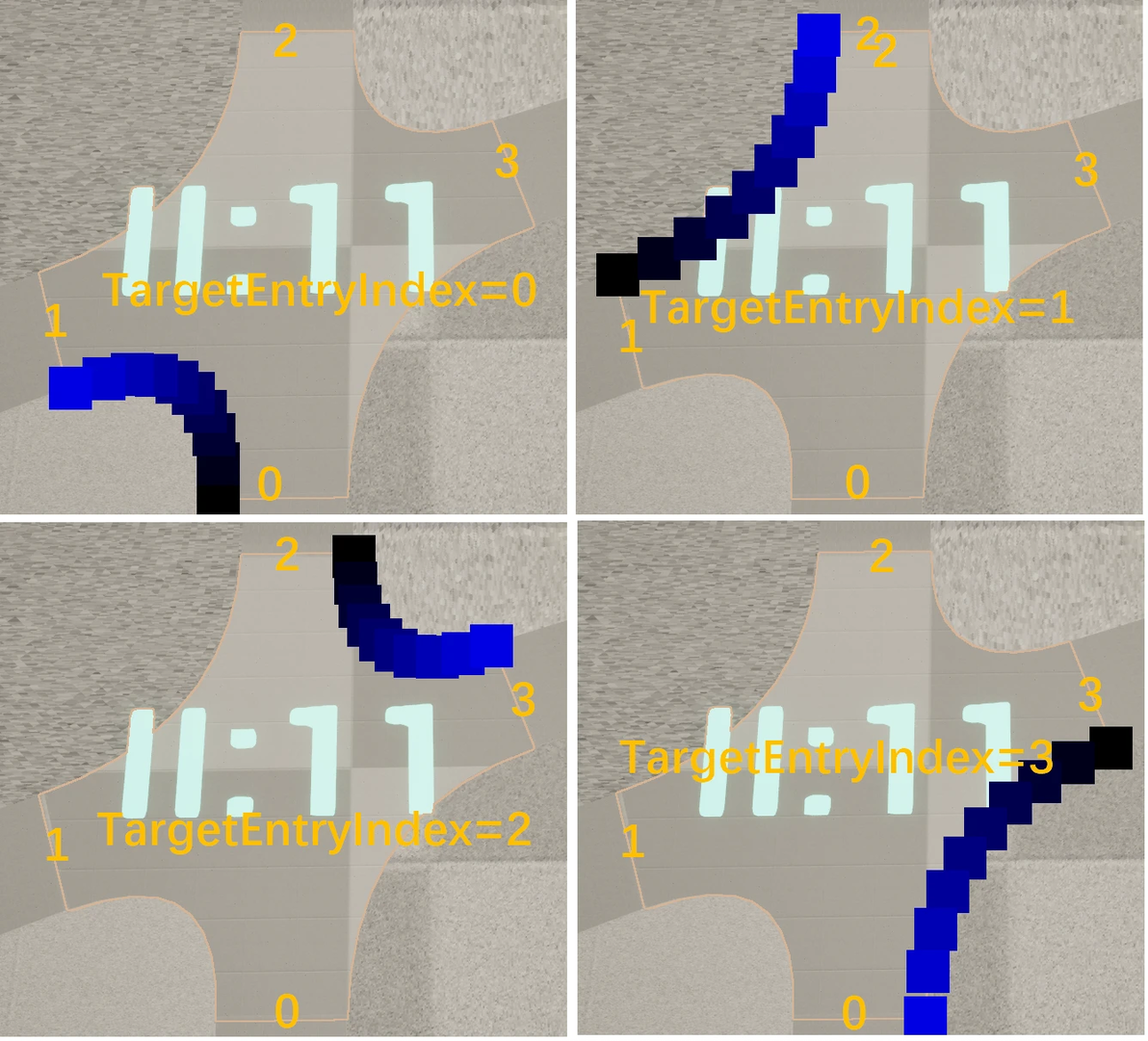
DrawTransitionalPoints效果
看上去很匹配我们的需求,那么是不是所有位置都符合这一规律呢?显然事情不会这么顺利:
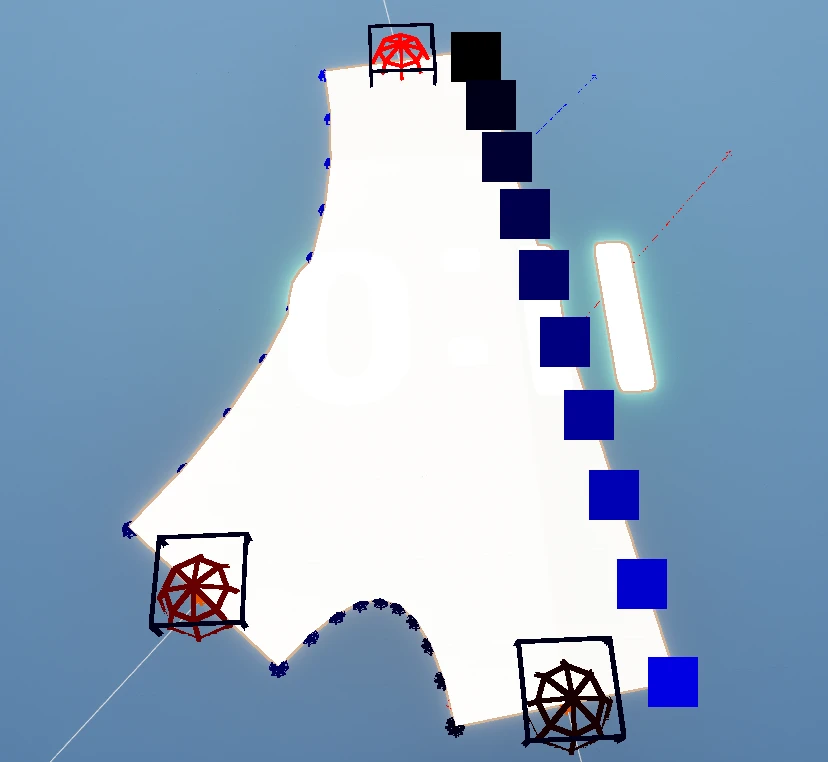
汇入路口EntryIndex值为0时返回点在右侧
那么我们还是需要从根源下手,从上面来看发生单侧汇入的交汇路口特点是和X轴走向相近,这一特性使得在排序时X轴走向的边会天然优先。我们可以用对应衔接点的顺序作为数组顺序,避免排序造成的顺序紊乱。
恰巧在我们的Visited数组中的编号已经帮我们完成了序号的排序工作,其第二层key值就对应了EntryIndex,所以通过下面的代码就可以完成我们的需求:
//IntersectionMeshGenerator.h
	/**
	 * 获取从给定EntryIndex到顺时针下一个Entry的过渡点数组
	 * @param EntryIndex EntryIndex,以该点为起点
	 * @return 到下一个Entry的过渡点的数组
	 */
	TArray GetTransitionalPoints(int32 EntryIndex, bool bOpenInterval = true);
//IntersectionMeshGenerator.cpp
TArray UIntersectionMeshGenerator::CreateExtrudeShape()
{
  	//前面内容省略
	//交点计算完毕获得在相交内容之间插值获得弧线过渡
	//不添加SplineComponent,直接使用
	FInterpCurveVector2D TransitionalSpline;
	TArray> AllTransitionalSplinePoints;
	AllTransitionalSplinePoints.SetNum(EdgeIntersections.Num());
	TArray TransitionalSplinePoints;
	TransitionalSplinePoints.SetNum(TransitionalSubdivisionNum);
	//直接使用EntryIndex作为ID,避免后续排序造成的顺序紊乱
	for (const auto& EdgeIntersectionElem : Visited)
	{
		if (-1 == EdgeIntersectionElem.Value)
		{
			//ensureMsgf(false, TEXT("Find Null Intersection Between Neighbors"));
			continue;
		}
		FVector2D EdgeIntersectionLoc = EdgeIntersections[EdgeIntersectionElem.Value];

		//这里拿到的是样条编号,小的排在前边,也就是说每一段都从左到右,取Start的左边界和To的右边界
		int32 FromSegmentIndex = EdgeIntersectionElem.Key.Key;
		FVector2D FromEdgeStartLoc = RoadEdgePoints[4 * FromSegmentIndex + 2];
		FVector2D FromEdgeTangent = CalTransitionalTangentOnEdge(EdgeIntersectionLoc, FromEdgeStartLoc);
		FInterpCurvePoint FromPoint(0.0, FromEdgeStartLoc, -FromEdgeTangent, FromEdgeTangent, CIM_CurveAuto);
		OccupiedBox += FromEdgeStartLoc;
		int32 ToSegmentIndex = EdgeIntersectionElem.Key.Value;
		FVector2D ToEdgeStartLoc = RoadEdgePoints[4 * ToSegmentIndex];
		FVector2D ToEdgeTangent = CalTransitionalTangentOnEdge(EdgeIntersectionLoc, ToEdgeStartLoc);
		FInterpCurvePoint ToPoint(1.0, ToEdgeStartLoc, -ToEdgeTangent, ToEdgeTangent, CIM_CurveAuto);
		OccupiedBox += ToEdgeStartLoc;

		TransitionalSpline.Reset();
		TransitionalSpline.Points.Add(FromPoint);
		TransitionalSpline.Points.Add(ToPoint);
		TransitionalSplinePoints[0] = FromEdgeStartLoc;
		for (int i = 1; i < TransitionalSubdivisionNum - 1; ++i)
		{
			float InputKey = i * (1.0f) / (TransitionalSubdivisionNum - 1);
			FVector2D SubdivisionLoc = TransitionalSpline.Eval(InputKey, FVector2D::Zero());
			TransitionalSplinePoints[i] = SubdivisionLoc;
		}
		TransitionalSplinePoints.Last() = ToEdgeStartLoc;
      //直接使用Index对作为数组索引,和EntryIndex值一致
		AllTransitionalSplinePoints[EdgeIntersectionElem.Key.Key] = TransitionalSplinePoints;
	}
	for (const TArray& SingleTransition : AllTransitionalSplinePoints)
	{
		IntersectionConstructionPoints.Append(SingleTransition);
	}
	for (int i = 0; i < IntersectionConstructionPoints.Num(); ++i)
	{
		uint8 ColorGreenDepth = i * 255 / IntersectionConstructionPoints.Num();
		DrawDebugSphere(GetWorld(), FVector(IntersectionConstructionPoints[i], 0.0), 20.0f, 8,
		                FColor(0, 0, ColorGreenDepth), true, -1, 0,
		                5);
		//世界空间转局部空间
		IntersectionConstructionPoints[i] = IntersectionConstructionPoints[i] - CenterLocation;
	}
	return IntersectionConstructionPoints;
}

TArray UIntersectionMeshGenerator::GetTransitionalPoints(int32 EntryIndex, bool bOpenInterval)
{
	TArray Results;
	AActor* Owner = GetOwner();
	if (Owner == nullptr)
	{
		return Results;
	}
	const FTransform OwnerTrans = Owner->GetTransform();
	int32 ArrayLength = bOpenInterval ? TransitionalSubdivisionNum - 2 : TransitionalSubdivisionNum;
	Results.SetNum(ArrayLength);
	int32 EntryNum = ExtrudeShape.Num() / TransitionalSubdivisionNum;
	int32 FromPointArrayIndex = EntryIndex * TransitionalSubdivisionNum;
	UE_LOG(LogTemp, Display, TEXT("Intersection:%d,Enter From:%d,Chose SectionIndex %d"), GetGlobalIndex(),
	       EntryIndex, FromPointArrayIndex);
	FromPointArrayIndex += bOpenInterval ? 1 : 0;
	//需要转换到世界空间不能直接Memcpy
	for (int i = 0; i < ArrayLength; ++i)
	{
		Results[i] = UKismetMathLibrary::TransformLocation(
			OwnerTrans, FVector(ExtrudeShape[FromPointArrayIndex + i], 0.0));
	}
	return Results;
}这里的UIntersectionMeshGenerator::GetTransitionalPoints()提供了对给定衔接点到下一衔接点参数的获取,同时考虑到两个端点和道路给定的衔接点重合,提供了布尔参数在输出时进行过滤。
街区网格体生成
最后我们在URoadGeneratorSubsystem中将所有逻辑连贯起来,按照之前组建交汇路口的原理生成几何体。
//URoadGeneratorSubsystem.cpp
void URoadGeneratorSubsystem::GenerateCityBlock()
{
	if (nullptr == RoadGraph)
	{
		return;
	}
	TArray BlockLoops = RoadGraph->GetSurfaceInGraph();
	//移除外轮廓
	RemoveInvalidLoopInline(BlockLoops);
	if (BlockLoops.Num() > AllLoopPath;
	//获取生成轮廓信息
	for (int32 i = 0; i < BlockLoops.Num(); ++i)
	{
		const TArray& RoadIndexes = BlockLoops[i].RoadIndexes;
		const TArray& IntersectionIndexes = BlockLoops[i].IntersectionIndexes;
		FColor DebugColor = FColor::MakeRandomColor();
		FString PrintStr = "";
		PrintStr += FString::Printf(TEXT("[%d]"), IntersectionIndexes.Last());
		//单个循环边组
		TArray SingleLoopPath;
		for (int j = 0; j < RoadIndexes.Num(); ++j)
		{
			PrintStr += FString::Printf(TEXT("-(%d)-"), RoadIndexes[j]);
			TWeakObjectPtr RoadGeneratorWeak = IDToRoadGenerator[RoadIndexes[j]];
			if (!RoadGeneratorWeak.IsValid())
			{
				continue;
			}
			URoadMeshGenerator* RoadGenerator = RoadGeneratorWeak.Pin().Get();
			//道路的起点终点
			int32 RoadPathFromConnection = INT32_ERROR;
			int32 RoadPathToConnection = INT32_ERROR;
			RoadGenerator->GetConnectionOrderOfIntersection(RoadPathFromConnection, RoadPathToConnection);
			//图顺序是当前边和它的终点
			int32 GraphStartEdge = IntersectionIndexes.Last();
			if (j != 0)
			{
				GraphStartEdge = IntersectionIndexes[j - 1];
			}
			int32 GraphEndEdge = IntersectionIndexes[j];
			ensureAlways(
				(RoadPathFromConnection==GraphStartEdge||RoadPathFromConnection==GraphEndEdge)&&(RoadPathToConnection==
					GraphStartEdge||RoadPathToConnection==GraphEndEdge));
			//根据道路朝向提取Location
			TArray RoadEdgeLocArray = RoadGenerator->GetRoadEdgePoints(
				RoadPathFromConnection == GraphStartEdge);
			SingleLoopPath.Append(RoadEdgeLocArray);
			//十字路口的衔接点
			PrintStr += FString::Printf(TEXT("[%d]"), IntersectionIndexes[j]);
			TWeakObjectPtr IntersectionGeneratorWeak = IDToIntersectionGenerator[
				IntersectionIndexes[j]];
			if (!IntersectionGeneratorWeak.IsValid())
			{
				UE_LOG(LogTemp, Error, TEXT("Intersection Indexes %d Was Invalid"), IntersectionIndexes[j])
				continue;
			}
			UIntersectionMeshGenerator* IntersectionGenerator = IntersectionGeneratorWeak.Pin().Get();
			//注意顺序
			int32 FromIntersection = j == 0 ? IntersectionIndexes.Last() : IntersectionIndexes[j - 1];
			int32 EntryIndex = RoadGraph->
				FindEdgeEntryIndex(IntersectionIndexes[j], FromIntersection, RoadIndexes[j]);
			if (EntryIndex == INT32_ERROR)
			{
				UE_LOG(LogTemp, Error, TEXT("Find Null Edge In Graph"))
				continue;
			}
			UE_LOG(LogTemp, Display, TEXT("Road Index %d, Intersection %d,At EntryIndex %d"), RoadIndexes[j],
			       IntersectionIndexes[j], EntryIndex);
			TArray TransitionalPoints = IntersectionGenerator->GetTransitionalPoints(EntryIndex);
			SingleLoopPath.Append(TransitionalPoints);
			for (const FVector& PathPoint : SingleLoopPath)
			{
				DrawDebugSphere(RoadGenerator->GetWorld(), PathPoint, 100.0f, 8, DebugColor,
				                true);
			}
		}
		AllLoopPath.Emplace(SingleLoopPath);
		UE_LOG(LogTemp, Display, TEXT("Block Loop:%d {%s}"), i, *PrintStr);
	}
	//生成Actor并挂载
	for (int32 i = 0; i < AllLoopPath.Num(); i++)
	{
		FString ActorLabel = FString::Printf(TEXT("BlockActor%d"), i);
		FTransform ActorTransform = FTransform::Identity;
		ActorTransform.SetLocation(AllLoopPath[i][0]);
		AActor* BlockActor = UEditorComponentUtilities::SpawnEmptyActor(ActorLabel, ActorTransform);
		ensureAlways(nullptr!=BlockActor);

		UActorComponent* MeshCompTemp = UEditorComponentUtilities::AddComponentInEditor(
			BlockActor, UDynamicMeshComponent::StaticClass());
		UDynamicMeshComponent* MeshComp = Cast(MeshCompTemp);
		UActorComponent* GeneratorCompTemp = UEditorComponentUtilities::AddComponentInEditor(
			BlockActor, UBlockMeshGenerator::StaticClass());
		UBlockMeshGenerator* GeneratorComp = Cast(GeneratorCompTemp);
		GeneratorComp->SetMeshComponent(MeshComp);
		GeneratorComp->SetSweepPath(AllLoopPath[i]);
		IDToBlockGenerator.Emplace(GeneratorComp->GetGlobalIndex(), TWeakObjectPtr(GeneratorComp));
	}
	//生成Mesh
	for (const auto& IDGeneratorPair : IDToBlockGenerator)
	{
		if (!IDGeneratorPair.Value.IsValid())
		{
			continue;
		}
		IDGeneratorPair.Value->GenerateMesh();
	}
}
//UBlockMeshGenerator.cpp
void UBlockMeshGenerator::SetSweepPath(const TArray& InSweepPath)
{
	AActor* CompOwner = GetOwner();
	ensureAlways(nullptr!=CompOwner);
	const FTransform OwnerTransform = CompOwner->GetTransform();
	for (const FVector& PathPoint : InSweepPath)
	{
		SweepPath.Emplace(UKismetMathLibrary::InverseTransformLocation(OwnerTransform, PathPoint));
	}
}

bool UBlockMeshGenerator::GenerateMesh()
{
	AActor* Owner = GetOwner();
	ensureAlwaysMsgf(nullptr!=Owner, TEXT("Component Has No Owner"));
	if (!MeshComponent.IsValid())
	{
		UNotifyUtilities::ShowPopupMsgAtCorner(
			FString::Printf(
				TEXT("[ERROR]%s Create Block Failed,Null MeshComp Found!"), *Owner->GetActorLabel()));
		return false;
	}
	if (SweepPath.IsEmpty())
	{
		UNotifyUtilities::ShowPopupMsgAtCorner(
			FString::Printf(
				TEXT("[ERROR]%s Create Block Failed,Spline Data Is Empty"), *Owner->GetActorLabel()));
		return false;
	}

	//临时占位
	TArray ExtrudeShape =SweepPath;
	if (ExtrudeShape.IsEmpty())
	{
		UNotifyUtilities::ShowPopupMsgAtCorner(
			FString::Printf(
				TEXT("[ERROR]%s Create Block Failed,Extrude Is Not Defined"), *Owner->GetActorLabel()));
		return false;
	}

	FGeometryScriptPrimitiveOptions GeometryScriptOptions;
	FTransform ExtrudeMeshTrans = FTransform::Identity;
	UGeometryScriptLibrary_MeshPrimitiveFunctions::AppendSimpleExtrudePolygon(
		MeshComponent->GetDynamicMesh(), GeometryScriptOptions, ExtrudeMeshTrans, ExtrudeShape, 30.0f);
	UGeometryScriptLibrary_MeshNormalsFunctions::AutoRepairNormals(MeshComponent->GetDynamicMesh());
	FGeometryScriptSplitNormalsOptions SplitOptions;
	FGeometryScriptCalculateNormalsOptions CalculateOptions;
	UGeometryScriptLibrary_MeshNormalsFunctions::ComputeSplitNormals(MeshComponent->GetDynamicMesh(), SplitOptions,
																	 CalculateOptions);
	return true;
}
生成效果如下:
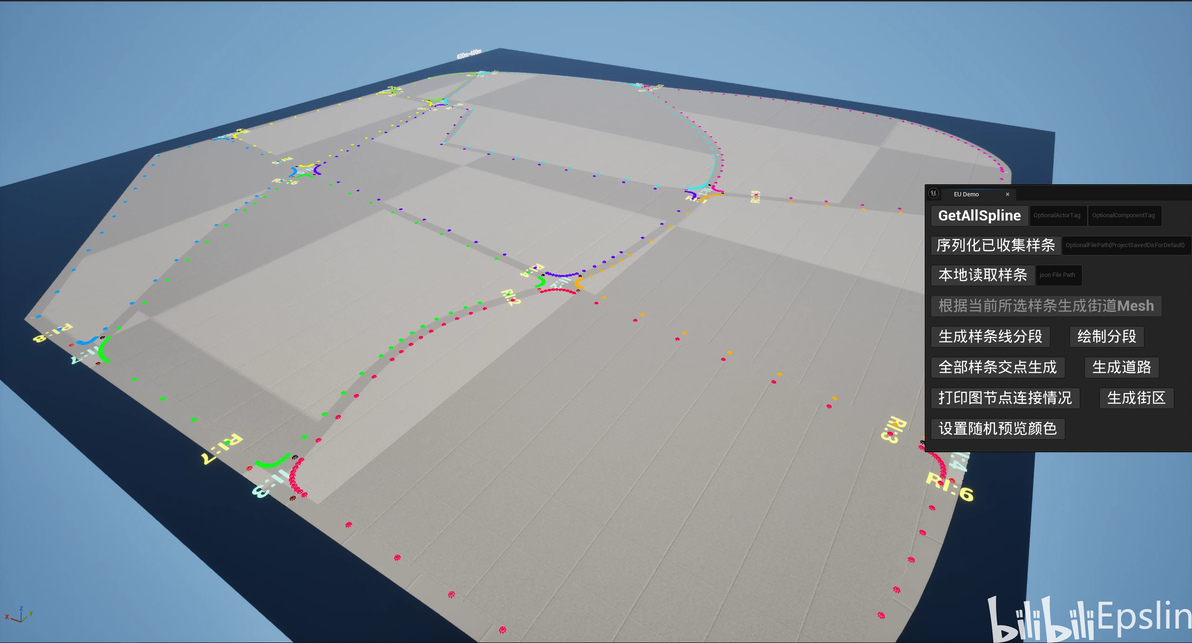
交汇路口、道路、街区生成结果
总结
经过之前的种种努力,我们实现了在UE编辑器中运用四叉树、有向图等数据结构实现了自动道路交点判定、街区面提取等功能,最终创建了城市的道路、交汇路口和街区模型,为后续复刻高级内容提供了基础。在后面的文章中,我会将按照之前所说,结合PCG内容进行城市中建筑、配景、交通网络等内容的生成,一步步完成我们的复刻目标。
以上就是本次分享的全部内容,希望对大家有所帮助!
