
作者@清蒸猫锅,中文地址https://www.bilibili.com/read/cv5916825#reply2877266177
Part 1 指到节点前的内容。
非常粗略的翻译,不当之处往指正。
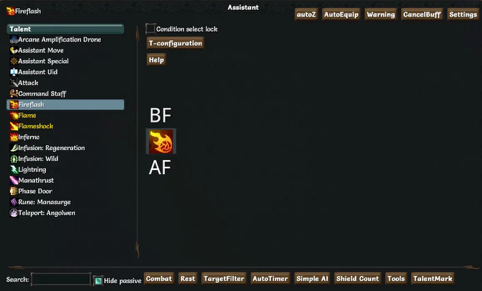
The default hotkey to access the window is Ctrl+A. Right clicking any skill, choosing ‘complicated condition’ serves the same goal. The target skill can be changed through the skill list on the left.
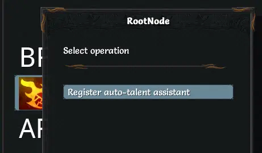
Right clicking the skill panel on the middle registers the skill to be ‘automatic’ (but additional steps are needed to make it truly automatic). After registering the skill, its CD won’t be considered while resting.
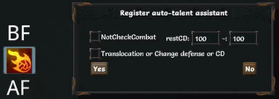
After registration a window will pop up. ‘Rest CD’ on the right hand side is the range of CD that sets the resting condition - it means that if the skill is in the range, then the player needs rest. Setting it to 1~100 is equivalent to normal rest, meaning that the skill will be available at the start of each fight. Note that this should be considered with the using setup of the same skill: if the skill is set to be used any time when it is available, then you may expect - the rest will be infinite!
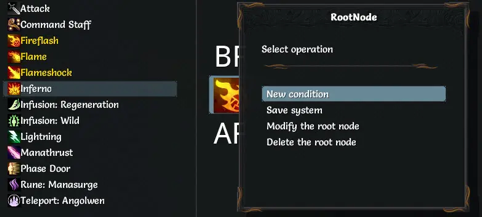
The registered skill will become golden with more complicated choices of using. In this window ‘Modify the root node’ is to modify the previously mentioned settings, and ‘Delete the root node’ is to stop the skill being automatic. ‘New condition’ is the most important one - it sets the using condition of the skill. Actually the purpose of the condition is to enable players achieving needed functions by restricting the automation. Normally skills won’t need special or too complex treatments.

Left to ‘*’ is the normal part, while the right side is for special requirements. ‘Auto-stage’ decides the circumstances the skill can be activated - be it either ‘only combat’, ‘only out-of-combat’, or ‘any time’. ‘Target’ decides the target of the skill, and ‘Priority’ decides the priority of the skills. Lower the number higher the priority and it can be negative.
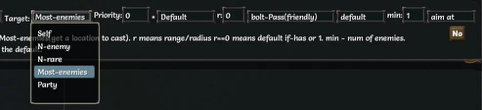
In detail, the options ‘target’ are default in the game. Either ‘myself’, ‘nearest enemy’, ‘nearest rare-and-above enemy’. The option ‘Most-enemies’ utilizes the options right to ‘*’, which chooses the spot to release the skill to make it contains as much enemies as possible based on its specific effect.
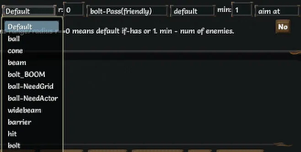
The first option analyses the skill by default. But some skills are not usually used based on its default category. ‘Ball’ flag is set to be not stopped by enemies, so a special treatment names ‘bolt-boom’ is needed for those ‘ball’ skills that mets the obstruction. Two branches ‘Need Grid’ and ‘Need Actor’ belonging to ‘ball’ are two more detailed flags specifying skill releasing. ‘Cone’, ‘beam’ and ‘wide beam’, ‘hit’ and ‘bolt’ are consistent with their usual meanings. ‘Barrier’ is an additional flag that release as close as possible to enemies, which is usually used for meat shields. Arcane Amplification Device can also use this flag. Note that once ‘default’ is chosen, ‘r’ the radius will be ignored.
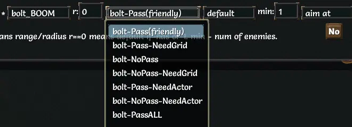
These options are for ‘bolt’ and ‘bolt_Boom’ which is used to avoid friendly fire. ‘Need grid’ and ‘need actor’ have apparent meaning. Note that ‘Pass all’ is not an option inconsistent with the basic property of ‘bolt’ (will be stopped by enemies), but an option to avoid deflection to projectiles which is granted to Mind Slayer, (), and gunslinger - releasing the projectile a grid behind them will avoid being deflected.
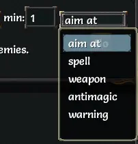
This list is the score system for enemies. As a AOE skill cannot cover all enemies most time, it is designed to target those with highest scores. ‘Anti-magic’, ‘weapon’, ‘spell’ specify three kinds of attack that the enemies will use. The enemies with more corresponding skills will get higher scores. For example, anti-magic skill Aura of Silence will target the part with mages. ‘Min’ is the minimum number of enemies that the region contains.
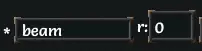
Finally, ‘r’ stands for the range. For AOE skills, ‘range’ not only means the release position of the skill from the character, but also the radius of the area that skill effects. An enemy at range 13 can be hit by a range 10 AOE skills with effecting radius 3. Range of cone is the same as its radius. ‘Barrier’ is default to be close to enemies, so setting a radius prevents it from being too far from the player. While ‘beam’ skills have obvious range, it can be targeted further away to change the LOS to contain more enemies, so setting 20 will be large enough.
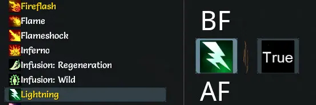
Normally the above will be enough for a damage skill, but searching for target and release location requires computing time. For those skills that are used rarely, it would be better to restrict them more.
