
Forza Horizon 6 PC Crash Error Codes
来源:Forza Support Team (https://support.forza.net/hc/en-us/articles/51642089902739-Forza-Horizon-6-PC-Crash-Error-Codes)
When attempting to launch or while playing Forza Horizon 6 on PC, if the game suddenly locks up and crashes to your desktop, you will receive an error message in the following pop-up dialog:
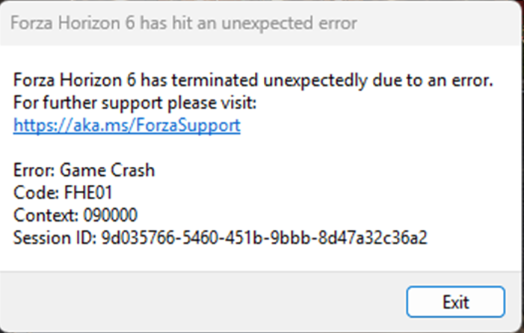
When submitting a ticket to the Forza Support team regarding PC game crashes, it is highly recommended that you include a screenshot of the PC error code dialog box that is displaying on your system whenever the game suddenly closes.
Different error codes will be displayed for different types of game crashes, divided into the following categories:
FHC – video card crash
FHD – out of video memory
FHE – game crash
FHF – out of system memory
Here is the full list of error codes in the PC version of Forza Horizon 6 PC and what they mean:
FHC00
Video Card Crash FH101
Need a minimum of 6 CPU logical processors and 6 threads, anything below this will throw this error code.
FH113
Please ensure you have the latest BIOS update for your processor.
FH201
Graphics card does not support the DX12 features required. Please check that you have the minimum supported graphics card and latest drivers.
FH202
Graphics card has less than 4GB of VRAM.
FH203
Graphics card does not support the DX12 features required. Please check that you have the minimum supported graphics card and latest drivers.
FH204
Graphics card does not support the DX12 features required. Please check that you have the minimum supported graphics card and latest drivers.
FH205
Graphics card does not support the DX12 features required. Please check that you have the minimum supported graphics card and latest drivers.
FH206
Graphics card does not support the DX12 features required. Please check that you have the minimum supported graphics card and latest drivers.
FH301
The graphics card driver needs to be updated.
FH302
Please check that you have the minimum supported graphics card and latest drivers.
FH401
Insufficient system memory. Please make sure your PC meets the minimum specification.
FH601
Unable to load the Microsoft Media Foundation. These components may need installing:
https://www.microsoft.com/en-us/download/details.aspx?id=48231
Fix Error Code FHC01
In Forza Horizon 6, error code FHC01 shows up when your game crashes due to your video card losing connection. It's a pretty common problem on PC, and it usually happens when:
Your graphics drivers are outdated.
Another program in the background conflicts with Forza's engine.
In-game settings push your GPU too hard, causing it to time out.
For a smooth experience, it's important to tackle this quickly before it keeps crashing your sessions.
How to Fix Error FHC01
Here's a straightforward approach, step by step:
1. Perform a Clean GPU Driver Install Use Display Driver Uninstaller (DDU) to completely remove your current drivers. Then download the latest drivers directly from NVIDIA or AMD for your card. Fresh drivers eliminate corruption or outdated code that might trigger FHC01.
2. Uninstall Citrix Workspace Many PC users report immediate crashes when Citrix Workspace is installed. If you have it, go to Windows Settings → Apps, locate Citrix Workspace, and uninstall it. This removes known engine conflicts.
3. Lower In-Game Video Settings Set graphics from "Extreme" down to High or Ultra. Turn on upscaling features like TAA or AMD FSR. Lowering stress on the GPU prevents driver timeouts and sudden crashes during gameplay.
4. Turn Off Overclocking and Overlays Close monitoring apps like MSI Afterburner, Rivatuner Statistics Server (RTSS), or GeForce Experience overlays. If your GPU has a factory overclock, try reducing the core speed by about 100–175 MHz. This can stabilize the card under heavy loads.
5. Cap Frame Rates in Driver Software Disable V-Sync and FPS limiters in the game itself. Instead, use the Nvidia Control Panel or AMD Adrenalin software to set a stable maximum framerate. This avoids sudden frame spikes that could crash your GPU and trigger FHC01.
Following these steps usually fixes the FHC01 error, letting you get back to racing without interruption. Staying on top of driver updates, avoiding conflicting apps, and managing your GPU load is key to preventing future crashes. With these fixes, Forza Horizon 6 should run smoother, letting you focus on your favorite tracks and challenges instead of troubleshooting.
来源:https://www.u4n.com/news/how-to-fix-error-fhc01-in-forza-horizon-6.html
