
吐槽下,不支持上传课件,这个编辑器太难用了,不支持MarkDown,大家将就看吧~~~
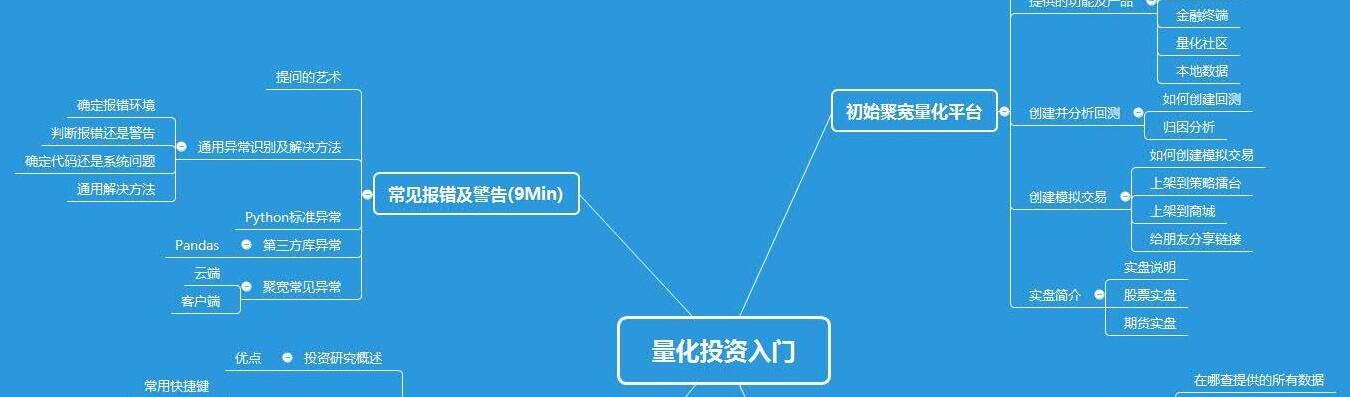
1.提问的艺术
明确是不是问题
问题是什么
善用搜索技术
简单准确的表述问题是什么,提供相关证据
对应的截图及测试代码
2.通用异常识别及解决方法
2.1 确定报错环境
本地环境自己安装的Python环境,例如使用Anaconda安装
聚宽官网回测、模拟交易、期货实盘
聚宽官网研究(Python2/3)
客户端(客户端版本)
一创聚宽(主要是股票实盘)
2.2 判断报错还是警告
#### 警告(WARNING)
##### 警告示例
```python
2019-01-04 00:00:00 - WARNING - /opt/conda/lib/python3.6/site-packages/joblib/_multiprocessing_helpers.py:38: UserWarning: [Errno 30] Read-only file system. joblib will operate in serial mode
warnings.warn('%s. joblib will operate in serial mode' % (e,))
```
##### 警告说明
- 不影响策略的正常影响,可以忽略
- 不过一般建议还是根据警告处理下
- 忽略警告的方法
```python
import warnings
warnings.filterwarnings("ignore")
```
#### 报错(ERROR)
#### 报错示例
```python
2019-01-04 00:00:00 - ERROR - Traceback (most recent call last):
File "/tmp/jqcore/jqboson/jqboson/core/entry.py", line 368, in _run
engine.start()
File "/tmp/jqcore/jqboson/jqboson/core/engine.py", line 220, in start
self._load()
File "/tmp/jqcore/jqboson/jqboson/core/engine.py", line 208, in _load
self._strategy.setup(self._context)
File "/tmp/jqcore/jqboson/jqboson/core/strategy.py", line 652, in setup
self._load(context)
File "/tmp/jqcore/jqboson/jqboson/core/strategy.py", line 250, in _load
self._module = self._loader.load(context)
File "/tmp/jqcore/jqboson/jqboson/core/loader.py", line 111, in load
exec(code, module.__dict__)
File "/tmp/strategy/user_code.py", line 2, in <module>
sns.plot()
AttributeError: module 'seaborn' has no attribute 'plot'
```
##### 报错说明
- 报错需要处理,否则程序不会运行;
2.3 确定写代码问题还是系统问题
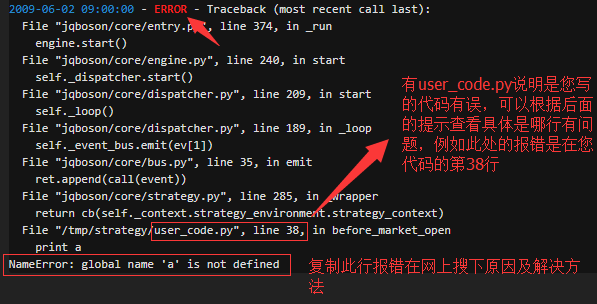
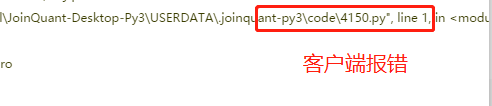
在报错提示中找user_code.py、code\xx.py等

#### 聚宽官网报错中寻找user_code.py
#### 客户端报错中寻找code\xx.py
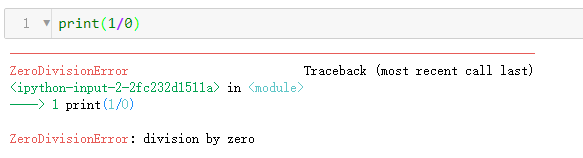
#### 研究中报错,主要看报错行
2.4 通用解决方法
大多数的异常或者报错,大家复制下报错代码的最后一行,在网上搜下原因或者解决方法就可以解决了;
回测或者模拟交易中的报错,可以在报错代码中找到**“user_code.py”**,然后再看下对应的报错在您代码中哪行,**重点关注下最后一行报错提示**,也可以直接将最后一行报错复制到网上搜下解决方法;
结合上面这两个方法,您可以解决大多数的问题,若还有问题的话,欢迎在[聚宽社区发帖提问](https://www.joinquant.com/view/community/edit?postType=ask),详细描述下您的问题,并附上对应的回测(或者测试代码)、结果截图以及预期结果,我们核查下答复您;
**多打印报错行附近的数据**,也可以通过[客户端连IDE](<https://www.joinquant.com/view/community/detail/e393efe3616b53b8c3e8247f65cdc7d9>)后Debug,不过一般的策略代码相对比较少,没那个必要
3. Python标准异常
下面简单说下常见的问题,点击查看更多[Python标准异常](<https://www.joinquant.com/view/community/detail/3c6f9671283746c56cf935b8a64805cb>)
3.1 SyntaxError Python 语法错误
忘记加 **:**
```python
# 测试代码
if count > 13
count += 1
# 报错
File "/tmp/strategy/user_code.py", line 2
if count > 13
^
SyntaxError: invalid syntax
```
缺少括号的后半部分
```python
# 测试代码
if (count > 13:
count += 1
# 报错
File "/tmp/strategy/user_code.py", line 2
if (count > 13:
^
SyntaxError: invalid syntax
```
字符串首尾忘记加引号
```python
# 测试代码
print("JoinQuant)
# 报错
File "/tmp/strategy/user_code.py", line 1
print("JoinQuant)
^
SyntaxError: EOL while scanning string literal
```
3.2 IndentationError 缩进错误
缩进有问题
```python
# 测试代码
if count > 13:
count += 1
# 报错
File "/tmp/strategy/user_code.py", line 3
count += 1
^
IndentationError: expected an indented block
```
3.3 NameError 未声明/初始化对象 (没有属性)
变量名拼写错误
```python
# 测试代码
count = 13
print(conut)
# 报错
File "/tmp/strategy/user_code.py", line 2, in <module>
print(conut)
NameError: name 'conut' is not defined
```
3.3 AttributeError 对象(模块)没有这个属性/方法
对象没有此方法(全局对象没有定义,直接调用)
```python
# 测试代码
print(g.count)
# 报错
File "/tmp/strategy/user_code.py", line 5, in handle_data
print(g.count)
AttributeError: 'StrategyGlobals' object has no attribute 'count'
```
模块没有对应的方法
```python
# 测试代码
import seaborn as sns
sns.plot()
# 报错
File "/tmp/strategy/user_code.py", line 2, in <module>
sns.plot()
AttributeError: module 'seaborn' has no attribute 'plot'
```
3.4 ZeroDivisionError 除(或取模)零 (所有数据类型)
被除数为0
```python
# 测试代码
print(1/0)
# 报错
File "/tmp/strategy/user_code.py", line 1, in <module>
print(1/0)
ZeroDivisionError: division by zero
```
3.5 IndexError 序列中没有此索引(index)
序列中没有此索引(解决方法:打印下具体的数据,求数据长度)
```python
# 测试代码
list1 = [1, 2, 4]
print(list1[3])
# 报错
File "/tmp/strategy/user_code.py", line 2, in <module>
print(list1[3])
IndexError: list index out of range
```
4. 第三方库异常
4.1 Pandas
IndexError: list index out of range,IndexError:index out of bounds
- 原因
获取List中不存在的索引的值
- 解决方法
首先找到user_code.py中错误所在位置,检查下代码;打印下具体的数据;在程序中加入判断list的长度。
AttributeError:'DataFrame' object has no attribute 'sort',AttributeError: 'DataFrame' object has no attribute 'sort_value'
- 原因
不同版本Pandas的排序方法不同,dataframe类型没有sort_value这个方法。一般的,早期版本的排序方法是sort,新版本的排序方法为sort_values。
- 解决方法:
您可以查看下您使用环境中Pandas的版本,并使用对应的排序方法。具体使用方法请参考Pandas的教程。
[sort的使用方法](<http://pandas.pydata.org/pandas-docs/version/0.17.0/generated/pandas.DataFrame.sort.html>)
[sort_values的使用方法](<http://pandas.pydata.org/pandas-docs/stable/generated/pandas.DataFrame.sort_values.html>)
```python
# 早期版本的排序
year_pct_sum_sort = years_pct_sum[year].order(ascending=False)
data.sort('change_pct', ascending=False)
# 新版本的排序
year_pct_sum_sort = years_pct_sum[year].sort_values(ascending=False)
data.sort_values(by='date')
# ascending=False为降序排列,即最大值在最前面;默认为升序排列
```
提示pandas没有stats方法
一般报错内容如下
```python
from pandas.stats.api import ols
ModuleNotFoundError: No module named 'pandas.stats'
```
产生的原因:在pandas0.18前的版本有stats方法,之后版本取消了这个方法。
解决方法:
(1)使用statsmodels的ols方法,具体使用方法请查询statsmodels模块的使用方法;
(2)聚宽官网的python2回测环境中pandas目前是0.16版的,可以正常使用;
(3)自定义客户端pandas的版本,不过不推荐,pandas是个很重要的Python库,如果降低了pandas的版本,客户端可能打不开。
5. 聚宽常见异常
5.1 云端
**SecurityNotExist,Exception:找不到标的xxx**
- 原因
输入的股票代码不对,或者后缀不对
- 解决方法
检查下输入的标的是否正确
**NameError: global name 'xxx' is not defined**
- 原因:
(1)局部变量写错了;(2)未在初始化中定义全局变量(g.***);
- 解决方法
查看报错user_code.py中报错信息的行数,有没有写错或者在全局变量中定义
**xxx在position中不存在,为了保持兼容...**

- 原因
这是因为当我们使用context.portfolio.positions(字典类型) 时查询了一个并不存在于于这个字典的标的持仓信息,为了兼容不报错才出现的警告。比如,我们的仓位中没有000001这只股票,当我们调用 context.portfolio.positions['000001.XSHE'] 时,就会提示 :
Security(code=000001.XSHE) 在 positions 中不存在, 为了保持兼容, 我们返回空的 Position 对象, amount/price/avg_cost 都是 0
(当然其他查询仓位信息的方法也会导致上边的问题,这里只举了一个最简单的例子)
这些警告对策略本身运行并没有影响,但如果策略中有用到上述数据的有可能会引发逻辑上的问题(很小的可能性哦,和策略有关,一般可选择忽略)。
- 解决方法
在调用上述方法前 ,先判断标的是否存在于上述对象中
[了解更多详情](<https://www.joinquant.com/view/community/detail/565685df54628ac3225ea44b866e6acd>)
Exception: read_file xxx.so: 文件'/opt/research-files/639/63928017444/xxx.so'不存在
- 原因
- 回测/模拟环境没有这个模块;
- 在回测/模拟交易中导入研究中自定义的.py文件报错;
- 在回测/模拟交易中导入研究中csv等格式的文件报错;
- 解决方法
- 可以在客户端自己安装,客户端可以自定义Python库及其版本;
- 先看下文件名及位置是否正确,还有问题的话查看API中的[自定义python库](<https://www.joinquant.com/help/api/help?name=api#%E8%87%AA%E5%AE%9A%E4%B9%89python%E5%BA%93>),可以先复制下示例代码运行后再优化;
- 先看下文件名及位置是否正确,还有问题的话查看教程[在回测及模拟交易中读取/写入研究中不同格式的文件](<https://www.joinquant.com/view/community/detail/a9f7577b37265f78ffc2c6bb2467d47e>)
5.2 客户端
客户端和官网使用方法基本相同,官网常见报错解决方法在客户端也适用
PermissionError
```python
PermissionError:[Error 13]Permission denied: '...\\JoinQuant-Desktop-Py3\\USERDATA\\.joinquant-py3\bundle\\stock1m\01\000001.XSHE\\__attrs__'
```
- 原因
这个是由于windows的权限引起的
- 解决方法
- 以管理员权限打开客户端;
- 还有问题的话,删除对应标的所在的文件夹,例如上图删除文件夹01(以及65),然后重新运行;
- 还有问题的话,删除文件stock1m(或者stock1d),新建文件夹stock1m(或者stock1d),然后重新运行;
