

FastAPI 作为一个高性能的 Python Web 框架,凭借其简洁优雅的语法和强大的功能,迅速开发人员的青睐。然而,在 Windows 环境下将 FastAPI 应用部署到生产环境,仍然需要一些额外的配置和工具。
本文将介绍一种轻量易用的部署方案,利用IIS HttpPlatformHandler 模块,让IIS仅充当代理功能,app将以Uvicorn作为ASGI(Asynchronous Server Gateway Interface)服务器来运行 FastAPI 应用,负责处理网络请求、负载均衡和静态文件服务等。这种方式可以充分发挥 FastAPI 的异步优势,并提升应用的性能和稳定性。
部署步骤概述如下:
一、安装HttpPlatformHandler模块
下载地址:https://www.iis.net/downloads/microsoft/httpplatformhandler
HttpPlatformHandler 是一个Internet Information Services (IIS) 模块,可用于:管理可在 HTTP 请求端口上侦听的所有进程(如 Tomcat、Jetty、node.exe、python和 Ruby);将代理请求发送到它所管理的进程。
二、安装Python与fastapi
推荐安装Python3.8以上的版本,对应下载路径:https://www.python.org/downloads/
打开命令提示符或PowerShell,运行以下命令安装uvicorn:pip install uvicorn & pip install fastapi
三、创建Flask应用程序
在您的服务器上创建一个文件夹,将您的Flask应用程序代码和相关文件放入其中;其中入口文件名main.py,相关代码:
import uvicorn
from datetime import datetime
from fastapi import FastAPI
from fastapi.middleware.cors import CORSMiddleware

app = FastAPI()

app.add_middleware(
    CORSMiddleware,
    allow_origins=["*"],
    allow_credentials=True,
    allow_methods=["*"],
    allow_headers=["*"],
)

@app.get("/")
def home():
    return {
        "Status": "ok",
        "Message": "Server running %s" % datetime.now()
    }

if __name__ == "__main__":
uvicorn.run('main:app',reload=True)四、添加站点
【操作路径】IIS管理器》网站》添加网站(右键)
网站名称:名字随你取
物理路径:X:\DingCode\FastApi
端口:8999
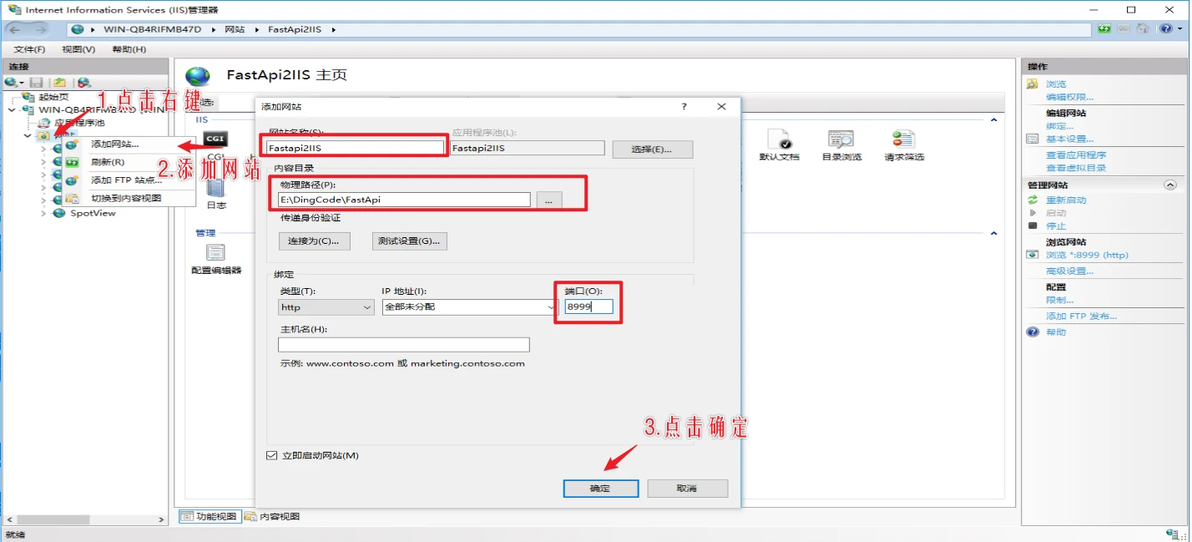
添加站点
五、添加模块映射
【操作路径】IIS管理器》选择网站》处理程序映射》添加模块映射
请求路径:*
模块:httpPlatformHandler
可执行路径:C:\Python39\python.exe
名称:名字随你取
注意:在请求限制里,取消仅当请求映射至以下内容时才调用处理程序
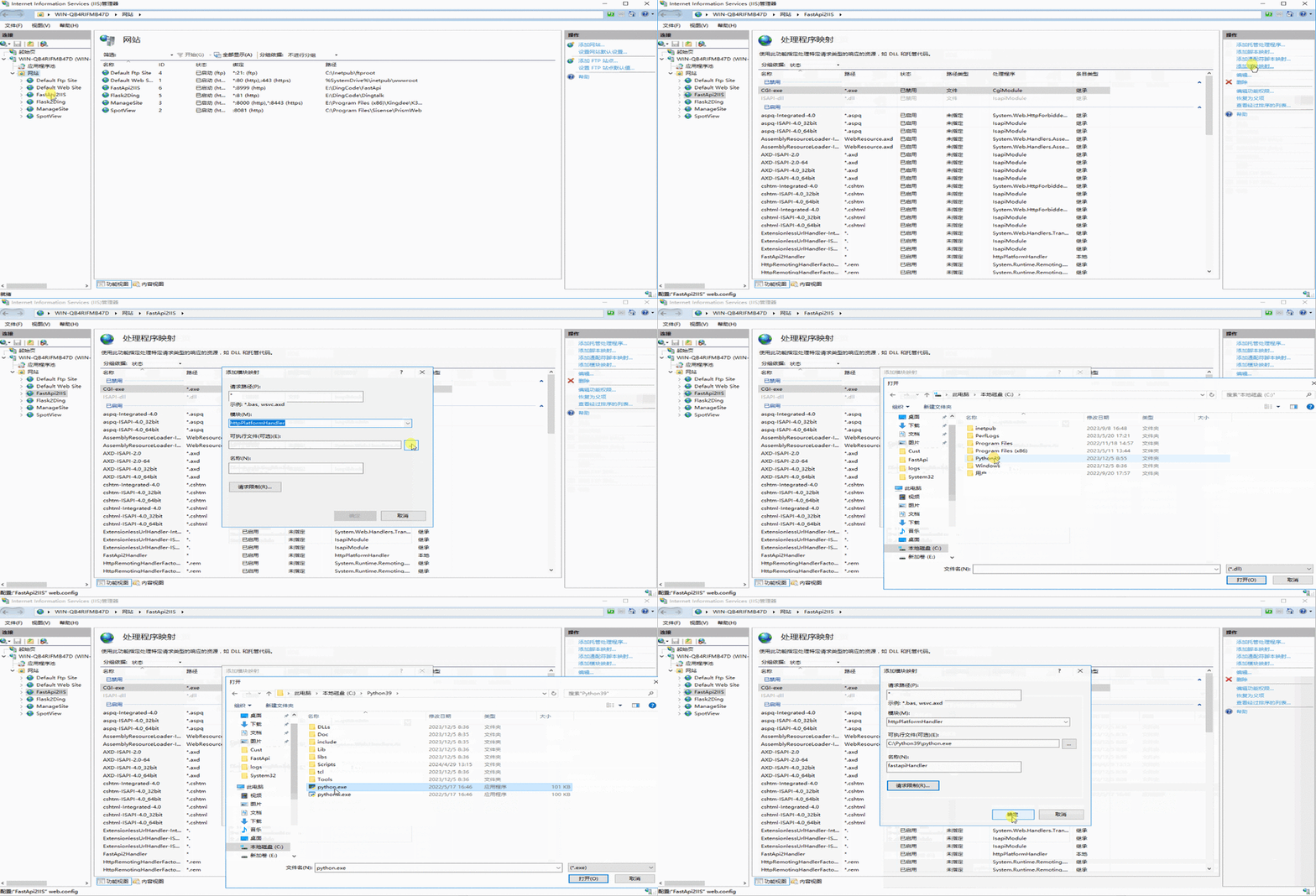
添加模块映射
六、修改配置文件
打开网站根目录下,找到自动创建的配置文件(web.config),将下述标记添加内容位置拷贝至文件并保存,重启启动当前网站即可即可:
<?xml version="1.0" encoding="UTF-8"?>
<configuration>
    <system.webServer>
      <handlers>
        <add name="FastApi2Handler" path="*" verb="*" modules="httpPlatformHandler" scriptProcessor="C:\Python39\python.exe" resourceType="Unspecified" requireAccess="Script" />
      </handlers>
      <!--添加内容开始位置-->
      <httpPlatform processPath="C:\Python39\python.exe" arguments="-m uvicorn main:app --host 0.0.0.0 --port %HTTP_PLATFORM_PORT%" stdoutLogEnabled="true" stdoutLogFile="E:\DingCode\FastApi\logs\dout.log">
          <environmentVariables>
            <environmentVariable name="SERVER_PORT" value="HTTP_PLATFORM_PORT" />
          </environmentVariables>
      </httpPlatform>
      <!--添加内容结束位置-->
    </system.webServer>
</configuration>想看视频教程吗?快来评论区告诉我们你的想法吧^_^
三连是对我们最好的支持,记得动手哦!!!
