
写在前面:最近unity2019.2释出带来了些许新特性,其中让我感兴趣的是不再强行捆绑visual studio作为默认IDE,可以使用jetbrain家的开发工具,这对熟悉jetbrain全家桶的程序员是好事。其次是新加入的增量式垃圾回收机制,这个新特性让我在粗略阅读过jvm的部分技术文档后产生了兴趣,粗略看完原文后我决定不发表评价,在文章末尾我引用了《深入理解java虚拟机》中对jvm中曾经的增量式垃圾回收器的评价。本文大致上基于谷歌翻译,人为校对润色后发布。
Feature Preview: Incremental Garbage Collection
特性预览:增量式垃圾收集
Jonas Echterhoff, November 26, 2018
We have just added an experimental new feature to Unity 19.1a10: Incremental Garbage Collection. Read this post to learn what this feature is all about, how it can help your project, what all our future plans for it and how can you get involved in the process.
我们刚刚为Unity 19.1a10添加了一个实验性新特性:增量式垃圾收集。阅读这篇文章,了解这个功能的全部内容,它如何帮助您的项目,我们未来的计划以及您如何参与到这个过程。
Why incremental GC?
为什么需要增量GC?
The C# language uses managed memory with automated garbage collection, meaning that it uses an automatic method of tracking objects in memory and releasing the memory of any object which is no longer needed (See our documentation for more info). The benefit of this is that you generally don’t need to manually keep track of releasing any memory which you don’t need anymore because the garbage collector will automatically do that for you, which makes your work easier and also removes a big source of potential bugs. The downside is that the garbage collector takes some time to do its work, and this may happen in moments when you would rather not want to spend time on this.
C#语言使用被自动垃圾收集器管理的内存,这意味着它使用自动跟踪内存中对象的方法,并释放不再需要的任何对象的内存(有关详细信息,请参阅我们的文档)。这样做的好处是,您通常不需要手动跟踪释放您不再需要的任何内存,因为垃圾收集器会自动为您执行此操作,这使您的工作更轻松,同时也消除了潜在的错误的一大来源。缺点是垃圾收集器需要一些时间来完成它的工作,这可能发生在你不想花时间在这上面的时候。
Unity uses the Boehm–Demers–Weiser garbage collector which is a stop-the-world garbage collector, meaning that whenever it needs to perform garbage collection, it will stop the running program, and only resume normal execution once it has finished all its work. This can cause delays in the execution of the program at somewhat arbitrary moments, which can take anywhere between less than 1 and several 100 milliseconds, depending on how much memory the garbage collector needs to process and on the platform the program is running on. Now, obviously, for real-time applications like games, this can become quite a big issue, as it isn’t possible to sustain a consistent frame rate as required for smooth animation if the program’s execution can be arbitrarily suspended by the garbage collector. These interruptions are also known as GC spikes, as they will show as spikes in an otherwise smooth profiler frame time graph. Usually, developers try to work around this issue by writing their code to avoid creating “garbage” memory while running the game, so the garbage collector has less work to do – but this isn’t always possible or easy.
Unity使用Boehm-Demers-Weiser垃圾收集器,这是一个会stop-the-world垃圾收集器,这意味着无论何时需要执行垃圾收集,它都会停止正在运行的程序,并且只有在完成所有工作后才能恢复正常执行。这可能导致程序在某些任意时刻执行的延迟,这可能需要在小于1和几百毫秒之间的任何时间,这取决于垃圾收集器需要处理多少内存以及程序运行的平台。现在,显然,对于像游戏这样的实时应用程序,这可能会成为一个很大的问题,因为如果程序的执行可以被垃圾收集器任意暂停,则无法维持平滑动画所需的一致帧速率。这些中断也称为GC峰值,因为它们会在平滑分析器帧时间图中显示为尖峰。通常,开发人员尝试通过编写代码来解决此问题,以避免在运行游戏时创建“垃圾”内存,因此垃圾收集器的工作量较少 - 但这并不总是可行或容易的。
Enter Incremental Garbage Collection. With Incremental GC, we still use the same Boehm–Demers–Weiser GC, but we run it in an incremental mode, which allows it to split its work into multiple slices. So instead of having a single long interruption of your program’s execution to allow the GC to do its work, you can have multiple, much shorter interruptions. While this will not make the GC faster overall, it can significantly reduce the problem of GC spikes breaking the smoothness of the animation by distributing the workload over multiple frames.
加入增量垃圾收集。使用增量GC,我们仍然使用相同的Boehm-Demers-Weiser GC,但我们以增量模式运行它,这允许它将其工作分成多个切片。因此,不是让程序的执行长时间中断以允许GC完成其工作,您可以进行多次,更短的中断。虽然这不会使GC总体上更快,但它可以通过在多个帧上分配工作负载来显着减少GC峰值破坏动画平滑性的问题。
To understand the impact of this, check these screenshots from the Unity Profiler of a little GC performance test script, running as a macOS Standalone build, without and with incremental GC enabled. The script is running at 60 fps. The light blue parts of the frame are “script operations” (simulated by a System.Threading.Thread.Sleep call in the script), the yellow parts are Vsync (ie, waiting for the next frame to begin), and the dark green parts are garbage collection.
要了解这一点的影响,请查看Unity Profiler中的这些屏幕截图,其中包含一个小型GC性能测试脚本,作为macOS独立版本运行,没有启用增量GC并且已启用增量GC。该脚本以60 fps运行。框架的淡蓝色部分是“脚本操作”(由脚本中的System.Threading.Thread.Sleep调用模拟),黄色部分是Vsync(即等待下一帧开始),深绿色零件是垃圾收集。
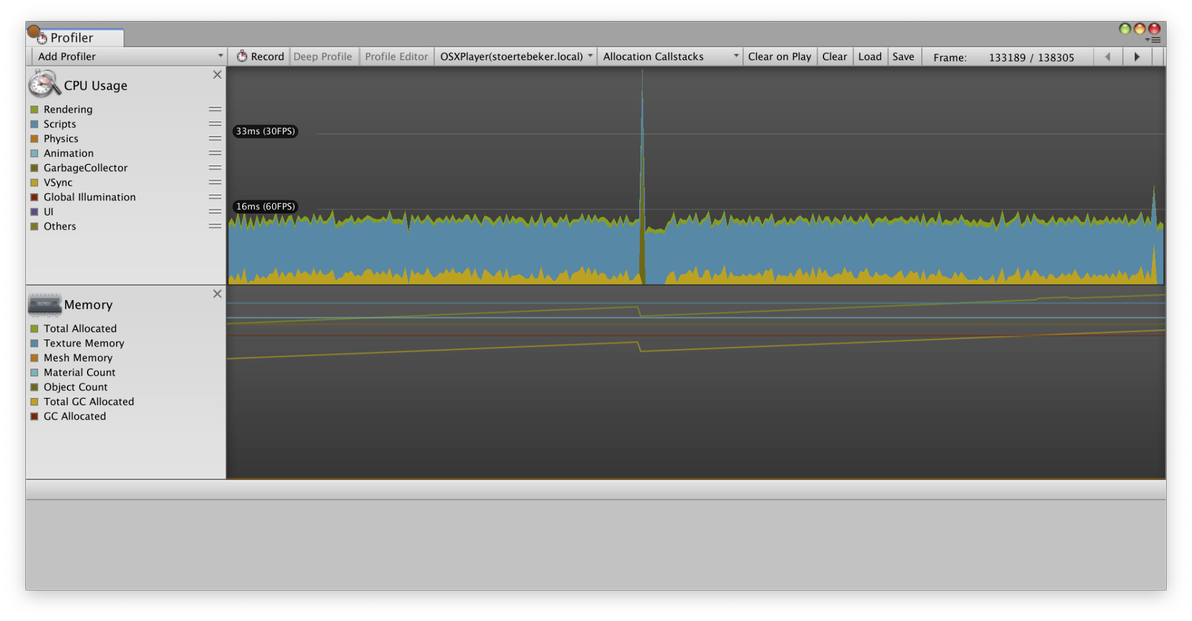
Without incremental GC (above), the project shows spikes of around 30ms every few seconds, interrupting the otherwise smooth 60fps frame rate.
没有使用增量GC(上图),项目每隔几秒就会显示大约30ms的峰值,从而中断平滑的60fps帧速率。
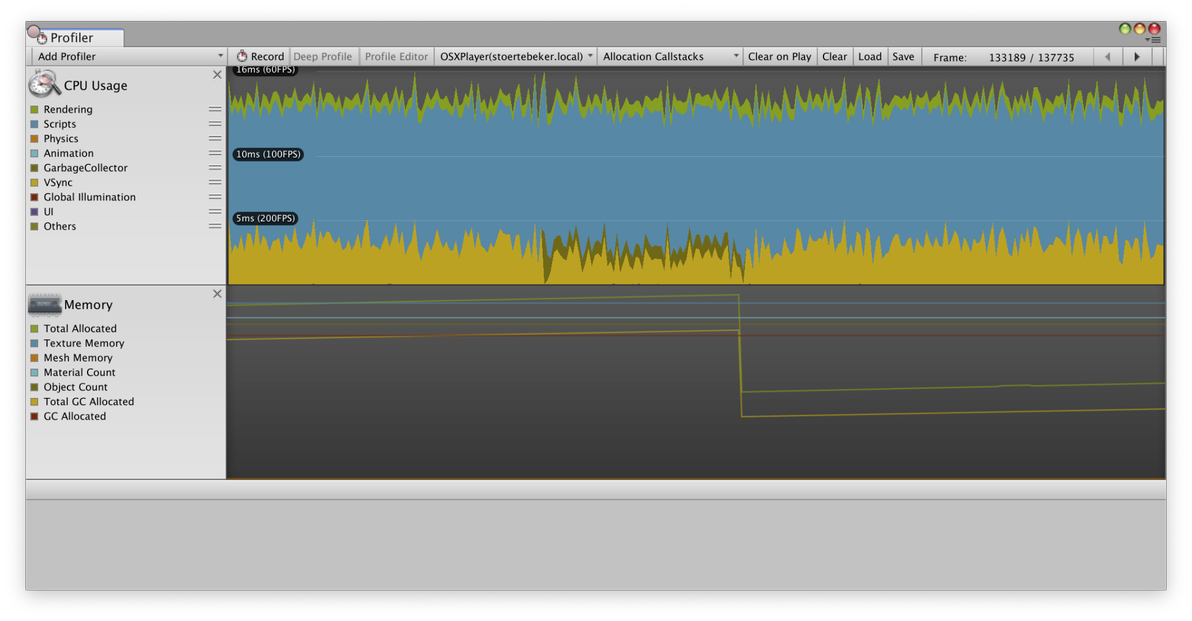
With incremental GC (above), the same project keeps its consistent 60fps frame rate, as the GC operation is broken up over several frames, using only a small time slice of each frame.
使用增量GC(上图),同一项目保持其一致的60fps帧速率,因为GC操作在几帧中被分解,每帧只使用一小段时间片。
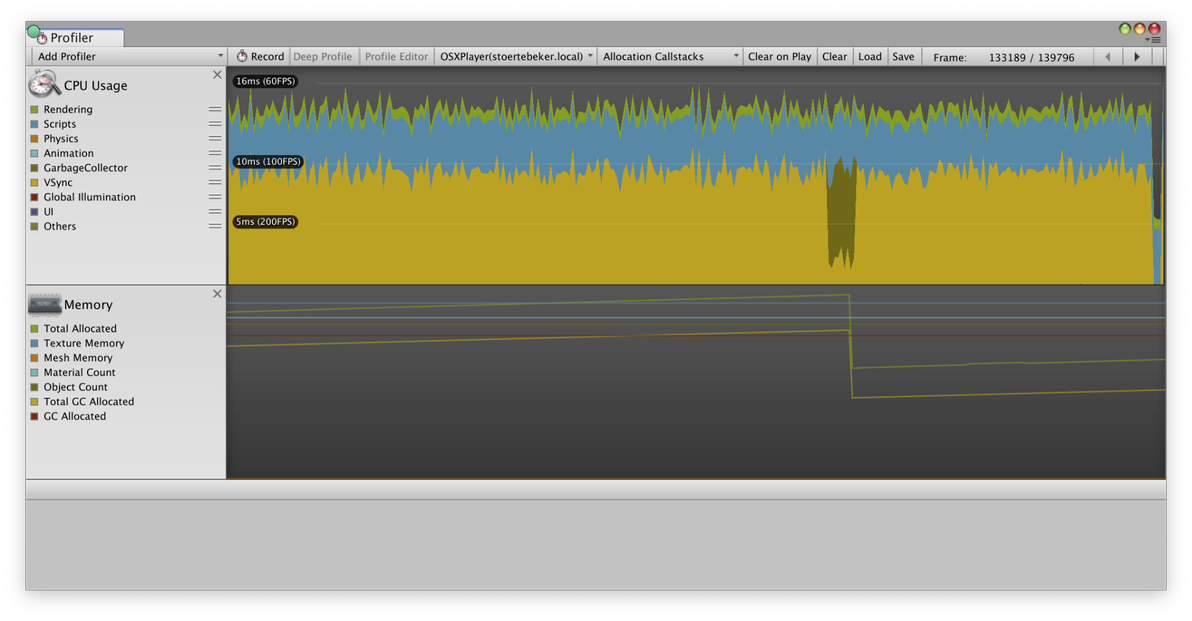
This screenshot shows the same project, also running with incremental GC enabled, but this time with fewer “scripting operations” per frame. Again, the GC operation is broken up over several frames. The difference is that this time, the GC uses more time each frame, and requires fewer total frames to finish. This is because we adjust the time allotted to the GC based on the remaining available frame time if Vsync or Application.targetFrameRate is being used. This way, we can run the GC in time which would otherwise be spent waiting, and thus get GC “for free”.
此屏幕截图显示了同一个项目,也在启用增量GC的情况下运行,但这次每帧的“脚本操作”更少。同样,GC操作在几帧中被分解。不同的是,这一次,GC每帧使用更多时间,并且需要更少的总帧数来完成。这是因为如果使用Vsync或Application.targetFrameRate,我们会根据剩余的可用帧时间调整分配给GC的时间。这样,我们可以及时运行GC,否则将花费等待,从而获得GC"for free"。
How to enable incremental GC?
如何启用增量GC?
Incremental GC is currently supported in Unity 2019.1 alpha on Mac, Windows and Linux Standalone Players and on iOS, Android and Windows UWP players. More supported platforms will be added in the future. Incremental GC requires the new .NET 4.x Equivalent scripting runtime version.
Unity 2019.1 alpha目前在Mac,Windows和Linux独立播放器以及iOS,Android和Windows UWP播放器上支持增量GC 。将来会增加更多支持的平台。增量GC需要新的.NET 4.x等效脚本运行时版本。
On supported configurations, Incremental GC is now available as an experimental option in the “Other settings” area of the Player settings window. Just enable the Use incremental GC (Experimental) checkbox, and build a player to give it a try.
在支持的配置上,增量GC现在可用作播放器设置窗口的“其他设置”区域中的实验选项。只需启用“使用增量GC(实验)”复选框,然后构建一个播放器即可尝试。
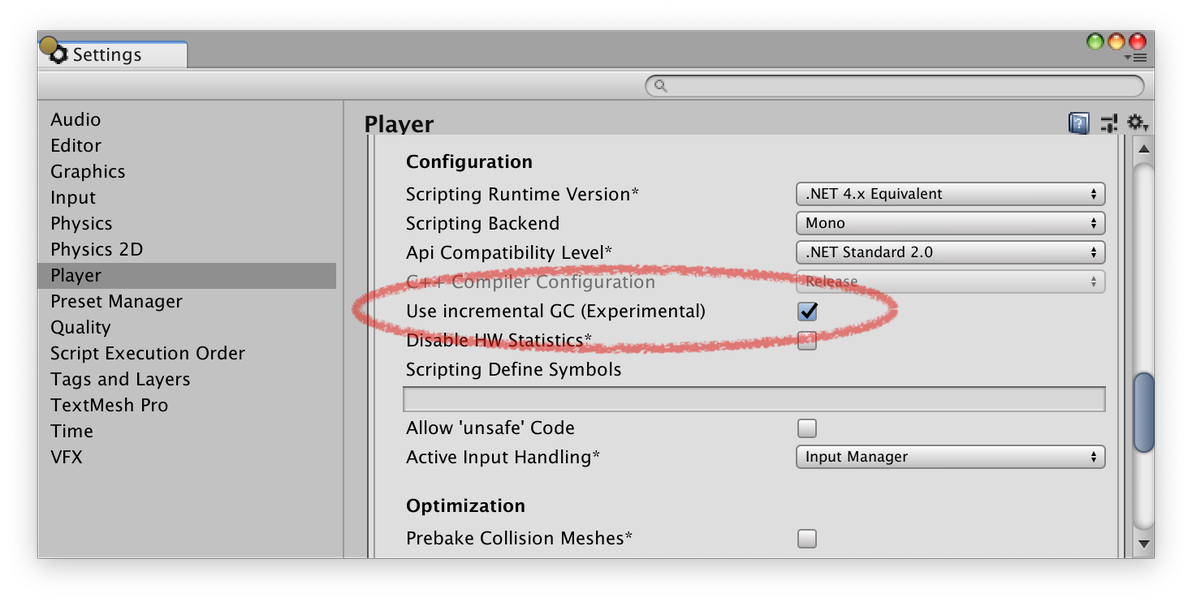
You can get more precise control over incremental GC behavior using the new Scripting.GarbageCollector APIs added in 2019.1.
您可以使用2019.1中添加的新Scripting.GarbageCollector API 更精确地控制增量GC行为。
Once you’ve tested it on your project, please let us know how it went on the forum – we’d love to hear your feedback!
一旦您在项目中进行了测试,请让我们在论坛上知道它的运行情况 - 我们很乐意听取您的反馈意见!
Expected results
预期结果
If you enable incremental GC, the garbage collector will split up the garbage collection work across multiple operations, which can then be distributed across multiple frames. We hope that in most cases where GC spikes were an issue, this will mitigate the symptoms. But Unity content is extremely diverse and can behave in very different ways – and it’s likely that there are cases where incremental GC may not be beneficial.
如果你启用增量GC,则垃圾收集器将跨多个操作拆分垃圾收集工作,然后可以跨多个帧分布。我们希望在GC峰值出现问题的大多数情况下,这将缓解症状。但是Unity内容极其多样化,并且可以以非常不同的方式运行 - 并且可能存在增量GC可能无益的情况。
Specifically, when incremental GC breaks up its work, the part which it breaks up is the marking phase, in which it scans all managed objects to find which other objects they reference, to track which objects are still in use. This assumes that most of the references between objects don’t change between slices of work. When they do change, the objects which have been changed need to be scanned again in the next iteration. This can cause a situation where incremental collection never finishes because it will always add more work to do – in this case, the GC will fall back to doing a full, non-incremental collection. It’s easy to create artificial test cases changing all the references all the time, where incremental GC will perform worse than non-incremental GC.
具体来说,当增量GC分解其工作时,它分解的部分是标记阶段,其中它扫描所有管理对象以查找它们引用的其他对象,以跟踪哪些对象仍在使用中。这假设对象之间的大多数引用不会在工作片之间发生变化。当它们发生变化时,需要在下一次迭代中再次扫描已更改的对象。这可能导致增量收集永远不会完成的情况,因为它总是会添加更多工作 - 在这种情况下,GC将回退到执行完整的非增量收集。创建人工测试用例很容易改变所有引用,其中增量GC的性能比非增量GC差。
Also, when using incremental GC, Unity needs to generate additional code (known as write barriers) to inform the GC whenever a reference has changed (so the GC will know if it needs to rescan an object). This adds some overhead when changing references which can have a measurable performance impact in some managed code.
此外,在使用增量GC时,Unity需要生成额外的代码(称为写屏障),以便在引用发生更改时通知GC(因此GC将知道是否需要重新扫描对象)。这会在更改引用时增加一些开销,这些引用会在某些托管代码中产生可衡量的性能影响。
Still, we believe that most typical Unity projects (if there is such a thing as “typical” Unity projects) can benefit from incremental GC, especially if they were suffering from GC spikes.
尽管如此,我们认为大多数典型的Unity项目(如果存在“典型”Unity项目这样的事情)都可以从增量GC中受益,特别是如果它们遭受GC峰值的影响。
Experimental status
实验状态
Incremental GC is included in Unity 2019.1 as an experimental preview feature. This has been done for a number of reasons:
增量GC包含在Unity 2019.1中作为实验预览功能。这样做有很多原因:
1. It isn’t yet supported on all platforms.
它尚未在所有平台上受支持。
2. As outlined in the “Expected Results” section above, we expect
incremental GC to be beneficial or at least not detrimental
performance-wise for most Unity content, and this seems to have been
true for various projects we have been testing with. But as Unity
content is very diverse, we want to make sure that this assumption
stays true across the greater Unity ecosystem, and we need your
feedback on this.
如上面的“预期结果”部分所述,我们希望增量GC对大多数Unity内容有益或至少不会对性能产生不利影响,对于我们一直在测试的各种项目,这似乎都是正确的。但是由于Unity内容非常多样化,我们希望确保这个假设在更大的Unity生态系统中保持正确,我们需要您对此提出反馈。
3. The requirement for Unity code and scripting VM (mono, il2cpp) to
add write barriers to inform the GC whenever references in managed
memory have changed introduces a potential source of bugs where we
have missed adding such a write barrier, which could lead to objects
being Garbage Collected when they are still needed. Now, we have
done extensive testing (both manual and automated) and we aren’t
aware of any such issues, and we believe that this feature is stable
(otherwise, we would not ship it). But, once again, because of the
diversity of Unity content and because such bugs might turn out to
be hard to trigger in practice, we cannot completely rule out the
possibility that there may be issues.
Unity代码和脚本VM(mono,il2cpp)需要添加写入障碍,以便在托管内存中的引用发生更改时通知GC,当我们忘了添加这样的写入障碍会导致潜在的错误来源,这可能导致对象成为垃圾收集时仍然需要它们。现在,我们已经进行了大量的测试(手动和自动),我们不知道任何这样的问题,我们相信这个功能是稳定的(否则,我们不会发出来)。但是,再一次,由于Unity内容的多样性,并且因为这些错误可能在实践中难以触发,我们不能完全排除可能存在问题的可能性。
So, overall we believe that this feature works as expected and there are no known issues with it. But, because of the complexity of the Unity ecosystem, we need some time and exposure to get the confidence to drop the experimental label, which we will do based on the feedback we get.
因此,总体而言,我们认为此功能可以按预期工作,并且没有任何已知问题。但是,由于Unity生态系统的复杂性,我们需要一些时间和曝光来获得放弃实验标签的信心,我们将根据我们得到的反馈做出这一点。
Future plans
未来计划
Incremental GC is available in Unity 2019.1 alpha now, but we expect a few changes to the feature in the course of the next year.
增量GC现在可用于Unity 2019.1 alpha,但我们预计明年会对该功能进行一些更改。
1. Add support for all other player platforms
添加对所有其他播放器平台的支持
2. Remove experimental label (this depends on your feedback)
删除实验标签(这取决于您的反馈)
3. Add support for running the Editor itself in incremental GC mode.
添加对在增量GC模式下运行编辑器本身的支持。
4. Make incremental GC the default option (this depends on your feedback)
使增量GC成为默认选项(这取决于您的反馈)
## Why did you not use [insert name] GC instead? I heard it’s really good!
为什么不使用[插入名称] GC?我听说这真的很棒!
When discussing incremental GC, we’re often asked why we haven’t considered using some other GC solution instead of Boehm GC, for instance Xamarin’s Sgen GC. We have considered other options (including writing our own GC) and will continue to do so, but the main reason for staying with Boehm and switching that to incremental mode instead is that this seems to be the safest step we can do while still getting significant improvements. As explained in the “Experimental Status” section above, one of the risks is introducing bugs due to missing or incorrectly placed write barriers. But the requirement of adding write barriers is shared by pretty much any GC solution more modern than what Unity uses today. So by staying with Boehm GC, we can somewhat isolate the risk created by having to add write barriers correctly from the risk of also switching to a completely different GC.
在讨论增量GC时,我们经常被问到为什么我们没有考虑使用其他GC解决方案而不是Boehm GC,例如Xamarin的Sgen GC。我们已经考虑了其他选择(包括编写我们自己的GC)并将继续这样做,但是留在Boehm并将其转换为增量模式的主要原因是,这似乎是我们可以做的最安全的一步,同时仍然具有重要意义改进。如上面“实验状态”部分所述,其中一个风险是由于缺少或错误放置写入障碍而引入错误。但是,添加写入障碍的要求几乎与Unity现在使用的任何GC解决方案相同。因此,通过与Boehm GC合作,我们可以在一定程度上隔离由于必须正确添加写入障碍而产生的风险,以及转换到完全不同的GC的风险。
We will continue to watch developments in this area, and see how your needs develop with the introduction of incremental Boehm. If we will find that incremental Boehm still leaves a lot of our users struggling to deal with GC spikes or other issues, we will consider other options.
我们将继续关注这一领域的发展,并通过引入增量Boehm了解您的需求如何发展。如果我们发现增量Boehm仍然让很多用户在努力应对GC峰值或其他问题,我们将考虑其他选择。
So, once again, your feedback is important, so please check out the alpha and let us know what you think on the forum!
所以,再次,您的反馈很重要,所以请查看alpha并告诉我们您在论坛上的想法!
原文地址:https://blogs.unity3d.com/2018/11/26/feature-preview-incremental-garbage-collection

CMS是一款优秀的收集器,它的主要优点在名字上已经体现出来了:并发收集、低停顿,Sun公司的一些官方文档中也称之为并发低停顿收集器(Concurrent Low Pause Collector)。但是CMS还远达不到完美的程度,它有以下3个明显的缺点:
CMS收集器对CPU资源非常敏感。其实,面向并发设计的程序都对CPU资源比较敏感。在并发阶段,它虽然不会导致用户线程停顿,但是会因为占用了一部分线程(或者说CPU资源)而导致应用程序变慢,总吞吐量会降低。CMS默认启动的回收线程数是(CPU数量+3)/4,也就是当CPU在4个以上时,并发回收时垃圾收集线程不少于25%的CPU资源,并且随着CPU数量的增加而下降。但是当CPU不足4个(譬如2个)时,CMS对用户程序的影响就可能变得很大,如果本来CPU负载就比较大,还分出一半的运算能力去执行收集器线程,就可能导致用户程序的执行速度忽然降低了50%,其实也让人无法接受。为了应付这种情况,虚拟机提供了一种称为“增量式并发收集器”(Incremental Concurrent Mark Sweep/i-CMS)的CMS收集器变种,所做的事情和单CPU年代PC机操作系统使用抢占式来模拟多任务机制的思想一样,就是在并发标记、清理的时候让GC线程、用户线程交替运行,尽量减少GC线程的独占资源的时间,这样整个垃圾收集的过程会更长,但对用户程序的影响就会显得少一些,也就是速度下降没有那么明显。实践证明,增量时的CMS收集器效果很一般,在目前版本中,i-CMS已经被声明为"deprecated",即不再提倡用户使用......
引用自《深入理解java虚拟机》 周志明著
