目录

白嫖微信官方推送,课程提醒,给女友的天气预报

手机消息推送可以做什么?每天早晨给女朋友推送天气预报,学生党推送课程表,提醒上课时间。上班族定时提醒发周报日报,推送系统故障,运维告警。有了推送这些个性化需求都可以满足。然而国内一直没有好用的手机"推送服务",统一推送联盟基本凉凉的状态。反而微信作为国民软件倒是人手一个。那么本期视频就分享如何白嫖微信官方的推送服务,通过申请测试版公众号,定制私人消息推送。爬爬虾经常分享一些微信的黑科技,半只脚已踏入封号区。但是这次属于官方功能,绝对合法合规,没有任何风险,请大家放心使用。
Github 地址:https://github.com/tech-shrimp/FreeWechatPush/
代码是我自己写的,希望各位点赞支持下~
05:10
5.4万观看
53弹幕

免费微信官方推送,做课程表提醒,给女友的天气预报,申请微信公众号测试号,Python定时任务做推送 还能做RSS订阅,运维告警,日程提醒
申请公众号测试账户
使用微信扫码即可
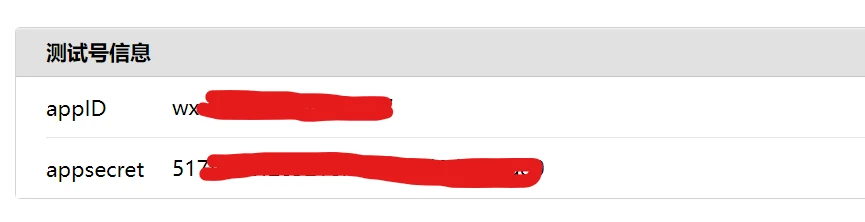
进入页面以后我们来获取到这四个值 appID, appSecret, openId, template_id
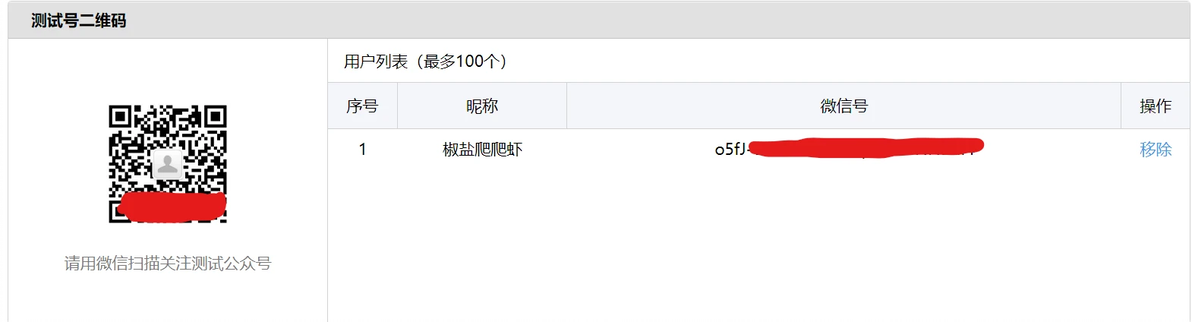
想让谁收消息,谁就用微信扫二维码,刷新页面后即出现在用户列表,获取微信号(openId)
新增测试模板获得 template_id(模板ID)

模板标题随便填,模板内容如下,可以根据需求自己定制
天气模板:
代码块
text/x-csrc
自动换行
复制代码
今天:{{date.DATA}}
地区:{{region.DATA}}
天气:{{weather.DATA}}
气温:{{temp.DATA}}
风向:{{wind_dir.DATA}}
对你说的话:{{today_note.DATA}}
复制成功
课程表模板:
代码块
text/x-csrc
自动换行
复制代码
消息:{{message.DATA}} 复制成功
配置代码
将上面获得的几个值填入代码这几行,启动即可
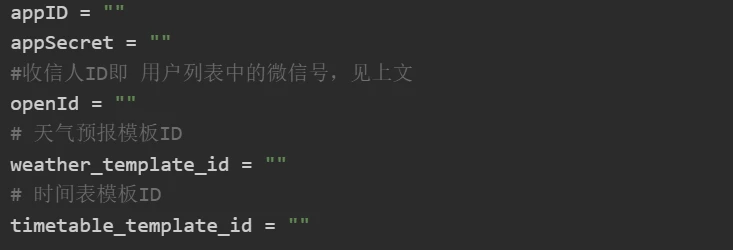
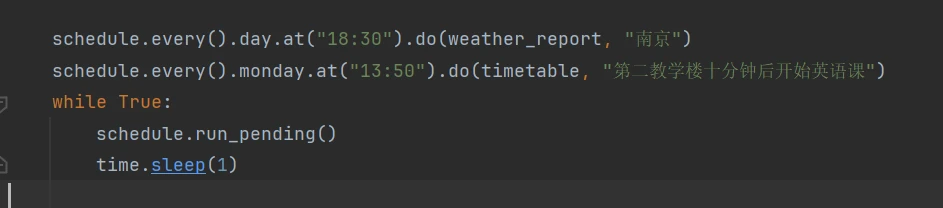
配置定时任务
根据需求修改这几行
python 代码
代码块
text/x-python
自动换行
复制代码
# 安装依赖 pip3 install requests html5lib bs4 schedule

import time
import requests
import json
import schedule
from bs4 import BeautifulSoup


# 从测试号信息获取
appID = ""
appSecret = ""
#收信人ID即 用户列表中的微信号,见上文
openId = ""
# 天气预报模板ID
weather_template_id = ""
# 时间表模板ID
timetable_template_id = ""


def get_weather(my_city):
    urls = ["http://www.weather.com.cn/textFC/hb.shtml",
            "http://www.weather.com.cn/textFC/db.shtml",
            "http://www.weather.com.cn/textFC/hd.shtml",
            "http://www.weather.com.cn/textFC/hz.shtml",
            "http://www.weather.com.cn/textFC/hn.shtml",
            "http://www.weather.com.cn/textFC/xb.shtml",
            "http://www.weather.com.cn/textFC/xn.shtml"
            ]
    for url in urls:
        resp = requests.get(url)
        text = resp.content.decode("utf-8")
        soup = BeautifulSoup(text, 'html5lib')
        div_conMidtab = soup.find("div", class_="conMidtab")
        tables = div_conMidtab.find_all("table")
        for table in tables:
            trs = table.find_all("tr")[2:]
            for index, tr in enumerate(trs):
                tds = tr.find_all("td")
                # 这里倒着数,因为每个省会的td结构跟其他不一样
                city_td = tds[-8]
                this_city = list(city_td.stripped_strings)[0]
                if this_city == my_city:

                    high_temp_td = tds[-5]
                    low_temp_td = tds[-2]
                    weather_type_day_td = tds[-7]
                    weather_type_night_td = tds[-4]
                    wind_td_day = tds[-6]
                    wind_td_day_night = tds[-3]

                    high_temp = list(high_temp_td.stripped_strings)[0]
                    low_temp = list(low_temp_td.stripped_strings)[0]
                    weather_typ_day = list(weather_type_day_td.stripped_strings)[0]
                    weather_type_night = list(weather_type_night_td.stripped_strings)[0]

                    wind_day = list(wind_td_day.stripped_strings)[0] + list(wind_td_day.stripped_strings)[1]
                    wind_night = list(wind_td_day_night.stripped_strings)[0] + list(wind_td_day_night.stripped_strings)[1]

                    # 如果没有白天的数据就使用夜间的
                    temp = f"{low_temp}——{high_temp}摄氏度" if high_temp != "-" else f"{low_temp}摄氏度"
                    weather_typ = weather_typ_day if weather_typ_day != "-" else weather_type_night
                    wind = f"{wind_day}" if wind_day != "--" else f"{wind_night}"
                    return this_city, temp, weather_typ, wind


def get_access_token():
    # 获取access token的url
    url = 'https://api.weixin.qq.com/cgi-bin/token?grant_type=client_credential&appid={}&secret={}' \
        .format(appID.strip(), appSecret.strip())
    response = requests.get(url).json()
    print(response)
    access_token = response.get('access_token')
    return access_token


def get_daily_love():
    # 每日一句情话
    url = "https://api.lovelive.tools/api/SweetNothings/Serialization/Json"
    r = requests.get(url)
    all_dict = json.loads(r.text)
    sentence = all_dict['returnObj'][0]
    daily_love = sentence
    return daily_love


def send_weather(access_token, weather):
    # touser 就是 openID
    # template_id 就是模板ID
    # url 就是点击模板跳转的url
    # data就按这种格式写,time和text就是之前{{time.DATA}}中的那个time,value就是你要替换DATA的值

    import datetime
    today = datetime.date.today()
    today_str = today.strftime("%Y年%m月%d日")

    body = {
        "touser": openId.strip(),
        "template_id": weather_template_id.strip(),
        "url": "https://weixin.qq.com",
        "data": {
            "date": {
                "value": today_str
            },
            "region": {
                "value": weather[0]
            },
            "weather": {
                "value": weather[2]
            },
            "temp": {
                "value": weather[1]
            },
            "wind_dir": {
                "value": weather[3]
            },
            "today_note": {
                "value": get_daily_love()
            }
        }
    }
    url = 'https://api.weixin.qq.com/cgi-bin/message/template/send?access_token={}'.format(access_token)
    print(requests.post(url, json.dumps(body)).text)


def send_timetable(access_token, message):
    body = {
        "touser": openId,
        "template_id": timetable_template_id.strip(),
        "url": "https://weixin.qq.com",
        "data": {
            "message": {
                "value": message
            },
        }
    }
    url = 'https://api.weixin.qq.com/cgi-bin/message/template/send?access_token={}'.format(access_token)
    print(requests.post(url, json.dumps(body)).text)


def weather_report(city):
    # 1.获取access_token
    access_token = get_access_token()
    # 2. 获取天气
    weather = get_weather(city)
    print(f"天气信息: {weather}")
    # 3. 发送消息
    send_weather(access_token, weather)


def timetable(message):
    # 1.获取access_token
    access_token = get_access_token()
    # 3. 发送消息
    send_timetable(access_token, message)


if __name__ == '__main__':
    weather_report("青岛")
    # timetable("第二教学楼十分钟后开始英语课")

    # schedule.every().day.at("18:30").do(weather_report, "南京")
    # schedule.every().monday.at("13:50").do(timetable, "第二教学楼十分钟后开始英语课")
    #while True:
    #    schedule.run_pending()
    #    time.sleep(1)
复制成功
本文为我原创,未经授权禁止转载
cv28928153
分享至
投诉或建议
