

NetBird
什么是 NetBird
NetBird is a simple and fast alternative to corporate VPNs built on top of WireGuard® making it easy to create secure private networks for your organization or home. It requires near zero configuration effort leaving behind the hassle of opening ports, complex firewall rules, vpn gateways, and so forth. NetBird 是一个简单快速的企业级 VPN 替代方案,建立在原生 WireGuard® 之上,可以轻松为您的组织或家庭创建安全的私人网络。它几乎不需要任何配置工作,从而摆脱了开放端口、复杂的防火墙规则、VPN 网关等烦琐任务的困扰。
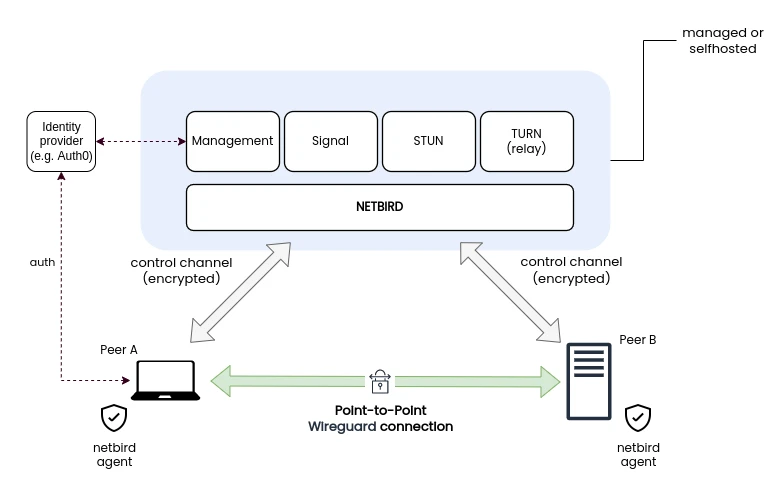
NetBird 架构
前置条件
基础设施
Linux 云主机 具有公网IP 不低于 1CPU 和 2GB 内存;
对公网开启如下端口;
TCP:80 443
UDP:3478 49152-65535
指向云主机公网IP的域名,国内需要备案;
软件要求
主机需要安装 docker、docker-compose,安装参考 Docker installation guide
需要安装 jq 在大多数发行版中通常在官方存储库中可用,并且可以使用 sudo apt install jq 或 sudo yum install jq 来进行安装
需要安装 jq 在大多数发行版中通常在官方存储库中可用,并且可以使用 sudo apt install curl 或 sudo yum install curl 来进行安装
部署 NetBird
下载部署脚本
下载部署脚本
curl -sSLO https://github.com/netbirdio/netbird/releases/latest/download/getting-started-with-zitadel.sh改部署脚本
需要将部署脚本生成 caddy 配置文件 caddyfile 的代码中 486行 的 protocols h1 h2c 通过注释的方法关闭该参数。
修改前内容如下
……
renderCaddyfile() {
  cat <<EOF
{
  debug
	servers :80,:443 {
    protocols h1 h2c
  }
}

(security_headers) {
    header * {
        # enable HSTS
        # https://cheatsheetseries.owasp.org/cheatsheets/HTTP_Headers_Cheat_Sheet.html#strict-transport-security-hsts
        # NOTE: Read carefully how this header works before using it.
        # If the HSTS header is misconfigured or if there is a problem with
        # the SSL/TLS certificate being used, legitimate users might be unable
        # to access the website. For example, if the HSTS header is set to a
        # very long duration and the SSL/TLS certificate expires or is revoked,
        # legitimate users might be unable to access the website until
        # the HSTS header duration has expired.
        # The recommended value for the max-age is 2 year (63072000 seconds).
        # But we are using 1 hour (3600 seconds) for testing purposes
        # and ensure that the website is working properly before setting
        # to two years.

        Strict-Transport-Security "max-age=3600; includeSubDomains; preload"

        # disable clients from sniffing the media type
        # https://cheatsheetseries.owasp.org/cheatsheets/HTTP_Headers_Cheat_Sheet.html#x-content-type-options
        X-Content-Type-Options "nosniff"

        # clickjacking protection
        # https://cheatsheetseries.owasp.org/cheatsheets/HTTP_Headers_Cheat_Sheet.html#x-frame-options
        X-Frame-Options "DENY"

        # xss protection
        # https://cheatsheetseries.owasp.org/cheatsheets/HTTP_Headers_Cheat_Sheet.html#x-xss-protection
        X-XSS-Protection "1; mode=block"

        # Remove -Server header, which is an information leak
        # Remove Caddy from Headers
        -Server

        # keep referrer data off of HTTP connections
        # https://cheatsheetseries.owasp.org/cheatsheets/HTTP_Headers_Cheat_Sheet.html#referrer-policy
        Referrer-Policy strict-origin-when-cross-origin
    }
}

:80${CADDY_SECURE_DOMAIN} {
    import security_headers
    # Signal
    reverse_proxy /signalexchange.SignalExchange/* h2c://signal:10000
    # Management
    reverse_proxy /api/* management:80
    reverse_proxy /management.ManagementService/* h2c://management:80
    # Zitadel
    reverse_proxy /zitadel.admin.v1.AdminService/* h2c://zitadel:8080
    reverse_proxy /admin/v1/* h2c://zitadel:8080
    reverse_proxy /zitadel.auth.v1.AuthService/* h2c://zitadel:8080
    reverse_proxy /auth/v1/* h2c://zitadel:8080
    reverse_proxy /zitadel.management.v1.ManagementService/* h2c://zitadel:8080
    reverse_proxy /management/v1/* h2c://zitadel:8080
    reverse_proxy /zitadel.system.v1.SystemService/* h2c://zitadel:8080
    reverse_proxy /system/v1/* h2c://zitadel:8080
    reverse_proxy /assets/v1/* h2c://zitadel:8080
    reverse_proxy /ui/* h2c://zitadel:8080
    reverse_proxy /oidc/v1/* h2c://zitadel:8080
    reverse_proxy /saml/v2/* h2c://zitadel:8080
    reverse_proxy /oauth/v2/* h2c://zitadel:8080
    reverse_proxy /.well-known/openid-configuration h2c://zitadel:8080
    reverse_proxy /openapi/* h2c://zitadel:8080
    reverse_proxy /debug/* h2c://zitadel:8080
    # Dashboard
    reverse_proxy /* dashboard:80
}
EOF
}
……修改后内容如下
……
renderCaddyfile() {
  cat <<EOF
{
  debug
	servers :80,:443 {
    # protocols h1 h2c
  }
}

(security_headers) {
    header * {
        # enable HSTS
        # https://cheatsheetseries.owasp.org/cheatsheets/HTTP_Headers_Cheat_Sheet.html#strict-transport-security-hsts
        # NOTE: Read carefully how this header works before using it.
        # If the HSTS header is misconfigured or if there is a problem with
        # the SSL/TLS certificate being used, legitimate users might be unable
        # to access the website. For example, if the HSTS header is set to a
        # very long duration and the SSL/TLS certificate expires or is revoked,
        # legitimate users might be unable to access the website until
        # the HSTS header duration has expired.
        # The recommended value for the max-age is 2 year (63072000 seconds).
        # But we are using 1 hour (3600 seconds) for testing purposes
        # and ensure that the website is working properly before setting
        # to two years.

        Strict-Transport-Security "max-age=3600; includeSubDomains; preload"

        # disable clients from sniffing the media type
        # https://cheatsheetseries.owasp.org/cheatsheets/HTTP_Headers_Cheat_Sheet.html#x-content-type-options
        X-Content-Type-Options "nosniff"

        # clickjacking protection
        # https://cheatsheetseries.owasp.org/cheatsheets/HTTP_Headers_Cheat_Sheet.html#x-frame-options
        X-Frame-Options "DENY"

        # xss protection
        # https://cheatsheetseries.owasp.org/cheatsheets/HTTP_Headers_Cheat_Sheet.html#x-xss-protection
        X-XSS-Protection "1; mode=block"

        # Remove -Server header, which is an information leak
        # Remove Caddy from Headers
        -Server

        # keep referrer data off of HTTP connections
        # https://cheatsheetseries.owasp.org/cheatsheets/HTTP_Headers_Cheat_Sheet.html#referrer-policy
        Referrer-Policy strict-origin-when-cross-origin
    }
}

:80${CADDY_SECURE_DOMAIN} {
    import security_headers
    # Signal
    reverse_proxy /signalexchange.SignalExchange/* h2c://signal:10000
    # Management
    reverse_proxy /api/* management:80
    reverse_proxy /management.ManagementService/* h2c://management:80
    # Zitadel
    reverse_proxy /zitadel.admin.v1.AdminService/* h2c://zitadel:8080
    reverse_proxy /admin/v1/* h2c://zitadel:8080
    reverse_proxy /zitadel.auth.v1.AuthService/* h2c://zitadel:8080
    reverse_proxy /auth/v1/* h2c://zitadel:8080
    reverse_proxy /zitadel.management.v1.ManagementService/* h2c://zitadel:8080
    reverse_proxy /management/v1/* h2c://zitadel:8080
    reverse_proxy /zitadel.system.v1.SystemService/* h2c://zitadel:8080
    reverse_proxy /system/v1/* h2c://zitadel:8080
    reverse_proxy /assets/v1/* h2c://zitadel:8080
    reverse_proxy /ui/* h2c://zitadel:8080
    reverse_proxy /oidc/v1/* h2c://zitadel:8080
    reverse_proxy /saml/v2/* h2c://zitadel:8080
    reverse_proxy /oauth/v2/* h2c://zitadel:8080
    reverse_proxy /.well-known/openid-configuration h2c://zitadel:8080
    reverse_proxy /openapi/* h2c://zitadel:8080
    reverse_proxy /debug/* h2c://zitadel:8080
    # Dashboard
    reverse_proxy /* dashboard:80
}
EOF
}
……注:修改部署脚本的原因会在后面解释
运行部署脚本
将 netbird 使用的域名传入环境变量
export NETBIRD_DOMAIN=netbird.example.com运行脚本
bash getting-started-with-zitadel.sh运行后输出如下

Rendering initial files...

Initializing Zitadel's CockroachDB


[+] Building 0.0s (0/0)                                                                                                                                                                                         docker:default
[+] Running 7/7
 ✔ Network netbird_netbird                 Created                                                                                                                                                                        0.1s
 ✔ Volume "netbird_netbird_crdb_data"      Created                                                                                                                                                                        0.0s
 ✔ Volume "netbird_netbird_crdb_certs"     Created                                                                                                                                                                        0.0s
 ✔ Volume "netbird_netbird_caddy_data"     Created                                                                                                                                                                        0.0s
 ✔ Volume "netbird_netbird_management"     Created                                                                                                                                                                        0.0s
 ✔ Volume "netbird_netbird_zitadel_certs"  Created                                                                                                                                                                        0.0s
 ✔ Container netbird-crdb-1                Started                                                                                                                                                                        0.1s

Waiting cockroachDB  to become ready  . done

Starting Zidatel IDP for user management


[+] Building 0.0s (0/0)                                                                                                                                                                                         docker:default
[+] Running 3/3
 ✔ Container netbird-caddy-1    Started                                                                                                                                                                                   0.1s
 ✔ Container netbird-crdb-1     Healthy                                                                                                                                                                                   0.0s
 ✔ Container netbird-zitadel-1  Started                                                                                                                                                                                   0.1s

Initializing Zitadel with NetBird's applications

Waiting for Zitadel's PAT to be created  . . . done
Reading Zitadel PAT
Waiting for Zitadel to become ready  . . . . . . . . . . . . . . . . . . done
Creating new zitadel project
Creating new Zitadel SPA Dashboard application
Creating new Zitadel SPA Cli application

Rendering NetBird files...


Starting NetBird services

[+] Building 0.0s (0/0)                                                                                                                                                                                         docker:default
[+] Running 7/7
 ✔ Container netbird-dashboard-1   Started                                                                                                                                                                                0.3s
 ✔ Container netbird-management-1  Started                                                                                                                                                                                0.2s
 ✔ Container netbird-signal-1      Started                                                                                                                                                                                0.3s
 ✔ Container netbird-coturn-1      Started                                                                                                                                                                                0.3s
 ✔ Container netbird-crdb-1        Healthy                                                                                                                                                                                0.0s
 ✔ Container netbird-caddy-1       Running                                                                                                                                                                                0.0s
 ✔ Container netbird-zitadel-1     Running                                                                                                                                                                                0.0s

Done!

You can access the NetBird dashboard at https://netbird.example.com:443
Login with the following credentials:
Username: admin@netbird.example.com
Password: (●'◡'●)注:在部署中使用的是真实域名,已经用 netbird.example.com 替代,密码为生成后的随机字符串,使用(●'◡'●)替代。
配置 NetBird
现在即可使用域名访问 netbird 了,我的域名还在备案中,后面会单独开一篇文档介绍,平台配置参考 ac_laoe 大佬的视频即可。


部署中遇到的问题,和排查过程
先说结果
因部署脚本中的 docker-conpose.yaml 没有指定 caddy 的版本,所以默认会拉取最新版的镜像,最新版已经进行了大版本更新,猜测已经不支持 protocols 这个参数 ,所以会有报错导致无法启动 caddy 进而导致认证程序 Zitadel 无法启动,部署脚本会一直卡在校验 Zitadel 启动成功的阶段。
问题现象
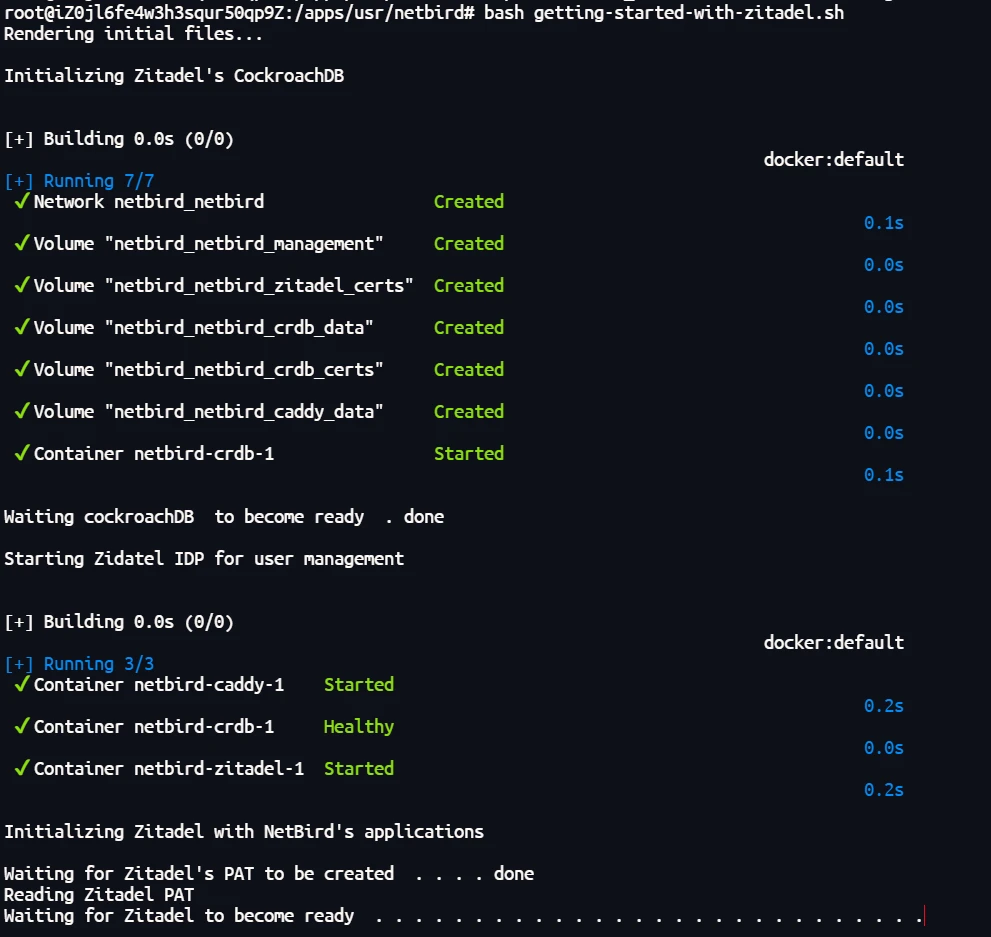
在没有修改部署脚本直接使用部署脚本进行部署时,脚本会卡在校验 Zitadel 启动成功的阶段,同时脚本不会继续进入下一个阶段,如下图
排查过程
通过官网和部署阶段的输出可知 部署脚本 会帮我们创建一套基于 docker 部署的自托管的 netbird,通过这部分输出如下图,可以知道目前已经创建了三个容器 netbird-caddy-1 、 netbird-crdb-1 、 netbird-zitadel-1。

查看启动的容器
docker-compose ps输出如下图

进一步查看启动的容器我们发现 netbird-crdb-1 的启动是正常的,部署脚本的输出是在等待校验 zitadel 启动的结果
查看 zitadel 的日志
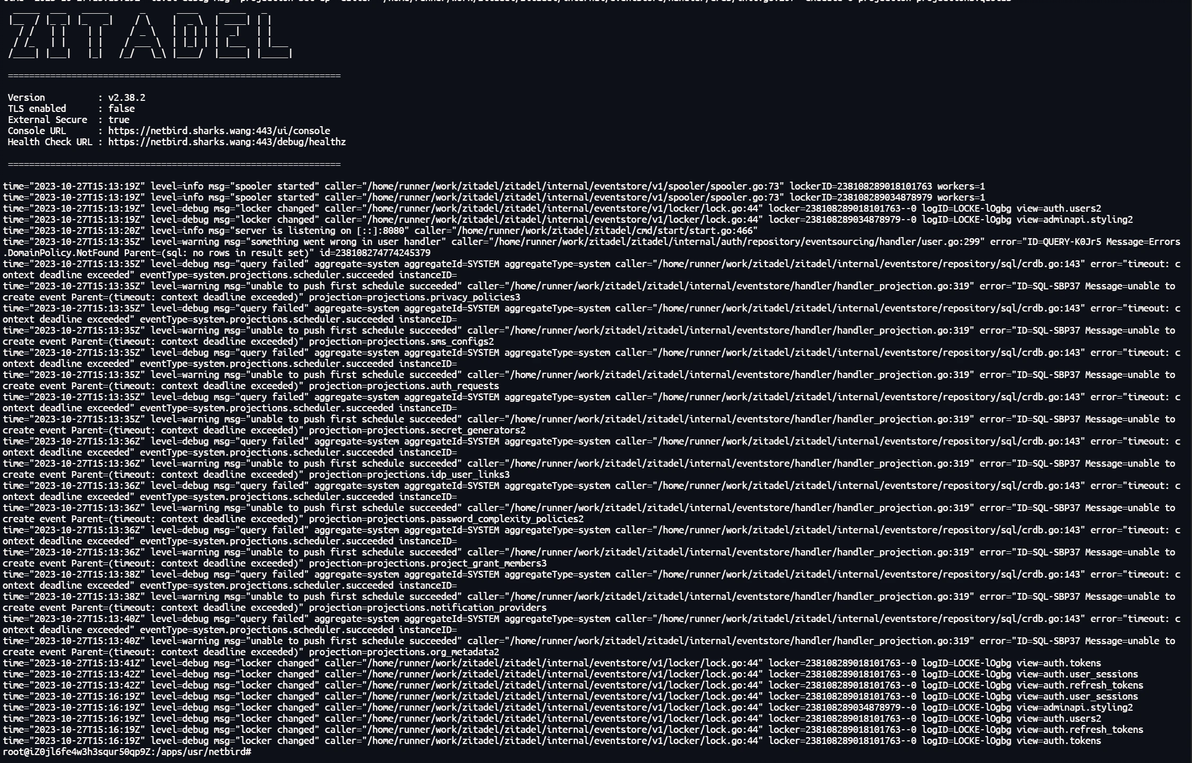
docker logs -f netbird-zitadel-1会发现 zitadel 日志有输出 error="timeout: context deadline exceeded" 的字段,因为 docker-compose.yaml 定义的重启策略为 restart: 'always' 会一直重启,但是无法通过日志判断具体的问题是出在哪里。
输出如下图
进一步查看启动的容器我们发现 netbird-caddy-1 这个容器无法启动,查看 netbird-caddy-1 的启动日志
docker logs -f netbird-caddy-1caddy 报错大致意思为 caddyfile 文件的 无法识别配置文件第 4 行的 protocols 这个参数
报错内容如下
{"level":"info","ts":1698338216.3617017,"msg":"using provided configuration","config_file":"/etc/caddy/Caddyfile","config_adapter":"caddyfile"}
run: adapting config using caddyfile: parsing caddyfile tokens for 'servers': /etc/caddy/Caddyfile:4 - Error during parsing: unrecognized servers option 'protocols'
{"level":"info","ts":1698338217.090449,"msg":"using provided configuration","config_file":"/etc/caddy/Caddyfile","config_adapter":"caddyfile"}
run: adapting config using caddyfile: parsing caddyfile tokens for 'servers': /etc/caddy/Caddyfile:4 - Error during parsing: unrecognized servers option 'protocols'
{"level":"info","ts":1698338217.7755132,"msg":"using provided configuration","config_file":"/etc/caddy/Caddyfile","config_adapter":"caddyfile"}
run: adapting config using caddyfile: parsing caddyfile tokens for 'servers': /etc/caddy/Caddyfile:4 - Error during parsing: unrecognized servers option 'protocols'
{"level":"info","ts":1698338218.5012972,"msg":"using provided configuration","config_file":"/etc/caddy/Caddyfile","config_adapter":"caddyfile"}
run: adapting config using caddyfile: parsing caddyfile tokens for 'servers': /etc/caddy/Caddyfile:4 - Error during parsing: unrecognized servers option 'protocols'
{"level":"info","ts":1698338219.6587715,"msg":"using provided configuration","config_file":"/etc/caddy/Caddyfile","config_adapter":"caddyfile"}
run: adapting config using caddyfile: parsing caddyfile tokens for 'servers': /etc/caddy/Caddyfile:4 - Error during parsing: unrecognized servers option 'protocols'
{"level":"info","ts":1698338221.6827826,"msg":"using provided configuration","config_file":"/etc/caddy/Caddyfile","config_adapter":"caddyfile"}
run: adapting config using caddyfile: parsing caddyfile tokens for 'servers': /etc/caddy/Caddyfile:4 - Error during parsing: unrecognized servers option 'protocols'
{"level":"info","ts":1698338225.3086724,"msg":"using provided configuration","config_file":"/etc/caddy/Caddyfile","config_adapter":"caddyfile"}注: caddy 这个代理程序本人也是在 netbird 中第一次见到,不是很熟悉。
继续查看启动脚本,搜索关键字 Waiting for Zitadel to become ready 找到如下代码段
init_zitadel() {
  echo -e "\nInitializing Zitadel with NetBird's applications\n"
  INSTANCE_URL="$NETBIRD_HTTP_PROTOCOL://$NETBIRD_DOMAIN:$NETBIRD_PORT"

  TOKEN_PATH=./machinekey/zitadel-admin-sa.token

  echo -n "Waiting for Zitadel's PAT to be created "
  wait_pat "$TOKEN_PATH"
  echo "Reading Zitadel PAT"
  PAT=$(cat $TOKEN_PATH)
  if [ "$PAT" = "null" ]; then
    echo "Failed requesting getting Zitadel PAT"
    exit 1
  fi

  echo -n "Waiting for Zitadel to become ready "
  wait_api "$INSTANCE_URL" "$PAT"

  #  create the zitadel project
  echo "Creating new zitadel project"
  PROJECT_ID=$(create_new_project "$INSTANCE_URL" "$PAT")

  ZITADEL_DEV_MODE=false
  BASE_REDIRECT_URL=$NETBIRD_HTTP_PROTOCOL://$NETBIRD_DOMAIN
  if [[ $NETBIRD_HTTP_PROTOCOL == "http" ]]; then
    ZITADEL_DEV_MODE=true
  fi

  # create zitadel spa applications
  echo "Creating new Zitadel SPA Dashboard application"
  DASHBOARD_APPLICATION_CLIENT_ID=$(create_new_application "$INSTANCE_URL" "$PAT" "Dashboard" "$BASE_REDIRECT_URL/nb-auth" "$BASE_REDIRECT_URL/nb-silent-auth" "$BASE_REDIRECT_URL/" "$ZITADEL_DEV_MODE")

  echo "Creating new Zitadel SPA Cli application"
  CLI_APPLICATION_CLIENT_ID=$(create_new_application "$INSTANCE_URL" "$PAT" "Cli" "http://localhost:53000/" "http://localhost:54000/" "http://localhost:53000/" "true")

  MACHINE_USER_ID=$(create_service_user "$INSTANCE_URL" "$PAT")

  SERVICE_USER_CLIENT_ID="null"
  SERVICE_USER_CLIENT_SECRET="null"

  create_service_user_secret "$INSTANCE_URL" "$PAT" "$MACHINE_USER_ID"

  DATE=$(add_organization_user_manager "$INSTANCE_URL" "$PAT" "$MACHINE_USER_ID")

  ZITADEL_ADMIN_USERNAME="admin@$NETBIRD_DOMAIN"
  ZITADEL_ADMIN_PASSWORD="$(openssl rand -base64 32 | sed 's/=//g')@"

  HUMAN_USER_ID=$(create_admin_user "$INSTANCE_URL" "$PAT" "$ZITADEL_ADMIN_USERNAME" "$ZITADEL_ADMIN_PASSWORD")

  DATE="null"

  DATE=$(add_instance_admin "$INSTANCE_URL" "$PAT" "$HUMAN_USER_ID")

  DATE="null"
  DATE=$(delete_auto_service_user "$INSTANCE_URL" "$PAT")
  if [ "$DATE" = "null" ]; then
      echo "Failed deleting auto service user"
      echo "Please remove it manually"
  fi

  export NETBIRD_AUTH_CLIENT_ID=$DASHBOARD_APPLICATION_CLIENT_ID
  export NETBIRD_AUTH_CLIENT_ID_CLI=$CLI_APPLICATION_CLIENT_ID
  export NETBIRD_IDP_MGMT_CLIENT_ID=$SERVICE_USER_CLIENT_ID
  export NETBIRD_IDP_MGMT_CLIENT_SECRET=$SERVICE_USER_CLIENT_SECRET
  export ZITADEL_ADMIN_USERNAME
  export ZITADEL_ADMIN_PASSWORD
}发现引用了 wait_api 这个函数,继续查看这个函数的定义代码,找到如下代码段
wait_api() {
    INSTANCE_URL=$1
    PAT=$2
    set +e
    while true; do
      curl -s --fail -o /dev/null "$INSTANCE_URL/auth/v1/users/me" -H "Authorization: Bearer $PAT"
      if [[ $? -eq 0 ]]; then
        break
      fi
      echo -n " ."
      sleep 1
    done
    echo " done"
    set -e
}分析这个函数的代码我们发现是在循环请求 $INSTANCE_URL/auth/v1/users/me 这个地址判读是否等于 0 ,等于 0 则 退出,反之则输出 " ." 等待1秒,继续循环。
我们大胆猜测 $INSTANCE_URL/auth/v1/users/me 这个地址可能是我们传入的域名,按照 netbird 的架构图我们知道所有的流量都会经过 caddy 来转发,同时 caddy 又处在无法启动的状态,我们可以粗略的猜测问题就是出在 caddy 身上,结合看到的 caddy 日志,猜测问题可能出在 caddy 的 protocols 配置参数,查看部署脚本,搜索 protocols 这个参数发现是 caddy 的 配置文件的对应字段
{
  debug
	servers :80,:443 {
    protocols h1 h2c
  }
}日志提到的是 'servers': /etc/caddy/Caddyfile:4 - Error during parsing: unrecognized servers option 'protocols' 无法识别的servers下protocols的选项,尝试将 protocols h1 h2c 这行通过注释的方法使它不生效后,按照官方文档的卸载流程卸载,再次尝试部署发现可以正常校验 Zitadel 启动成功的阶段,稍等一会后 netbird 启动正常。
参考链接
https://netbird.io/
https://docs.netbird.io/about-netbird/netbird-vs-traditional-vpn
