
我们会因为各种各样的原因来给自己的安卓设备(手机)添加设备管理员权限 而这个过程,对于经历过的人来说无比简单 但又对于第一次搞的小白来说却又无比困难 并不是每个人都是传说中的“机佬” 麻烦,故障,处处碰壁 我们到底如何才能摆脱这样的困境? 直到现在,我都没明白谷歌为啥要加这些玩意的检测 ——引言
如果你也跟我一样遇到了类似的保报错却又绞尽脑汁无从下手?让我们从头开始,逐步分析,逐个击破
希望我的文章能够帮到你
#0x01:初步尝试

首次尝试激活设备管理员时出现的报错
具体细节:
java.lang.IllegalStateException: Not allowed to set the device owner because there are already some accounts on the device
        at android.os.Parcel.createException(Parcel.java:2099)
        at android.os.Parcel.readException(Parcel.java:2059)
        at android.os.Parcel.readException(Parcel.java:2007)
        at android.app.admin.IDevicePolicyManager$Stub$Proxy.setDeviceOwner(IDevicePolicyManager.java:8419)
        at com.android.commands.dpm.Dpm.runSetDeviceOwner(Dpm.java:203)
        at com.android.commands.dpm.Dpm.onRun(Dpm.java:115)
        at com.android.internal.os.BaseCommand.run(BaseCommand.java:56)
        at com.android.commands.dpm.Dpm.main(Dpm.java:41)
        at com.android.internal.os.RuntimeInit.nativeFinishInit(Native Method)
        at com.android.internal.os.RuntimeInit.main(RuntimeInit.java:359)
Caused by: android.os.RemoteException: Remote stack trace:
        at com.android.server.devicepolicy.DevicePolicyManagerService.enforceCanSetDeviceOwnerLocked(libmapleservices.so:14900324)
        at com.android.server.devicepolicy.DevicePolicyManagerService.setDeviceOwner(libmapleservices.so:17221536)
        at android.app.admin.IDevicePolicyManager$Stub.onTransact(libmapleframework.so:5801308)
        at com.android.server.devicepolicy.DevicePolicyManagerService.onTransact(libmapleservices.so:7493704)
        at android.os.Binder.execTransactInternal(libmapleframework.so:6274340)
callee: null 1667/2946


D:\platform-tools_r34.0.4-windows\platform-tools>adb shell dpm set-device-owner --user 0 'com.byyoung.setting/utils.DeviceAdminUtils.MyDeviceAdminReceiver'
java.lang.IllegalStateException: Not allowed to set the device owner because there are already some accounts on the device
        at android.os.Parcel.createException(Parcel.java:2099)
        at android.os.Parcel.readException(Parcel.java:2059)
        at android.os.Parcel.readException(Parcel.java:2007)
        at android.app.admin.IDevicePolicyManager$Stub$Proxy.setDeviceOwner(IDevicePolicyManager.java:8419)
        at com.android.commands.dpm.Dpm.runSetDeviceOwner(Dpm.java:203)
        at com.android.commands.dpm.Dpm.onRun(Dpm.java:115)
        at com.android.internal.os.BaseCommand.run(BaseCommand.java:56)
        at com.android.commands.dpm.Dpm.main(Dpm.java:41)
        at com.android.internal.os.RuntimeInit.nativeFinishInit(Native Method)
        at com.android.internal.os.RuntimeInit.main(RuntimeInit.java:359)
Caused by: android.os.RemoteException: Remote stack trace:
        at com.android.server.devicepolicy.DevicePolicyManagerService.enforceCanSetDeviceOwnerLocked(libmapleservices.so:14900324)
        at com.android.server.devicepolicy.DevicePolicyManagerService.setDeviceOwner(libmapleservices.so:17221536)
        at android.app.admin.IDevicePolicyManager$Stub.onTransact(libmapleframework.so:5801308)
        at com.android.server.devicepolicy.DevicePolicyManagerService.onTransact(libmapleservices.so:7493704)
        at android.os.Binder.execTransactInternal(libmapleframework.so:6274340)
callee: null 1667/2148
总结下来,和我们有关的也就这些:
java.lang.IllegalStateException: Not allowed to set the device owner because there are already some accounts on the device
(译:不允许设置设备所有者,因为设备上已经有一些帐户)
#0x02:问题定位
知道了问题出在了哪里,那接下来解决就应该很简单了吧,毕竟人家都告诉了问题原因
(简单个锤子,要是真有这么简单我还用写这个?这才刚开始呢)
尝试搜教程,得到的结果应该是这样的:
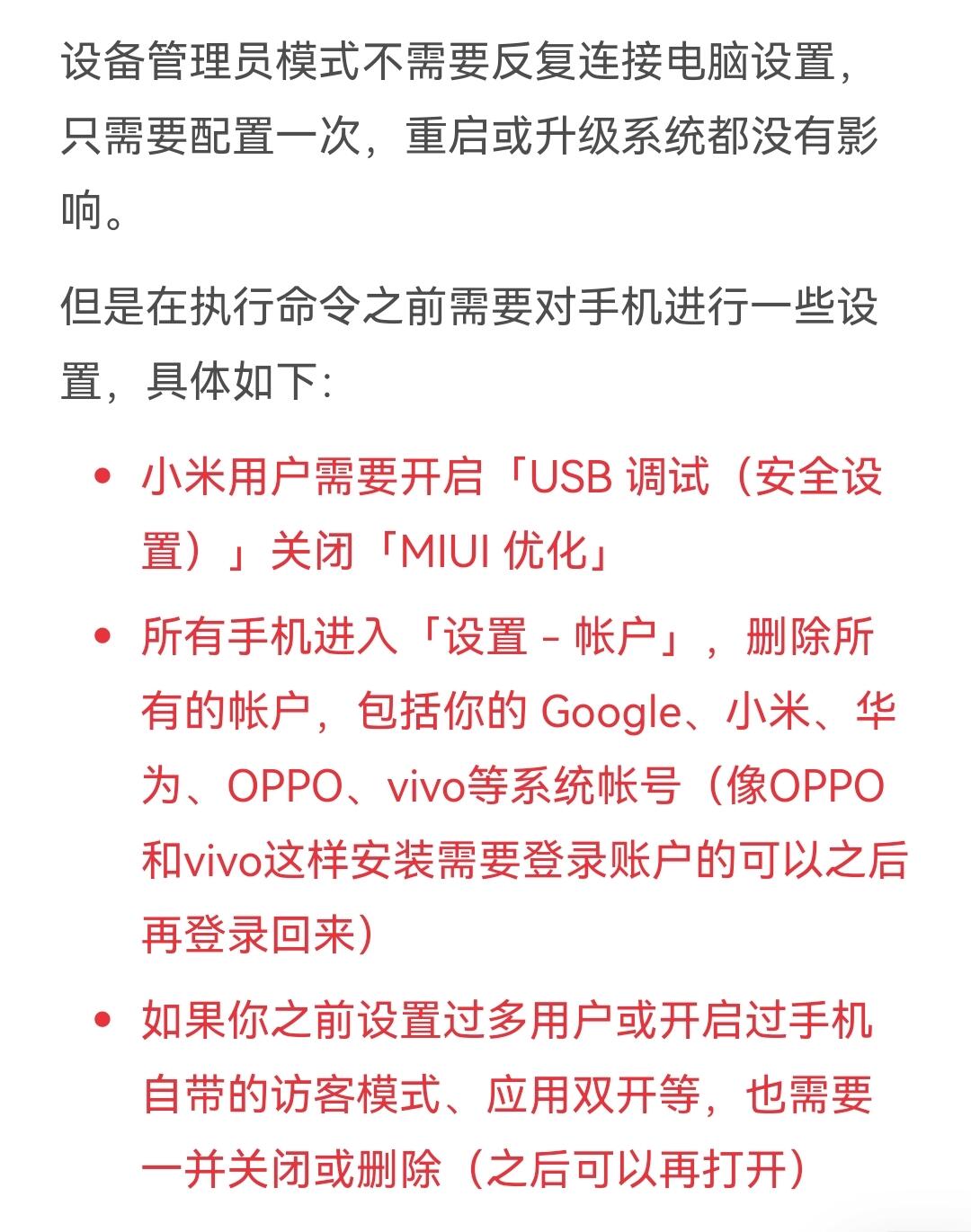
爱玩机给出来的解决方案
看完,我突然明白了什么:这玩意还是谷歌故意整的“多用户环境检测”啊!如果设备里面有多个用户,就会触发检测从而导致设备管理器权限获取失败并抛出异常
是不是只要我确保我设备只有唯一一个账户(机主),就能成功了?
行,我退完了华为账号登录,去掉了锁屏密码,关闭了多开框架(本来就没开),关掉了预览体验计划(还是日志上报来着?),重启了设备。
再根据他提供给的用户查找指令adb shell pm list users

确实是只剩一个用户了
再次尝试
然而,又回到了和#0x01一样的报错
我都要急死了,差点变成“急急国王”
咋只有一个用户了,还是这个b情况啊!我都无语死了,真不知道下一步要干啥了
于是我拿着这错误信息当关键词去百度,以求能让我从一样感同身受的人身上寻找一丝慰藉
真没想到,我还能从中得到一些关键线索
(如果这里做完你已经Success了,就证明你成功了,下面就应该可以不用看了)
#0x03 问题解决
我发现了这么一个发现(?)

线索1
以及还有一个adb shell dumpsys account命令(查看所有用户,包括似有非有的隐藏)
由此我推断出,某些软件的运行服务是基于它自己创建的隐形账户上的

线索2
那一堆XXXXXXXXX都是软件创的我也不知道干啥的“服务账户”——Accounts
然后我就根据包名找到对应的软件直接卸载掉了
为了给自己留个后路,我用MT管理器备份了所有我为了执行这个操作而卸载的软件安装包
然后当我写到这里的时候我才知道原来这玩意是可以直接用adb命令来清的(但是我不会),不一定要卸载对应软件。如果遇到对应服务用户是系统软件创建的没法卸载的情况下估计就能用这方法
幸运的是,我没遇到这种的软件
补充:
如果你曾经激活过畅连之类的软件,就像我上面写的那样搞不掉它创建的那玩意,需要让你恢复出厂设置的,可以直接拿你手里的adb直接删掉这软件再重启设备
指令为adb uninstall com.huawei.meetime(鸿蒙工具箱也行)
注意:本操作存在一定风险(可能删了装不回来),建议像我一样做好备份再搞
无论怎么样让Accounts的数量变成0就行了

就像这样
然后再执行一次获取设备管理器权限的指令(我这是爱玩机给的,随着软件和用途可能会发生对应参数的变化。也就是我文章开头就使用到的那个)
adb shell dpm set-device-owner --user 0 'com.byyoung.setting/utils.DeviceAdminUtils.MyDeviceAdminReceiver'
此处不推荐直接照抄复制来用,仅为指令操作演示!即使相同的软件指令也可能会发生些许变化。请直接用软件提供给你的获取设备管理员的指令!

真正的终点
Success: Device owner set to package ComponentInfo{com.byyoung.setting/utils.DeviceAdminUtils.MyDeviceAdminReceiver} Active admin set to component {com.byyoung.setting/utils.DeviceAdminUtils.MyDeviceAdminReceiver}
终于啊,一波三折!
打开你的软件,看看设备管理员的权限是不是已经给上了
下面是一堆杂七杂八的附件
User UserInfo{0:机主:13}:
  Accounts: 11
    Account {name=XXXXXXXXX, type=com.xunmeng.pinduoduo.account_type}
    Account {name=XXXXXXXXX, type=com.xunmeng.pinduoduo.tide_account_type}
    Account {name=XXXXXXXXX, type=com.snda.wifilocating.sync}
    Account {name=XXXXXXXXX, type=com.android.email}
    Account {name=XXXXXXXXX, type=com.android.email}
    Account {name=XXXXXXXXX, type=com.android.email}
    Account {name=XXXXXXXXX, type=com.lantern.daemon.sync}
    Account {name=XXXXXXXXX, type=com.lantern.daemon.sync.one}
    Account {name=XXXXXXXXX, type=com.eg.android.AlipayGphone.perf}
    Account {name=XXXXXXXXX, type=com.lantern.daemon.sync.new}
    Account {name=XXXXXXXXX, type=quark.account}

  AccountId, Action_Type, timestamp, UID, TableName, Key
  Accounts History
  946,action_account_add,2022-12-08 10:44:28,10134,accounts,4
  539,action_authenticator_remove,2022-12-08 11:11:49,1000,accounts,5
  947,action_account_add,2022-12-08 11:12:12,10705,accounts,6
  944,action_authenticator_remove,2022-12-09 18:37:43,1000,accounts,7
  945,action_called_account_remove,2022-12-11 16:51:13,10627,accounts,8
  948,action_account_add,2022-12-11 16:51:13,10627,accounts,9
  945,action_account_remove,2022-12-11 16:51:13,10627,accounts,10
  20,action_clear_password,2022-12-24 19:10:51,10134,accounts,11
  7,action_authenticator_remove,2022-12-24 19:57:06,1000,accounts,12
  -1,action_sync_de_ce_accounts,2022-12-24 19:57:32,1000,accounts,13
  948,action_called_account_remove,2022-12-24 22:32:04,10627,accounts,14
  948,action_account_remove,2022-12-24 22:32:05,10627,accounts,15
  949,action_account_add,2022-12-24 22:32:05,10627,accounts,16
  949,action_called_account_remove,2022-12-25 00:12:24,10627,accounts,17
  950,action_account_add,2022-12-25 00:12:24,10627,accounts,18
  949,action_account_remove,2022-12-25 00:12:25,10627,accounts,19
  950,action_called_account_remove,2022-12-25 00:34:03,10627,accounts,20
  950,action_account_remove,2022-12-25 00:34:03,10627,accounts,21
  951,action_account_add,2022-12-25 00:34:04,10627,accounts,22
  951,action_called_account_remove,2022-12-25 17:27:29,10627,accounts,23
  952,action_account_add,2022-12-25 17:27:29,10627,accounts,24
  951,action_account_remove,2022-12-25 17:27:30,10627,accounts,25
  952,action_called_account_remove,2022-12-27 14:34:01,10627,accounts,26
  952,action_account_remove,2022-12-27 14:34:01,10627,accounts,27
  953,action_account_add,2022-12-27 14:34:01,10627,accounts,28
  891,action_authenticator_remove,2023-02-21 23:18:56,1000,accounts,29
  954,action_account_add,2023-06-10 08:57:46,10627,accounts,30
  953,action_called_account_remove,2023-06-10 08:58:09,10627,accounts,31
  954,action_called_account_remove,2023-06-10 08:58:09,10627,accounts,32
  954,action_called_account_remove,2023-06-10 08:58:09,10627,accounts,33
  954,action_account_remove,2023-06-10 08:58:11,10627,accounts,34
  953,action_account_remove,2023-06-10 08:58:11,10627,accounts,35
  955,action_account_add,2023-06-19 18:42:28,10627,accounts,36
  956,action_account_add,2023-07-01 12:10:42,10627,accounts,37
  955,action_called_account_remove,2023-07-01 12:10:48,10627,accounts,38
  956,action_called_account_remove,2023-07-01 12:10:48,10627,accounts,39
  955,action_account_remove,2023-07-01 12:10:50,10627,accounts,40
  956,action_account_remove,2023-07-01 12:10:50,10627,accounts,41
  957,action_account_add,2023-07-01 12:10:50,10627,accounts,42
  957,action_called_account_remove,2023-07-04 02:46:54,10627,accounts,43
  957,action_account_remove,2023-07-04 02:46:59,10627,accounts,44
  958,action_account_add,2023-07-04 02:47:02,10627,accounts,45
  958,action_called_account_remove,2023-07-05 20:47:41,10627,accounts,46
  958,action_account_remove,2023-07-05 20:47:41,10627,accounts,47
  959,action_account_add,2023-07-07 13:22:43,10627,accounts,48
  959,action_called_account_remove,2023-07-07 19:22:38,10627,accounts,49
  959,action_account_remove,2023-07-07 19:22:48,10627,accounts,50
  960,action_account_add,2023-07-07 19:26:42,10627,accounts,51
  961,action_account_add,2023-07-15 13:32:02,10756,accounts,52
  961,action_authenticator_remove,2023-07-15 13:32:17,1000,accounts,53
  962,action_account_add,2023-07-15 13:37:49,10758,accounts,54
  962,action_authenticator_remove,2023-07-25 12:56:08,1000,accounts,55
  963,action_account_add,2023-07-26 20:13:19,10762,accounts,56
  964,action_account_add,2023-09-30 01:45:14,10754,accounts,57
  17,action_authenticator_remove,2023-10-02 00:11:18,1000,accounts,58
  947,action_authenticator_remove,2023-10-02 00:11:18,1000,accounts,59
  960,action_authenticator_remove,2023-10-02 00:11:19,1000,accounts,60
  6,action_authenticator_remove,2023-10-02 00:11:21,1000,accounts,61
  914,action_authenticator_remove,2023-10-02 00:11:21,1000,accounts,62
  963,action_authenticator_remove,2023-10-02 00:11:21,1000,accounts,63
  4,action_called_account_remove,2023-10-07 23:08:26,10072,accounts,0
  4,action_account_remove,2023-10-07 23:08:26,10072,accounts,1
  30,action_called_account_remove,2023-10-07 23:08:45,10132,accounts,2
  30,action_account_remove,2023-10-07 23:08:46,1000,accounts,3

  Active Sessions: 0

  RegisteredServicesCache: 9 services
    ServiceInfo: AuthenticatorDescription {type=com.eg.android.AlipayGphone.perf}, ComponentInfo{com.eg.android.AlipayGphone/com.alipay.mobile.performance.sync.PerfAuthenticatorService}, uid 10166
    ServiceInfo: AuthenticatorDescription {type=com.android.email}, ComponentInfo{com.huawei.email/com.android.email.service.LegacyImapPop3AuthenticatorService}, uid 10134
    ServiceInfo: AuthenticatorDescription {type=com.eg.android.AlipayGphone}, ComponentInfo{com.eg.android.AlipayGphone/com.alipay.mobile.healthcommon.accountsync.AuthenticationService}, uid 10166
    ServiceInfo: AuthenticatorDescription {type=com.huawei.meetime.account}, ComponentInfo{com.huawei.meetime/com.huawei.hicontacts.meetime.devicemanager.AuthenticationService}, uid 10132
    ServiceInfo: AuthenticatorDescription {type=com.android.email.exchange}, ComponentInfo{com.huawei.email/com.android.email.service.ExchangeAuthenticatorService}, uid 10134
    ServiceInfo: AuthenticatorDescription {type=com.tencent.mobileqq.account}, ComponentInfo{com.tencent.mobileqq/com.tencent.mobileqq.contactsync.authenticator.AuthenticationService}, uid 10746
    ServiceInfo: AuthenticatorDescription {type=com.huawei.hwid}, ComponentInfo{com.huawei.hwid/com.huawei.hms.runtimekit.stubexplicit.HwIDHwAccMgrService}, uid 10072
    ServiceInfo: AuthenticatorDescription {type=cn.cj.pe.account_keep_alive}, ComponentInfo{com.xwtec.sd.mobileclient/com.water.richprocess.MyAuthService}, uid 10160
    ServiceInfo: AuthenticatorDescription {type=quark.account}, ComponentInfo{com.quark.browser/com.quark.account_sync.AuthenticatorService}, uid 10754

  Account visibility:
最上面的是用户名称,下面是各种应用的账号,再下面是各种账号的操作记录
另外“鏈轰富”就是“机主”这俩字因为字符编码问题而产生的
如果出现这玩意你就需要改你cmd的默认编码了(不改也行,你知道什么意思就行)
经典GBK和UTF-8显示出错
如果你尝试用pm remove-user 0会发生:
嗯,就这样
