目录
CSS学习笔记之选择器

收录于文集
共2篇
2、选择器
作用:选择页面上的某一个或者某一类元素
2.1、基本选择器
1、标签选择器 :选择一类标签 标签{}
代码块
HTML
自动换行
复制代码
html <!DOCTYPE html> <html lang="en"> <head> <meta charset="UTF-8"> <title>Title</title>

<style>
    /*标签选择器,会选择到页面上所有的这个标签的元素*/
    h1{
        color:#a13d30;
        background: #3cbda6;
        border-radius: 24px;
    }
    p{
        font-size: 80px;
    }
</style>
</head> <body>

<h1>学Java</h1> <h1>学Java</h1> <p>听狂神说</p>

</body> </html>
复制成功
2、类选择器 class :选择class属性一致的标签,跨标签 .类名{}
代码块
HTML
自动换行
复制代码
<!DOCTYPE html>
<html lang="en">
<head>
    <meta charset="UTF-8">
    <title>Title</title>

    <style>
        /*类选择器的格式   .class的名称{}
        好处:可以多个标签归类,是同一个 class
        */
        .test1{
            color: #3748ff;
        }
        .test2{
            color: #a24fff;
        }

    </style>

</head>
<body>

<h1 class="test1">标题1</h1>
<h1 class="test2">标题2</h1>
<h1 class="test1">标题3</h1>

<p class="test1">P标签</p>

</body>
</html>
复制成功
3、id选择器 :全局唯一! #id{}
代码块
HTML
自动换行
复制代码
<!DOCTYPE html>
<html lang="en">
<head>
    <meta charset="UTF-8">
    <title>Title</title>

    <style>
        /* id选择器     :  id必须保证全局唯一!
           #id名称{}

           优先级:
           不遵循就近原则,优先级固定
           id选择器  >  class选择器  >  标签选择器
         */
        #test1{
            color: #ff008a;
        }
        .style1{
            color: #02ff00;
        }
        h1{
            color: #2d1dc1;
        }
    </style>

</head>
<body>

<h1 id="test1" class="style1">标题1</h1>
<h1 class="style1">标题2</h1>
<h1 class="style1">标题3</h1>
<h1>标题4</h1>
<h1>标题5</h1>

</body>
</html>
复制成功
优先级: id选择器 > class选择器 > 标签选择器
2.2、层次选择器
1、后代选择器: 在某个元素的后面 ==> 祖爷爷 爷爷 爸爸 你
代码块
CSS
自动换行
复制代码
body p{
  background: red;
}
复制成功
2、子选择器 ==> 一代,儿子
代码块
CSS
自动换行
复制代码
/*子选择器*/
body>p{
  background: #3cbda6;
}
复制成功
3、相邻兄弟选择器 ==> 同辈,相邻
代码块
CSS
自动换行
复制代码
/*相邻兄弟选择器*/
.active + p{
  background: #a13d30;
}
复制成功
4、通用兄弟选择器
代码块
CSS
自动换行
复制代码
/*通用兄弟选择器,当前选中元素的所有的兄弟元素*/
.active~p{
    background: #02ff00;
}
复制成功
2.3、结构伪类选择器
伪类:条件
代码块
HTML
自动换行
复制代码
<!DOCTYPE html>
<html lang="en">
<head>
    <meta charset="UTF-8">
    <title>Title</title>
    <!-- 避免使用class,id选择器 -->
    <style>
        /* ul的第一个子元素 */
        ul li:first-child{
            background: #02ff00;
        }
        /* ul的最后一个子元素 */
        ul li:last-child{
            background: #ff4832;
        }

        /* 选中 p1: 定位到父元素,选择当前的第一个元素
        选择当前p元素的父级元素,选中父级元素的第一个,并且是当前元素才生效!
         */
        p:nth-child(1){
            background: #2700ff;
        }

        /* 选中父元素下的p元素第二个,类型 */
        p:nth-of-type(2){
            background: yellow;
        }

        /*a:hover{*/
        /*    background: #000b3e;*/
        /*}*/

    </style>
</head>
<body>
<!--    <a href="">31231</a>-->
<!--    <h1>h1</h1>-->
    <p>p1</p>
    <p>p2</p>
    <p>p3</p>
    <ul>
        <li>li1</li>
        <li>li2</li>
        <li>li3</li>
    </ul>

</body>
</html>
复制成功
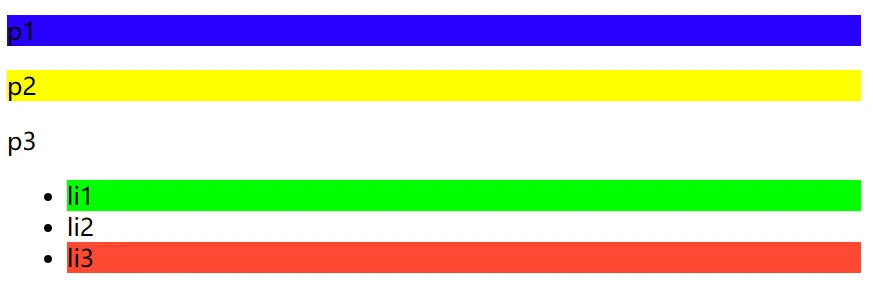
上方代码的效果
2.4、属性选择器(常用)
id + class结合~
代码块
HTML
自动换行
复制代码
<!DOCTYPE html>
<html lang="en">
<head>
    <meta charset="UTF-8">
    <title>Title</title>

  <style>
    .demo a{
      float: left;
      display: block;
      height: 50px;
      width: 50px;
      border-radius: 10px;
      background: #2700ff;
      text-align: center;
      color: gainsboro;
      text-decoration: none;
      margin-right: 5px;
      font: bold 20px/50px Arial;
    }

    /*属性名,属性名 (下列符号) 属性值(可以为正则)
    符号有:
        =     绝对等于
        *=    包含
        ^=    以这个开头
        $=    以这个结尾
    */

    /*存在id属性的元素     a[]{}*/
    /*a[id]{*/
    /*  background: yellow;*/
    /*}*/

    /*id=first的元素*/
    /*a[id=first]{*/
    /*  background: #63ff23;*/
    /*}*/

    /*class 中含有links的元素*/
    /*a[class*="links"]{*/
    /*  background: yellow;*/
    /*}*/

    /*选中href中以http开头的元素*/
    /*a[href^=http]{*/
    /*  background: yellow;*/
    /*}*/


    a[href$=jpg]{
      background: yellow;
    }

  </style>

</head>
<body>

<p class="demo">

  <a href="https://www.baidu.com" class="links item first" id="first">1</a>
  <a href="http://blog.kuangstudy.com" class="links item active" target="_blank" title="test">2</a>
  <a href="images/123.html" class="links item">3</a>
  <a href="images/123.png" class="links item">4</a>
  <a href="images/123.jpg" class="links item">5</a>
  <a href="abc" class="links item">6</a>
  <a href="/a.pdf" class="links item">7</a>
  <a href="/abc.pdf" class="links item">8</a>
  <a href="abc.doc" class="links item">9</a>
  <a href="abcd.doc" class="links item last">10</a>

</p>


</body>
</html>
复制成功

上方代码效果
代码块
HTML
自动换行
复制代码
=
*=
^=
$=
复制成功
友链——极好的编程论坛:https://fishc.com.cn
辛苦整理出来的,如果喜欢的话,就动动你的手指,点赞+投币+关注吧!
本文为我原创,未经授权禁止转载
cv25152310
分享至
投诉或建议
