
1.首先是看了合肥的天气,链接如下:
https://www.weather.com.cn/weather/101220101.shtml。随后看了地区的天气,发现每个地方对应一个编号,这里合肥(101220101)。确定了url的格式。
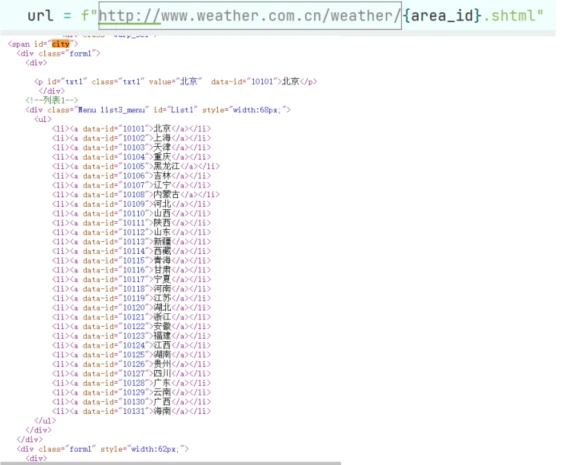
2.最后在网站的源代码中找到了js,存放了这些数据。
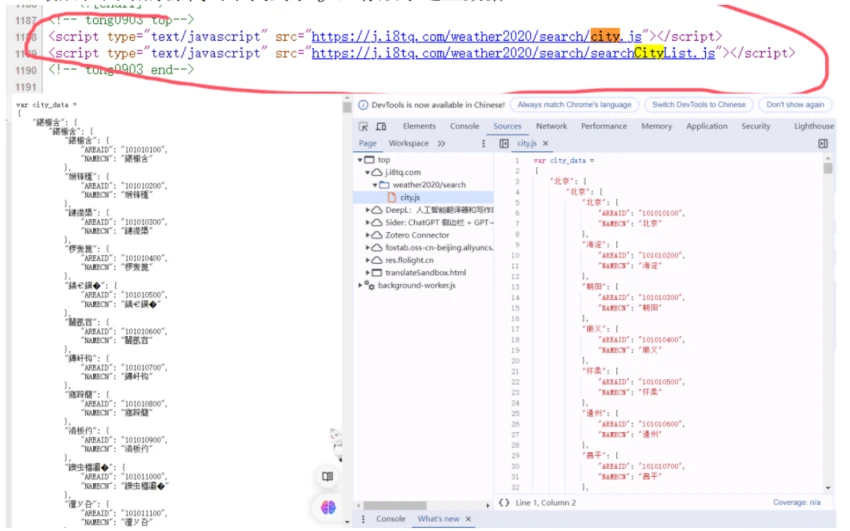
注意到了这里可以截取等号后的部分。后面的是一个嵌套的字典。这样我就能通过访问这个js来获取一个省份对应的市的area_id数组,从而用for循环就能实现对各个市的天气网站进行遍历。

3.第三步是聚焦一个城市,这里用合肥的举例。看合肥的天气网页的源代码,找到需要爬取的目标。这一步是比较轻松的,很容易就找到了数据在类型为t clearfix的ul标签下。目标数据在li里。
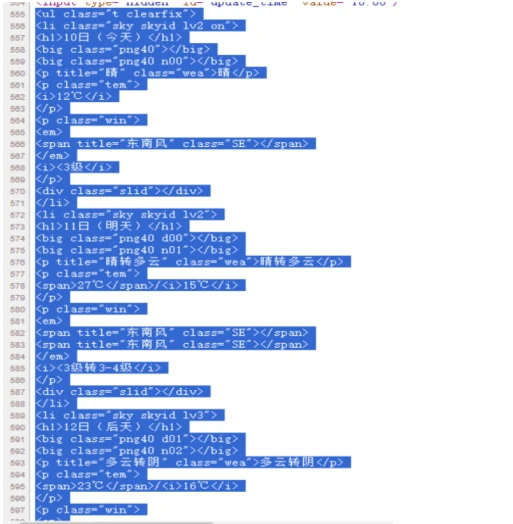
4.针对第二步和第三步,编写两个函数:get_AnHui_areaid()、get_weather_data(url)。(本次实验中爬取的是安徽的天气,所以第一个函数命名获取安徽的市的代号数组)
为了增加代码的健壮性,这里使用了try/except结构。
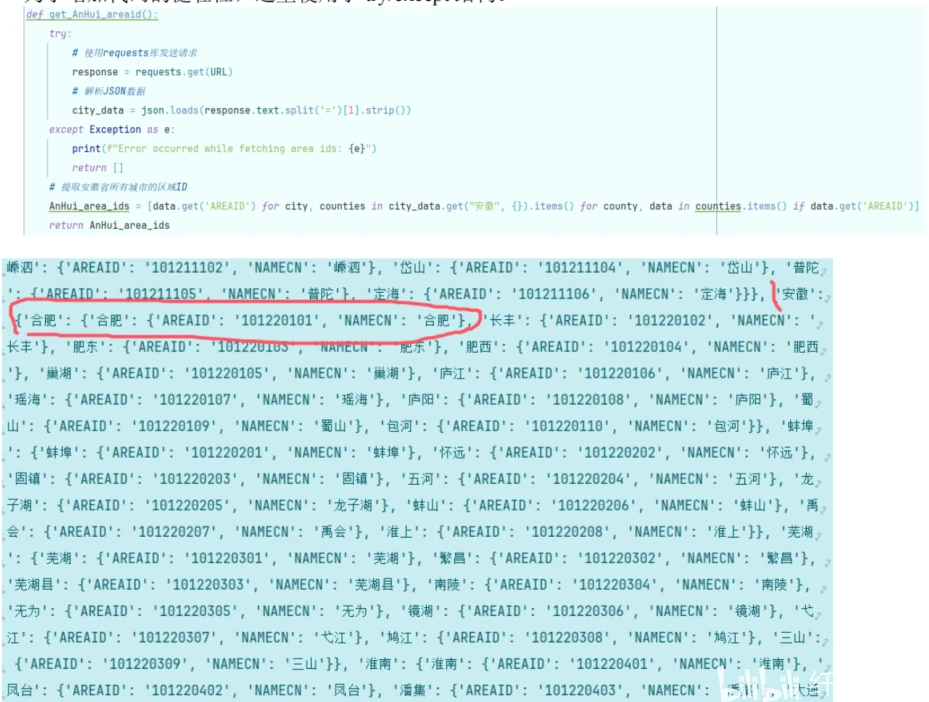
这里是city_data的部分。
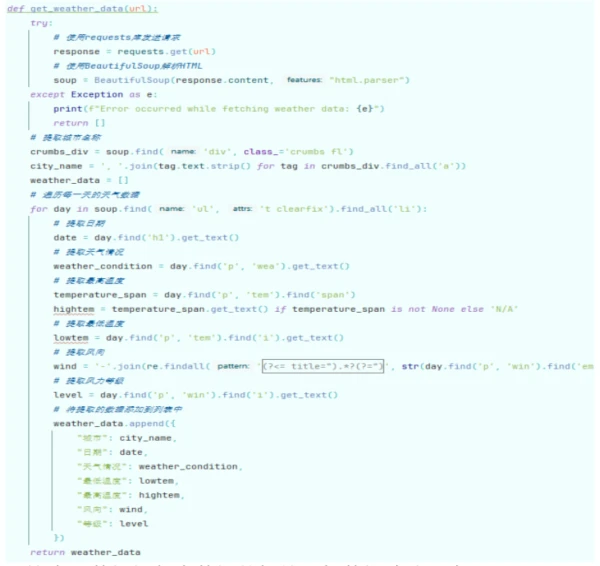
这个函数根据每个数据的标签,把数据清洗出来。
随后将数据写到本地文件中,实验就结束了。得到的数据集如下:
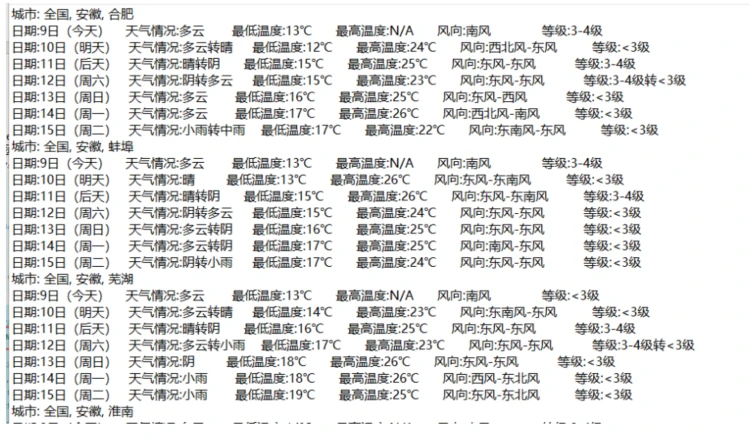
代码如下:
import json
import requests
from bs4 import BeautifulSoup
import re
# 定义全局常量
URL = "https://j.i8tq.com/weather2020/search/city.js"
FILENAME = 'AnHui_weather_data.txt'
# 获取安徽省所有城市的区域ID
def get_AnHui_areaid():
try:
# 使用requests库发送请求
response = requests.get(URL)
# 解析JSON数据
city_data = json.loads(response.text.split('=')[1].strip())
except Exception as e:
print(f"Error occurred while fetching area ids: {e}")
return []
# 提取安徽省所有城市的区域ID
AnHui_area_ids = [data.get('AREAID') for city, counties in city_data.get("安徽", {}).items() for county, data in counties.items() if data.get('AREAID')]
return AnHui_area_ids
# 根据URL获取天气数据
def get_weather_data(url):
try:
# 使用requests库发送请求
response = requests.get(url)
# 使用BeautifulSoup解析HTML
soup = BeautifulSoup(response.content, "html.parser")
except Exception as e:
print(f"Error occurred while fetching weather data: {e}")
return []
# 提取城市名称
crumbs_div = soup.find('div', class_='crumbs fl')
city_name = ', '.join(tag.text.strip() for tag in crumbs_div.find_all('a'))
weather_data = []
# 遍历每一天的天气数据
for day in soup.find('ul', 't clearfix').find_all('li'):
# 提取日期
date = day.find('h1').get_text()
# 提取天气情况
weather_condition = day.find('p', 'wea').get_text()
# 提取最高温度
temperature_span = day.find('p', 'tem').find('span')
hightem = temperature_span.get_text() if temperature_span is not None else 'N/A'
# 提取最低温度
lowtem = day.find('p', 'tem').find('i').get_text()
# 提取风向
wind = '-'.join(re.findall('(?<= title=").*?(?=")', str(day.find('p', 'win').find('em'))))
# 提取风力等级
level = day.find('p', 'win').find('i').get_text()
# 将提取的数据添加到列表中
weather_data.append({
"城市": city_name,
"日期": date,
"天气情况": weather_condition,
"最低温度": lowtem,
"最高温度": hightem,
"风向": wind,
"等级": level
})
return weather_data
# 定义一个函数,将天气数据写入文件
def write_to_file(weather_data, filename=FILENAME):
try:
# 打开文件,准备写入
with open(filename, 'w', encoding='utf-8') as file:
current_city = ""
# 遍历天气数据
for data in weather_data:
city = data['城市']
# 如果当前城市与上一个城市不同,则写入新的城市名称
if city != current_city:
file.write(f"城市: {city}\n")
current_city = city
# 提取天气数据
date = data['日期']
weather = data['天气情况']
low_temp = data['最低温度']
high_temp = data['最高温度']
wind = data['风向']
level = data['等级']
# 将天气数据写入文件
file.write(f"日期:{date:<10}天气情况:{weather:<9}最低温度:{low_temp:<9}最高温度:{high_temp:<9}风向:{wind:<15}等级:{level:<6}\n")
# 打印消息,表示数据已经写入文件
print(f"Data written to {filename}")
except Exception as e:
# 如果在写入文件过程中发生错误,打印错误消息
print(f"Error occurred while writing to file: {e}")
# 主函数,获取安徽省所有城市的天气数据,并写入文件
def main():
try:
AnHui_area_ids = get_AnHui_areaid()
all_weather_data = []
for area_id in AnHui_area_ids:
url = f"http://www.weather.com.cn/weather/{area_id}.shtml"
weather_data = get_weather_data(url)
if weather_data and weather_data[0]['城市'] not in [data['城市'] for data in all_weather_data]:
all_weather_data.extend(weather_data)
write_to_file(all_weather_data)
except Exception as e:
print(f"An error occurred: {e}")
# 如果直接运行这个文件,就执行main函数
if __name__ == "__main__":
main()
