
前言
我实在是理解不了为什么这种非常简单的东西(比如apex斗枪宏)还要什么加群才给或者收费,所以我直接把罗技宏的代码放在这里,谁需要直接复制粘贴,有问题留言,随缘回复,我只做方便大众的免费的东西
一、可调节(取自某位up的教程,具体是谁忘了,在里面添加了点东西)
local x = 0; local y = 2; EnablePrimaryMouseButtonEvents(true); startgame=-1 function OnEvent(event, arg) if (event == "MOUSE_BUTTON_PRESSED" and arg == 5) then if IsModifierPressed("ralt") then x = x - 1 elseif IsModifierPressed("lalt") then x = x 1 elseif IsModifierPressed("rctrl") then y = y - 1 elseif IsModifierPressed("lctrl") then y = y 1 elseif IsModifierPressed("rshift") then y = y - 2 elseif IsModifierPressed("lshift") then y = y 2 else x = 0;y= 2; end OutputLogMessage("x == %s, y == %s \n",x,y) x=math.floor(x); y=math.floor(y); end if (event == "MOUSE_BUTTON_PRESSED" and arg == 4) then startgame = -1 * startgame if startgame == 1 then OutputLogMessage("................................... \n") OutputLogMessage("............ ......... \n") OutputLogMessage("............... ..... ............. \n") OutputLogMessage("............ ........ \n") OutputLogMessage("............... ..... ............. \n") OutputLogMessage(".............. ...... ............. \n") OutputLogMessage("............. ....... ............. \n") OutputLogMessage("............ ........ ............. \n") OutputLogMessage("........... ......... ............. \n") OutputLogMessage(" \n") OutputLogMessage(" \n") else OutputLogMessage("............... ..... ............. \n") OutputLogMessage("................ ... .............. \n") OutputLogMessage("............. .......... \n") OutputLogMessage(".................. ................ \n") OutputLogMessage("............ .......... \n") OutputLogMessage(".................. ................ \n") OutputLogMessage("................ ... .............. \n") OutputLogMessage("............... ..... ............. \n") OutputLogMessage(".............. ........ ........... \n") OutputLogMessage(" \n") OutputLogMessage(" \n") end end if startgame == 1 then Sleep(50) if IsMouseButtonPressed(1) then if IsMouseButtonPressed(3) then MoveMouseRelative(0,10) repeat Sleep(5) MoveMouseRelative(x,y) until not IsMouseButtonPressed(1)or not IsMouseButtonPressed(3) end end end end
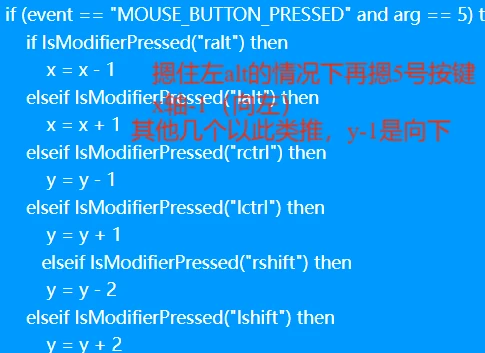
可调节注释1

可调节注释2

可调节注释3

可调节注释4
二、带随机延迟的(从v老鸽那里n年前学的基础版,后来自己发扬光大了)
EnablePrimaryMouseButtonEvents(1)
random1 = math.random(0, 30)
a=1
b=1
k = false
function OnEvent(event, arg)
--OutputLogMessage("Event: "..event.." Arg: "..arg.."\n")
if (event == "MOUSE_BUTTON_PRESSED" and arg == 4) then
k = not k
if k then
OutputLogMessage("kai\n")
else
OutputLogMessage("guan\n")
end
end
if k then
Sleep(50)
if IsMouseButtonPressed(1) then
Sleep(random1)
if IsMouseButtonPressed(3) then
Sleep(random1)
repeat
Sleep(5)
MoveMouseRelative(0,2)
until not IsMouseButtonPressed(1)or not IsMouseButtonPressed(3)
end
end
end
end
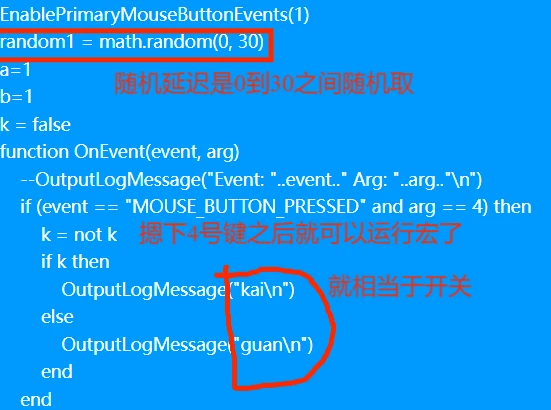
随机延迟注释1

随机延迟注释2
三、自制变向宏
像彩六和生死狙击2这种弹道虽然固定,但是会在特定时候转向的这种,用这种宏,基本可以做到0后座(但是还是有问题,比如在镜子没开全的情况下,会疯狂过压,因为我灵敏度很低)
EnablePrimaryMouseButtonEvents(1)
a=1
b=1
c=1
k = false
function OnEvent(event, arg)
--OutputLogMessage("Event: "..event.." Arg: "..arg.."\n")
if (event == "MOUSE_BUTTON_PRESSED" and arg == 4) then
k = not k
if k then
OutputLogMessage("kai\n")
else
OutputLogMessage("guan\n")
end
end
if k then
Sleep(50)
if IsMouseButtonPressed(1) then
if IsMouseButtonPressed(3) then
MoveMouseRelative(0,110)
repeat
a=a+1
Sleep(5)
MoveMouseRelative(1,17)
until not IsMouseButtonPressed(1)or not IsMouseButtonPressed(3)or (a>40)
repeat
b=b+1
Sleep(5)
MoveMouseRelative(1,18)
until not IsMouseButtonPressed(1)or not IsMouseButtonPressed(3)or (b>80)
repeat
c=c+1
Sleep(5)
MoveMouseRelative(1,20)
until not IsMouseButtonPressed(1)or not IsMouseButtonPressed(3)or (c>30)
MoveMouseRelative(0,-20)
b=1
a=1
c=1
end
end
end
end

三次变向注释1
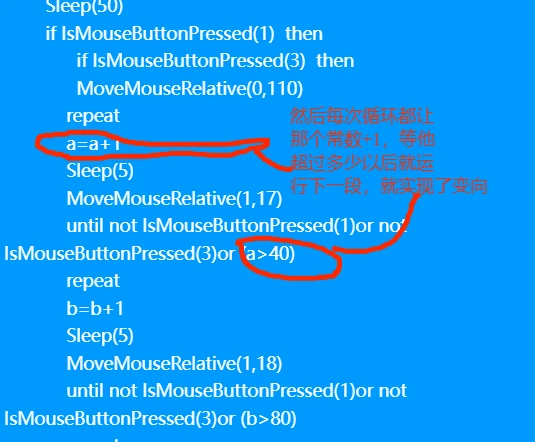
三次变向注释2

三次变向注释3
四、APEX斗枪宏
EnablePrimaryMouseButtonEvents(1)
k = false
function OnEvent(event, arg)
if (event == "MOUSE_BUTTON_PRESSED" and arg == 4) then
k = not k
if k then
OutputLogMessage("kai\n")
else
OutputLogMessage("guan\n")
end
end
if k then
Sleep(50)
if IsMouseButtonPressed(1) then
if IsMouseButtonPressed(3) then
repeat
Sleep(5)
MoveMouseRelative(0,6)
Sleep(5)
MoveMouseRelative(-7,0)
Sleep(5)
MoveMouseRelative(0,-4)
Sleep(5)
MoveMouseRelative(8,0)
until not IsMouseButtonPressed(1)or not IsMouseButtonPressed(3)
end
end
end
end

APEX注释1
apex部分和上面第二部分的主体差不多,只是压强部分有区别,不懂得自己对照一下就行。
--------------------------------------------------------------------------------------------
PS:1、MoveMouseRelative(),这个括号里的东西就是压强的力度,自己随意更改就行
2、其他不明白的可以先搜一下V老鸽(我不确定还有没有那个视频,随缘吧),然后还是不懂就去看百度搜索 lua|菜鸟教程,我基本自学
3、这毕竟是罗技宏,所以最好自学之前先下载一个G-series Lua API 中文参考文档,像MoveMouseRelative()这种语句都是出自这个参考文档。这个文档百度应该能搜到,后面如果很多人想要我再想办法发一下。
暂时就想到这么多,后面有问题我再改
