

零:元宇宙系列专栏C01:Matlab到Blender Python程序化建模
[元宇宙]C01.10:从Matlab到Blender Python的程序化建模小结
涵盖了从Matlab面型生成,RGBD深度图,XyzRgb点云,泊松面片重建,BlenderMesh模型生成和图像渲染。
一、ColorMap的替换
Matlab在生成Peaks的时候,会给生成的数据提供一个颜色映射。
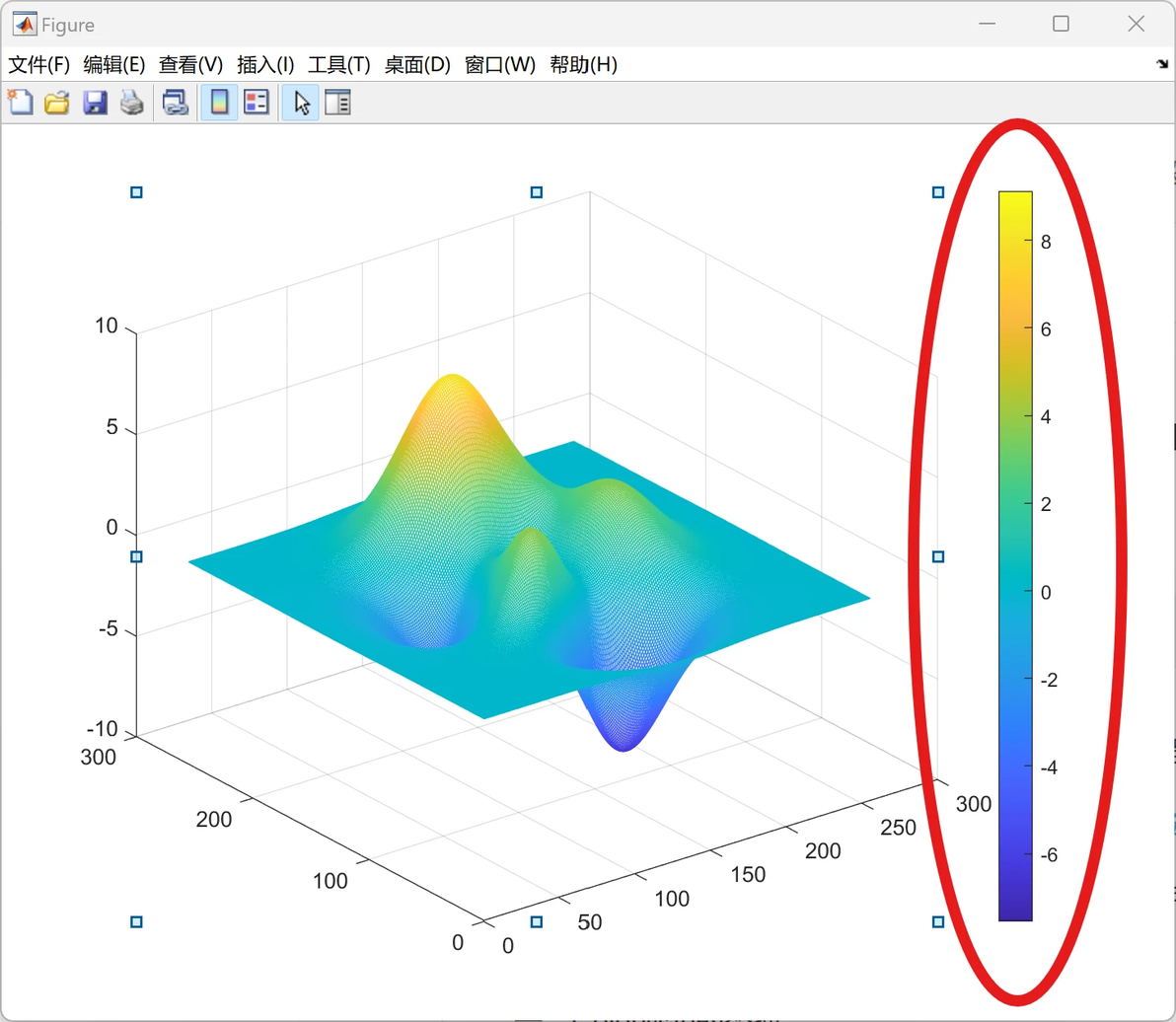
ColorMap
稍微专业点的术语是ColorMap,就是根据Z值的数据,映射到一个256*3的颜色Map当中去。
刚开始的时候,还以为这个是小菜一碟,不就是映射么。
自己写一个映射Map就好了。后来发现不是那么回事。
二、Matlab的Parula ColorMap
据说这个Parula是后来更新的,灰度变化更均匀。
而且官方帮助文档也没有给出具体的实现。
只说了一个这个。
c = parula returns the parula colormap as a three-column array with the same number of rows as the colormap for the current figure. If no figure exists, then the number of rows is equal to the default length of 256. Each row in the array contains the red, green, and blue intensities for a specific color. The intensities are in the range [0,1], and the color scheme looks like this image.

GUI界面可以选择不同的ColorMap
三、网络提供的Python使用parula的函数
在Python中使用Matlab中的parula格式的colormap Python 中没有类似于 matlb 中 parula 格式的 colormap,解决方法: 在 matlab 中导出 parula 格式的 colormap 对应的颜色矩阵 256*3,导出文件为 csv 格式。 然后在 python 中导入 csv 格式的文件即可。
实际上还是,利用Maltab构建parula ColorMap。
Matlab并没有提供parula的具体实现。
四、Matlab自己的parula函数实现

parula
具体实现如下:
P = size(values,1);
map = interp1(1:size(values,1), values, linspace(1,P,m), 'linear');values:是一个写死的256*3的矩阵,表示256采样点下的Parula ColorMap
m:Parula的输入参数,表示生成m*3的ColorMap。
上面两句的意思是
根据输入m,将values的256*3的Parula颜色,线性插值成m*3,然后输出。
五、Python的Parula函数实现
一样,知道Parula函数的实现原理之后,就可以借助values原生的256*3 Parula颜色,线性插值成需要输出的m*3颜色
def ColorMap_parula(Num):
values = np.array([[0.2422, 0.1504, 0.6603], [0.2444, 0.1534, 0.6728], [0.2464, 0.1569, 0.6847], [0.2484, 0.1607, 0.6961], [0.2503, 0.1648, 0.7071], [0.2522, 0.1689, 0.7179], [0.2540, 0.1732, 0.7286], [0.2558, 0.1773, 0.7393], [0.2576, 0.1814, 0.7501], [0.2594, 0.1854, 0.7610], [0.2611, 0.1893, 0.7719], [0.2628, 0.1932, 0.7828], [0.2645, 0.1972, 0.7937], [0.2661, 0.2011, 0.8043], [0.2676, 0.2052, 0.8148], [0.2691, 0.2094, 0.8249], [0.2704, 0.2138, 0.8346], [0.2717, 0.2184, 0.8439], [0.2729, 0.2231, 0.8528], [0.2740, 0.2280, 0.8612], [0.2749, 0.2330, 0.8692], [0.2758, 0.2382, 0.8767], [0.2766, 0.2435, 0.8840], [0.2774, 0.2489, 0.8908], [0.2781, 0.2543, 0.8973], [0.2788, 0.2598, 0.9035], [0.2794, 0.2653, 0.9094], [0.2798, 0.2708, 0.9150], [0.2802, 0.2764, 0.9204], [0.2806, 0.2819, 0.9255], [0.2809, 0.2875, 0.9305], [0.2811, 0.2930, 0.9352], [0.2813, 0.2985, 0.9397], [0.2814, 0.3040, 0.9441], [0.2814, 0.3095, 0.9483], [0.2813, 0.3150, 0.9524], [0.2811, 0.3204, 0.9563], [0.2809, 0.3259, 0.9600], [0.2807, 0.3313, 0.9636], [0.2803, 0.3367, 0.9670], [0.2798, 0.3421, 0.9702], [0.2791, 0.3475, 0.9733], [0.2784, 0.3529, 0.9763], [0.2776, 0.3583, 0.9791], [0.2766, 0.3638, 0.9817], [0.2754, 0.3693, 0.9840], [0.2741, 0.3748, 0.9862], [0.2726, 0.3804, 0.9881], [0.2710, 0.3860, 0.9898], [0.2691, 0.3916, 0.9912], [0.2670, 0.3973, 0.9924], [0.2647, 0.4030, 0.9935], [0.2621, 0.4088, 0.9946], [0.2591, 0.4145, 0.9955], [0.2556, 0.4203, 0.9965], [0.2517, 0.4261, 0.9974], [0.2473, 0.4319, 0.9983], [0.2424, 0.4378, 0.9991], [0.2369, 0.4437, 0.9996], [0.2311, 0.4497, 0.9995], [0.2250, 0.4559, 0.9985], [0.2189, 0.4620, 0.9968], [0.2128, 0.4682, 0.9948], [0.2066, 0.4743, 0.9926], [0.2006, 0.4803, 0.9906], [0.1950, 0.4861, 0.9887], [0.1903, 0.4919, 0.9867], [0.1869, 0.4975, 0.9844], [0.1847, 0.5030, 0.9819], [0.1831, 0.5084, 0.9793], [0.1818, 0.5138, 0.9766], [0.1806, 0.5191, 0.9738], [0.1795, 0.5244, 0.9709], [0.1785, 0.5296, 0.9677], [0.1778, 0.5349, 0.9641], [0.1773, 0.5401, 0.9602], [0.1768, 0.5452, 0.9560], [0.1764, 0.5504, 0.9516], [0.1755, 0.5554, 0.9473], [0.1740, 0.5605, 0.9432], [0.1716, 0.5655, 0.9393], [0.1686, 0.5705, 0.9357], [0.1649, 0.5755, 0.9323], [0.1610, 0.5805, 0.9289], [0.1573, 0.5854, 0.9254], [0.1540, 0.5902, 0.9218], [0.1513, 0.5950, 0.9182], [0.1492, 0.5997, 0.9147], [0.1475, 0.6043, 0.9113], [0.1461, 0.6089, 0.9080], [0.1446, 0.6135, 0.9050], [0.1429, 0.6180, 0.9022], [0.1408, 0.6226, 0.8998], [0.1383, 0.6272, 0.8975], [0.1354, 0.6317, 0.8953], [0.1321, 0.6363, 0.8932], [0.1288, 0.6408, 0.8910], [0.1253, 0.6453, 0.8887], [0.1219, 0.6497, 0.8862], [0.1185, 0.6541, 0.8834], [0.1152, 0.6584, 0.8804], [0.1119, 0.6627, 0.8770], [0.1085, 0.6669, 0.8734], [0.1048, 0.6710, 0.8695], [0.1009, 0.6750, 0.8653], [0.0964, 0.6789, 0.8609], [0.0914, 0.6828, 0.8562], [0.0855, 0.6865, 0.8513], [0.0789, 0.6902, 0.8462], [0.0713, 0.6938, 0.8409], [0.0628, 0.6972, 0.8355], [0.0535, 0.7006, 0.8299], [0.0433, 0.7039, 0.8242], [0.0328, 0.7071, 0.8183], [0.0234, 0.7103, 0.8124], [0.0155, 0.7133, 0.8064], [0.0091, 0.7163, 0.8003], [0.0046, 0.7192, 0.7941], [0.0019, 0.7220, 0.7878], [0.0009, 0.7248, 0.7815], [0.0018, 0.7275, 0.7752], [0.0046, 0.7301, 0.7688], [0.0094, 0.7327, 0.7623], [0.0162, 0.7352, 0.7558], [0.0253, 0.7376, 0.7492], [0.0369, 0.7400, 0.7426], [0.0504, 0.7423, 0.7359], [0.0638, 0.7446, 0.7292], [0.0770, 0.7468, 0.7224], [0.0899, 0.7489, 0.7156], [0.1023, 0.7510, 0.7088], [0.1141, 0.7531, 0.7019], [0.1252, 0.7552, 0.6950], [0.1354, 0.7572, 0.6881], [0.1448, 0.7593, 0.6812], [0.1532, 0.7614, 0.6741], [0.1609, 0.7635, 0.6671], [0.1678, 0.7656, 0.6599], [0.1741, 0.7678, 0.6527], [0.1799, 0.7699, 0.6454], [0.1853, 0.7721, 0.6379], [0.1905, 0.7743, 0.6303], [0.1954, 0.7765, 0.6225], [0.2003, 0.7787, 0.6146], [0.2061, 0.7808, 0.6065], [0.2118, 0.7828, 0.5983], [0.2178, 0.7849, 0.5899], [0.2244, 0.7869, 0.5813], [0.2318, 0.7887, 0.5725], [0.2401, 0.7905, 0.5636], [0.2491, 0.7922, 0.5546], [0.2589, 0.7937, 0.5454], [0.2695, 0.7951, 0.5360], [0.2809, 0.7964, 0.5266], [0.2929, 0.7975, 0.5170], [0.3052, 0.7985, 0.5074], [0.3176, 0.7994, 0.4975], [0.3301, 0.8002, 0.4876], [0.3424, 0.8009, 0.4774], [0.3548, 0.8016, 0.4669], [0.3671, 0.8021, 0.4563], [0.3795, 0.8026, 0.4454], [0.3921, 0.8029, 0.4344], [0.4050, 0.8031, 0.4233], [0.4184, 0.8030, 0.4122], [0.4322, 0.8028, 0.4013], [0.4463, 0.8024, 0.3904], [0.4608, 0.8018, 0.3797], [0.4753, 0.8011, 0.3691], [0.4899, 0.8002, 0.3586], [0.5044, 0.7993, 0.3480], [0.5187, 0.7982, 0.3374], [0.5329, 0.7970, 0.3267], [0.5470, 0.7957, 0.3159], [0.5609, 0.7943, 0.3050], [0.5748, 0.7929, 0.2941], [0.5886, 0.7913, 0.2833], [0.6024, 0.7896, 0.2726], [0.6161, 0.7878, 0.2622], [0.6297, 0.7859, 0.2521], [0.6433, 0.7839, 0.2423], [0.6567, 0.7818, 0.2329], [0.6701, 0.7796, 0.2239], [0.6833, 0.7773, 0.2155], [0.6963, 0.7750, 0.2075], [0.7091, 0.7727, 0.1998], [0.7218, 0.7703, 0.1924], [0.7344, 0.7679, 0.1852], [0.7468, 0.7654, 0.1782], [0.7590, 0.7629, 0.1717], [0.7710, 0.7604, 0.1658], [0.7829, 0.7579, 0.1608], [0.7945, 0.7554, 0.1570], [0.8060, 0.7529, 0.1546], [0.8172, 0.7505, 0.1535], [0.8281, 0.7481, 0.1536], [0.8389, 0.7457, 0.1546], [0.8495, 0.7435, 0.1564], [0.8600, 0.7413, 0.1587], [0.8703, 0.7392, 0.1615], [0.8804, 0.7372, 0.1650], [0.8903, 0.7353, 0.1695], [0.9000, 0.7336, 0.1749], [0.9093, 0.7321, 0.1815], [0.9184, 0.7308, 0.1890], [0.9272, 0.7298, 0.1973], [0.9357, 0.7290, 0.2061], [0.9440, 0.7285, 0.2151], [0.9523, 0.7284, 0.2237], [0.9606, 0.7285, 0.2312], [0.9689, 0.7292, 0.2373], [0.9770, 0.7304, 0.2418], [0.9842, 0.7330, 0.2446], [0.9900, 0.7365, 0.2429], [0.9946, 0.7407, 0.2394], [0.9966, 0.7458, 0.2351], [0.9971, 0.7513, 0.2309], [0.9972, 0.7569, 0.2267], [0.9971, 0.7626, 0.2224], [0.9969, 0.7683, 0.2181], [0.9966, 0.7740, 0.2138], [0.9962, 0.7798, 0.2095], [0.9957, 0.7856, 0.2053], [0.9949, 0.7915, 0.2012], [0.9938, 0.7974, 0.1974], [0.9923, 0.8034, 0.1939], [0.9906, 0.8095, 0.1906], [0.9885, 0.8156, 0.1875], [0.9861, 0.8218, 0.1846], [0.9835, 0.8280, 0.1817], [0.9807, 0.8342, 0.1787], [0.9778, 0.8404, 0.1757], [0.9748, 0.8467, 0.1726], [0.9720, 0.8529, 0.1695], [0.9694, 0.8591, 0.1665], [0.9671, 0.8654, 0.1636], [0.9651, 0.8716, 0.1608], [0.9634, 0.8778, 0.1582], [0.9619, 0.8840, 0.1557], [0.9608, 0.8902, 0.1532], [0.9601, 0.8963, 0.1507], [0.9596, 0.9023, 0.1480], [0.9595, 0.9084, 0.1450], [0.9597, 0.9143, 0.1418], [0.9601, 0.9203, 0.1382], [0.9608, 0.9262, 0.1344], [0.9618, 0.9320, 0.1304], [0.9629, 0.9379, 0.1261], [0.9642, 0.9437, 0.1216], [0.9657, 0.9494, 0.1168], [0.9674, 0.9552, 0.1116], [0.9692, 0.9609, 0.1061], [0.9711, 0.9667, 0.1001], [0.9730, 0.9724, 0.0938], [0.9749, 0.9782, 0.0872], [0.9769, 0.9839, 0.0805]])其中values里面就是parula的256*3的颜色数据。
    XS = np.linspace(1, 256, Num)
    XP = np.linspace(1, 256, 256)
    R = np.interp(XS, XP, values[:, 0], left=None, right=None, period=None)
    G = np.interp(XS, XP, values[:, 1], left=None, right=None, period=None)
    B = np.interp(XS, XP, values[:, 2], left=None, right=None, period=None)
    Color = np.zeros([Num, 3], dtype='float16')
    Color[:, 0] = B
    Color[:, 1] = G
Color[:, 2] = R后面的部分就是numpy的线性插值。
return Color #BGR,2024.05.15.1805函数最后返回Color。
六、Matlab和Python的Parula ColorMap的对比
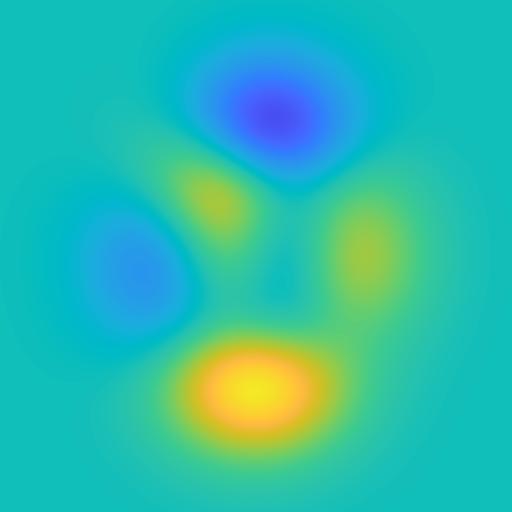
Matlab的Parula ColorMap

Python的Parula ColorMap
七、结束语
我是小白,
一个致力于Blender Python 智能化三维建模的Up主,
精通Matlab,会用Python,超级精通光学三维建模。
E-mail:AICV_Blender2024@163.com
QQ-群:Blender智能三维建模技术:1051208654
