一个手搓的qbittorrent硬链接保种方案

序
因为有PT保种和jellyfin的使用需求,所以打算在qbittorrent下载完成后将所有文件内容硬链接到jellyfin的监控目录下以方便二次整理,qbittorrent下载目录里的内容不动,且相同文件只占用一份大小。
市面上已经有基于nas-tools解决方案,但是我选择diy(方便后续定制功能)

实现原理
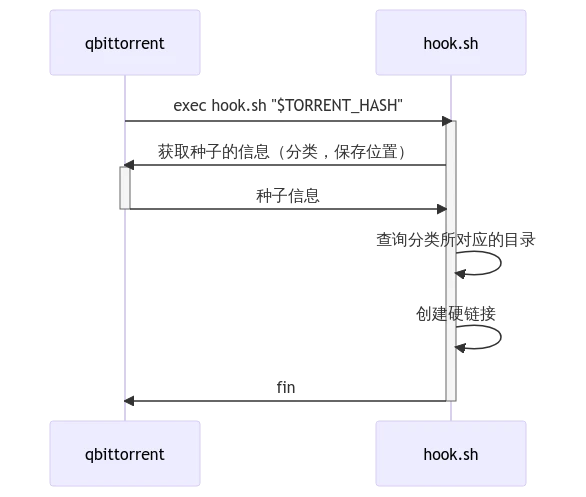
qbittorrent有一个功能是在任务结束后执行特定的指令,且可以带当前种子的参数。所以可以在一个脚本内拿到种子的分类、保存路径等信息,并完成对所有文件的硬链接操作,以下是时序。
实操
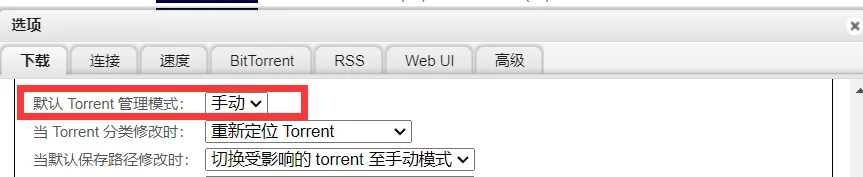
首先把管理模式改为手动(自动可能好使,我没试过)
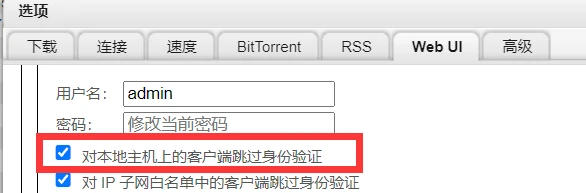
允许localhost上跳过验证(懒得写登录了)
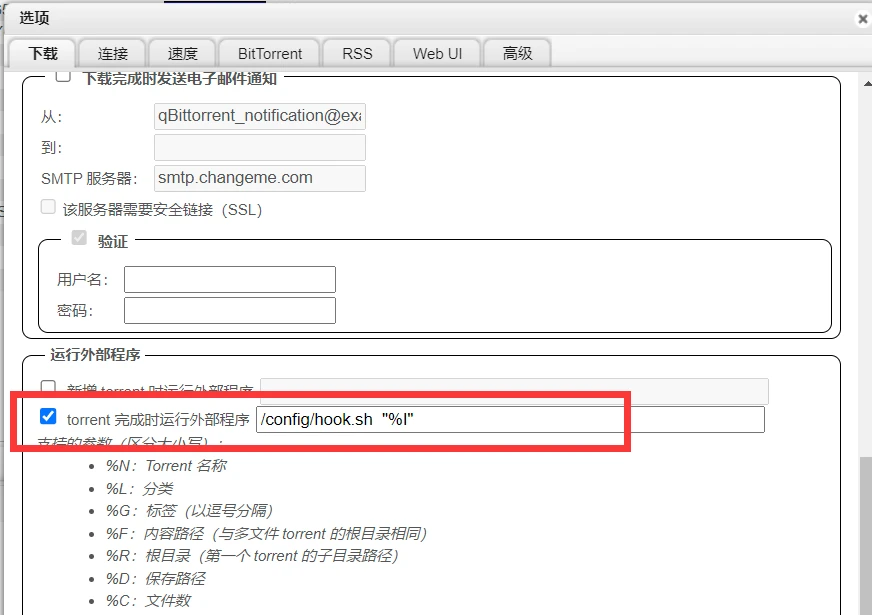
打开 “torrent完成时运行外部程序”,并指定脚本的位置(注意docker的路径映射问题),后面接 "%I"。
把下面的脚本塞到指定位置,当然你有更复杂的逻辑也可以在此基础上魔改
代码块
Shell
自动换行
复制代码
#!/usr/bin/env bash

set -eu

# QB的路径,一般都是在放在QB同一台机器或者容器上,所以这个不用改
QBTORRENT_URL=http://127.0.0.1:8080/

# QB的分类以及要将硬链接的创建目的地,json格式
CATEGORY_MAP='
{
    "Anime": "/data/Videos/Anime",
    "Dorama": "/data/Videos/Dorama",
    "Movies": "/data/Videos/Movies"
}
'

get_dest_dir_by_category_name() {
    _category_name="$1"
    echo "$CATEGORY_MAP" | jq -re ".$_category_name"
}

get_torrent_info_by_hash() {
    _hash="$1"
    curl -sfS "${QBTORRENT_URL%/}/api/v2/torrents/info?hashes=$_hash" |
        jq -re '.[0]'
}

log() {
    _level="$1"
    _msg="$2"
    echo "$(date '+%y-%m-%d %H:%M')[$_level]: $_msg" >>"$(dirname "$0")/hooks.log"
}

main() {
    for _hash in "$@"; do
		   # 找不到hash对应的种子信息则跳过
        if ! _info=$(get_torrent_info_by_hash "$_hash"); then
            log "ERROR" "torrent[hash=$_hash] not found"
            continue
        fi
        _name="$(echo "$_info" | jq -r '.name')"
        _content_path="$(echo "$_info" | jq -r '.content_path')"
        # category为空的种子跳过
        if ! _category_name=$(echo "$_info" | jq -re '.category'); then
            log "INFO" "torrent[name=$_name] category is empty, skipeed"
            continue
        fi
        # category不在上边的映射表里的话的跳过
        if ! _dest_dir=$(get_dest_dir_by_category_name $_category_name); then
            log "INFO" "torrent[name=$_name, category=$_category_name] dest path not specified, skipeed"
            continue
        fi
        # 递归创建硬链接
        cp -rl "$_content_path" "$_dest_dir"
        log "INFO" "torrent[name=$_name, category=$_category_name] successed hard link to: $_dest_dir"
    done
}

main "$@"
复制成功
最后注意别忘了给脚本赋执行权限。
之后创建任务,选好分类,任务完成后就会自动根据分类在指定目录下创建硬链了,分类为空的不受影响。
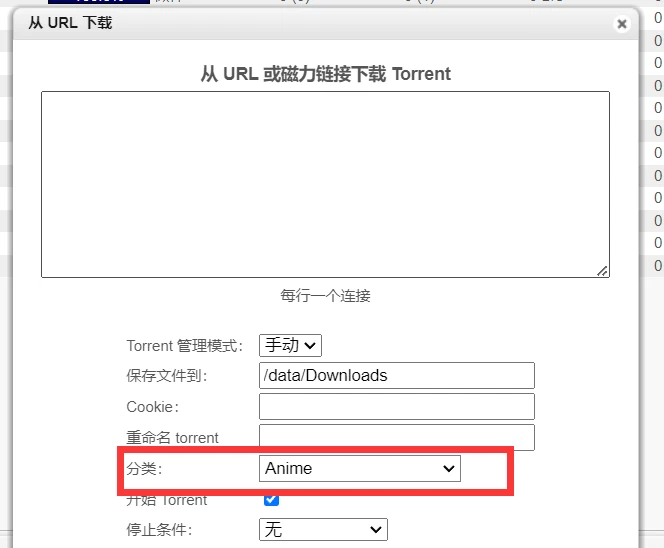
在/config/hooks.log下是脚本输出的log,有问题可以根据这个排查

没了。
本文为我原创,未经授权禁止转载
cv24631856
分享至
投诉或建议
