目录
【AHK】自定义按键一键显隐桌面图标

收录于文集
共4篇
(原文章不小心删除了,此文为补档,并增加了双击)
在 Windows 中 “桌面右键->查看->显示桌面图标” 可以来显示和隐藏桌面的图标,但微软并没有提供快捷键,且通过右键设置过于麻烦。
本文使用AHK2.0提供一个快捷的显示/隐藏桌面图标的功能,下方选一个自己习惯的操作方式代码即可。
1、演示效果
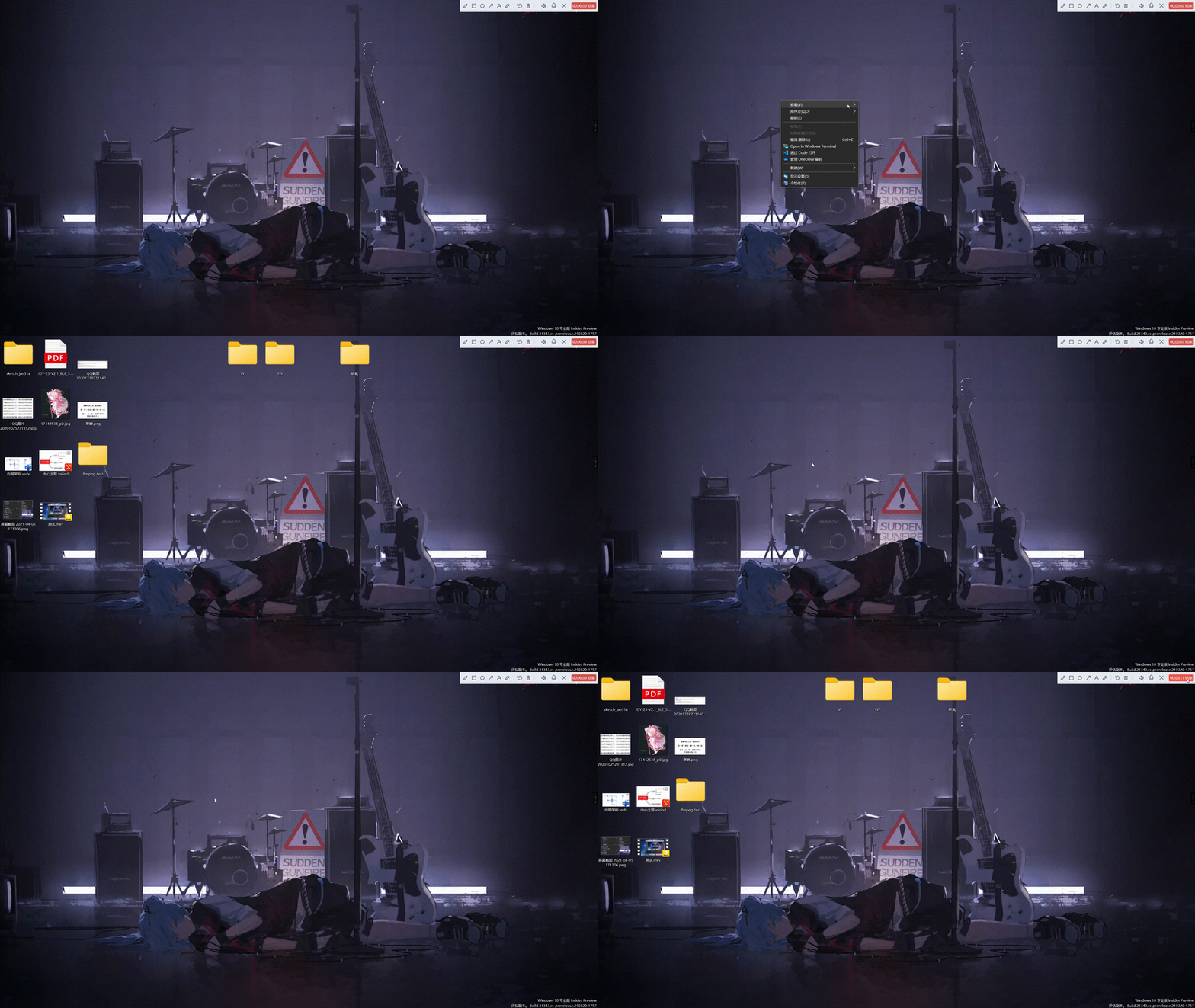
2、如何安装使用AHK
3、使用鼠标中键来 显示/隐藏 图标
只有鼠标悬浮在桌面区域才生效
代码块
JavaScript
自动换行
复制代码
; ----- 在桌面按下鼠标中键(滚轮键) 隐藏/显示桌面图标 -----
#HotIf WinExist("ahk_class WorkerW") or WinExist("ahk_class Progman")
~MButton::{
    MouseGetPos &mX, &mY, &pId ; 获取鼠标悬浮窗口类名
    MouseClass := WinGetClass("ahk_id " pId)
    if (MouseClass ~= "WorkerW|Progman") { ; 判断当前鼠标是否悬浮在桌面
        pId := ControlGetHwnd("SysListView321", "ahk_class " . MouseClass) ; 获取桌面图标层ID
        if (DllCall("User32\IsWindowVisible", "UInt", pId)) { ; 判断当前桌面图标显隐状态
            WinHide "ahk_id " . pId
        } else {
            WinShow "ahk_id " . pId
        }
    }
}
复制成功
4、使用双击鼠标左键来显示桌面图标
只有鼠标悬浮在桌面区域才生效,隐藏图标是才生效,需先手动隐藏图标,显示图标后一定时间后自动隐藏(可设置)
代码块
JavaScript
自动换行
复制代码
;----- 在桌面双击鼠标左键 显示一段时间桌面图标 -----
#HotIf WinExist("ahk_class WorkerW") or WinExist("ahk_class Progman")
~LButton::{
    DoubleClickTime := 200 ; 双击最大间隔时间,单位毫秒
    WinShowTime := 3000 ; 图标显示时间,单位毫秒
    if (ThisHotkey = A_PriorHotkey && A_TimeSincePriorHotkey < DoubleClickTime) {
        MouseGetPos &mX, &mY, &pId ; 获取鼠标悬浮窗口类名
        MouseClass := WinGetClass("ahk_id " pId)
        if (MouseClass ~= "WorkerW|Progman") { ; 判断当前鼠标是否悬浮在桌面
            pId := ControlGetHwnd("SysListView321", "ahk_class " . MouseClass) ; 获取桌面图标层ID
            if (!DllCall("User32\IsWindowVisible", "UInt", pId)) { ; 判断当前桌面图标显隐状态
                WinShow "ahk_id " . pId
                Sleep WinShowTime
                WinHide "ahk_id " . pId
            }
        }
    }
}
复制成功
本文为我原创,未经授权禁止转载
cv23754841
分享至
投诉或建议
