目录
win10家庭版Hyper-v安装与卸载

安装
随便一搜就有脚本可以在家庭版安装,现贴出一个自己使用的
代码块
JavaScript
自动换行
复制代码
pushd "%~dp0"

dir /b %SystemRoot%\servicing\Packages\*Hyper-V*.mum >hyper-v.txt

for /f %%i in ('findstr /i . hyper-v.txt 2^>nul') do dism /online /norestart /add-package:"%SystemRoot%\servicing\Packages\%%i"

del hyper-v.txt

Dism /online /enable-feature /featurename:Microsoft-Hyper-V-All /LimitAccess /ALL
复制成功
也是很好理解的,安装包并开启功能而已,重启后即可在“启用或关闭Windows功能”中找到并开启Hyper-v。
卸载
搜索到的大多数方法没给出卸载方法,而是都给出关闭方法,更有甚者添加一个新的引导来达到暂时关闭目的,但Hyper-v始终还是存在于系统内。
卸载其实很好实现,既然安装是装包并打开功能,那卸载就是关闭功能并移除对应的包就可以了。
微软给出的dism文档中的将包添加到脱机映像和从脱机映像中删除包的命令分别为Add-Package和Remove-Package,替换后并更改顺序即可。
代码块
JavaScript
自动换行
复制代码
Dism /online /disable-feature /featurename:Microsoft-Hyper-V-All /LimitAccess /ALL

pushd "%~dp0"

dir /b %SystemRoot%\servicing\Packages\*Hyper-V*.mum >hyper-v.txt

for /f %%i in ('findstr /i . hyper-v.txt 2^>nul') do dism /online /norestart /remove-package:"%SystemRoot%\servicing\Packages\%%i"

del hyper-v.txt
复制成功
重启后,在“启用或关闭Windows功能”中查看Hyper-v选项已消失。
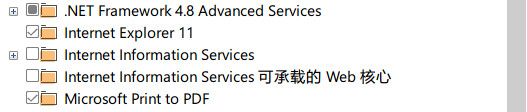
已无Hyper-v
cv21415793
分享至
投诉或建议
