目的
景深是什么?主要的表现效果是什么?
实现方法是什么? 需要注意都有那些点。
景深和散景的区别是什么?
使用 Unlty 2022.1
景深原理
景深表现效果
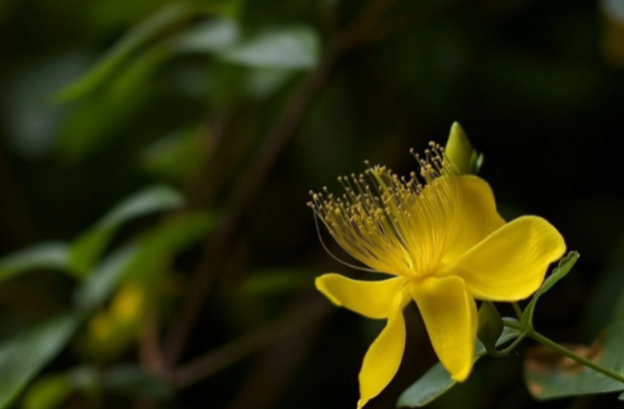
景深一般在摄影中比较常见,简单理解就是要拍清楚的主清楚,其余背景是模糊的效果。
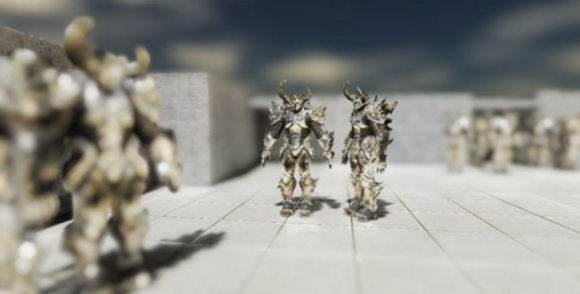
UE4 中的景深
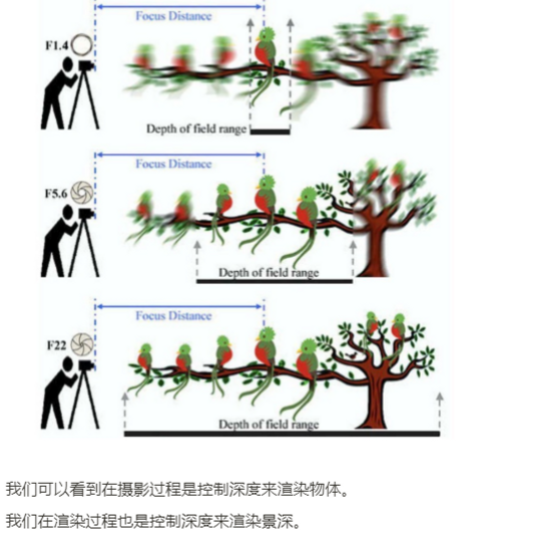
示意图
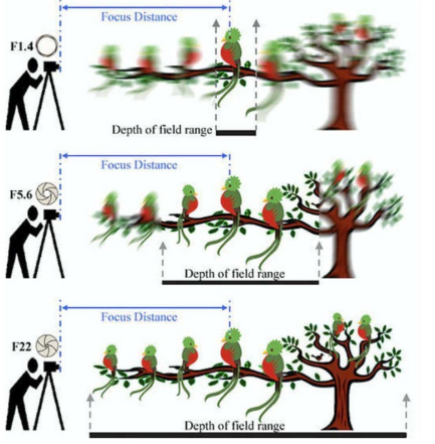
我们可以看到在摄影过程是控制深度来渲染物体。
我们在渲染过程也是控制深度来渲染景深。
计算过程
获取渲染深度图
对深度图进行控制调整显示的深度位置。
分开近景和远近计算,我们希望不在景深的里的物体进行模糊。
使用后处理来对画面进行处理。
景深实现 | Depth Of Field
高斯景深 | Gaussian
这种模式近似相机的效果,但不完全模仿他们。它有一个有限的模糊半径和只做远场模糊。这种模式是速度最快的,也是低端平台的最佳模式。
URP | Depth 深度 - 哔哩哔哩 (bilibili.com)
计算深度
float2 screenPos = i.scrPos.xy / i.scrPos.w;                     //透视除法
// 纹理采样

float Depth = SAMPLE_TEXTURE2D(_CameraDepthTexture,sampler_CameraDepthTexture,screenPos);
float depthValue = Linear01Depth(Depth, _ZBufferParams);获取深度
怎么控制获取的深度范围,
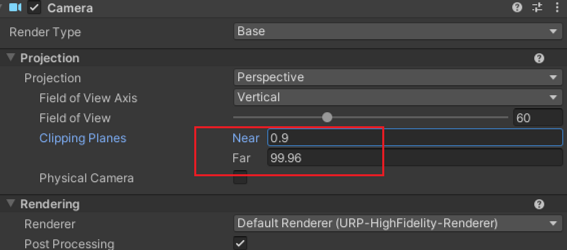
我们可以使用摄像机这两个数值查看渲染的深度位置。
效果
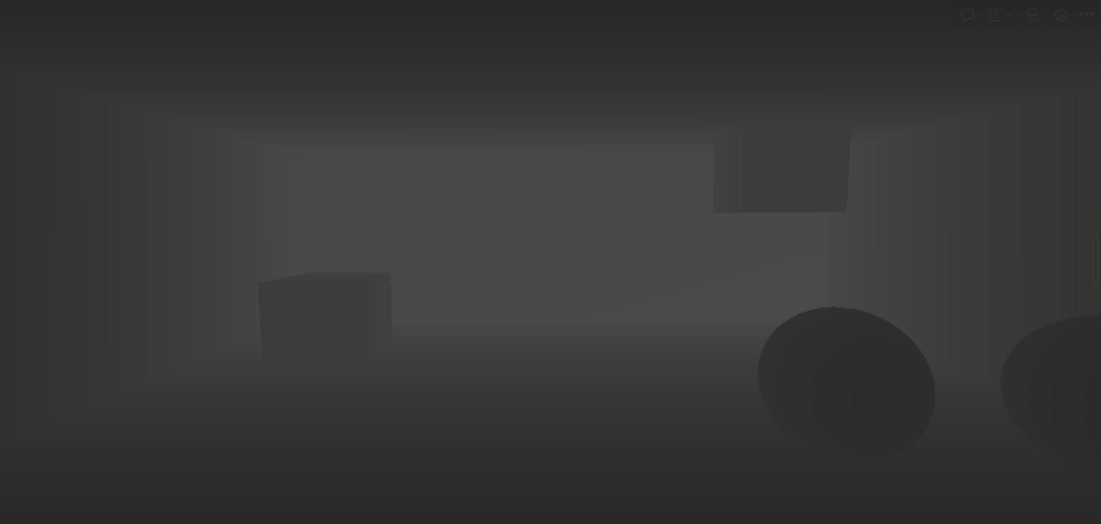
这样我们就获取到了物体到摄像机的距离。
注意:深度和摄像机Far有关系,这个效果默认是1000。
景深权重
我们景深的效果 中间清楚,前后模糊的效果。
类似
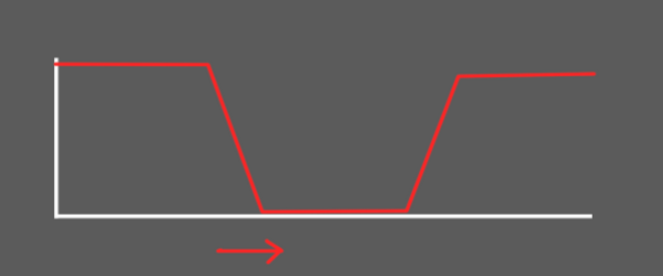
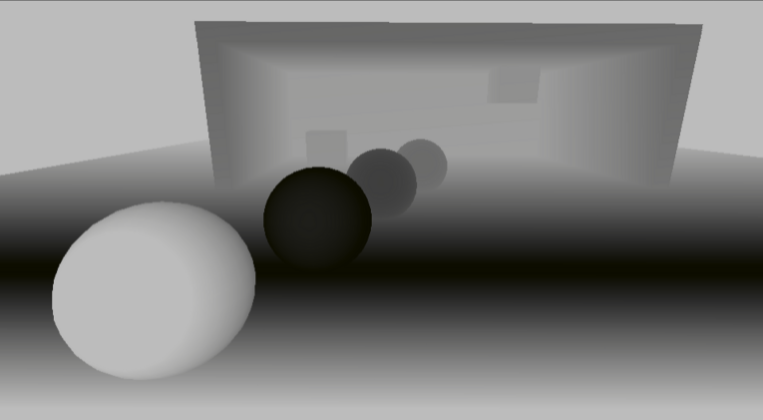
我们就需要深度 (白-黑-白) 的关系,
白色模糊
黑色清楚
Shader
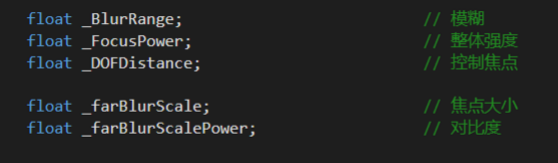
定义两个变量,一个变量控制我们 视角的焦点 ,一个变量控制我们的强度
变量
使用另一种方法获取深度,Unity函数
#include "Packages/com.unity.render-pipelines.universal/ShaderLibrary/DeclareDepthTexture.hlsl"


float depth = SampleSceneDepth(uv);         // 使用这个函数获取深度
我们前使用二次函数,限制在0-1范围
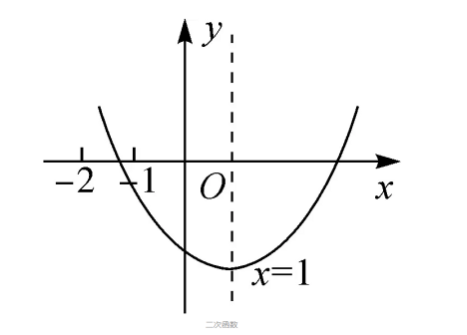
depth = (1 - depth - _DOFDistance)*(1 - depth - _DOFDistance);增加两个变量控制 一个是焦点大小的 一个是 白色黑色对比度
float DOFOffset(float2 uv)
{

	float depth = SampleSceneDepth(uv);
	//depth = (1 - depth - _DOFDistance)*(1 - depth - _DOFDistance);
	float final_result_depth = saturate(_farBlurScale*(1 - depth - _DOFDistance)*(1 - depth - _DOFDistance));
	float  Offset = _FocusPower * pow(final_result_depth, _farBlurScalePower);

	return Offset;
}效果
我们需要两个变量,
把这个计算过程合并成一个函数,方便我们调用。
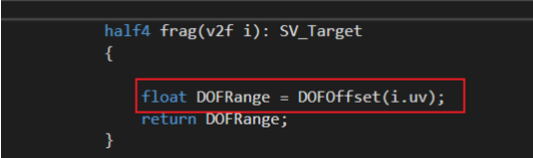
全代码
Shader "URP/05_GaussianDOF"
{
    Properties
    {
        // 基础纹理
        _MainTex ("Base (RGB)", 2D) = "white" { }


        _DOFDistance("_DOFDistance", Float) = 1
        _FocusPower("_FocusPower", Float) = 0.5

        _farBlurScale("_FocusPower", Float) = 1
        _farBlurScalePower("_FocusPower", Float) = 1

    }
    SubShader
    {
        Tags { "RenderPipeline" = "UniversalPipeline" }

        HLSLINCLUDE
        #include "Packages/com.unity.render-pipelines.universal/ShaderLibrary/Core.hlsl"
        #include "Packages/com.unity.render-pipelines.universal/ShaderLibrary/DeclareDepthTexture.hlsl"

        CBUFFER_START(UnityPerMaterial)
        float4 _MainTex_ST;

        float _BlurRange;                          // 模糊
        float _FocusPower;                         // 整体强度
        float _DOFDistance;                        // 控制焦点

        float _farBlurScale;                       // 焦点大小
        float _farBlurScalePower;                  // 对比度

        CBUFFER_END

        TEXTURE2D(_MainTex);            SAMPLER(sampler_MainTex);


        struct a2v
        {
            float4 vertex: POSITION;
            float4 texcoord: TEXCOORD0;
        };

        struct v2f
        {
            float4 pos: SV_POSITION;
            half2 uv: TEXCOORD0;

        };


        ENDHLSL

        Pass
        {

            HLSLPROGRAM

            #pragma vertex vert
            #pragma fragment frag

            float DOFOffset(float2 uv)
            {

                float depth = SampleSceneDepth(uv);

                //depth = (1 - depth - _DOFDistance)*(1 - depth - _DOFDistance);

                float final_result_depth = saturate(_farBlurScale*(1 - depth - _DOFDistance)*(1 - depth - _DOFDistance));
                float  Offset = _FocusPower * pow(final_result_depth, _farBlurScalePower);


                return Offset;
            }

            v2f vert(a2v v)
            {
                v2f o;

                o.pos = TransformObjectToHClip(v.vertex.xyz);
                o.uv = TRANSFORM_TEX(v.texcoord, _MainTex);
                return o;
            }

            half4 frag(v2f i): SV_Target
            {

                float DOFRange = DOFOffset(i.uv);
                return DOFRange;
            }

            ENDHLSL
        }
   }

}计算深度的就算完成,我们还需要控制模糊效果,黑色不模糊,白色模糊。
高斯模糊
我们获取深度控制焦点已经实现,接下来实现模糊效果,
URP | 后处理-模糊算法总结 - 哔哩哔哩 (bilibili.com)
我们在创建一个片元着色器来处理模糊,
half4 DOFfrag(v2f i) : SV_Target                       // 第二个片元着色器
            {

                float4 col = float4(0, 0, 0, 0);
                float blurrange = _BlurRange / 300 * DOFOffset(i.uv);                    // 景深处理

                col += SAMPLE_TEXTURE2D(_MainTex, sampler_MainTex, i.uv + float2(0.0, 0.0)) * 0.147716f;
                col += SAMPLE_TEXTURE2D(_MainTex, sampler_MainTex, i.uv + float2(blurrange, 0.0)) * 0.118318f;
                col += SAMPLE_TEXTURE2D(_MainTex, sampler_MainTex, i.uv + float2(0.0, -blurrange)) * 0.118318f;
                col += SAMPLE_TEXTURE2D(_MainTex, sampler_MainTex, i.uv + float2(0.0, blurrange)) * 0.118318f;
                col += SAMPLE_TEXTURE2D(_MainTex, sampler_MainTex, i.uv + float2(-blurrange, 0.0)) * 0.118318f;

                col += SAMPLE_TEXTURE2D(_MainTex, sampler_MainTex, i.uv + float2(blurrange, blurrange)) * 0.0947416f;
                col += SAMPLE_TEXTURE2D(_MainTex, sampler_MainTex, i.uv + float2(-blurrange, -blurrange)) * 0.0947416f;
                col += SAMPLE_TEXTURE2D(_MainTex, sampler_MainTex, i.uv + float2(blurrange, -blurrange)) * 0.0947416f;
                col += SAMPLE_TEXTURE2D(_MainTex, sampler_MainTex, i.uv + float2(-blurrange, blurrange)) * 0.0947416f;

                return col;
}这个片元着色器才是输出的效果,
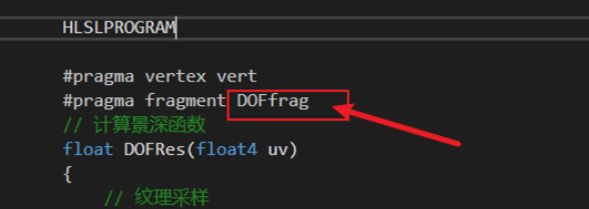
上面那个是我们输出查看深度值的,这才是输出查看模糊值。
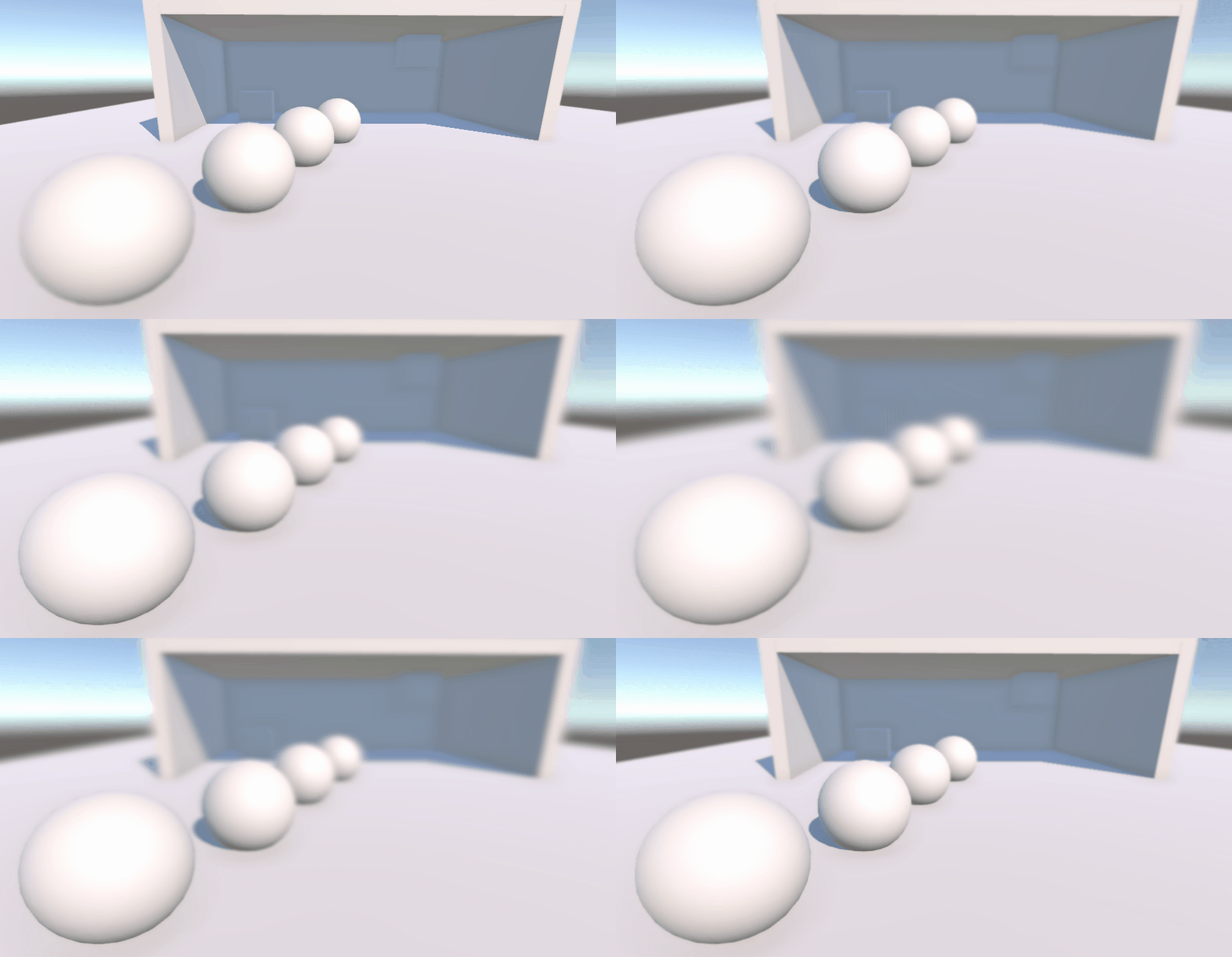
全代码
Shader "URP/05_GaussianDOF"
{
    Properties
    {
        // 基础纹理
        _MainTex ("Base (RGB)", 2D) = "white" { }


        _DOFDistance("_DOFDistance", Float) = 1
        _FocusPower("_FocusPower", Float) = 0.5

        _farBlurScale("_FocusPower", Float) = 1
        _farBlurScalePower("_FocusPower", Float) = 1

    }
    SubShader
    {
        Tags { "RenderPipeline" = "UniversalPipeline" }

        HLSLINCLUDE
        #include "Packages/com.unity.render-pipelines.universal/ShaderLibrary/Core.hlsl"
        #include "Packages/com.unity.render-pipelines.universal/ShaderLibrary/DeclareDepthTexture.hlsl"

        CBUFFER_START(UnityPerMaterial)
        float4 _MainTex_ST;

        float _BlurRange;                          // 模糊
        float _FocusPower;                         // 整体强度
        float _DOFDistance;                        // 控制焦点

        float _farBlurScale;                       // 焦点大小
        float _farBlurScalePower;                  // 对比度

        CBUFFER_END

        TEXTURE2D(_MainTex);            SAMPLER(sampler_MainTex);


        struct a2v
        {
            float4 vertex: POSITION;
            float4 texcoord: TEXCOORD0;
        };

        struct v2f
        {
            float4 pos: SV_POSITION;
            half2 uv: TEXCOORD0;

        };


        ENDHLSL

        Pass
        {

            HLSLPROGRAM

            #pragma vertex vert
            #pragma fragment DOFfrag

            float DOFOffset(float2 uv)
            {

                float depth = SampleSceneDepth(uv);

                //depth = (1 - depth - _DOFDistance)*(1 - depth - _DOFDistance);

                float final_result_depth = saturate(_farBlurScale*(1 - depth - _DOFDistance)*(1 - depth - _DOFDistance));
                float  Offset = _FocusPower * pow(final_result_depth, _farBlurScalePower);


                return Offset;
            }

            v2f vert(a2v v)
            {
                v2f o;

                o.pos = TransformObjectToHClip(v.vertex.xyz);
                o.uv = TRANSFORM_TEX(v.texcoord, _MainTex);
                return o;
            }

            half4 frag(v2f i): SV_Target
            {

                float DOFRange = DOFOffset(i.uv);
                return DOFRange;
            }

            half4 DOFfrag(v2f i) : SV_Target                       // 第二个片元着色器
            {

                float4 col = float4(0, 0, 0, 0);
                float blurrange = _BlurRange / 300 * DOFOffset(i.uv);                    // 景深处理

                col += SAMPLE_TEXTURE2D(_MainTex, sampler_MainTex, i.uv + float2(0.0, 0.0)) * 0.147716f;
                col += SAMPLE_TEXTURE2D(_MainTex, sampler_MainTex, i.uv + float2(blurrange, 0.0)) * 0.118318f;
                col += SAMPLE_TEXTURE2D(_MainTex, sampler_MainTex, i.uv + float2(0.0, -blurrange)) * 0.118318f;
                col += SAMPLE_TEXTURE2D(_MainTex, sampler_MainTex, i.uv + float2(0.0, blurrange)) * 0.118318f;
                col += SAMPLE_TEXTURE2D(_MainTex, sampler_MainTex, i.uv + float2(-blurrange, 0.0)) * 0.118318f;

                col += SAMPLE_TEXTURE2D(_MainTex, sampler_MainTex, i.uv + float2(blurrange, blurrange)) * 0.0947416f;
                col += SAMPLE_TEXTURE2D(_MainTex, sampler_MainTex, i.uv + float2(-blurrange, -blurrange)) * 0.0947416f;
                col += SAMPLE_TEXTURE2D(_MainTex, sampler_MainTex, i.uv + float2(blurrange, -blurrange)) * 0.0947416f;
                col += SAMPLE_TEXTURE2D(_MainTex, sampler_MainTex, i.uv + float2(-blurrange, blurrange)) * 0.0947416f;

                return col;
            }
            ENDHLSL
        }
   }

}注意:前调整好流程,在调整效果。
Volume
using System;

namespace UnityEngine.Rendering.Universal
{

    [Serializable, VolumeComponentMenu("B_Post/Depth of Dield")]
    public class DepthDieldVolume : VolumeComponent, IPostProcessComponent
    {

        [Header("Depth of Dield")]
        public ClampedFloatParameter FocusPower = new ClampedFloatParameter(0.1f, 0f, 1f);
        public ClampedFloatParameter DOFDistance = new ClampedFloatParameter(0.0f, -0.5f, 0.5f);
        public ClampedFloatParameter FarBlurScale = new ClampedFloatParameter(0.1f, 1f, 500f);
        public ClampedFloatParameter FarBlurScalePower = new ClampedFloatParameter(0.1f, 0f, 1f);

        [Space(10)]
        [Header("Blur")]
        [Range(0f, 10f), Tooltip("模糊的迭代次数")]
        public IntParameter BlurTimes = new ClampedIntParameter(5, 0, 10);
        [Range(0f, 10f), Tooltip("模糊半径")]
        public FloatParameter BlurRange = new ClampedFloatParameter(1.0f, 0.0f, 10.0f);
        [Range(0f, 10f), Tooltip("降采样次数")]
        public IntParameter RTDownSampling = new ClampedIntParameter(1, 1, 10);

        public bool IsActive() => BlurTimes.value > 0;

        public bool IsTileCompatible() => false;

    }
}效果
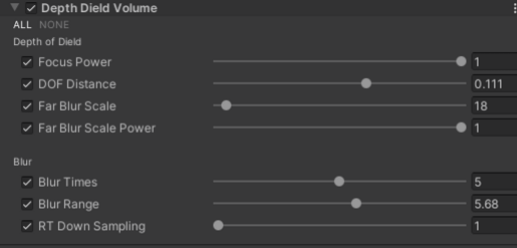
这次新增加两个功能
属性太多分割,
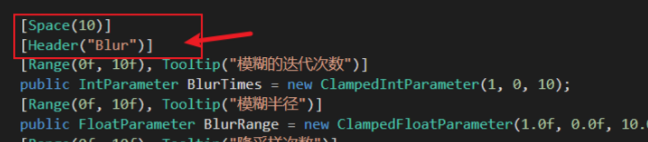
增加自己的组件路径

RendererFeature
using UnityEngine;
using UnityEngine.Rendering;
using UnityEngine.Rendering.Universal;


public class DepthDield : ScriptableRendererFeature
{
    [System.Serializable]
    public class Settings
    {
        public RenderPassEvent renderPassEvent = RenderPassEvent.BeforeRenderingPostProcessing;
        public Shader shader;

    }
    public Settings settings = new Settings();

    DepthDieldPass depthdieldPass;           // 定义我们创建出Pass


    public override void Create()
    {
        this.name = "Depth of Dield";    // 模糊渲染的名字
        depthdieldPass = new DepthDieldPass(RenderPassEvent.BeforeRenderingPostProcessing, settings.shader);    // 初始化 我们的渲染层级和Shader

    }
    public override void AddRenderPasses(ScriptableRenderer renderer, ref RenderingData renderingData)
    {
        renderer.EnqueuePass(depthdieldPass);
    }
}


public class DepthDieldPass : ScriptableRenderPass
{
    static readonly string RenderTag = "Post Effects";                         // 设置渲染标签

    DepthDieldVolume dieldVolume;                                                            // 定义组件类型
    Material material;                                                      // 后处理材质


    public DepthDieldPass(RenderPassEvent evt, Shader biltshader)
    {
        renderPassEvent = evt;
        var shader = biltshader;

        if (shader == null)
        {
            Debug.LogError("没有指定Shader");
            return;
        }
        material = CoreUtils.CreateEngineMaterial(biltshader);
    }

    public override void Execute(ScriptableRenderContext context, ref RenderingData renderingData)
    {
        if (material == null)
        {
            Debug.LogError("材质初始化失败");
            return;
        }

        if (!renderingData.cameraData.postProcessEnabled)
        {
            return;
        }

        var stack = VolumeManager.instance.stack;                          // 传入 volume
        dieldVolume = stack.GetComponent<DepthDieldVolume>();                     // 获取到后处理组件

        var cmd = CommandBufferPool.Get(RenderTag);    // 渲染标签

        Render(cmd, ref renderingData);                 // 调用渲染函数

        context.ExecuteCommandBuffer(cmd);              // 执行函数,回收。
        CommandBufferPool.Release(cmd);

    }

    void Render(CommandBuffer cmd, ref RenderingData renderingData)
    {
        RenderTargetIdentifier  source = renderingData.cameraData.renderer.cameraColorTarget;                 // 定义RT
        RenderTextureDescriptor inRTDesc = renderingData.cameraData.cameraTargetDescriptor;
        inRTDesc.depthBufferBits = 0;                                                                          // 清除深度


        material.SetFloat("_BlurRange", dieldVolume.BlurRange.value);             // Shader变量  和 Volume 组件属性 绑定
        material.SetFloat("_FocusPower", dieldVolume.FocusPower.value);
        material.SetFloat("_DOFDistance", dieldVolume.DOFDistance.value);
        material.SetFloat("_farBlurScale", dieldVolume.FarBlurScale.value);
        material.SetFloat("_farBlurScalePower", dieldVolume.FarBlurScalePower.value);

        int destination = Shader.PropertyToID("Temp1");

        // 定义屏幕尺寸
        var width = (int)(inRTDesc.width / dieldVolume.RTDownSampling.value);
        var height = (int)(inRTDesc.height / dieldVolume.RTDownSampling.value);


        // 获取一张临时RT
        cmd.GetTemporaryRT(destination, width, height, 0, FilterMode.Bilinear, RenderTextureFormat.DefaultHDR); //申请一个临时图像,并设置相机rt的参数进去

        // 计算模糊
        for (int i = 0; i < dieldVolume.BlurTimes.value; i++)
        {
            cmd.Blit(source, destination);                         //  前一次的渲染传入,
            cmd.Blit(destination, source, material, 0);    //  第二个Pass
        }

    }
}这里增加降采样模糊,虽然有这个功能但是不推荐开启。
完成
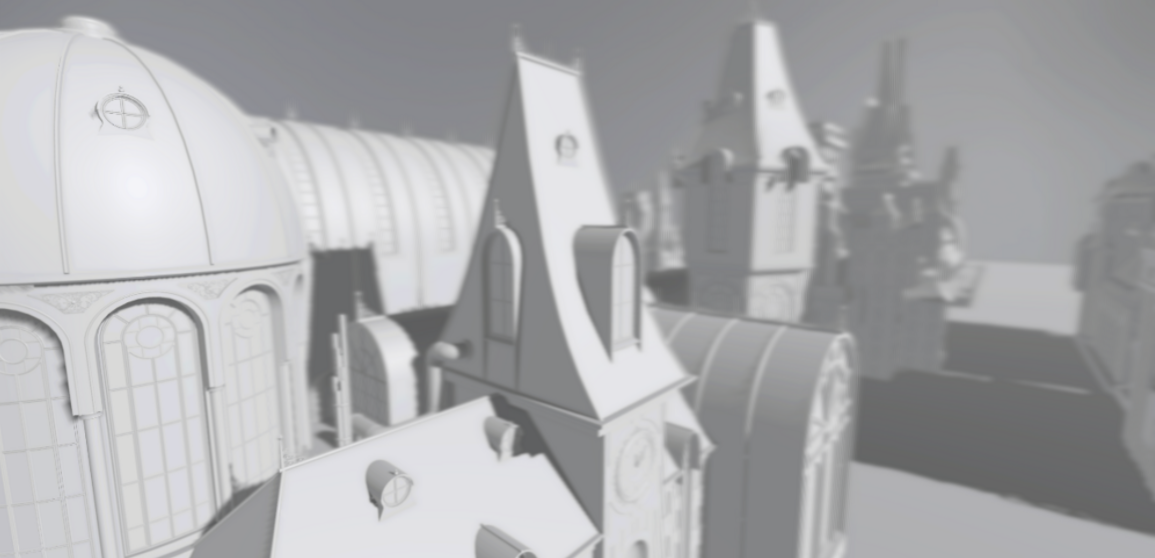
背景模糊
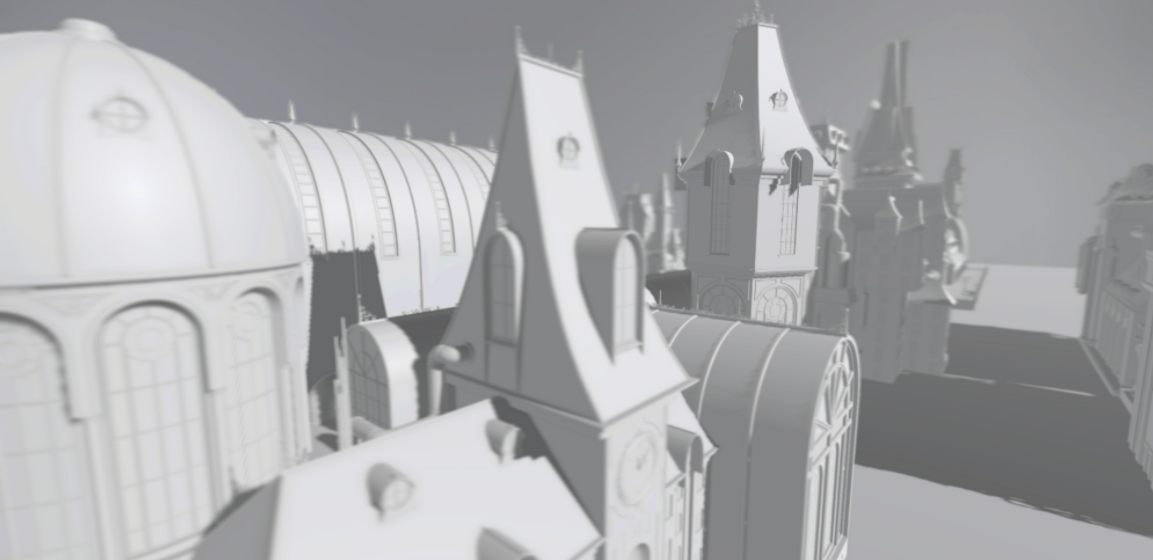
中景清楚,前后模糊
散景模糊 | Bokeh
大佬 高品质后处理:十种图像模糊算法的总结与实现 - 知乎
散景(Bokeh)亦称焦外成像,是一个摄影名词,一般表示在景深较浅的摄影成像中,落在景深以外的画面,会有逐渐产生松散模糊的效果。散景效果有可能因为摄影技巧或光圈孔形状的不同,而产生各有差异的效果。例如镜头本身的光圈叶片数不同(所形成的光圈孔形状不同),会让圆形散景呈现不同的多角形变化。此外,反射式镜头焦外的散景,会呈现独有的甜甜圈形状。
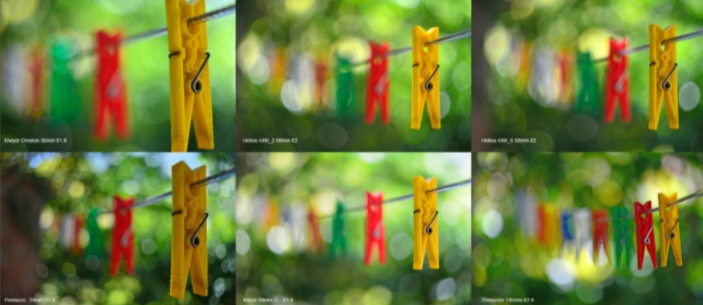
散景模糊
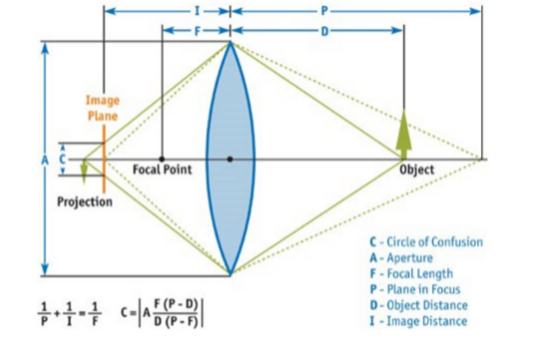
散景(Bokeh)在摄影学中被称为焦外成像,而在光学上被称为Circle of Confusion, CoC(弥散圆/散光圈/散射圆盘 ),即下图橙色Image Plane 中的蓝色C所示区域。由于不同的物距(物体到镜头的距离)投影到镜头所形成的焦点不同,但Image Plane 只能放在某个点上,所以就形成了Circle of Confusion, CoC(弥散圆)。
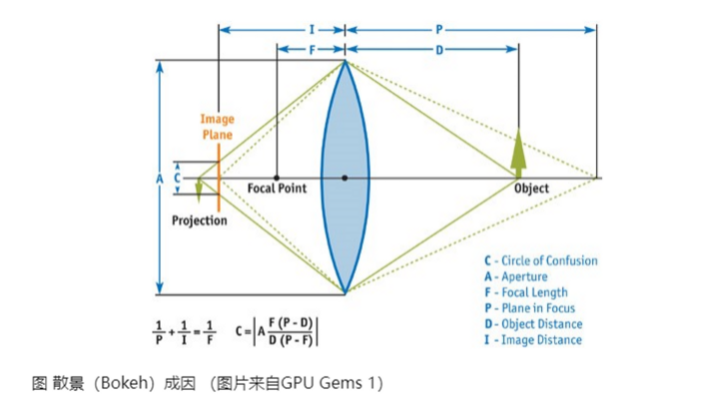
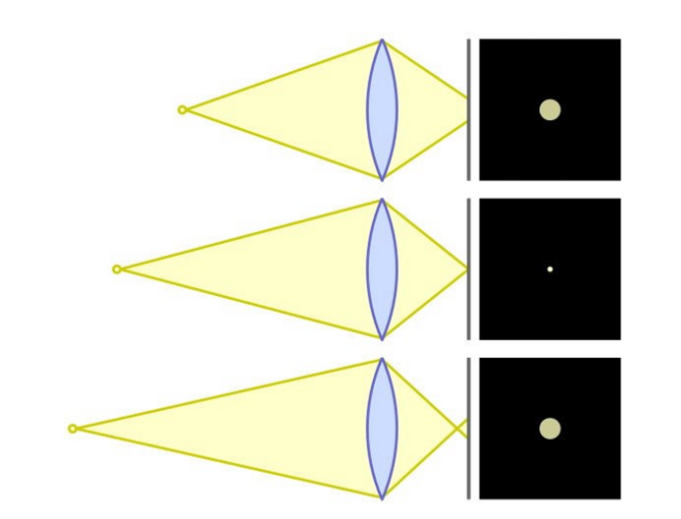
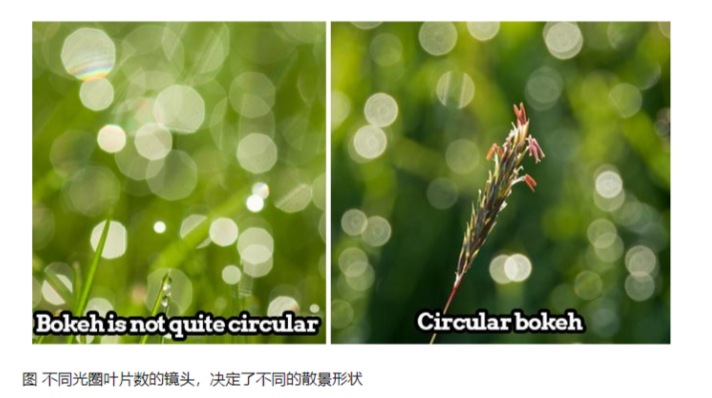
理解 整体表现是在模糊的背景有光斑效果
Shader
核心代码 使用圆形散景为例, 采用Golden进行散景模糊(Bokeh Blur)算法的实现
half4 BokehBlur(float2 uv)
            {
                // 预结算 旋转
                float c = cos(2.39996323f);
                float s = sin(2.39996323f);

                half4 GoldenRot = half4(c, s, -s, c);

                half2x2 rot = half2x2(GoldenRot);
                half4 accumvlaor = 0.0;
                half4 divisor = 0.0;

                half r = 1.0;
                half2 angle = half2(0.0, _BlurSize);

                for (int j = 0; j < _Iteration; j++)
                {
                    r += 1.0/r;
                    angle = mul(rot, angle);
                    half4 bokeh = SAMPLE_TEXTURE2D(_MainTex, sampler_MainTex, float2(uv + _DownSample * (r - 1.0) * angle));
                    accumvlaor += bokeh * bokeh;
                    divisor += bokeh;

                }
                return accumvlaor/divisor;
}即对于每一次迭代,让采样uv旋转一个角度,经过足够次数的迭代后,众多以圆形分散开来的点,将一起组成合适的Bokeh形状。
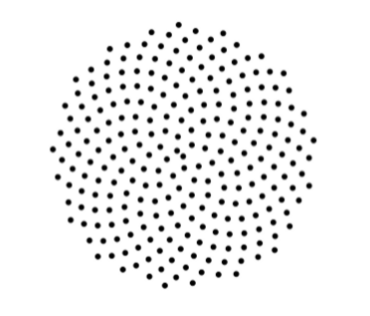
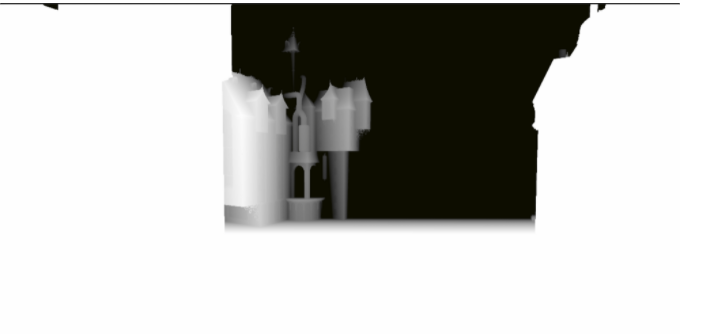
这个函数就得到了,主要是计算模糊的效果。我们还需要计算深度,根据不同深度使用模糊,和我们的上面类似,
不同的区别是这次黑白过度快速,硬一点,景深模糊我们希望黑白过度线性。
half4 frag(v2f i): SV_Target
            {


                float Depth = SAMPLE_TEXTURE2D(_CameraDepthTexture,sampler_CameraDepthTexture,i.uv).r;
                float depthValue = Linear01Depth(Depth, _ZBufferParams);

                float4 col =  SAMPLE_TEXTURE2D(_MainTex, sampler_MainTex, i.uv);


                float DOFRange = saturate(-_End *  depthValue + _Density * _End) * (step(-_Density, -depthValue)) +
                                 saturate(_Start * depthValue - _Density * _Start) * (step(_Density, depthValue));

                col.rgb = lerp(col.rgb, BokehBlur(i.uv).rgb, DOFRange);

                return col;
}深度计算我们处理一下,分成前半部分和后部分,单独可以控制这俩部分的颜色。
在使用 Lerp 融合 前面是原图,后面是散射效果,使用白色模糊 黑色不模糊
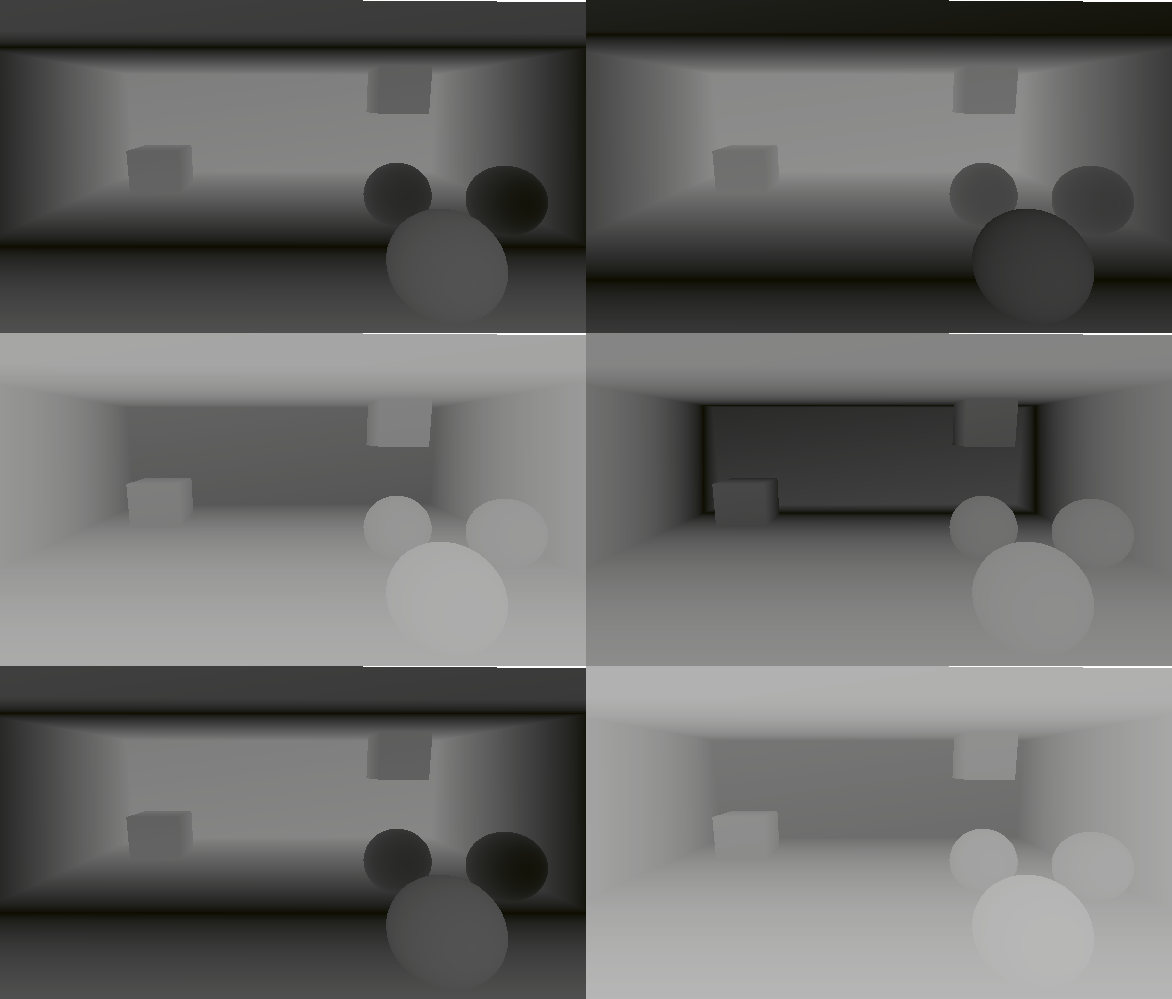
深度
效果
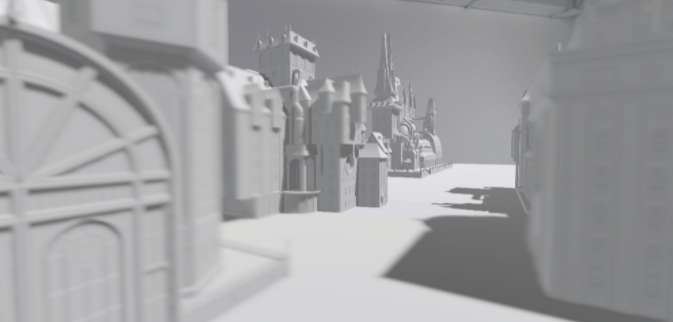
Shader全代码
Shader "URP/05_BorkeDOF"
{
    Properties
    {
        // 基础纹理
        _MainTex ("Base (RGB)", 2D) = "white" { }
    }
    SubShader
    {
        Tags { "RenderPipeline" = "UniversalPipeline" }

        HLSLINCLUDE
        #include "Packages/com.unity.render-pipelines.universal/ShaderLibrary/Core.hlsl"


        CBUFFER_START(UnityPerMaterial)

        float4 _MainTex_ST;

        float  _BlurSize;         // 模糊强度
        float _Iteration;         // 迭代次数
        float _DownSample;        // 像素大小

        float _End;
        float _Start;
        float _Density;
        float _PowDistance;
        CBUFFER_END

        TEXTURE2D(_MainTex);            SAMPLER(sampler_MainTex);
        TEXTURE2D(_CameraDepthTexture);  SAMPLER(sampler_CameraDepthTexture);


        struct a2v
        {
            float4 vertex: POSITION;
            float4 texcoord: TEXCOORD0;
        };

        struct v2f
        {
            float4 pos: SV_POSITION;
            half2 uv: TEXCOORD0;
        };


        ENDHLSL

        Pass
        {

            HLSLPROGRAM

            #pragma vertex vert
            #pragma fragment frag

            half4 BokehBlur(float2 uv)
            {
                // 预结算 旋转
                float c = cos(2.39996323f);
                float s = sin(2.39996323f);

                half4 GoldenRot = half4(c, s, -s, c);

                half2x2 rot = half2x2(GoldenRot);
                half4 accumvlaor = 0.0;
                half4 divisor = 0.0;

                half r = 1.0;
                half2 angle = half2(0.0, _BlurSize);

                for (int j = 0; j < _Iteration; j++)
                {
                    r += 1.0/r;
                    angle = mul(rot, angle);
                    half4 bokeh = SAMPLE_TEXTURE2D(_MainTex, sampler_MainTex, float2(uv + _DownSample * (r - 1.0) * angle));
                    accumvlaor += bokeh * bokeh;
                    divisor += bokeh;

                }
                return accumvlaor/divisor;
            }


            v2f vert(a2v v)
            {
                v2f o;

                o.pos = TransformObjectToHClip(v.vertex.xyz);
                o.uv = TRANSFORM_TEX(v.texcoord, _MainTex);

                return o;
            }

            half4 frag(v2f i): SV_Target
            {


                float Depth = SAMPLE_TEXTURE2D(_CameraDepthTexture,sampler_CameraDepthTexture,i.uv).r;
                float depthValue = Linear01Depth(Depth, _ZBufferParams);

                float4 col =  SAMPLE_TEXTURE2D(_MainTex, sampler_MainTex, i.uv);


                float DOFRange = saturate(-_End *  depthValue + _Density * _End) * (step(-_Density, -depthValue)) +
                                 saturate(_Start * depthValue - _Density * _Start) * (step(_Density, depthValue));

                col.rgb = lerp(col.rgb, BokehBlur(i.uv).rgb, DOFRange);

                return col;
            }
            ENDHLSL
        }
   }
}
Volume
Volume 组件和RendererFeature 都使用景深组件,我们定义 枚举来控制显示那个属性,
using System;

namespace UnityEngine.Rendering.Universal
{

    public enum DepthMode
    {
        Off,
        Gaussian,
        Bokeh
    }


    [Serializable, VolumeComponentMenu("B_Post/Depth of Dield")]
    public class DepthDieldVolume : VolumeComponent, IPostProcessComponent
    {

        public EnumModeParameter mode = new EnumModeParameter(DepthMode.Off);


        [Header("Depth of Dield")]
        public ClampedFloatParameter FocusPower = new ClampedFloatParameter(1f, 0f, 1f);
        public ClampedFloatParameter DOFDistance = new ClampedFloatParameter(0.0f, -0.2f, 0.2f);
        public ClampedFloatParameter FarBlurScale = new ClampedFloatParameter(300f, 1f, 500f);
        public ClampedFloatParameter FarBlurScalePower = new ClampedFloatParameter(0.5f, 0f, 1f);

        [Range(0f, 10f), Tooltip("模糊的迭代次数")]
        public IntParameter BlurTimes = new ClampedIntParameter(5, 0, 10);
        [Range(0f, 10f), Tooltip("模糊半径")]
        public FloatParameter BlurRange = new ClampedFloatParameter(0.0f, 0.0f, 10.0f);
        [Range(0f, 10f), Tooltip("降采样次数")]
        public IntParameter RTDownSampling = new ClampedIntParameter(1, 1, 10);

        [Space(10)]
        [Header("Broke")]
        [Range(0f, 10f), Tooltip("模糊强度")]
        public ClampedFloatParameter BlurSize = new ClampedFloatParameter(1.0f, 0.0f, 1.0f);
        [Range(0f, 10f), Tooltip("迭代次数")]
        public ClampedIntParameter Iteration = new ClampedIntParameter(1, 1, 100);
        [Range(0f, 10f), Tooltip("像素大小")]
        public ClampedFloatParameter DownSample = new ClampedFloatParameter(0.1f, 0.0f, 1.0f);
        [Space(10)]
        public ClampedFloatParameter End = new ClampedFloatParameter(0.0f, 0.0f, 100.0f);
        public ClampedFloatParameter Start = new ClampedFloatParameter(1.0f, 0.0f, 100.0f);
        public ClampedFloatParameter Density = new ClampedFloatParameter(0.1f, -0.5f, 0.5f);

        public bool IsActive() => BlurTimes.value > 0;

        public bool IsTileCompatible() => false;

    }

    [Serializable]
    public sealed class EnumModeParameter : VolumeParameter<DepthMode>
    {
        public EnumModeParameter(DepthMode value, bool overrideState = false) : base(value, overrideState) { }
    }
}注意:这里没有学会Volume 组件使用Eume显示不同属性。
效果
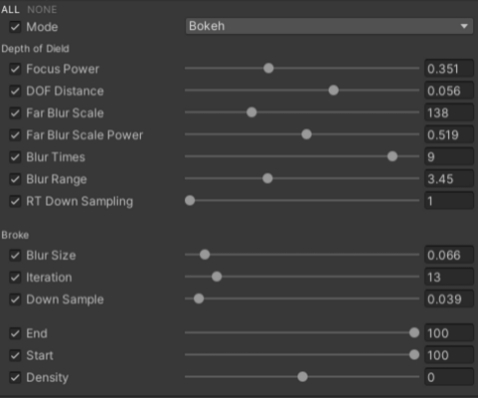
设置Bokeh类型,Broke属性起作用。
设置Bokeh类型,Broke属性起作用。
RendererFeature
URP | 后处理-模糊算法总结 - 哔哩哔哩 (bilibili.com)
URP | 后处理-自定义后处理 - 哔哩哔哩 (bilibili.com)
这里大部分和上面一样,主要区别是不同枚举类的使用判断执行不同效果。
定义2个函数,输入需要的数据

定义一个大的Render 渲染
void Render(CommandBuffer cmd, ref RenderingData renderingData)
    {
        RenderTargetIdentifier source = renderingData.cameraData.renderer.cameraColorTarget;                 // 定义RT

        RenderTextureDescriptor inRTDesc = renderingData.cameraData.cameraTargetDescriptor;

        inRTDesc.depthBufferBits = 0;                                            // 清除深度

        if (dieldVolume.mode.value == DepthMode.Gaussian)
        {
            GauDOFRender(cmd, source, inRTDesc);
        }
        else if (dieldVolume.mode.value == DepthMode.Bokeh)
        {
            BokDOFRender(cmd, source, inRTDesc);
        }

}根据不同的类型执行不同的函数,
全代码
using UnityEngine;
using UnityEngine.Rendering;
using UnityEngine.Rendering.Universal;


public class DepthDield : ScriptableRendererFeature
{
    [System.Serializable]
    public class Settings
    {
        public RenderPassEvent renderPassEvent = RenderPassEvent.BeforeRenderingPostProcessing;
        public Shader shader;

    }
    public Settings settings = new Settings();

    DepthDieldPass depthdieldPass;           // 定义我们创建出Pass


    public override void Create()
    {
        this.name = "Depth of Dield";    // 模糊渲染的名字
        depthdieldPass = new DepthDieldPass(RenderPassEvent.BeforeRenderingPostProcessing, settings.shader);    // 初始化 我们的渲染层级和Shader

    }
    public override void AddRenderPasses(ScriptableRenderer renderer, ref RenderingData renderingData)
    {
        renderer.EnqueuePass(depthdieldPass);
    }
}


public class DepthDieldPass : ScriptableRenderPass
{
    static readonly string RenderTag = "Post Effects";                         // 设置渲染标签

    DepthDieldVolume dieldVolume;                                                            // 定义组件类型
    Material material;                                                      // 后处理材质


    public DepthDieldPass(RenderPassEvent evt, Shader biltshader)
    {
        renderPassEvent = evt;
        var shader = biltshader;

        if (shader == null)
        {
            Debug.LogError("没有指定Shader");
            return;
        }
        material = CoreUtils.CreateEngineMaterial(biltshader);
    }

    public override void Execute(ScriptableRenderContext context, ref RenderingData renderingData)
    {
        if (material == null)
        {
            Debug.LogError("材质初始化失败");
            return;
        }

        if (!renderingData.cameraData.postProcessEnabled)
        {
            return;
        }

        var stack = VolumeManager.instance.stack;                          // 传入 volume
        dieldVolume = stack.GetComponent<DepthDieldVolume>();                     // 获取到后处理组件

        var cmd = CommandBufferPool.Get(RenderTag);    // 渲染标签

        Render(cmd, ref renderingData);                 // 调用渲染函数

        context.ExecuteCommandBuffer(cmd);              // 执行函数,回收。
        CommandBufferPool.Release(cmd);

    }

    void Render(CommandBuffer cmd, ref RenderingData renderingData)
    {
        RenderTargetIdentifier source = renderingData.cameraData.renderer.cameraColorTarget;                 // 定义RT

        RenderTextureDescriptor inRTDesc = renderingData.cameraData.cameraTargetDescriptor;

        inRTDesc.depthBufferBits = 0;                                            // 清除深度

        if (dieldVolume.mode.value == DepthMode.Gaussian)
        {
            GauDOFRender(cmd, source, inRTDesc);
        }
        else if (dieldVolume.mode.value == DepthMode.Bokeh)
        {
            BokDOFRender(cmd, source, inRTDesc);
        }

    }
    void GauDOFRender(CommandBuffer cmd, RenderTargetIdentifier source, RenderTextureDescriptor inRTDesc)
    {


        material.SetFloat("_BlurRange", dieldVolume.BlurRange.value);             // Shader变量  和 Volume 组件属性 绑定
        material.SetFloat("_FocusPower", dieldVolume.FocusPower.value);
        material.SetFloat("_DOFDistance", dieldVolume.DOFDistance.value);
        material.SetFloat("_farBlurScale", dieldVolume.FarBlurScale.value);
        material.SetFloat("_farBlurScalePower", dieldVolume.FarBlurScalePower.value);

        int destination = Shader.PropertyToID("Temp1");


        var width = (int)(inRTDesc.width / dieldVolume.RTDownSampling.value);
        var height = (int)(inRTDesc.height / dieldVolume.RTDownSampling.value);


        // 获取一张临时RT
        cmd.GetTemporaryRT(destination, width, height, 0, FilterMode.Bilinear, RenderTextureFormat.DefaultHDR); //申请一个临时图像,并设置相机rt的参数进去

        // 计算模糊
        for (int i = 0; i < dieldVolume.BlurTimes.value; i++)
        {
            cmd.Blit(source, destination);                         //  前一次的渲染传入,
            cmd.Blit(destination, source, material, 0);    //  第二个Pass
        }

    }

    void BokDOFRender(CommandBuffer cmd, RenderTargetIdentifier source, RenderTextureDescriptor inRTDesc)
    {

        // Broke
        material.SetFloat("_BlurSize", dieldVolume.BlurSize.value);
        material.SetFloat("_Iteration", dieldVolume.Iteration.value);
        material.SetFloat("_DownSample", dieldVolume.DownSample.value);

        material.SetFloat("_End", dieldVolume.End.value);
        material.SetFloat("_Start", dieldVolume.Start.value);
        material.SetFloat("_Density", dieldVolume.Density.value);

        int destination = Shader.PropertyToID("Temp1");


        // 获取一张临时RT
        cmd.GetTemporaryRT(destination, inRTDesc.width, inRTDesc.height, 0, FilterMode.Bilinear, RenderTextureFormat.DefaultHDR); //申请一个临时图像,并设置相机rt的参数进去


        cmd.Blit(source, destination);                         //  前一次的渲染传入,
        cmd.Blit(destination, source, material, 0);    //  第二个Pass

    }


}
效果
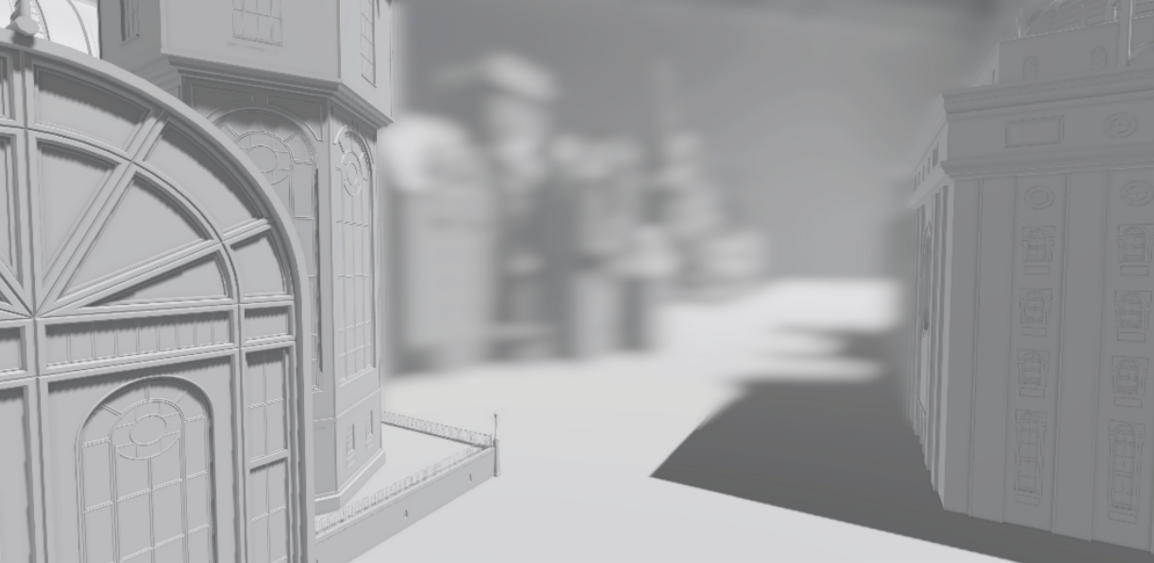
总结
景深模糊,简单理解就是获取深度控制深度形成V型,进行模糊的效果,渐变平滑过度,线性。
散景模糊,过度快速,对比强,