


前言
这是有关创建自定义脚本渲染管线的教程系列的第四部分。它增加了对级联阴影贴图的支持,终于…写完了,不容易。
本文翻译自https://catlikecoding.com/unity/tutorials/custom-srp/directional-shadows/。
通过这篇文章,我们可以学习到如下内容:
Render and sample shadow maps.
Support multiple shadowed directional lights.
Use cascaded shadow maps.
Blend, fade, and filter shadows.

Rendering Shadows
绘制某些东西时,表面和光照信息足以计算光照。但是两者之间可能有一些东西阻挡了光线,在我们正在绘制的表面上投下阴影。为了使阴影成为可能,我们必须以某种方式让着色器意识到阴影投射对象,为此有多种技术。最常见的方法是生成一个阴影贴图,该贴图存储光在到达表面之前可以离开其光源的距离。在同一方向上更远的任何东西都不能被同一光照亮。Unity 的 RP 使用这种方法,我们也将如此。
#1 Shadow Settings
在我们开始渲染阴影之前,我们首先必须对质量做出一些决定,特别是我们将渲染阴影的距离以及我们的阴影贴图的大小。
虽然我们可以在相机所能看到的范围内渲染阴影,但这需要大量的绘图和非常大的地图才能充分覆盖该区域,这几乎是不切实际的。 因此,我们将引入阴影的最大距离(默认设置为 100 个单位),最小值为零。创建一个新的可序列化 ShadowSettings 类以包含此选项。这个类纯粹是一个配置选项的容器,所以我们会给它一个公共的 maxDistance 字段。
using UnityEngine;

[System.Serializable]
public class ShadowSettings {

	[Min(0f)]
	public float maxDistance = 100f;
}对于地图大小,我们将引入嵌套在 ShadowSettings 中的 TextureSize 枚举类型。使用它来定义允许的纹理大小,都是 256-8192 范围内的 2 的幂次方。
	public enum TextureSize {
		_256 = 256, _512 = 512, _1024 = 1024,
		_2048 = 2048, _4096 = 4096, _8192 = 8192
}然后为阴影贴图添加一个大小字段,默认为 1024。我们将使用单个纹理来包含多个阴影贴图,因此将其命名为 atlasSize。由于我们目前仅支持平行光,因此我们还专门在此点使用定向阴影贴图。但我们将来会支持其他灯光类型,它们将获得自己的阴影设置。所以把 atlasSize 放在一个内部的 Directional 结构中。这样我们就可以在检查器中自动获得分层配置。
	[System.Serializable]
	public struct Directional {

		public TextureSize atlasSize;
	}

	public Directional directional = new Directional {
		atlasSize = TextureSize._1024
};将阴影设置字段添加到 CustomRenderPipelineAsset。
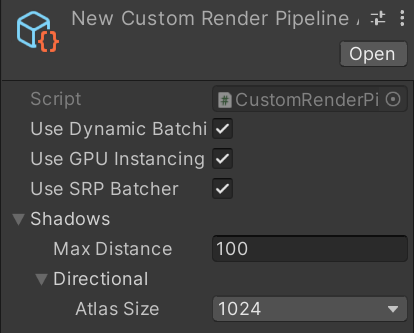
在构造时将这些设置传递给 CustomRenderPipeline 实例。
	protected override RenderPipeline CreatePipeline () {
		return new CustomRenderPipeline(
			useDynamicBatching, useGPUInstancing, useSRPBatcher, shadows
		);
}然后顺着渲染逻辑跟踪数据,将渲染管线的参数补上。
	ShadowSettings shadowSettings;

	public CustomRenderPipeline (
		bool useDynamicBatching, bool useGPUInstancing, bool useSRPBatcher,
		ShadowSettings shadowSettings
	) {
		this.shadowSettings = shadowSettings;
		…
	}
#2 Passing Along Settings
从现在开始,我们将在调用其 Render 方法时将这些设置传递给相机渲染器。这样就可以很容易地添加在运行时更改阴影设置的支持,但我们不会在本教程中处理这个问题。
	protected override void Render (
		ScriptableRenderContext context, Camera[] cameras
	) {
		foreach (Camera camera in cameras) {
			renderer.Render(
				context, camera, useDynamicBatching, useGPUInstancing,
				shadowSettings
			);
		}
}然后 CameraRenderer.Render 将其传递给 Lighting.Setup 以及它自己的 Cull 方法。
	public void Render (
		ScriptableRenderContext context, Camera camera,
		bool useDynamicBatching, bool useGPUInstancing,
		ShadowSettings shadowSettings
	) {
		…
		if (!Cull(shadowSettings.maxDistance)) {
			return;
		}

		Setup();
		lighting.Setup(context, cullingResults, shadowSettings);
		…
}我们需要 Cull 中的设置,因为阴影距离是通过剔除参数设置的。
	bool Cull (float maxShadowDistance) {
		if (camera.TryGetCullingParameters(out ScriptableCullingParameters p)) {
			p.shadowDistance = maxShadowDistance;
			cullingResults = context.Cull(ref p);
			return true;
		}
		return false;
}渲染比相机能看到的更远的阴影是没有意义的,所以取最大阴影距离和相机远剪辑平面中的最小值。
p.shadowDistance = Mathf.Min(maxShadowDistance, camera.farClipPlane);为了使代码编译,我们还必须将阴影设置的参数添加到 Lighting.Setup,但我们暂时不会对它们做任何事情。
	public void Setup (
		ScriptableRenderContext context, CullingResults cullingResults,
		ShadowSettings shadowSettings
	) { … }
#3 Shadows Class
虽然阴影在逻辑上是照明的一部分,但它们相当复杂,所以让我们创建一个专门用于它们的新 Shadows 类。它从 Lighting 的简单copy开始,具有自己的缓冲区、上下文字段、剔除结果和设置、用于初始化字段的 Setup 方法和 ExecuteBuffer 方法。
using UnityEngine;
using UnityEngine.Rendering;

public class Shadows {

	const string bufferName = "Shadows";

	CommandBuffer buffer = new CommandBuffer {
		name = bufferName
	};

	ScriptableRenderContext context;

	CullingResults cullingResults;

	ShadowSettings settings;

	public void Setup (
		ScriptableRenderContext context, CullingResults cullingResults,
		ShadowSettings settings
	) {
		this.context = context;
		this.cullingResults = cullingResults;
		this.settings = settings;
	}

	void ExecuteBuffer () {
		context.ExecuteCommandBuffer(buffer);
		buffer.Clear();
	}
}然后Lighting需要做的就是跟踪一个Shadows实例并在SetupLights之前在它自己的Setup方法中调用Shadows的Setup方法。
	public void Setup (…) {
		this.cullingResults = cullingResults;
		buffer.BeginSample(bufferName);
		shadows.Setup(context, cullingResults, shadowSettings);
		SetupLights();
		…
}#4 Lights with Shadows
由于渲染阴影需要额外的工作,它会降低帧速率,因此我们将限制可以有多少阴影平行光,而与支持配置多少平行光无关。为阴影添加一个常量,平行光数量默认设置为一个。 const int maxShadowedDirectionalLightCount = 1;
const int maxShadowedDirectionalLightCount = 1;我们不知道哪些可见光会产生阴影,所以我们设置产生阴影的光照。除此之外,稍后我们还将跟踪每个阴影光的更多数据,因此让我们定义一个内部 ShadowedDirectionalLight 结构,该结构目前仅包含索引并跟踪这些数据的数组。
	struct ShadowedDirectionalLight {
		public int visibleLightIndex;
	}

	ShadowedDirectionalLight[] ShadowedDirectionalLights =
new ShadowedDirectionalLight[maxShadowedDirectionalLightCount];为了确定哪个灯光得到阴影,我们将添加一个公共 ReserveDirectionalShadows 方法,其中包含灯光和可见光索引参数。它的工作是在阴影图集中为灯光的阴影贴图保留空间,并存储渲染它们所需的信息。
public void ReserveDirectionalShadows (Light light, int visibleLightIndex) {}由于产生阴影的光照的数量有限,我们必须跟踪已经保留了多少阴影贴图。在设置中将计数重置为零。然后在 ReserveDirectionalShadows 中检查是否达到最大值。如果还有空间,则存储灯光的可见索引并增加计数。
	int ShadowedDirectionalLightCount;

	…

	public void Setup (…) {
		…
		ShadowedDirectionalLightCount = 0;
	}

	public void ReserveDirectionalShadows (Light light, int visibleLightIndex) {
		if (ShadowedDirectionalLightCount < maxShadowedDirectionalLightCount) {
			ShadowedDirectionalLights[ShadowedDirectionalLightCount++] =
				new ShadowedDirectionalLight {
					visibleLightIndex = visibleLightIndex
				};
		}
}一个光影模式设置为无或它的阴影强度为零,那么它没有阴影,应该被忽略。
		if (
			ShadowedDirectionalLightCount < maxShadowedDirectionalLightCount &&
			light.shadows != LightShadows.None && light.shadowStrength > 0f
) { … }除此之外,可见光可能最终不会影响任何投射阴影的对象,要么是因为它们被配置为不这样做,要么是因为光线只影响超出最大阴影距离的对象。我们可以通过对可见光索引的剔除结果调用 GetShadowCasterBounds 来检查这一点。它的返回结果是Bool类型,表示是否有物体需要投射阴影,如果无,则没有要为该灯光渲染的阴影,应该忽略它。
		if (
			ShadowedDirectionalLightCount < maxShadowedDirectionalLightCount &&
			light.shadows != LightShadows.None && light.shadowStrength > 0f &&
			cullingResults.GetShadowCasterBounds(visibleLightIndex, out Bounds b)
) { … }现在我们可以在 Lighting.SetupDirectionalLight 中保留阴影。
#5 Creating the Shadow Atlas
保存了阴影后,我们需要渲染它们。我们在 Lighting.Render 中的 SetupLights 完成后,通过调用新的 Shadows.Render 方法来执行此操作。
		shadows.Setup(context, cullingResults, shadowSettings);
		SetupLights();
shadows.Render();Shadows.Render 方法将平行光阴影的渲染委托给另一个 RenderDirectionalShadows 方法,但前提是存在阴影灯光。
	public void Render () {
		if (ShadowedDirectionalLightCount > 0) {
			RenderDirectionalShadows();
		}
	}

void RenderDirectionalShadows () {}创建阴影贴图是通过将阴影投射对象绘制到纹理来完成的。我们将使用 _DirectionalShadowAtlas 来引用定向阴影图集。从设置中以整数形式检索图集大小,然后在命令缓冲区上调用 GetTemporaryRT,将纹理标识符作为参数,加上其宽度和高度的大小(以像素为单位)。
	static int dirShadowAtlasId = Shader.PropertyToID("_DirectionalShadowAtlas");

	…

	void RenderDirectionalShadows () {
		int atlasSize = (int)settings.directional.atlasSize;
		buffer.GetTemporaryRT(dirShadowAtlasId, atlasSize, atlasSize);
}上面设置的是方形render texture,但默认情况下它是普通的 ARGB 纹理。我们需要一个阴影贴图,我们设置另外三个参数来指定它。首先是深度缓冲区的位数。我们希望它尽可能高,所以我们使用 32。其次是过滤模式,我们使用默认的双线性过滤。第三个是render texture类型,它必须是 RenderTextureFormat.Shadowmap。 这为我们提供了适合渲染阴影贴图的纹理,尽管具体格式取决于目标平台。
		buffer.GetTemporaryRT(
			dirShadowAtlasId, atlasSize, atlasSize,
			32, FilterMode.Bilinear, RenderTextureFormat.Shadowmap
);What kind of texture format do we get?
It's typically a 24 or 32 bits integer or floating-point texture. You could also choose 16 bits, which is what Unity's RPs do.
当我们得到一个临时render texture时,我们也应该在完成后释放它。等到我们用相机完成渲染,之后我们可以通过使用缓冲区的纹理标识符调用 ReleaseTemporaryRT 来释放它,我们将在新的 public clean() 方法中执行此操作。
	public void Cleanup () {
		buffer.ReleaseTemporaryRT(dirShadowAtlasId);
		ExecuteBuffer();
}给 Lighting 一个公共的 Cleanup 方法,它将调用 Shadows里的cleanup方法。
	public void Cleanup () {
		shadows.Cleanup();
}然后CameraRenderer可以在提交之前直接请求清理。 public void Render (…) { … lighting.Cleanup(); Submit(); }
	public void Render (…) {
		…
		lighting.Cleanup();
		Submit();
}如果我们首先声明纹理,才能释放纹理,我们目前只在有平行光阴影要渲染时才这样做。显而易见的解决方案是仅在有阴影时才释放纹理。但是,不声明纹理会导致 WebGL 2.0 出现问题,因为它将纹理和采样器绑定在一起。如果在缺少纹理的情况下使用我们的着色器加载材质,它将失败,因为它将获得与阴影采样器不兼容的默认纹理。我们可以通过引入着色器关键字,来生成省略阴影采样代码的着色器变体,从而避免这种情况。另一种方法是在不需要阴影时获取 1×1 虚拟纹理,从而避免额外的着色器变体。
	public void Render () {
		if (shadowedDirLightCount > 0) {
			RenderDirectionalShadows();
		}
		else {
			buffer.GetTemporaryRT(
				dirShadowAtlasId, 1, 1,
				32, FilterMode.Bilinear, RenderTextureFormat.Shadowmap
			);
		}
}在请求render texture之后,Shadows.RenderDirectionalShadows 还必须指示 GPU 渲染到这个纹理而不是camera's target。这是通过在缓冲区上调用 SetRenderTarget、识别render texture以及应如何加载和存储其数据来完成的。我们不关心它的初始状态,因为我们会立即清除它,所以我们将使用 RenderBufferLoadAction.DontCare。纹理的目的是包含阴影数据,因此我们需要使用 RenderBufferStoreAction.Store 作为第三个参数。
		buffer.GetTemporaryRT(…);
		buffer.SetRenderTarget(
			dirShadowAtlasId,
			RenderBufferLoadAction.DontCare, RenderBufferStoreAction.Store
);设置完成后,我们可以像清除 Camera Target 一样使用 ClearRenderTarget,在这种情况下只关心深度缓冲区。如果您至少有一个阴影平行光处于活动状态,那么您将在帧调试器中看到清理操作。
		buffer.ClearRenderTarget(true, false, Color.clear);
		ExecuteBuffer();
#6 Shadows First
当我们在设置阴影图集之前设置常规相机时,我们最终会在渲染常规几何体之前切换到将renderTarget设置到阴影图集,这不是我们想要的。我们应该在调用 CameraRenderer.Render 中的 CameraRenderer.Setup 之前渲染阴影,这样常规渲染就不会受到影响。
		//Setup();
		lighting.Setup(context, cullingResults, shadowSettings);
		Setup();
		DrawVisibleGeometry(useDynamicBatching, useGPUInstancing);

我们可以让阴影条目嵌套在帧调试器中的 Main Camera 内部,方法是在设置lighting之前开始一个sample,并在它之后立即结束该示例,然后再清除相机的Target。
		buffer.BeginSample(SampleName);
		ExecuteBuffer();
		lighting.Setup(context, cullingResults, shadowSettings);
		buffer.EndSample(SampleName);
		Setup();

#7 Rendering
要为单个灯光渲染阴影,我们将向 Shadow 添加一个变体 RenderDirectionalShadows 方法,它有两个参数:第一个是阴影光索引,第二个是它在图集中的图块大小。然后为其他 RenderDirectionalShadows 方法中的所有阴影灯光调用此方法,由 BeginSample 和 EndSample 调用包装。由于我们目前仅支持单个阴影光,因此它的图块大小等于图集大小。
	void RenderDirectionalShadows () {
		…
		buffer.ClearRenderTarget(true, false, Color.clear);
		buffer.BeginSample(bufferName);
		ExecuteBuffer();

		for (int i = 0; i < ShadowedDirectionalLightCount; i++) {
			RenderDirectionalShadows(i, atlasSize);
		}

		buffer.EndSample(bufferName);
		ExecuteBuffer();
	}

void RenderDirectionalShadows (int index, int tileSize) {}要渲染阴影,我们需要一个 ShadowDrawingSettings 结构值。我们可以通过使用之前存储的剔除结果和适当的可见光指数调用其构造方法来创建一个正确配置的方法。
	void RenderDirectionalShadows (int index, int tileSize) {
		ShadowedDirectionalLight light = ShadowedDirectionalLights[index];
		var shadowSettings =
			new ShadowDrawingSettings(cullingResults, light.visibleLightIndex);
}阴影贴图是我们从灯光的角度渲染场景,只存储深度信息。结果告诉我们光在击中某物之前行进了多远,即深度图。
然而,平行光被假定为无限远,因此没有真实的位置。所以我们要做的是找出与光的方向相匹配的视角和投影矩阵,并为我们提供一个裁剪空间立方体,该立方体与相机可见的区域重叠,可以包含光的阴影。与其自己解决这个问题,我们可以使用剔除结果的 ComputeDirectionalShadowMatricesAndCullingPrimitives 方法为我们做这件事,向它传递九个参数。
第一个参数是可见光指数。接下来的三个参数是两个整数和一个 Vector3,它们控制阴影级联。我们稍后会处理级联,所以现在使用0、1和0向量。之后是纹理大小,我们需要使用平铺大小。 第六个参数是平面附近的阴影,我们暂时将其忽略并设置为零。
这些是输入参数,其余三个是输出参数。首先是视角矩阵,然后是投影矩阵,最后一个参数是 ShadowSplitData 结构。
		var shadowSettings =
			new ShadowDrawingSettings(cullingResults, light.visibleLightIndex);
		cullingResults.ComputeDirectionalShadowMatricesAndCullingPrimitives(
			light.visibleLightIndex, 0, 1, Vector3.zero, tileSize, 0f,
			out Matrix4x4 viewMatrix, out Matrix4x4 projectionMatrix,
			out ShadowSplitData splitData
);The split data 包含有关如何剔除阴影投射对象的信息,我们必须将其复制到阴影设置中。我们必须通过在缓冲区上调用 SetViewProjectionMatrices 来应用视角矩阵和投影矩阵。
		cullingResults.ComputeDirectionalShadowMatricesAndCullingPrimitives(…);
		shadowSettings.splitData = splitData;
buffer.SetViewProjectionMatrices(viewMatrix, projectionMatrix);我们最终通过执行缓冲区来安排阴影投射的绘制,然后在上下文中调用 DrawShadows,而阴影设置则通过引用传递给它。
		shadowSettings.splitData = splitData;
		buffer.SetViewProjectionMatrices(viewMatrix, projectionMatrix);
		ExecuteBuffer();
context.DrawShadows(ref shadowSettings);Why am I getting an error about dimensions not matching?
This can happen in Unity 2020 at this point. Just continue, it will get resolved in the next section.
#8 Shadow Caster Pass
此时阴影投射应该被渲染了,但图集仍然是空的。这是因为 DrawShadows 只渲染具有 ShadowCaster 通道的材质的对象。 因此,将第二个 Pass 块添加到我们的 Lit 着色器,并将其光照模式设置为 ShadowCaster。使用相同的Target level,支持实例化,以及 _CLIPPING 着色器功能。然后让它使用特殊的 shadow-caster 函数,我们将在一个新的 ShadowCasterPass HLSL 文件中定义这些函数。另外,因为我们只需要写入深度,所以我们可以禁用颜色写入,通过在HLSL程序之前添加ColorMask 0。
	SubShader {
		Pass {
			Tags {
				"LightMode" = "CustomLit"
			}

			…
		}

		Pass {
			Tags {
				"LightMode" = "ShadowCaster"
			}

			ColorMask 0

			HLSLPROGRAM
			#pragma target 3.5
			#pragma shader_feature _CLIPPING
			#pragma multi_compile_instancing
			#pragma vertex ShadowCasterPassVertex
			#pragma fragment ShadowCasterPassFragment
			#include "ShadowCasterPass.hlsl"
			ENDHLSL
		}
}通过复制 LitPass 并删除阴影投射器不需要的内容来创建 ShadowCasterPass 文件。所以我们只需要裁剪空间的位置,加上用来判断裁剪的base color。片段着色器没有任何东西可以返回,因此返回值为void,不需要设置系统语义,它唯一做的作用就是alpha test。
#ifndef CUSTOM_SHADOW_CASTER_PASS_INCLUDED
#define CUSTOM_SHADOW_CASTER_PASS_INCLUDED

#include "../ShaderLibrary/Common.hlsl"

TEXTURE2D(_BaseMap);
SAMPLER(sampler_BaseMap);

UNITY_INSTANCING_BUFFER_START(UnityPerMaterial)
	UNITY_DEFINE_INSTANCED_PROP(float4, _BaseMap_ST)
	UNITY_DEFINE_INSTANCED_PROP(float4, _BaseColor)
	UNITY_DEFINE_INSTANCED_PROP(float, _Cutoff)
UNITY_INSTANCING_BUFFER_END(UnityPerMaterial)

struct Attributes {
	float3 positionOS : POSITION;
	float2 baseUV : TEXCOORD0;
	UNITY_VERTEX_INPUT_INSTANCE_ID
};

struct Varyings {
	float4 positionCS : SV_POSITION;
	float2 baseUV : VAR_BASE_UV;
	UNITY_VERTEX_INPUT_INSTANCE_ID
};

Varyings ShadowCasterPassVertex (Attributes input) {
	Varyings output;
	UNITY_SETUP_INSTANCE_ID(input);
	UNITY_TRANSFER_INSTANCE_ID(input, output);
	float3 positionWS = TransformObjectToWorld(input.positionOS);
	output.positionCS = TransformWorldToHClip(positionWS);

	float4 baseST = UNITY_ACCESS_INSTANCED_PROP(UnityPerMaterial, _BaseMap_ST);
	output.baseUV = input.baseUV * baseST.xy + baseST.zw;
	return output;
}

void ShadowCasterPassFragment (Varyings input) {
	UNITY_SETUP_INSTANCE_ID(input);
	float4 baseMap = SAMPLE_TEXTURE2D(_BaseMap, sampler_BaseMap, input.baseUV);
	float4 baseColor = UNITY_ACCESS_INSTANCED_PROP(UnityPerMaterial, _BaseColor);
	float4 base = baseMap * baseColor;
	#if defined(_CLIPPING)
		clip(base.a - UNITY_ACCESS_INSTANCED_PROP(UnityPerMaterial, _Cutoff));
	#endif
}

#endif我们现在能够渲染阴影了。我创建了一个简单的测试场景,其中包含平面顶部的一些不透明对象,其中一个平行光启用了最大强度的阴影来进行测试。灯光设置为使用硬阴影还是软阴影都没有关系。

阴影还不会影响最终渲染的图像,但我们已经可以通过帧调试器看到渲染到阴影图集中的内容。它通常被可视化为单色纹理,随着距离的增加从白色变为黑色,但当使用OpenGL时,它是红色的。

将最大阴影距离设置为 100,我们最终将所有内容都渲染到纹理的一小部分。减少最大距离有效地使阴影贴图放大相机前面的内容。
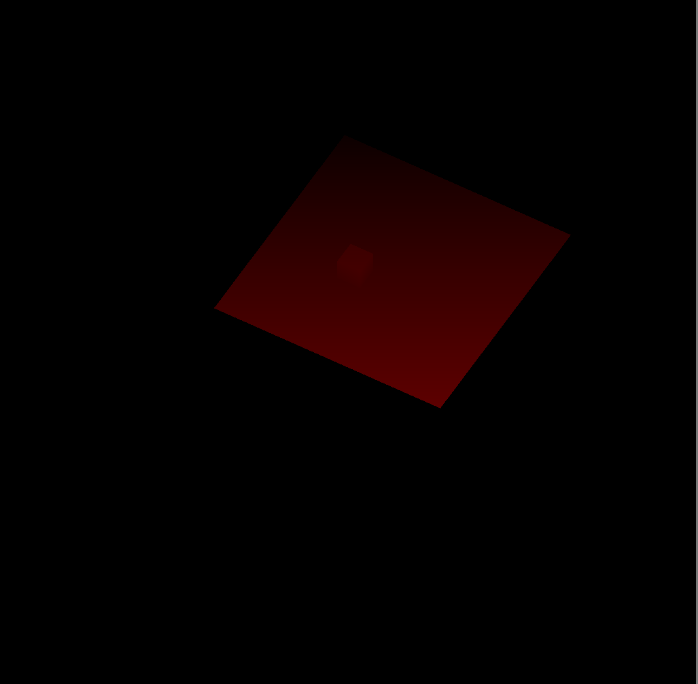
请注意,阴影投射器是使用正交投影渲染的,因为我们正在渲染平行光。
#9 Multiple Lights
我们最多可以有四个平行灯,所以我们也最多支持四张阴影贴图。
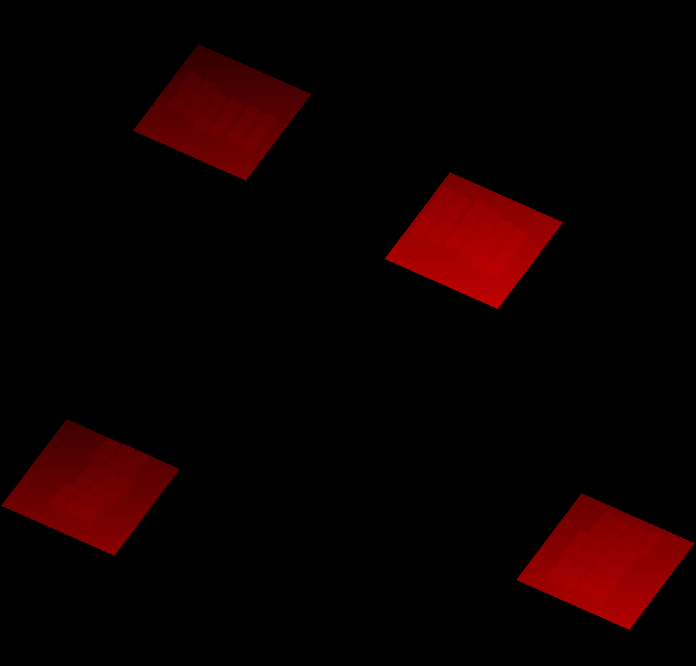
const int maxShadowedDirectionalLightCount = 4;作为一个快速测试,我使用了四个等效的平行光,然后将它们绕着 Y 依次旋转了 90°。
尽管我们最终正确地渲染了所有灯光的阴影贴图,但当我们为每个灯光渲染到整个图集时,它们是叠加的。我们必须拆分我们的图集,以便我们可以为每个灯光提供自己的图块来渲染。
我们最多支持四个shadow light,我们将在我们的方形图集中为每个灯分配一个方形图块。因此,如果我们最终得到多个阴影光,我们必须通过将图块大小减半来将图集分成四个图块。在 Shadows.RenderDirectionalShadows 中确定分割量和图块大小,并将两者都传递给每个灯光的另一个 RenderDirectionalShadows 方法。
	void RenderDirectionalShadows () {
		…

		int split = ShadowedDirectionalLightCount <= 1 ? 1 : 2;
		int tileSize = atlasSize / split;

		for (int i = 0; i < ShadowedDirectionalLightCount; i++) {
			RenderDirectionalShadows(i, split, tileSize);
		}
	}

void RenderDirectionalShadows (int index, int split, int tileSize) { … }我们可以通过调整渲染视口来渲染到单个图块。为此创建一个新方法,该方法将图块索引作为拆分参数。它首先计算图块偏移量,根据索引作 X 偏移和 Y 偏移。这些都是整数运算,但我们最终定义了一个 Rect,因此将结果存储为 Vector2。
	void SetTileViewport(int index, int split)
	{
		Vector2 offset = new Vector2(index % split, index / split);
}然后使用 Rect 在缓冲区上调用 SetViewPort,偏移量按图块尺寸缩放,图块尺寸则是第三个参数。
	void SetTileViewport (int index, int split, float tileSize) {
		Vector2 offset = new Vector2(index % split, index / split);
		buffer.SetViewport(new Rect(
			offset.x * tileSize, offset.y * tileSize, tileSize, tileSize
		));
}Invoke in when setting the matrices.
		SetTileViewport(index, split, tileSize);
		buffer.SetViewProjectionMatrices(viewMatrix, projectionMatrix);
Sampling Shadows
PS:逐句翻译成中文太慢了,简单的英文就不翻译了,只翻译重难点吧
Now we're rendering shadows casters, but that doesn't affect the final image yet. To make shadows show up we have to sample the shadow map in the CustomLit pass and us it to determine whether a surface fragment is shadowed or not.
#1 Shadow Matrices
For each fragment we have to sample the depth information from the appropriate tile in the shadow atlas. So we have to find the shadow texture coordinates for a give world-space position. We'll make this possible by creating a shadow transformation matrix for each shadowed directional light and sending them to the GPU. Add a _DirectionalShadowMatrices shader property identifier and static matrix array to Shadows to make this possible.
	static int
		dirShadowAtlasId = Shader.PropertyToID("_DirectionalShadowAtlas"),
		dirShadowMatricesId = Shader.PropertyToID("_DirectionalShadowMatrices");

	static Matrix4x4[]
dirShadowMatrices = new Matrix4x4[maxShadowedDirectionalLightCount];We can create a conversion matrix from world space to light space by multiplying the light's shadow projection matrix and view matrix in .
	void RenderDirectionalShadows (int index, int split, int tileSize) {
		…
		SetTileViewport(index, split, tileSize);
		dirShadowMatrices[index] = projectionMatrix * viewMatrix;
		buffer.SetViewProjectionMatrices(viewMatrix, projectionMatrix);
		…
}Then once all shadowed lights are rendered send the matrices to the GPU by invoking on the buffer.
	void RenderDirectionalShadows () {
		…

		buffer.SetGlobalMatrixArray(dirShadowMatricesId, dirShadowMatrices);
		buffer.EndSample(bufferName);
		ExecuteBuffer();
}但是,这忽略了我们正在使用阴影图集的事实。让我们创建一个 ConvertToAtlasMatrix 方法,该方法接受一个光照矩阵、Tile偏移和分割,并返回一个从世界空间转换到阴影Tile空间的矩阵。
	Matrix4x4 ConvertToAtlasMatrix (Matrix4x4 m, Vector2 offset, int split) {
		return m;
}We already calculate the tile offset in , so make it return that.
	Vector2 SetTileViewport (int index, int split, float tileSize) {
		…
		return offset;
}Then adjust so it invokes .
		//SetTileViewport(index, split, tileSize);
		dirShadowMatrices[index] = ConvertToAtlasMatrix(
			projectionMatrix * viewMatrix,
			SetTileViewport(index, split, tileSize), split
);The first thing that we should do in is negate the Z dimension if a reversed Z buffer is used. We can check this via .
	Matrix4x4 ConvertToAtlasMatrix (Matrix4x4 m, Vector2 offset, int split) {
		if (SystemInfo.usesReversedZBuffer) {
			m.m20 = -m.m20;
			m.m21 = -m.m21;
			m.m22 = -m.m22;
			m.m23 = -m.m23;
		}
		return m;
}Why are Z buffers reversed?
It is most intuitive to have zero represent zero depth and one represent maximum depth. That's what OpenGL does. But due to the way precision is limited in the depth buffer and the fact that it is stored nonlinearly we make better use of the bits by reversing that. Other graphics API used the reversed approach. We usually we don't need to worry about it, except when we're explicitly working with clip space.
Second, clip space is defined inside a cube with with coordinates going from −1 to 1, with zero at its center. But textures coordinates and depth go from zero to one. We can bake this conversion into the matrix by scaling and offsetting the XYZ dimensions by half. We could do this with a matrix multiplication, but it would result in a lot of multiplications with zero and needless additions. So let's adjust the matrix directly.
		m.m00 = 0.5f * (m.m00 + m.m30);
		m.m01 = 0.5f * (m.m01 + m.m31);
		m.m02 = 0.5f * (m.m02 + m.m32);
		m.m03 = 0.5f * (m.m03 + m.m33);
		m.m10 = 0.5f * (m.m10 + m.m30);
		m.m11 = 0.5f * (m.m11 + m.m31);
		m.m12 = 0.5f * (m.m12 + m.m32);
		m.m13 = 0.5f * (m.m13 + m.m33);
		m.m20 = 0.5f * (m.m20 + m.m30);
		m.m21 = 0.5f * (m.m21 + m.m31);
		m.m22 = 0.5f * (m.m22 + m.m32);
		m.m23 = 0.5f * (m.m23 + m.m33);
return m;Finally, we have to apply the tile offset and scale. Once again we can do this directly to avoid a lot of unnecessary calculations.
		float scale = 1f / split;
		m.m00 = (0.5f * (m.m00 + m.m30) + offset.x * m.m30) * scale;
		m.m01 = (0.5f * (m.m01 + m.m31) + offset.x * m.m31) * scale;
		m.m02 = (0.5f * (m.m02 + m.m32) + offset.x * m.m32) * scale;
		m.m03 = (0.5f * (m.m03 + m.m33) + offset.x * m.m33) * scale;
		m.m10 = (0.5f * (m.m10 + m.m30) + offset.y * m.m30) * scale;
		m.m11 = (0.5f * (m.m11 + m.m31) + offset.y * m.m31) * scale;
		m.m12 = (0.5f * (m.m12 + m.m32) + offset.y * m.m32) * scale;
		m.m13 = (0.5f * (m.m13 + m.m33) + offset.y * m.m33) * scale;
#2 Storing Shadow Data Per Light
To sample shadows for a light we need to know the index of its tile in the shadow atlas, if it has one. This is something that has to be stored per light, so let's make return the required data. We'll provide two values: the shadow strength and the shadow tile offset, packed in a Vector2. If the light doesn't get shadows then the result is the zero vector.
	public Vector2 ReserveDirectionalShadows (…) {
		if (…) {
			ShadowedDirectionalLights[ShadowedDirectionalLightCount] =
				new ShadowedDirectionalLight {
					visibleLightIndex = visibleLightIndex
				};
			return new Vector2(
				light.shadowStrength, ShadowedDirectionalLightCount++
			);
		}
		return Vector2.zero;
}Have make this data available to shaders via a _DirectionalLightShadowData vector array.
	static int
		dirLightCountId = Shader.PropertyToID("_DirectionalLightCount"),
		dirLightColorsId = Shader.PropertyToID("_DirectionalLightColors"),
		dirLightDirectionsId = Shader.PropertyToID("_DirectionalLightDirections"),
		dirLightShadowDataId =
			Shader.PropertyToID("_DirectionalLightShadowData");

	static Vector4[]
		dirLightColors = new Vector4[maxDirLightCount],
		dirLightDirections = new Vector4[maxDirLightCount],
		dirLightShadowData = new Vector4[maxDirLightCount];

	…

	void SetupLights () {
		…
		buffer.SetGlobalVectorArray(dirLightShadowDataId, dirLightShadowData);
	}

	void SetupDirectionalLight (int index, ref VisibleLight visibleLight) {
		dirLightColors[index] = visibleLight.finalColor;
		dirLightDirections[index] = -visibleLight.localToWorldMatrix.GetColumn(2);
		dirLightShadowData[index] =
			shadows.ReserveDirectionalShadows(visibleLight.light, index);
}And add it to the _CustomLight buffer in the Light HLSL file as well.
CBUFFER_START(_CustomLight)
	int _DirectionalLightCount;
	float4 _DirectionalLightColors[MAX_DIRECTIONAL_LIGHT_COUNT];
	float4 _DirectionalLightDirections[MAX_DIRECTIONAL_LIGHT_COUNT];
	float4 _DirectionalLightShadowData[MAX_DIRECTIONAL_LIGHT_COUNT];
CBUFFER_END
#3 Shadow HLSL File
We'll also create a dedicated Shadows HLSL file for shadow sampling. Define the same max shadowed directional light count, along with the _DirectionalShadowAtlas texture, plus the _DirectionalShadowMatrices array in a buffer.
#ifndef CUSTOM_SHADOWS_INCLUDED
#define CUSTOM_SHADOWS_INCLUDED

#define MAX_SHADOWED_DIRECTIONAL_LIGHT_COUNT 4

TEXTURE2D(_DirectionalShadowAtlas);
SAMPLER(sampler_DirectionalShadowAtlas);

CBUFFER_START(_CustomShadows)
	float4x4 _DirectionalShadowMatrices[MAX_SHADOWED_DIRECTIONAL_LIGHT_COUNT];
CBUFFER_END

#endifAs the atlas isn't a regular texture let's define it via the macro instead to be clear, even though it doesn't make a difference for the platforms that we support. And we'll use a special macro to define the sampler state, as this does define a different way to sample shadow maps, because regular bilinear filtering doesn't make sense for depth data.
TEXTURE2D_SHADOW(_DirectionalShadowAtlas);
SAMPLER_CMP(sampler_DirectionalShadowAtlas);事实上,只有一种合适的方式来采样阴影贴图,所以我们可以定义一个独特的采样器状态,而不是依赖于 Unity 为我们的渲染纹理推导出的一个。采样器状态可以通过创建一个名称中包含特定单词的状态来内联定义。我们可以使用 sampler_linear_clamp_compare,让我们也为它定义一个简写的 SHADOW_SAMPLER 宏。
TEXTURE2D_SHADOW(_DirectionalShadowAtlas);
#define SHADOW_SAMPLER sampler_linear_clamp_compare
SAMPLER_CMP(SHADOW_SAMPLER);Include Shadows before Light in LitPass.
#4 Sampling Shadows
To sample shadows we need to know the per-light shadow data, so let's defined a struct for that in Shadows, specifically for directional lights. It contains the strength and tile offset, but the code in Shadows doesn't know where it is stored.
struct DirectionalShadowData {
	float strength;
	int tileIndex;
};We also need to know the surface position, so add it to the struct.
struct Surface {
	float3 position;
	…
};And assign it in .
	Surface surface;
	surface.position = input.positionWS;
surface.normal = normalize(input.normalWS);Add a function to Shadows that samples the shadow atlas via the macro, passing it the atlas, shadow sampler, and position in shadow texture space, which a corresponding parameter.
float SampleDirectionalShadowAtlas (float3 positionSTS) {
	return SAMPLE_TEXTURE2D_SHADOW(
		_DirectionalShadowAtlas, SHADOW_SAMPLER, positionSTS
	);
}然后添加一个 GetDirectionalShadowAttenuation 函数,该函数返回阴影衰减,给定平行光阴影数据和表面数据,该数据应该在世界空间中定义。它使用Tile offset来检索正确的矩阵,将表面位置转换为阴影Tile空间,然后对图集进行采样。
float GetDirectionalShadowAttenuation (DirectionalShadowData data, Surface surfaceWS) {
	float3 positionSTS = mul(
		_DirectionalShadowMatrices[data.tileIndex],
		float4(surfaceWS.position, 1.0)
	).xyz;
	float shadow = SampleDirectionalShadowAtlas(positionSTS);
	return shadow;
}The result of sampling the shadow atlas is a factor that determines how much of the light reaches the surface, taking only shadows into account. It's a value in the 0–1 range that's know as an attenuation factor. If the fragment is fully shadowed then we get zero and when it's not shadowed at all then we get one. Values in between indicate that the fragment is partially shadowed.
除此之外,出于艺术原因或表示半透明表面的阴影,可以降低灯光的阴影强度。 当强度降低到零时,衰减根本不受阴影影响,应该是一。因此,最终衰减是通过基于强度的 1 和采样衰减之间的线性插值来找到的。
return lerp(1.0, shadow, data.strength);But when the shadow strength is zero then it isn't needed to sample shadows at all, as they have no effect and haven't even been rendered. In that case we have an unshadowed light and should always return one.
float GetDirectionalShadowAttenuation (DirectionalShadowData data, Surface surfaceWS) {
	if (data.strength <= 0.0) {
		return 1.0;
	}
	…
}Is it a good idea to branch in shaders?
Branching used to be inefficient, but modern GPUs can deal with them just fine. What you have to keep in mind is that blocks of fragments are shaded in parallel. If even one fragment branches a specific way then the entire block does, even if all other fragments ignore the results of that code path. In this case we branch based on the light's strength, which is—at least at this point—the same for all fragments.
#5 Attenuating Light
We'll store the light's attenuation in the struct.
struct Light {
	float3 color;
	float3 direction;
	float attenuation;
};Add a function to Light that gets the directional shadow data.
DirectionalShadowData GetDirectionalShadowData (int lightIndex) {
	DirectionalShadowData data;
	data.strength = _DirectionalLightShadowData[lightIndex].x;
	data.tileIndex = _DirectionalLightShadowData[lightIndex].y;
	return data;
}Then add a world-space surface parameter to , have it retrieve the directional shadow data and use to set the light's attenuation.
Light GetDirectionalLight (int index, Surface surfaceWS) {
	Light light;
	light.color = _DirectionalLightColors[index].rgb;
	light.direction = _DirectionalLightDirections[index].xyz;
	DirectionalShadowData shadowData = GetDirectionalShadowData(index);
	light.attenuation = GetDirectionalShadowAttenuation(shadowData, surfaceWS);
	return light;
}Now in Lighting must also pass the surface to . And the surface is now expected to be defined in world space, so rename the parameter accordingly. Only BRDF doesn't care about the space of the light and surface, as long as they match.
float3 GetLighting (Surface surfaceWS, BRDF brdf) {
	float3 color = 0.0;
	for (int i = 0; i < GetDirectionalLightCount(); i++) {
		color += GetLighting(surfaceWS, brdf, GetDirectionalLight(i, surfaceWS));
	}
	return color;
}The final step to get shadows working is factoring attenuation into the light's intensity.
float3 IncomingLight (Surface surface, Light light) {
	return
		saturate(dot(surface.normal, light.direction) * light.attenuation) *
		light.color;
}现在可以得到阴影了,但是阴影的效果非常糟糕。

不应被遮蔽的表面最终会形成像素化带的阴影。 些是由阴影贴图的有限分辨率导致的自阴影引起的。使用不同的分辨率会改变自阴影,但不会消除它们。表面最终会部分遮蔽自己,但我们稍后会处理这个问题。我们现在可以很容易地看到阴影贴图所覆盖的区域,所以我们暂时保留这张帖图。

例如,我们可以看到阴影贴图只覆盖了部分可见区域,由最大阴影距离控制。更改最大值会增大或缩小区域。阴影贴图与光线方向对齐,而不是与相机对齐。 一些阴影在最大距离之外是可见的,但有些是丢失的,并且当阴影被采样到地图边缘之外时会变得很奇怪。如果只有一个阴影灯处于活动状态,则结果将被Clamp,否则样本可以跨越图块边界,并且一盏灯最终会使用来自另一盏灯的阴影。

We'll correctly cut off shadows at the max distance later, but for now these invalid shadows remain visible.
Cascaded Shadow Maps
Because directional lights affect everything up to the max shadow distance their shadow maps end up covering a large area. As the shadow map uses an orthographic projecting each texel in the shadow map has a fixed world-space size. If this size is too large then individual shadow texels are clearly visible, resulting in jagged shadow edges and small shadows that can disappear. This can be alleviated by increasing the atlas size, but only up to a point.
当使用透视相机时,远处的东西看起来更小。在某个视觉距离处,阴影贴图纹素将映射到单个显示像素,这意味着阴影分辨率在理论上是最佳的。离相机越近,我们需要更高的阴影分辨率(因为多个像素可能对应同一个阴影贴图的纹素),而离相机越远,越低的分辨率就足够了。这表明理想情况下,我们会根据阴影接收器的视距使用可变阴影贴图分辨率。
Cascaded shadows maps(级联阴影贴图) are a solution to this problem. The idea is that shadow casters are rendered more than once, so each light gets multiple tiles in the atlas, known as cascades. The first cascade covers only a small region close to the camera and successive cascades zoom out to cover an increasingly larger area with the same amount of texels. The shader then samples the best cascade available for each fragment.
#1 Settings
Unity's shadow code supports up to four cascades per directional light. So far we've only used a single cascade that covers everything up to the max shadow distances. To support more we'll add a cascade count slider to the directional shadow settings. While we could use a different amount per directional light it makes most sense to use the same for all shadowed directional lights.
每个级联覆盖阴影区域的一部分,直到最大阴影距离。我们将通过为前三个级联添加比率滑块来配置确切的部分。 最后一个级联总是覆盖整个范围,因此不需要滑块。默认情况下将级联计数设置为四,级联比率为 0.1、0.25 和 0.5。这些比率应该随着级联增加,但我们不会在 UI 中强制执行。
	public struct Directional {

		public MapSize atlasSize;

		[Range(1, 4)]
		public int cascadeCount;

		[Range(0f, 1f)]
		public float cascadeRatio1, cascadeRatio2, cascadeRatio3;
	}

	public Directional directional = new Directional {
		atlasSize = MapSize._1024,
		cascadeCount = 4,
		cascadeRatio1 = 0.1f,
		cascadeRatio2 = 0.25f,
		cascadeRatio3 = 0.5f
	};

The method requires us to provide the ratios packed in a , so let's add a convenient property to the settings to retrieve them in that form.
		public Vector3 CascadeRatios =>
			new Vector3(cascadeRatio1, cascadeRatio2, cascadeRatio3);
#2 Rendering Cascades(设置级联映射阴影)
Each cascade requires its own transformation matrix, so the shadow matrix array size of has to be multiplied by the maximum amount of cascades per light, which is four.
	const int maxShadowedDirectionalLightCount = 4, maxCascades = 4;

	…

	static Matrix4x4[]
dirShadowMatrices = new Matrix4x4[maxShadowedDirectionalLightCount * maxCascades];Increase the array's size in Shadows as well.
#define MAX_SHADOWED_DIRECTIONAL_LIGHT_COUNT 4
#define MAX_CASCADE_COUNT 4

…

CBUFFER_START(_CustomShadows)
	float4x4 _DirectionalShadowMatrices
		[MAX_SHADOWED_DIRECTIONAL_LIGHT_COUNT * MAX_CASCADE_COUNT];
CBUFFER_END完成此操作后,Unity 会complain着色器的数组大小已更改,但无法使用新大小。这是因为一旦着色器声明了固定数组,它们的大小就不能在同一 session 期间在 GPU 上更改。我们必须重新启动 Unity 才能重新初始化它。
After that's done, multiply the returned tile offset in by the configured cascade amount, as each directional light will now claim multiple successive tiles.
			return new Vector2(
				light.shadowStrength,
				settings.directional.cascadeCount * ShadowedDirectionalLightCount++
);Likewise, the amount of used tiles gets multiplied in , which means that we could end up with a total of sixteen tiles, requiring a split by four.
		int tiles = ShadowedDirectionalLightCount * settings.directional.cascadeCount;
		int split = tiles <= 1 ? 1 : tiles <= 4 ? 2 : 4;
int tileSize = atlasSize / split;Why not also support a split by 3?
We limit ourselves to powers of two, the same restriction we apply to the atlas size. That way an integer division is always possible, otherwise we can get misalignment issues(错位问题). This means that some light configurations won't use all available tiles, wasting texture space. If this is a problem then you could add support for a rectangular atlas that doesn't need to be square. However, you're more likely to by limited by the amount of tiles that you can render than texture space.
现在RenderDirectionalShadows必须为每个级联绘制阴影。 将代码从 ComputeDirectionalShadowMatricesAndCullingPrimitives 到并包括 DrawShadows 放在每个已配置级联的循环中。ComputeDirectionalShadowMatricesAndCullingPrimitives 的第二个参数现在成为级联索引,然后是级联计数和级联比率。还要调整 Tile 索引,使其成为灯光的平铺偏移加上级联索引。
	void RenderDirectionalShadows (int index, int split, int tileSize) {
		ShadowedDirectionalLight light = shadowedDirectionalLights[index];
		var shadowSettings =
			new ShadowDrawingSettings(cullingResults, light.visibleLightIndex);
		int cascadeCount = settings.directional.cascadeCount;
		int tileOffset = index * cascadeCount;
		Vector3 ratios = settings.directional.CascadeRatios;

		for (int i = 0; i < cascadeCount; i++) {
			cullingResults.ComputeDirectionalShadowMatricesAndCullingPrimitives(
				light.visibleLightIndex, i, cascadeCount, ratios, tileSize, 0f,
				out Matrix4x4 viewMatrix, out Matrix4x4 projectionMatrix,
				out ShadowSplitData splitData
			);
			shadowSettings.splitData = splitData;
			int tileIndex = tileOffset + i;
			dirShadowMatrices[tileIndex] = ConvertToAtlasMatrix(
				projectionMatrix * viewMatrix,
				SetTileViewport(tileIndex, split, tileSize), split
			);
			buffer.SetViewProjectionMatrices(viewMatrix, projectionMatrix);
			ExecuteBuffer();
			context.DrawShadows(ref shadowSettings);
		}
	}

#3 Culling Spheres(根据比率获得采样层)
Unity 通过为每个级联创建一个剔除球体来确定每个级联覆盖的区域。由于阴影投影是正交的和方形的,它们最终会紧密贴合它们的剔除球体,但也会覆盖它们周围的一些空间。这就是为什么在剔除区域之外可以看到一些阴影的原因。此外,光的方向与球体无关,因此所有 Directional 光最终都使用相同的剔除球体。

These spheres are also needed to determine which cascade to sample from, so we have to send them to the GPU. Add an identifier for a cascade count and a cascaded culling sphere array, plus a static array for the sphere data. They're defined by four-component vectors, containing their XYZ position plus their radius in the W component.
	static int
		dirShadowAtlasId = Shader.PropertyToID("_DirectionalShadowAtlas"),
		dirShadowMatricesId = Shader.PropertyToID("_DirectionalShadowMatrices"),
		cascadeCountId = Shader.PropertyToID("_CascadeCount"),
		cascadeCullingSpheresId = Shader.PropertyToID("_CascadeCullingSpheres");

static Vector4[] cascadeCullingSpheres = new Vector4[maxCascades];The cascade's culling sphere is part of the split data that outputs. Assign it to the sphere array in the loop in . But we only need to do this for the first light, as the cascades of all lights are equivalent.
		for (int i = 0; i < cascadeCount; i++) {
			cullingResults.ComputeDirectionalShadowMatricesAndCullingPrimitives(…);
			shadowSettings.splitData = splitData;
			if (index == 0) {
				cascadeCullingSpheres[i] = splitData.cullingSphere;
			}
			…
}We need the spheres in the shader to check whether a surface fragment lies inside them, which can be done by comparing the square distance from the sphere's center with its square radius. So let's store the square radius instead, so we don't have to calculate it in the shader.
				Vector4 cullingSphere = splitData.cullingSphere;
				cullingSphere.w *= cullingSphere.w;
cascadeCullingSpheres[i] = cullingSphere;Send the cascade count and spheres to the GPU after rendering the cascades.
	void RenderDirectionalShadows () {
		…

		buffer.SetGlobalInt(cascadeCountId, settings.directional.cascadeCount);
		buffer.SetGlobalVectorArray(
			cascadeCullingSpheresId, cascadeCullingSpheres
		);
		buffer.SetGlobalMatrixArray(dirShadowMatricesId, dirShadowMatrices);
		buffer.EndSample(bufferName);
		ExecuteBuffer();
	}
#4 Sampling Cascades(根据级联映射的层级采样)
Add the cascade count and culling spheres array to Shadows.
	int _CascadeCount;
float4 _CascadeCullingSpheres[MAX_CASCADE_COUNT];The cascade index is determined per fragment, not per light. So let's introduce a global struct that contains it. We'll add some more data to it later. Also add a function that returns the shadow data for a world-space surface, initially with the cascade index always set to zero.
struct ShadowData {
	int cascadeIndex;
};

ShadowData GetShadowData (Surface surfaceWS) {
	ShadowData data;
	data.cascadeIndex = 0;
	return data;
}Add the new data as a parameter to , so it can select the correct tile index by adding the cascade index to the light's shadow tile offset.
Light GetDirectionalLight (int index, Surface surfaceWS, ShadowData shadowData) {
	…
	DirectionalShadowData dirShadowData =
		GetDirectionalShadowData(index, shadowData);
	light.attenuation = GetDirectionalShadowAttenuation(dirShadowData, surfaceWS);
	return light;
}Get the shadow data in and pass it along.
float3 GetLighting (Surface surfaceWS, BRDF brdf) {
	ShadowData shadowData = GetShadowData(surfaceWS);
	float3 color = 0.0;
	for (int i = 0; i < GetDirectionalLightCount(); i++) {
		Light light = GetDirectionalLight(i, surfaceWS, shadowData);
		color += GetLighting(surfaceWS, brdf, light);
	}
	return color;
}
First cascade

Last cascade
To select the correct cascade we need to calculate the square distance between two points. Let's add a convenient function to for that.
float DistanceSquared(float3 pA, float3 pB) {
	return dot(pA - pB, pA - pB);
}Loop through all cascade culling spheres in until we find one that contains the surface position. Break out of the loop once it's found and then use the current loop iterator as the cascade index. This means we end up with an invalid index if the fragment lies outside all spheres, but we'll ignore that for now.
	int i;
	for (i = 0; i < _CascadeCount; i++) {
		float4 sphere = _CascadeCullingSpheres[i];
		float distanceSqr = DistanceSquared(surfaceWS.position, sphere.xyz);
		if (distanceSqr < sphere.w) {
			break;
		}
	}
	data.cascadeIndex = i;

We now get shadows with a much better distribution of texel density. The curved transition borders between cascades are also visible due to the self-shadowing artifacts, though we can make them easier to spot by replacing the shadow attenuation with the cascade index, divided by four.
	Light light;
	light.color = _DirectionalLightColors[index].rgb;
	light.direction = _DirectionalLightDirections[index].xyz;
	DirectionalShadowData dirShadowData =
		GetDirectionalShadowData(index, shadowData);
	light.attenuation = GetDirectionalShadowAttenuation(dirShadowData, surfaceWS);
		light.attenuation = shadowData.cascadeIndex * 0.25;

5# Culling Shadow Sampling(剔除最大阴影距离之外的阴影)
If we end up beyond the last cascade them there is most likely no valid shadow data and we should not sample shadows at all. An easy way to enforce this is by adding a strength field to , setting it to one by default and to zero if we end up beyond the last cascade.
struct ShadowData {
	int cascadeIndex;
	float strength;
};

ShadowData GetShadowData (Surface surfaceWS) {
	ShadowData data;
	data.strength = 1.0;
	int i;
	for (i = 0; i < _CascadeCount; i++) {
		…
	}

	if (i == _CascadeCount) {
		data.strength = 0.0;
	}

	data.cascadeIndex = i;
	return data;
}Then factor the global shadow strength into the directional shadow strength in . This culls all shadows beyond the last cascade.
	data.strength =
_DirectionalLightShadowData[lightIndex].x * shadowData.strength;Also, restore the correct attenuation in .
	light.attenuation = GetDirectionalShadowAttenuation(dirShadowData, surfaceWS);
//light.attenuation = shadowData.cascadeIndex * 0.25;那么最大距离之外就没有阴影了。

#6 Max Distance
Some experimentation with the max shadow distance will reveal that some shadow casters suddenly disappear while still inside the culling sphere of the last cascade. This happens because the outermost culling sphere doesn't end exactly at the configured max distance but extends a bit beyond it. This discrepancy is most noticeable with a small max distance.(问题就是在剔除球体之内的阴影突然出现和消失的现象)
We can fix the popping of shadows by also stopping to sample shadows at the max distance. To make this possible we have to send the max distance to the GPU in .
	static int
		…
		cascadeCullingSpheresId = Shader.PropertyToID("_CascadeCullingSpheres"),
		shadowDistanceId = Shader.PropertyToID("_ShadowDistance");

	…

	void RenderDirectionalShadows () {
		…
		buffer.SetGlobalFloat(shadowDistanceId, settings.maxDistance);
		buffer.EndSample(bufferName);
		ExecuteBuffer();
}The max distance is based on view-space depth, not distance to the camera's position. So to perform this culling we need to know the depth of the surface. Add a field for that to .
struct Surface {
	float3 position;
	float3 normal;
	float3 viewDirection;
	float depth;
	…
};The depth can be found in by converting from world space to view space via and taking the negated Z coordinate. As this conversion is only a rotation and offset relative to world space the depth is the same in both view space and world space.
	surface.viewDirection = normalize(_WorldSpaceCameraPos - input.positionWS);
surface.depth = -TransformWorldToView(input.positionWS).z;Now instead of always initializing the strength to one in do this only when the surface depth is less than the max distance, otherwise set it to zero.
CBUFFER_START(_CustomShadows)
	…
	float _ShadowDistance;
CBUFFER_END

…
float FadedShadowStrength (float distance, float scale, float fade) {
	return saturate((1.0 - distance * scale) * fade);
}

ShadowData GetShadowData (Surface surfaceWS) {
	ShadowData data;
	data.strength = surfaceWS.depth < _ShadowDistance ? 1.0 : 0.0;
	…
}

#7 Fading Shadows(最大距离处的阴影衰减)
Suddenly cutting off shadows at the max distance can by very obvious, so let's make the transition smoother by linearly fading them. The fading starts some distance before the max, until we reach a strength of zero at the max. We can use the function 1−dmf1-dmf clamped to 0–1 for that, where dd is the surface depth, mm is the max shadow distance, and ff is a fade range, expressed as a fraction of the max distance.

Add a slider for the distance fade to the shadow settings. As both the fade and max values are used as divisors they shouldn't be zero, so set their minimum values to 0.001.
	[Min(0.001f)]
	public float maxDistance = 100f;

	[Range(0.001f, 1f)]
public float distanceFade = 0.1f;Replace the shadow distance identifier in with one for both the distance value and the fade value.
		//shadowDistanceId = Shader.PropertyToID("_ShadowDistance");
shadowDistanceFadeId = Shader.PropertyToID("_ShadowDistanceFade");When sending them as the XY components of a vector to the GPU, use one divided by the values so we can avoid divisions in the shader, as multiplications are faster.
		//buffer.SetGlobalFloat(shadowDistanceId, settings.maxDistance);
		buffer.SetGlobalVector(
			shadowDistanceFadeId,
			new Vector4(1f / settings.maxDistance, 1f / settings.distanceFade)
);Adjust the buffer in Shadows to match.
	//float _ShadowDistance;
float4 _ShadowDistanceFade;Now we can calculate the faded shadow strength using (1-ds)f saturated, with 1/m used for the scale s and 1/f used for the new fade multiplier f. Create a function for that and use it in .
float FadedShadowStrength (float distance, float scale, float fade) {
	return saturate((1.0 - distance * scale) * fade);
}

ShadowData GetShadowData (Surface surfaceWS) {
	ShadowData data;
	data.strength = FadedShadowStrength(
		surfaceWS.depth, _ShadowDistanceFade.x, _ShadowDistanceFade.y
	);
	…
}

#8 Fading Cascades(最后一级级联阴影的淡出)
We can fade shadows at the edge of the last cascade as well instead of cutting them off, using the same approach. Add a cascade fade shadow setting slider for that.
	public struct Directional {

		…

		[Range(0.001f, 1f)]
		public float cascadeFade;
	}

	public Directional directional = new Directional {
		…
		cascadeRatio3 = 0.5f,
		cascadeFade = 0.1f
	};


		float f = 1f - settings.directional.cascadeFade;
		buffer.SetGlobalVector(
			shadowDistanceFadeId, new Vector4(
				1f / settings.maxDistance, 1f / settings.distanceFade,
				1f / (1f - f * f)
			)
);要执行级联淡入淡出,请检查我们是否在最后一个级联中,同时是否在 GetShadowData 中的循环内。如果是这样,计算级联的褪色阴影强度并将其计入最终强度。

Shadow Quality
Now that we have functional cascading shadow maps let's focus on improving the quality of the shadows. The artifacts that we've observed all this time are known as shadow acne(阴影痤疮), which is caused by incorrect self-shadowing of surfaces that aren't perfectly aligned with the light direction. Acne gets worse as the surface gets closer to being parallel to the light direction.

Increasing the atlas size decreases the world-space size of the texels, so the acne artifacts get smaller. However, the amount of artifacts also increases, so the problem cannot be solved by simply increasing the atlas size.
#1 Depth Bias(深度偏移)
There are various approaches to mitigate shadow acne. The simplest is adding a constant bias to the depth of shadow casters, pushing them away from the light so incorrect self-shadowing no longer happens. The quickest way to add this technique is by applying a global depth bias when rendering, invoking SetGlobalDepthBias on the buffer before DrawShadows and setting it back to zero afterwards. This is a depth bias applied in clip space and a multiple of a very small value, the specifics depending on the exact format used for shadow maps. We can get an idea of how it works by using a large value, like 50000. There is also a second argument for a slope-scale bias, but we'll keep that at zero for now. 总而言之就是先用全局偏移变量来做一个深度偏移。
			buffer.SetGlobalDepthBias(50000f, 0f);
			ExecuteBuffer();
			context.DrawShadows(ref shadowSettings);
buffer.SetGlobalDepthBias(0f, 0f);消失了一大半,很好!

A constant bias is simple but is only able to remove artifacts for surfaces that are mostly lit head-on. Removing all acne requires a much larger bias, like an order of magnitude bigger.
buffer.SetGlobalDepthBias(500000f, 0f);

However, as the depth bias pushes shadow casters away from the light the sampled shadows are also moved in the same direction. Biases that are large enough to remove most acne invariable move shadow so far away that they appear to detach from their casters, causing visual artifacts known as Peter-Panning. 这里总而言之就是,Bias设置太大,会造成物体和影子割裂的现象。

另一种方法是应用斜率比例偏差,这是通过对 SetGlobalDepthBias 的第二个参数使用非零值来完成的。该值用于沿 X 和 Y 维度缩放绝对裁剪空间深度导数的最大值。因此,对于垂直光照方向的表面,它为零,当光线在两个维度中的至少一个中以 45° 角撞击时,它为 1,当表面法线和光线方向的点积达到零时,它接近无穷大。因此,接近平行表面时,偏差会自动增加,且没有上限。因此,消除痤疮所需的因子要低得多,例如 3 而不是 500000。
这里说人话就是,根据不同的斜率,做不同的偏差,斜率越大,偏差越大。
buffer.SetGlobalDepthBias(0f, 3f);还是有一点点偏差,但是好很多了。

Slope scale bias is effective but not intuitive. Experimentation is needed to arrive at an acceptable result that trades acne for Peter-Panning. So let's disable it for now and look for a more intuitive and predictable approach. 就是偏移总归是有一点点瑕疵,所以我们寻找更有效的方法。
			//buffer.SetGlobalDepthBias(0f, 3f);
			ExecuteBuffer();
			context.DrawShadows(ref shadowSettings);
			//buffer.SetGlobalDepthBias(0f, 0f);
#2 Cascade Data(做一个小优化,把阴影边界衰减在GPU中的除法在CPU中提前算了)
Because the size of the acne depends on the world-space texel size a consistent approach that works in all cases must take this into account. As the texel size varies per cascade this means that we'll have to send some more cascade data to the GPU. Add a generic cascade data vector array to for that.
	static int
		…
		cascadeCullingSpheresId = Shader.PropertyToID("_CascadeCullingSpheres"),
		cascadeDataId = Shader.PropertyToID("_CascadeData"),
		shadowDistanceFadeId = Shader.PropertyToID("_ShadowDistanceFade");

	static Vector4[]
		cascadeCullingSpheres = new Vector4[maxCascades],
cascadeData = new Vector4[maxCascades];Send it to the GPU along with everything else.
		buffer.SetGlobalVectorArray(
			cascadeCullingSpheresId, cascadeCullingSpheres
		);
buffer.SetGlobalVectorArray(cascadeDataId, cascadeData);One thing we can already do is put the inverse of the squared cascade radius in the X component of these vectors. (把级联球半径的导入放入数组)That way we don't have to perform this division in the shader. Do this in a new method, along with storing the culling sphere and invoke it in . Pass it the cascade index, culling sphere, and tile size as a float.
	void RenderDirectionalShadows (int index, int split, int tileSize) {
		…

		for (int i = 0; i < cascadeCount; i++) {
			…
			if (index == 0) {
				SetCascadeData(i, splitData.cullingSphere, tileSize);
			}
			…
		}
	}

	void SetCascadeData (int index, Vector4 cullingSphere, float tileSize) {
		cascadeData[index].x = 1f / cullingSphere.w;
		cullingSphere.w *= cullingSphere.w;
		cascadeCullingSpheres[index] = cullingSphere;
}Add the cascade data to the _CustomShadows buffer in Shadows.
				data.strength *= FadedShadowStrength(
					distanceSqr, _CascadeData[i].x, _ShadowDistanceFade.z
				);
#3 Normal Bias
Incorrect self-shadowing happens because a shadow caster depth texel covers more than one fragment, which causes the caster's volume to poke out of its surface(自阴影问题的原因是由于一个阴影纹理覆盖了多个像素). So if we shrink the caster enough this should no longer happen. However, shrinking shadows caster will make shadows smaller than they should be and can introduce holes that shouldn't exist.
We can also do the opposite: inflate the surface while sampling shadows. Then we're sampling a bit away from the surface, just far enough to avoid incorrect self-shadowing. This will adjust the positions of shadows a bit, potentially causing misalignment along edges and adding false shadows, but these artifacts tend to be far less obvious than Peter-Panning. (阴影采样的时候可以做一点偏移,效果不完美,但也可以减缓Peter-Panning)
We can do that by moving the surface position a bit along its normal vector for the purpose of sampling shadows. If we only consider a single dimension then an offset equal to the world-space texel size should be sufficient. We can find the texel size in SetCascadeData by dividing the diameter of the culling sphere by the tile size. Store it in the Y component of the cascade data vector.(就采样的时候,采样点沿着法线移动一个阴影纹素的距离就好了)
		float texelSize = 2f * cullingSphere.w / tileSize;
		cullingSphere.w *= cullingSphere.w;
		cascadeCullingSpheres[index] = cullingSphere;
		//cascadeData[index].x = 1f / cullingSphere.w;
		cascadeData[index] = new Vector4(
			1f / cullingSphere.w,
			texelSize
);However, this isn't always sufficient because texels are squares. In the worst case we end up having to offset along the square's diagonal, so let's scale it by √2.
texelSize * 1.4142136fOn the shader side, add a parameter for the global shadow data to . Multiply the surface normal with the offset to find the normal bias and add it to the world position before calculating the position in shadow tile space.
float GetDirectionalShadowAttenuation (DirectionalShadowData directional, ShadowData global, Surface surfaceWS) {
	if (directional.strength <= 0.0) {
		return 1.0;
	}
	float3 normalBias = surfaceWS.normal * _CascadeData[global.cascadeIndex].y;
	float3 positionSTS = mul(_DirectionalShadowMatrices[directional.tileIndex],float4(surfaceWS.position + normalBias, 1.0)).xyz;
	float shadow = SampleDirectionalShadowAtlas(positionSTS);
	return lerp(1.0, shadow, directional.strength);
}Pass the extra data to it in .
	light.attenuation =
GetDirectionalShadowAttenuation(dirShadowData, shadowData, surfaceWS);现在问题基本解决了呢。


#4 Configurable Biases
The normal bias gets rid of shadow acne without introducing obvious new artifacts, but it cannot eliminate all shadow problems. For example, there are shadow lines visible on the floor below walls that shouldn't be there.(还是有问题,比如墙下会产生阴影) This isn't self-shadowing, but shadows poking out of the wall affecting the floor below it. Adding a little slope-scale bias can deal with those, but there is no perfect value for it. So we'll configure it per light, using their existing Bias slider. Add a field for it to the struct in .
	struct ShadowedDirectionalLight {
		public int visibleLightIndex;
		public float slopeScaleBias;
}The light's bias is made available via its property. Add it to the data in .
			shadowedDirectionalLights[ShadowedDirectionalLightCount] =
				new ShadowedDirectionalLight {
					visibleLightIndex = visibleLightIndex,
					slopeScaleBias = light.shadowBias
};And use it to configure the slope-scale bias in .
			buffer.SetGlobalDepthBias(0f, light.slopeScaleBias);
			ExecuteBuffer();
			context.DrawShadows(ref shadowSettings);
buffer.SetGlobalDepthBias(0f, 0f);Let's also use the light's existing Normal Bias slider to modulate the normal bias that we apply. Make return a and use the light's for the new Z component.
	public Vector3 ReserveDirectionalShadows (
		Light light, int visibleLightIndex
	) {
		if (…) {
			…
			return new Vector3(
				light.shadowStrength,
				settings.directional.cascadeCount * ShadowedDirectionalLightCount++,
				light.shadowNormalBias
			);
		}
		return Vector3.zero;
}Add the new normal bias to and apply it in in Shadows.
struct DirectionalShadowData {
	float strength;
	int tileIndex;
	float normalBias;
};

…

float GetDirectionalShadowAttenuation (…) {
	…
	float3 normalBias = surfaceWS.normal *
		(directional.normalBias * _CascadeData[global.cascadeIndex].y);
	…
}And configure it in in Light.
	data.tileIndex =
		_DirectionalLightShadowData[lightIndex].y + shadowData.cascadeIndex;
data.normalBias = _DirectionalLightShadowData[lightIndex].z;我们现在可以调整每盏灯的两个偏差。斜率比例偏差为零,正常偏差为零是一个很好的默认值。 如果你增加第一个,你可以减少第二个。但请记住,我们对这些灯光设置的解释与其最初的目的不同。它们曾经是剪辑空间深度偏差和世界空间收缩法线偏差。所以当你创建一个新的灯光时,你会得到严重的Peter-,直到你调整偏差。

#5 Shadow Pancaking
Another potential problem that can cause artifacts is that Unity applies shadow pancaking. The idea is that when rendering shadow casters for a directional light the near plane is moved forward as much as possible. This increases depth precision, but it means that shadow casters that aren't in view of the camera can end up in front of the near plane, which causes them to get clipped while they shouldn't.(就是在ShadowCaster的近平面之外的物体是不会进行阴影投射的)

这可以通过在 ShadowCasterPassVertex 中将顶点位置固定在近平面上来解决,有效地压平位于近平面前面的阴影投射,将它们变成粘在近平面上的薄饼。 我们通过取裁剪空间 Z 和 W 坐标中的最大值来做到这一点,或者在定义 UNITY_REVERSED_Z 时取它们的最小值。 要为 W 坐标使用正确的符号,请将其与 UNITY_NEAR_CLIP_VALUE 相乘。
	output.positionCS = TransformWorldToHClip(positionWS);

	#if UNITY_REVERSED_Z
		output.positionCS.z =
			min(output.positionCS.z, output.positionCS.w * UNITY_NEAR_CLIP_VALUE);
	#else
		output.positionCS.z =
			max(output.positionCS.z, output.positionCS.w * UNITY_NEAR_CLIP_VALUE);
	#endif
This works perfectly for shadow casters that are fully on either side of the near plane, but shadows casters that cross the plane get deformed as only some of their vertices are affected. This isn't noticeable for small triangles, but large triangles can end up deforming a lot, bending them and often causing them to sink into surfaces.(就是太大的穿过近平面的三角形显示畸形了,就要么都投影,要么都不投影,一部分投影了,另一部分没投影,就会产生畸形,三角形越大,畸形越明显)

The problem can be alleviated by pulling the near plane back a bit. That's what the Near Plane slider of lights is for. Add a field for the near plane offset to .
	struct ShadowedDirectionalLight {
		public int visibleLightIndex;
		public float slopeScaleBias;
		public float nearPlaneOffset;
}And copy the light's property to it.
			shadowedDirectionalLights[ShadowedDirectionalLightCount] =
				new ShadowedDirectionalLight {
					visibleLightIndex = visibleLightIndex,
					slopeScaleBias = light.shadowBias,
					nearPlaneOffset = light.shadowNearPlane
};We apply it by filling in the last argument of that we still gave a fixed value of zero.
			cullingResults.ComputeDirectionalShadowMatricesAndCullingPrimitives(
				light.visibleLightIndex, i, cascadeCount, ratios, tileSize,
				light.nearPlaneOffset, out Matrix4x4 viewMatrix,
				out Matrix4x4 projectionMatrix, out ShadowSplitData splitData
			);

#6 PCF Filtering(抗锯齿的一种方式)
Up to this point we've only used hard shadows, by sampling the shadow map once per fragment. The shadow compare sampler uses a special form of bilinear interpolation, performing a depth comparison before interpolating. This is known as percentage closer filtering—PCF for short—specifically a 2×2 PCF filter because four texels are involved.(就可以用PCF方法才采样阴影贴图)
But this isn't the only way we can filter the shadow map. We could also use a larger filter, making the shadows softer and less aliased, though less accurate as well. Let's add support for 2×2, 3×3, 5×5, and 7×7 filtering. We won't use the existing soft shadow mode to control this per light. We'll instead make all directional lights use the same filter. Add a enum to for that, along with a filter option to , set to 2×2 by default.
	public enum FilterMode {
		PCF2x2, PCF3x3, PCF5x5, PCF7x7
	}

	…

	[System.Serializable]
	public struct Directional {

		public MapSize atlasSize;

		public FilterMode filter;

		…
	}

	public Directional directional = new Directional {
		atlasSize = MapSize._1024,
		filter = FilterMode.PCF2x2,
		…
	};

We'll create shader variants for the new filter modes. Add a static array with three keywords for that to Shadows.
	static string[] directionalFilterKeywords = {
		"_DIRECTIONAL_PCF3",
		"_DIRECTIONAL_PCF5",
		"_DIRECTIONAL_PCF7",
};Create a method that either enables or disables the appropriate keywords. Invoke it in before executing the buffer.
	void RenderDirectionalShadows () {
		…
		SetKeywords();
		buffer.EndSample(bufferName);
		ExecuteBuffer();
	}

	void SetKeywords () {
		int enabledIndex = (int)settings.directional.filter - 1;
		for (int i = 0; i < directionalFilterKeywords.Length; i++) {
			if (i == enabledIndex) {
				buffer.EnableShaderKeyword(directionalFilterKeywords[i]);
			}
			else {
				buffer.DisableShaderKeyword(directionalFilterKeywords[i]);
			}
		}
}Larger filters require more texture samples. We need to know both the atlas size and texel size in the shader to do this. Add a shader identifier for this data.
		cascadeDataId = Shader.PropertyToID("_CascadeData"),
		shadowAtlasSizeId = Shader.PropertyToID("_ShadowAtlasSize"),
shadowDistanceFadeId = Shader.PropertyToID("_ShadowDistanceFade");And add it to on the shader side.
CBUFFER_START(_CustomShadows)
	…
	float4 _ShadowAtlasSize;
	float4 _ShadowDistanceFade;
CBUFFER_ENDStore the size in its X component and texel size in its Y component.
		SetKeywords();
		buffer.SetGlobalVector(
			shadowAtlasSizeId, new Vector4(atlasSize, 1f / atlasSize)
);Add a directive to the CustomLit pass of Lit for the three keywords, plus and underscore for the no-keyword option matching the 2×2 filter.
			#pragma shader_feature _PREMULTIPLY_ALPHA
			#pragma multi_compile _ _DIRECTIONAL_PCF3 _DIRECTIONAL_PCF5 _DIRECTIONAL_PCF7
#pragma multi_compile_instancing我们将使用 Core RP Library 的 Shadow/ShadowSamplingTent HLSL 文件中定义的函数,因此将其包含在 Shadows 的顶部。如果定义了 3×3 关键字,我们总共需要四个过滤器样本,我们将使用 SampleShadow_ComputeSamples_Tent_3x3 函数进行设置。我们只需要抽取四个样本,因为每个样本都使用双线性 2×2 滤波器。那些在所有方向上偏移半个纹素的正方形用tent filter覆盖了 3×3 纹素,中心比边缘具有更高的权重。
#include "Packages/com.unity.render-pipelines.core/ShaderLibrary/Shadow/ShadowSamplingTent.hlsl"

#if defined(_DIRECTIONAL_PCF3)
	#define DIRECTIONAL_FILTER_SAMPLES 4
	#define DIRECTIONAL_FILTER_SETUP SampleShadow_ComputeSamples_Tent_3x3
#endif

#define MAX_SHADOWED_DIRECTIONAL_LIGHT_COUNT 4
#define MAX_CASCADE_COUNT 4For the same reason we can suffice with nine samples for the 5×5 filter and sixteen samples for the 7×7 filter, plus appropriately-named functions.
#if defined(_DIRECTIONAL_PCF3)
	#define DIRECTIONAL_FILTER_SAMPLES 4
	#define DIRECTIONAL_FILTER_SETUP SampleShadow_ComputeSamples_Tent_3x3
#elif defined(_DIRECTIONAL_PCF5)
	#define DIRECTIONAL_FILTER_SAMPLES 9
	#define DIRECTIONAL_FILTER_SETUP SampleShadow_ComputeSamples_Tent_5x5
#elif defined(_DIRECTIONAL_PCF7)
	#define DIRECTIONAL_FILTER_SAMPLES 16
	#define DIRECTIONAL_FILTER_SETUP SampleShadow_ComputeSamples_Tent_7x7
#endifCreate a new function for a shadow tile space position. When is defined it needs to sample multiple times, otherwise it can suffice with invoking once.
float FilterDirectionalShadow (float3 positionSTS) {
	#if defined(DIRECTIONAL_FILTER_SETUP)
		float shadow = 0;
		return shadow;
	#else
		return SampleDirectionalShadowAtlas(positionSTS);
	#endif
}过滤器设置功能具有四个参数。首先是参数类型为float4的size参数,前两个分量的X和Y表示过滤器的大小,Z和W的阴影图集的大小。然后是原始样本位置,然后是每个样本的权重和位置的输出参数。它们被定义为float和float2数组。之后,我们可以遍历所有样本,累积它们的权重进行绘制。
	#if defined(DIRECTIONAL_FILTER_SETUP)
		float weights[DIRECTIONAL_FILTER_SAMPLES];
		float2 positions[DIRECTIONAL_FILTER_SAMPLES];
		float4 size = _ShadowAtlasSize.yyxx;
		DIRECTIONAL_FILTER_SETUP(size, positionSTS.xy, weights, positions);
		float shadow = 0;
		for (int i = 0; i < DIRECTIONAL_FILTER_SAMPLES; i++) {
			shadow += weights[i] * SampleDirectionalShadowAtlas(
				float3(positions[i].xy, positionSTS.z)
			);
		}
		return shadow;
#elseInvoke this new function in instead of going directly to .
	float shadow = FilterDirectionalShadow(positionSTS);
	return lerp(1.0, shadow, directional.strength);

PCF2x2

PCF 7x7
Increasing the filter size makes shadows smoother, but also causes acne to appear again. We have to increase the normal bias to match the filter size. We can do this automatically by multiplying the texel size by one plus the filter mode in .
	void SetCascadeData (int index, Vector4 cullingSphere, float tileSize) {
		float texelSize = 2f * cullingSphere.w / tileSize;
		float filterSize = texelSize * ((float)settings.directional.filter + 1f);
		…
			1f / cullingSphere.w,
			filterSize * 1.4142136f
		);
}Besides that, increasing the sample region also means that we can end up sampling outside of the cascade's culling sphere. We can avoid that by reducing the sphere's radius by the filter size before squaring it.(这里就是最后有一个根据距离的判断,然后将判断的阈值减小,因为沿着法线做了偏移,坐标位置外扩了)
		cullingSphere.w -= filterSize;
		cullingSphere.w *= cullingSphere.w;

PCF 7x7
This solves shadow acne again, but the increased filter size aggravates the downside of applying a normal bias and makes the wall shadow problem that we saw earlier worse as well. Some slope-scale bias or a larger atlas size is needed to alleviate these artifacts.
#7 Blending Cascades(级联阴影交界处淡入淡出)
Softer shadows look better, but they also make the sudden transition between cascades a lot more obvious.

We can make the transitions less noticeable—though not hidden completely—by adding a transition region between cascades where we blend both. We already have a cascade fade factor that we can use for this purpose.
First, add a cascade blend value to ShadowData in Shadows, which we'll use to interpolate between adjacent cascades.
struct ShadowData {
	int cascadeIndex;
	float cascadeBlend;
	float strength;
};Initially set the blend to 1 in , indicating that the selected cascade is at full strength. Then always calculate the fade factor when the cascade is found in the loop. If we're at the last cascade factor it into the strength as before, otherwise use it for the blend.
	data.cascadeBlend = 1.0;
	data.strength = FadedShadowStrength(
		surfaceWS.depth, _ShadowDistanceFade.x, _ShadowDistanceFade.y
	);
	int i;
	for (i = 0; i < _CascadeCount; i++) {
		float4 sphere = _CascadeCullingSpheres[i];
		float distanceSqr = DistanceSquared(surfaceWS.position, sphere.xyz);
		if (distanceSqr < sphere.w) {
			float fade = FadedShadowStrength(
				distanceSqr, _CascadeData[i].x, _ShadowDistanceFade.z
			);
			if (i == _CascadeCount - 1) {
				data.strength *= fade;
			}
			else {
				data.cascadeBlend = fade;
			}
			break;
		}
}Now check in whether the cascade blend is less than one after retrieving the first shadow value. If so we're in a transition zone and have to also sample from the next cascade and interpolate between both values.
	float shadow = FilterDirectionalShadow(positionSTS);
	if (global.cascadeBlend < 1.0) {
		normalBias = surfaceWS.normal *
			(directional.normalBias * _CascadeData[global.cascadeIndex + 1].y);
		positionSTS = mul(
			_DirectionalShadowMatrices[directional.tileIndex + 1],
			float4(surfaceWS.position + normalBias, 1.0)
		).xyz;
		shadow = lerp(
			FilterDirectionalShadow(positionSTS), shadow, global.cascadeBlend
		);
	}
	return lerp(1.0, shadow, directional.strength);

Note that the cascade fade ratio applies to the entire radius of every cascade, not just its visible part. So make sure that the ratio doesn't extend all the way to a lower cascade. In general this isn't a problem because you'd want to keep the transition region small.(就是让各个级联的比率分布合理,不要让过度区域太大)
#8 Dithered Transition(原理就是靠近级联阴影边界的使用采用噪声与某个值的比较,根据比较的结果决定去哪个层级采样采样)
Although blending between cascades looks better it also doubles the amount of times we have to sample the shadow map in blend regions. An alternative approach is to always sample from one cascade, based on a dither pattern. This doesn't look as good but is a lot cheaper, especially when using a large filter.(级联淡入淡出消耗太大了,尤其是开启PFC模式下,所以要寻找优化方案)
Add a cascade blend mode option to , supporting a hard, soft, or dither approach.
		public enum CascadeBlendMode {
			Hard, Soft, Dither
		}

		public CascadeBlendMode cascadeBlend;
	}

	public Directional directional = new Directional {
		…
		cascadeFade = 0.1f,
		cascadeBlend = Directional.CascadeBlendMode.Hard
	};

Add a static array for soft and dither cascade blending keywords to .
	static string[] cascadeBlendKeywords = {
		"_CASCADE_BLEND_SOFT",
		"_CASCADE_BLEND_DITHER"
};Adjust so it works for an arbitrary keyword array and index, then also set the cascade blend keywords.
	void RenderDirectionalShadows () {
		SetKeywords(
			directionalFilterKeywords, (int)settings.directional.filter - 1
		);
		SetKeywords(
			cascadeBlendKeywords, (int)settings.directional.cascadeBlend - 1
		);
		buffer.SetGlobalVector(
			shadowAtlasSizeId, new Vector4(atlasSize, 1f / atlasSize)
		);
		buffer.EndSample(bufferName);
		ExecuteBuffer();
	}

	void SetKeywords (string[] keywords, int enabledIndex) {
		//int enabledIndex = (int)settings.directional.filter - 1;
		for (int i = 0; i < keywords.Length; i++) {
			if (i == enabledIndex) {
				buffer.EnableShaderKeyword(keywords[i]);
			}
			else {
				buffer.DisableShaderKeyword(keywords[i]);
			}
		}
}Add the required multi-compile direction to the CustomLit pass.
			#pragma multi_compile _ _CASCADE_BLEND_SOFT _CASCADE_BLEND_DITHER
#pragma multi_compile_instancingTo perform dithering we need a dither value, which we can add to .
struct Surface {
	…
	float dither;
};There are multiple ways to generate a dither value in . The easiest is to use the function from the Core RP Library, which generates a rotated tiled dither pattern given a screen-space XY position. In the fragment function that's equal to the clip-space XY position. It also requires a second argument which is used to animate it, which we don't need and can leave at zero.(片元着色器中的PositionCS经过映射和插值了)
	surface.smoothness =
		UNITY_ACCESS_INSTANCED_PROP(UnityPerMaterial, _Smoothness);
surface.dither = InterleavedGradientNoise(input.positionCS.xy, 0);Before setting the cascade index in , set the cascade blend to zero when soft blending isn't used. That way the entire branch will be eliminated from those shader variants.
	if (i == _CascadeCount) {
		data.strength = 0.0;
	}
	#if !defined(_CASCADE_BLEND_SOFT)
		data.cascadeBlend = 1.0;
	#endif
data.cascadeIndex = i;And when dither blending is used, if we're not in the last cascade, jump to the next cascade if the blend value is less than the dither value.
	if (i == _CascadeCount) {
		data.strength = 0.0;
	}
	#if defined(_CASCADE_BLEND_DITHER)
		else if (data.cascadeBlend < surfaceWS.dither) {
			i += 1;
		}
	#endif
	#if !defined(_CASCADE_BLEND_SOFT)
		data.cascadeBlend = 1.0;
#endifHow acceptable dither blending is depends on the resolution at which we render the frame. If a post effect is used that smudges the final result then it can be quite effective, for example in combination with temporal anti-aliasing and an animated dither pattern.(就是这种模糊阴影的方式和后处理非常契合)
#9 Culling Bias
One downside of using cascaded shadow maps is that we end up rendering the same shadow casters more than once per light. It makes sense to try and cull some shadow casters from larger cascades if it can be guaranteed that their results will always be covered by a smaller cascade. Unity makes this possible by setting the shadowCascadeBlendCullingFactor of the split data to one. Do this in RenderDirectionalShadows before applying it to the shadow settings.(就同一个物体在级联阴影上渲染多次太消耗性能了,所以可以剔除掉已经渲染的部分)
			splitData.shadowCascadeBlendCullingFactor = 1f;
shadowSettings.splitData = splitData;该值用于调节前一个级联的半径来进行剔除。Unity 在剔除时相当保守,但我们应该通过级联淡入淡出率降低它,并额外增加一点以确保过渡区域中的阴影投射器永远不会被剔除。 所以让我们用 0.8 减去渐变范围,最小值为零。如果您看到级联转换周围的阴影中出现孔洞,则必须进一步减少它。
(这里没做出剔除效果,不知道哪里出问题了)
Transparency
We'll wrap up this tutorial by considering transparent shadow casters. Both clip, fade, and transparent materials can receive shadows like opaque materials, but only clip materials currently cast correct shadows themselves. Transparent objects behave as if they're solid shadow casters.(透明物体也可以投射阴影,但是只有Clip的物体才能正确投射阴影)
#1 Shadow Modes
有几种方法可以修改阴影映射。因为它涉及写入深度缓冲区,所以我们的阴影是二进制的,无论是否存在,但这仍然给了我们一些灵活性。它们可以打开并完全固定、剪切、抖动或完全关闭。我们可以独立于其他材料属性来做到这一点,以支持最大的灵活性。因此,让我们为其添加一个单独的 _Shadows 着色器属性。我们可以使用 KeywordEnum 属性为其创建一个关键字下拉菜单,默认情况下启用阴影。

Add a shader feature for these modes, replacing the existing _CLIPPING feature. We only need three variants, using no keyword for on and off, _SHADOWS_CLIP, and _SHADOWS_DITHER.
#pragma shader_feature _ _SHADOWS_CLIP _SHADOWS_DITHERCreate a setter property for shadows in .
	enum ShadowMode {
		On, Clip, Dither, Off
	}

	ShadowMode Shadows {
		set {
			if (SetProperty("_Shadows", (float)value)) {
				SetKeyword("_SHADOWS_CLIP", value == ShadowMode.Clip);
				SetKeyword("_SHADOWS_DITHER", value == ShadowMode.Dither);
			}
		}
}Then set the shadows appropriately in the preset methods. That would be on for opaque, clip for clip, and let's use dither for both fade and transparent.
#2 Clipped Shadows
	#if defined(_SHADOWS_CLIP)
		clip(base.a - UNITY_ACCESS_INSTANCED_PROP(UnityPerMaterial, _Cutoff));
	#endif

It is now possible to give transparent materials clipped shadows, which might be appropriate for surfaces that have parts that are mostly fully opaque or transparent but for which alpha blending is needed.
#3 Dithered Shadows
Dithered shadows work just like clipped shadows, except that the criteria is different. In this case we subtract a dither value from the surface alpha and clip based on that. We can again use the function.
	#if defined(_SHADOWS_CLIP)
		clip(base.a - UNITY_ACCESS_INSTANCED_PROP(UnityPerMaterial, _Cutoff));
	#elif defined(_SHADOWS_DITHER)
		float dither = InterleavedGradientNoise(input.positionCS.xy, 0);
		clip(base.a - dither);
	#endif

Dithering can be used to approximate semitransparent shadow casters, but it's a rather crude approach. Hard dithered shadows look bad, but it might look acceptable when larger PCF filters are used.
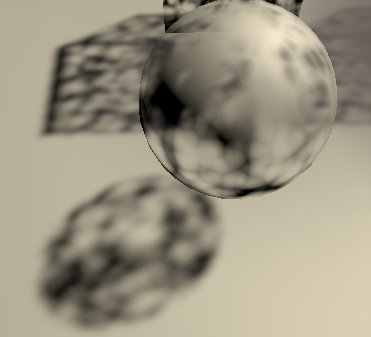
Because the dither pattern is fixed per texel, overlapping semitransparent shadow casters do not cast a combined darker shadow. The effect is as strong as the most opaque shadow caster. Also, because the resulting pattern is noisy it suffers a lot more from temporal artifacts when the shadow matrix changes, which can make the shadows appear to tremble. This approach works better for other light types with fixed projections, as long as objects don't move. It is usually more practical to either used clipped shadows or no shadows at all for semitransparent objects.(总而言之就是Dither模式适合固定物体)
#4 No Shadows(取消阴影映射)
It's possible to turn off shadow casting per object, by adjusting the Cast Shadows settings of an object's component. However, this isn't practical if you want to disable shadows for everything that uses the same material, so we'll also support disabling them per material. We do that by disabling the material's ShadowCaster pass.
Add a method to that begins by checking whether the _Shadows shader property exists. If so, also check whether all selected materials are set to the same mode, via its property. If there is no mode or it's mixed abort. Otherwise, either enable or disable the ShadowCaster pass for all materials, by invoking on them, with the pass name and enabled state as arguments.
	void SetShadowCasterPass () {
		MaterialProperty shadows = FindProperty("_Shadows", properties, false);
		if (shadows == null || shadows.hasMixedValue) {
			return;
		}
		bool enabled = shadows.floatValue < (float)ShadowMode.Off;
		foreach (Material m in materials) {
			m.SetShaderPassEnabled("ShadowCaster", enabled);
		}
}The simplest way to make sure that the pass is set correctly is by always invoking when the material got changed via the GUI. We can do that by invoking at the start of and at its end. The latter method returns whether something changed since we began the check. If so, set the shadow caster pass.
	public override void OnGUI (
		MaterialEditor materialEditor, MaterialProperty[] properties
	) {
		EditorGUI.BeginChangeCheck();
		…
		if (EditorGUI.EndChangeCheck()) {
			SetShadowCasterPass();
		}
	}
#5 Unlit Shadow Casters
Although unlit materials aren't affected by lighting you might want them to cast shadows. We can support that by simply copying the ShadowCaster pass from Lit to the Unlit shader.
#6 Receive Shadows
Finally, we can also make lit surfaces ignore shadows, which might be useful for things like holograms, or just for artistic purposes. Add a _RECEIVE_SHADOWS keyword toggle property to Lit for this.
[Toggle(_RECEIVE_SHADOWS)] _ReceiveShadows ("Receive Shadows", Float) = 1Plus the accompanying shader feature in the CustomLit pass.
#pragma shader_feature _RECEIVE_SHADOWSAll we have to do is force the shadow attenuation to one in when the keyword is defined.
float GetDirectionalShadowAttenuation (…) {
	#if !defined(_RECEIVE_SHADOWS)
		return 1.0;
	#endif
	…
}

