
1. 前言
好久没搞过CS2服务器了,现在于 Debian13.2 系统下搭建CS2服务器,并安装 MetaMod2.0.0-git1376 和 CounterStrikeSharp1.0.355 两个插件,发现CS2服务器并不能正常启动,存在以下两个问题:
【问题1】
根据CS2服务器启动日志,发现报错缺少 libv8.so 这个依赖库,导致CS2纯净服也无法正常启动。(实际上共缺少6个依赖库,分别为:libv8.so、libv8_libbase.so、libv8_icui18n.so、libv8_icuuc.so、libv8_zlib.so、libv8_libcpp.so)
报错:failed to dlopen /home/aaa/Steam/cs2-ds/game/csgo/bin/linuxsteamrt64/libserver.so error=libv8.so: cannot open shared object file: No such file or directory
解决办法:将 */game/bin/linuxsteamrt64/ 目录下的这6个依赖库复制到 */game/csgo/bin/linuxsteamrt64/ 里就能正常启动CS2纯净服了。(这个 * 代表你的CS2服务器安装目录)
【问题2】
CS2服务器能正常运行 MetaMod 却不能运行 CounterStrikeSharp ,查看CS2服务器启动日志发现报错:[META] Failed to load plugin addons/counterstrikesharp/bin/linuxsteamrt64/counterstrikesharp: /home/aaa/Steam/cs2-ds/game/csgo/addons/counterstrikesharp/bin/linuxsteamrt64/counterstrikesharp.so: cannot enable executable stack as shared object requires: Invalid argument
此问题是 debian13 系统与 CounterStrikeSharp 插件不兼容造成的,所以目前还是推荐使用 Debian12 系统搭建CS2服务器。不过从CounterStrikeSharp 的 Issues 列表里也能查到对应的解决方法,github原贴网址:https://github.com/roflmuffin/CounterStrikeSharp/issues/1086
2. 解决 CounterStrikeSharp 与 Debian13 不兼容的问题
2.1 安装 patchelf
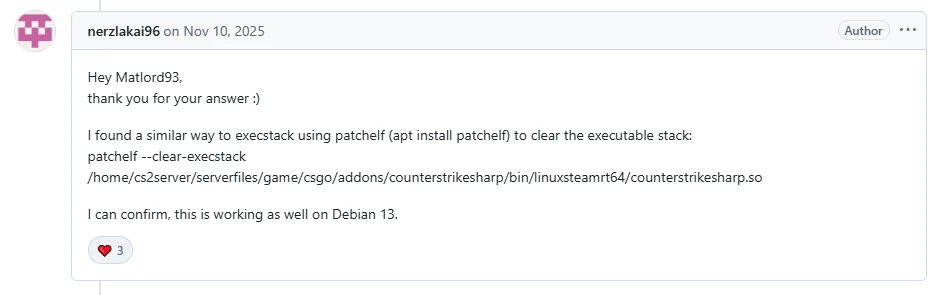
根据github上这位大佬的方法,要先在 debian13 系统安装 patchelf ,安装命令为:apt install patchelf
(如果你是非管理员身份,安装命令改为:sudo apt install patchelf )
然后使用 patchelf 来清除可执行堆栈(谷歌机翻是这么翻译的)命令为:patchelf --clear-execstack /home/aaa/Steam/cs2-ds/game/csgo/addons/counterstrikesharp/bin/linuxsteamrt64/counterstrikesharp.so
(要将上述命令中的路径改为你自己的CS2服务器安装目录)
然后重启CS2服务器就能发现 CounterStrikeSharp 插件已经能运行了
2.2 解决 libicu 问题
虽然插件能运行了,但我的CS2服务器启动进程又中断了,报错为:Process terminated. Couldn't find a valid ICU package installed on the system. Please install libicu (or icu-libs) using your package manager and try again. Alternatively you can set the configuration flag System.Globalization.Invariant to true if you want to run with no globalization support. Please see https://aka.ms/dotnet-missing-libicu for more information.
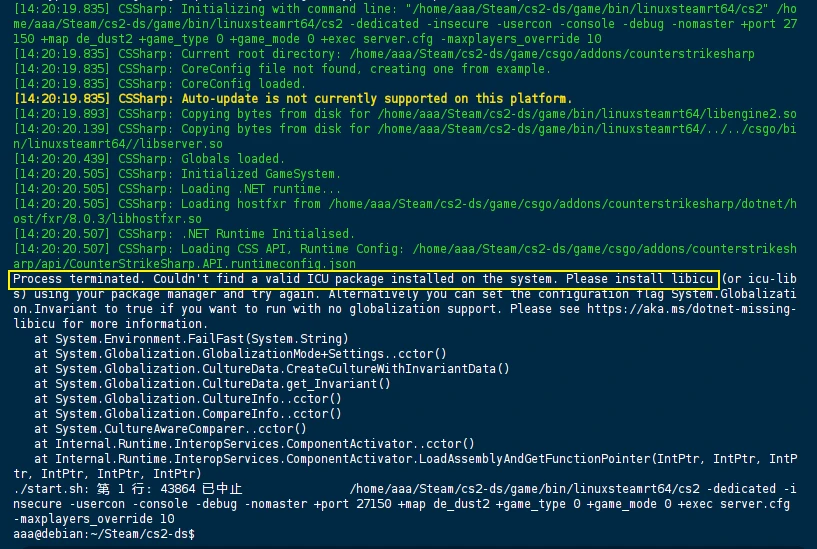
很明显,似乎是缺少了叫 libicu 的东西,网上搜索到安装它的方法(虽然安装的是 libicu-dev 而不是 libicu,但也能解决问题),网址:https://packages.debian.org/zh-cn/bullseye/amd64/libicu-dev/download
由于 libicu 不能直接使用 apt 命令安装,需要先添加镜像源
【步骤1】编辑debian的镜像源,命令:sudo vim /etc/apt/sources.list
【步骤2】在sources.list里添加一行并保存:deb http://security.debian.org/debian-security bullseye-security main
【步骤3】安装libicu-dev,命令:sudo apt install libicu-dev
安装完成后,CS2服务器终于能正常启动,CounterStrikeSharp插件也能正常运行了。
