
准备了一份加固过的apk和一份未加固的apk。
话不多说直接开搞
1、尝试静态调试:搜索“global-metadata.dat”发现加固后的libil2cpp.so中加载函数是加密过的
2、尝试动态调试:使用frida在加载libil2cpp.so后将其dump出来,然后使用soFixer修复,使用IDA查看
function dump_so(libName:string) {
    Java.perform(function() {
        // // 1. 更可靠地获取模块信息
        var libso = Process.getModuleByName(libName);
        if (!libso) {
            console.error("[!] 错误:未找到模块 libil2cpp.so");
            return;
        }

        // 2. 验证基地址和大小是否合理
        console.log("[+] 模块基址: " + libso.base);
        console.log("[+] 模块大小: " + libso.size);
        if (libso.size <= 0 || libso.size > 0x10000000) { // 大小合理性检查,例如大于256MB则可疑
            console.error("[!] 模块大小异常,可能获取失败");
            return;
        }

        // 3. 安全地设置内存权限并读取
        try {
            // 修改内存权限为可读
            // var originProtection =
            Memory.protect(libso.base, libso.size, 'r--');

            // 关键改进:分块读取内存,避免不连续映射区域导致崩溃
            var chunkSize = 0x1000; // 每次读取4KB
            var totalSize = libso.size;
            var file_path = "/sdcard/download/" + libso.name + "_" + libso.base + "_" + ptr(totalSize) + ".so";
            var file_handle = new File(file_path, "wb");

            if (file_handle) {
                for (var offset = 0; offset < totalSize; offset += chunkSize) {
                    var bytesToRead = Math.min(chunkSize, totalSize - offset);
                    try {
                        // 读取内存块
                        var chunk = libso.base.add(offset).readByteArray(bytesToRead);
                        if (chunk !== null) {
                            file_handle.write(chunk);
                        } else {
                            console.warn("[!] 读取的内存块为空,跳过写入");
                        }
                    } catch (e) {
                        // 如果某一块读取失败,用0填充并继续
                        console.warn("[!] 偏移 0x" + offset.toString(16) + " 处读取失败,用0填充");
                        var zeroBuffer = new ArrayBuffer(bytesToRead);
                        file_handle.write(zeroBuffer);
                    }
                }
                file_handle.flush();
                file_handle.close();
                console.log("[dump] 成功: " + file_path);
            }
        } catch (e) {
            console.error("[!] dump_so 过程中发生异常: " + (e as any).message);
        }
    });
}
setTimeout(function () {
  console.log("[+] 延迟后开始 dump...");
  dump_so("libil2cpp.so");

}, 1000); // 延迟500毫秒,可根据实际情况调整3、搜索字符串global-metadata.dathook,定位到函数sub_48D10C。

结合il2cpp的源码
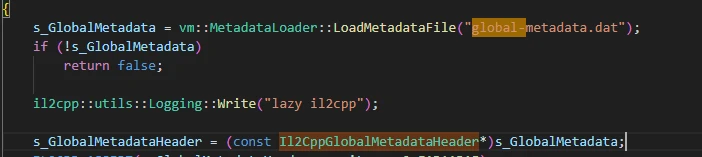
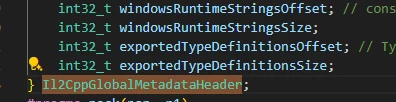
可以知道exportedTypeDefinitionsOffset和exportedTypeDefinitionsSize的偏移值,尝试在未加固的程序里hook一下该函数获取返回值。
 var libil2cpp: Module | null = null;
var isCalled = false;
var metadata_size = 0;
function hookdlopen() {
  var dlopen = Process.getModuleByName("libc.so").getExportByName("dlopen");
  if (dlopen !== null) {
    Interceptor.attach(dlopen, {
      onEnter: function (args) {
        var path = args[0].readCString();
        if (path && path.indexOf('libil2cpp.so') !== -1) {
          this.path = path;
          console.log("[+] 检测到 libil2cpp.so 加载");
        }

      },
      onLeave: function (retval) {
        if (this.path && this.path.indexOf('libil2cpp.so') !== -1 && !isCalled) {
          libil2cpp = Process.getModuleByName("libil2cpp.so");
          if (!libil2cpp) {
            console.error("[!] 错误:未找到模块 libil2cpp.so");
            return;
          }
          else{
            console.log("[+] 成功获取 libil2cpp.so 模块: " + libil2cpp.name + " 基址: " + libil2cpp.base + " 大小: " + libil2cpp.size);
          }
          hook_loadMetadata();
        }
      }
    });

  } else {
    console.error("无法找到 dlopen 函数");
  }

}

function hook_loadMetadata() {
  const loadMetadata = libil2cpp?.base.add(0x48D10C);
  if (loadMetadata) {
    console.log("[+] 成功获取函数 loadMetadata 地址: " + loadMetadata);
    Interceptor.attach(loadMetadata, {
      onEnter: function (args) {
        console.log('loadMetadata called');
      },
      onLeave(retval) {
        console.log('loadMetadata returned');
        if (!isCalled) {
          // 捕获元数据指针
          globalMetadata.ptr = retval;
          console.log("[+] 元数据加载成功! 地址: " + globalMetadata.ptr);

          // 读取头部
          const tamperedSanity = globalMetadata.ptr.readU32();
          const tamperedVersion = globalMetadata.ptr.add(4).readU32();
          console.log("    魔数: 0x" + tamperedSanity.toString(16));
          console.log("    版本: " + tamperedVersion);

          // 计算完整元数据大小
          const exportedTypeOffset = globalMetadata.ptr.add(0xE0).readU32(); // 偏移0xE0是exportedTypeDefinitionsOffset
          const exportedTypeSize = globalMetadata.ptr.add(0xE4).readU32();   // 偏移0xE4是exportedTypeDefinitionsSize
          globalMetadata.size = exportedTypeOffset + exportedTypeSize;
          metadata_size = globalMetadata.size;
          console.log("    估算元数据大小: " + globalMetadata.size + " 字节");

          console_byte_array(globalMetadata.ptr, globalMetadata.size);
          isCalled = true;
        }
      },
    });
  }
  else {
    console.error("loadMetadata function not found");
  }
}

function console_byte_array(ptr: NativePointer, size: number) {
  if (!ptr || size === 0) {
    console.error("[-] 错误: 未捕获到元数据");
    return;
  }
  const buffer = ptr.readByteArray(size);
    // console.log("    读取内存成功,开始写入文件...");
    if (buffer) {
      console.log("    元数据前64字节:");
      console.log(hexdump(ptr, {
        offset: 0,
        length: 64,
        header: true,
        ansi: true
      }));
      return true;
    }
    else {
      console.log("    [!] 无法读取内存");
      return false;
    }
}可以获取到与原global-metadata.dat相同的数据
可以确定在执行sub_48D10C(loadmetadata)函数后会将global-metadata.dat加载到内存中
4、hook加固后的该函数,获取返回值,发现数据除了前四个字节其余部分是完全相同的。
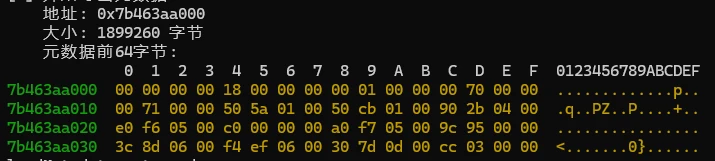
看起来数据应该就是在sub_48D10C中进行的解密
5、至此已经可以dump出解密后的global-metadata.data数据
function dump_global_metadata(ptr: NativePointer, size: number) {
  Java.perform(function () {
    console.log("[+] 开始导出元数据...");
    console.log("    地址: " + ptr);
    console.log("    大小: " + size + " 字节");


    // 方法1:使用应用私有目录(推荐)
    try {
      if (console_byte_array(ptr, size)) {
        //分块读取内存,避免不连续映射区域导致崩溃
        var chunkSize = 0x1000; // 每次读取4KB
        var totalSize = size;
        var file_path = "/sdcard/download/global-metadata.dat";
        var file_handle = new File(file_path, "wb");
        if (file_handle) {
          for (var offset = 0; offset < totalSize; offset += chunkSize) {
            var bytesToRead = Math.min(chunkSize, totalSize - offset);
            try {
              // 读取内存块
              var chunk = ptr.add(offset).readByteArray(bytesToRead);
              if (chunk !== null) {
                file_handle.write(chunk);
              } else {
                console.warn("[!] 读取的内存块为空,跳过写入");
              }
            } catch (e) {
              // 如果某一块读取失败,用0填充并继续
              console.warn("[!] 偏移 0x" + offset.toString(16) + " 处读取失败,用0填充");
              var zeroBuffer = new ArrayBuffer(bytesToRead);
              file_handle.write(zeroBuffer);
            }
          }
          file_handle.flush();
          file_handle.close();
          console.log("[dump] 成功: " + file_path);
        }
        else {
          console.log("    [!] 无法打开文件进行写入");
        }
      }
    } catch(e: any){
        console.error("    [!] 导出元数据过程中发生异常: " + e.message);
    }
  });
}6、不过目的不是要dump出global-metadata.data的数据而是获取其解密算法,所以进一步查看sub_48D10C的内容,分析如何解密,逐步分析两个函数的差异
7、继续深入sub_48D10C函数,和源码对比,发现sub_45A3F0函数对应的是mmap函数
unsigned __int64 __fastcall sub_48D10C(const char *a1)
{
  unsigned __int64 v2; // x8
  const char *v3; // x9
  __int64 v4; // x0
  char *v5; // x8
  unsigned __int64 v6; // x9
  __int64 v7; // x0
  const char *v8; // x1
  __int64 v9; // x20
  unsigned __int64 v10; // x19
  const char *v12; // [xsp+0h] [xbp-70h] BYREF
  __int64 v13; // [xsp+8h] [xbp-68h]
  _QWORD v14[2]; // [xsp+10h] [xbp-60h] BYREF
  const char *v15; // [xsp+20h] [xbp-50h]
  _QWORD v16[3]; // [xsp+28h] [xbp-48h] BYREF
  char *v17; // [xsp+40h] [xbp-30h] BYREF
  unsigned __int64 v18; // [xsp+48h] [xbp-28h]

  sub_44B644((__int64)v14);
  v12 = "Metadata";
  v13 = 8LL;
  v2 = (unsigned __int64)LOBYTE(v14[0]) >> 1;
  if ( (v14[0] & 1) != 0 )
    v3 = v15;
  else
    v3 = (char *)v14 + 1;
  if ( (v14[0] & 1) != 0 )
    v2 = v14[1];
  v17 = (char *)v3;
  v18 = v2;
  sub_44ADBC(&v17, &v12, v16);
  if ( (v14[0] & 1) != 0 )
    sub_8C66D0();
  v4 = sub_8C6670(a1);
  if ( (v16[0] & 1) != 0 )
    v5 = (char *)v16[2];
  else
    v5 = (char *)v16 + 1;
  if ( (v16[0] & 1) != 0 )
    v6 = v16[1];
  else
    v6 = (unsigned __int64)LOBYTE(v16[0]) >> 1;
  v12 = a1;
  v13 = v4;
  v17 = v5;
  v18 = v6;
  sub_44ADBC(&v17, &v12, v14);
  LODWORD(v17) = 0;
  v7 = sub_427A0C((__int64)v14, 3, 1u, 1u, 0, &v17);
  if ( (_DWORD)v17 )
  {
    if ( (v14[0] & 1) != 0 )
      v8 = v15;
    else
      v8 = (char *)v14 + 1;
    sub_45A264("ERROR: Could not open %s", v8);
  }
  else
  {
    v9 = v7;
    v10 = sub_45A3F0();
    sub_427C4C(v9, &v17);
    if ( !(_DWORD)v17 )
      goto LABEL_22;
    sub_45A400(v10);
  }
  v10 = 0LL;
LABEL_22:
  if ( (v14[0] & 1) != 0 )
    sub_8C66D0();
  if ( (v16[0] & 1) != 0 )
    sub_8C66D0();
  return v10;
}8、继续深入分析sub_45A3F0函数,发现只要sub_4283B4和sub_428574函数和返回值有关
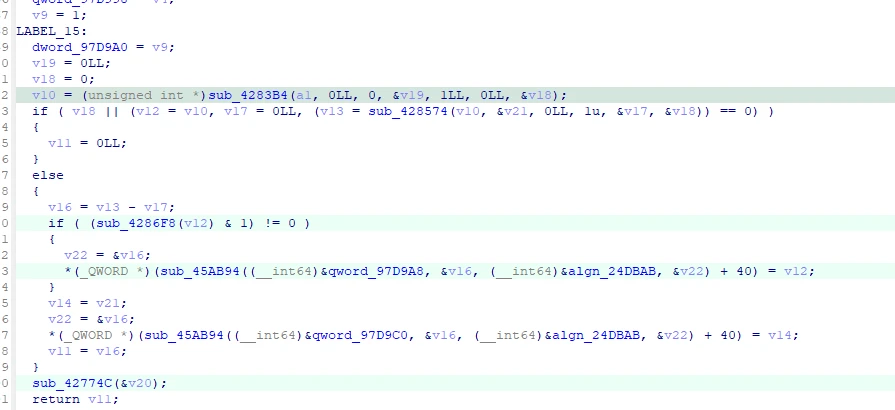
sub_4283B4函数看起来应该是和文件的加载有关和解密应该没有关系,那解密的逻辑应该就是藏在sub_428574里了
9、和返回值有关的函数只有sub_8C6750,与未加固的对比
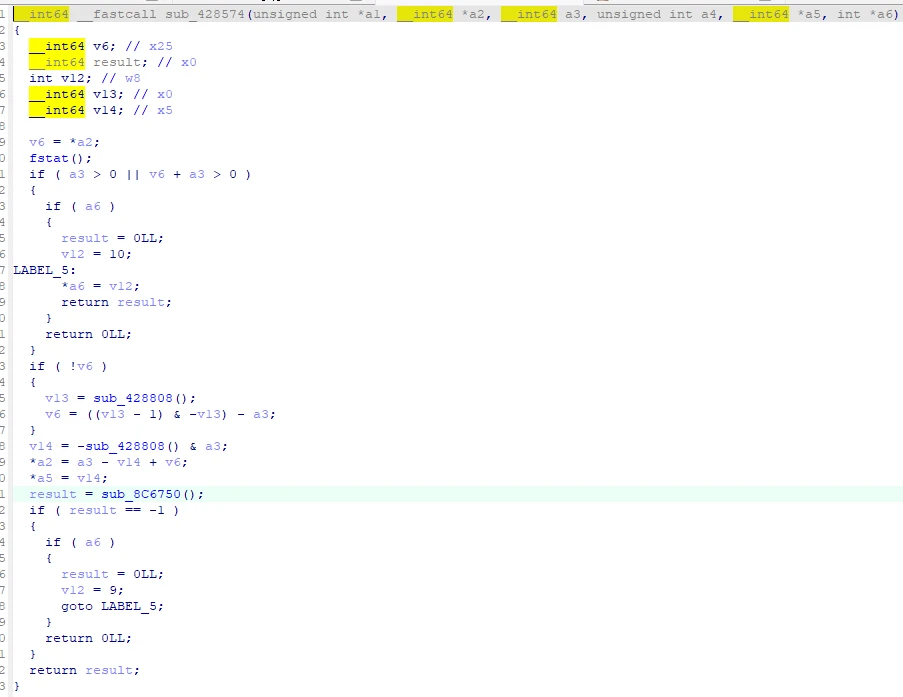
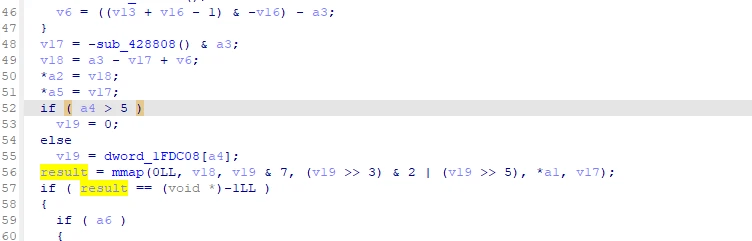


可以看到这里原本是调用导入函数mmap函数


现在则是变成了指向某个地址,使用frida获取其实际地址并算出偏移值
function find_ptr(name:string,ptr_addr:number) {
  var qwordAddr = libil2cpp?.base.add(ptr_addr); // 替换为实际偏移量
  if (!qwordAddr)
    return;
  var m_ptr = qwordAddr.readPointer();
  var ptr_module = Process.findModuleByAddress(m_ptr);
  var rva = m_ptr.sub(ptr_module ? ptr_module.base : ptr(0));
  console.log(name+" 地址: " + m_ptr + " 所属模块: " + (ptr_module ? ptr_module.name : "未知模块") + " 偏移: " + rva);
}
find_ptr("mmap",0x91F270)

加固前

加固后
10、找到偏移值的位置

function find_mmap_ptr() {
  var qwordMmapAddr = libil2cpp?.base.add(0xB9F5E0); // 替换为实际偏移量
  if (!qwordMmapAddr)
    return;
  var mmapPtr = qwordMmapAddr.readPointer();
  var mmapModule = Process.findModuleByAddress(mmapPtr);
  var rva = mmapPtr.sub(mmapModule ? mmapModule.base : ptr(0));
  console.log("[+] mmap 地址: " + mmapPtr + " 所属模块: " + (mmapModule ? mmapModule.name : "未知模块") + " 偏移: " + rva);

}

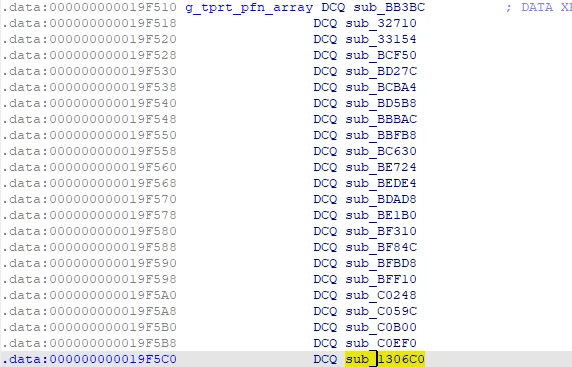
计算出偏移,发现是libtprt.so库里的,根据汇编代码可知最终调用的地址是19f510+b0=1306c0,也就是函数1306c0,应该离结果很近了!
11、那么这个函数应该就是实际的mmap函数了,hook一下验证

let libtprt: Module | null = null;
function load_libtprt(){
  if(libtprt){
    return;
  }
  libtprt = Process.getModuleByName("libtprt.so");
  if(!libtprt){
    console.error("[-] 错误: 未找到 libtprt.so 模块");
    return;
  }
  console.log("[+] 成功获取 libtprt.so 模块: " + libtprt.name + " 基址: " + libtprt.base + " 大小: " + libtprt.size);
  var sub_1306C0 = libtprt.base.add(0x1306C0);
  if(!sub_1306C0){
    console.error("[-] 错误: 未找到 sub_1306C0 函数地址");
    return;
  }
  console.log("[+] 成功获取 sub_1306C0 函数地址: " + sub_1306C0);
  Interceptor.attach(sub_1306C0,{
    onEnter: function(args){
      console.log("[+] sub_1306C0 被调用");
    },
    onLeave: function(retval){
      console.log("[+] sub_1306C0 返回: " + retval);
      globalMetadata.ptr = retval;
      console.log("[+] 元数据加载成功! 地址: " + globalMetadata.ptr);

      const tamperedSanity = globalMetadata.ptr.readU32();
      const tamperedVersion = globalMetadata.ptr.add(4).readU32();
      console.log("    魔数: 0x" + tamperedSanity.toString(16));
      console.log("    版本: " + tamperedVersion);

      const exportedTypeOffset = globalMetadata.ptr.add(0xE0).readU32();
      const exportedTypeSize = globalMetadata.ptr.add(0xE4).readU32();
      globalMetadata.size = exportedTypeOffset + exportedTypeSize;
      metadata_size = globalMetadata.size;
      console.log("    估算元数据大小: " + globalMetadata.size + " 字节");

      console_byte_array(globalMetadata.ptr, globalMetadata.size);
    }
  });
}输出
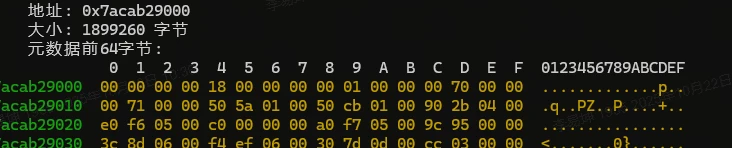
可以确认该函数就是mmap函数了,继续深入分析。
11、查看sub_1306c0函数,F5看一下伪C
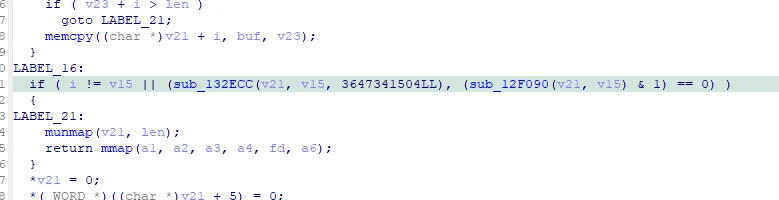
可以看到有一个数字非常的显眼3647341504,转成16进制是12 72 43 94,这与加密后的global-metadata.dat的头一致,猜测sub_13ECC就是解密函数,跟进去看看
__int64 __fastcall sub_132ECC(__int64 a1, unsigned __int64 a2, __int64 a3, __int64 a4)
{
  char v6; // w9
  unsigned __int64 v7; // x8
  _BYTE *v8; // x10
  unsigned int v10; // w21
  __int64 i; // x8
  __int64 v12; // x10
  int8x16_t v13; // q0
  __int64 v14; // x14
  __int64 v15; // x11
  __int64 v16; // x13
  __int64 v17; // x12
  __int64 v18; // x9
  _BYTE *v19; // x8
  __int64 v20[2]; // [xsp+8h] [xbp-18h] BYREF
  char v21; // [xsp+18h] [xbp-8h]

  if ( !a1 )
    return 0xFFFFFFFFLL;
  if ( a2 >> 20 )
  {
    if ( BYTE2(a3) )
      v10 = WORD1(a3);
    else
      v10 = -121;
    for ( i = 8LL; i != 4096; ++i )
      *(_BYTE *)(a1 + i) ^= v10;
    v20[0] = 0LL;
    v20[1] = 0LL;
    v21 = 0;
    sub_133038(v20, a2, a3, a4, (unsigned int)a3, (unsigned int)a3);
    sub_11B790(a1 + 4096, 0x4000LL, 0LL, 2LL, v20, 16LL);
    v12 = 0LL;
    if ( a2 - 69632 >= 0x10000 )
    {
      v13 = vdupq_n_s8(v10);
      v14 = 1LL;
      v15 = a1 + 69632;
      do
      {
        v16 = 0LL;
        v17 = v14;
        do
        {
          *(int8x16_t *)(v15 + v16) = veorq_s8(*(int8x16_t *)(v15 + v16), v13);
          v16 += 16LL;
        }
        while ( v16 != 0x4000 );
        ++v14;
        v15 += 0x10000LL;
      }
      while ( v17 != ((a2 - 135168) >> 16) + 1 );
      v12 = v17 << 16;
    }
    v18 = a2 - 69632 - v12;
    if ( v18 )
    {
      v19 = (_BYTE *)(a1 + 69632 + v12);
      do
      {
        --v18;
        *v19++ ^= v10;
      }
      while ( v18 );
    }
  }
  else
  {
    v6 = BYTE2(a3);
    v7 = a2 - 8;
    if ( !BYTE2(a3) )
      v6 = -121;
    if ( a2 != 8 )
    {
      v8 = (_BYTE *)(a1 + 8);
      do
      {
        --v7;
        *v8++ ^= v6;
      }
      while ( v7 );
    }
  }
  return 0LL;
}看得出来这就是解密函数了,在a2小于1MB时对范围内的每个字节与密钥进行简单的逐字节异或,大于1MB时则需要进一步分析。查看一下该函数的调用树。
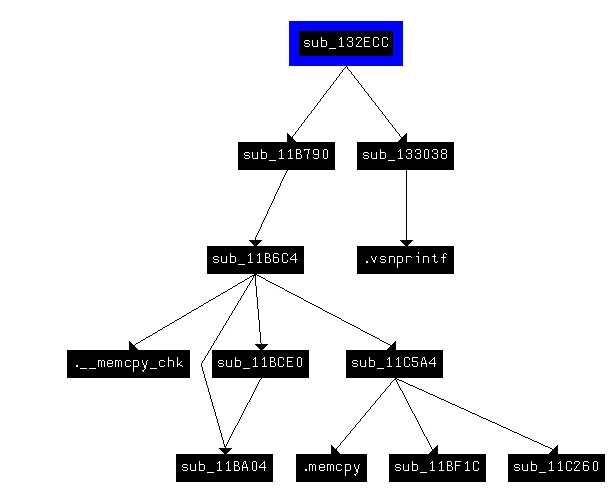
这里偷个懒直接把这些函数丢给ai分析一下
分析报告:sub_132ECC函数及其子函数
工作流程(大文件):
初始化异或:对前 4096 字节的偏移 8–4095 进行异或(密钥来自 a3)。
AES 密钥生成:调用 sub_133038基于 a2, a3, a4生成 16 字节密钥。
AES 解密核心:sub_11B790→ sub_11B6C4→ sub_11BCE0(密钥扩展) → sub_11C5A4(解密)。对接下来 16384 字节(偏移 4096–20479)分块(2048 字节/块)解密:
剩余数据异或:向量化异或每 64KB 块的前 16KB(NEON 优化)。逐字节异或剩余部分。对偏移 69632 之后的数据:
小文件简化:仅对整个数据(偏移 8 开始)异或。
根据该逻辑就可以写一个解密脚本进行还原了。脚本就懒得写了。
