
数据下载
打开官网下载数据:
https://aims2.llnl.gov/search
首先检索,这里发现几个小技巧。
检索时同一分类可以同时选择多个检索条件,出现的结果是我选择的所有条件的并集。比如不用先检索ssp126,再检索ssp245。在检索框中连续输入-选择,再输入-再选择,就可以选上多个条件了。
如果要把一页的检索结果全部加入cart,可以先点左上角的对勾全选,然后点右上角的Add selected to cart。注意先把一页显示几个数据改成100/page,不然要勾选的页数太多了。
同时加入了好几个相同的数据到cart的时候,下载后也只给一个下载链接,所以用第2条的方法不用担心重复下载。
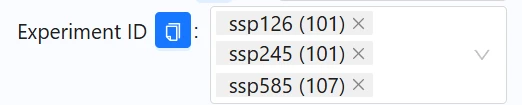
例:同时检索ssp126,ssp245,ssp585
检索后到cart中下载wget文件(如果只下载一个数据,直接在检索页面右侧下载wget文件即可)。
举一个例子。首先先把下载条件检索好,experiment id,variable id 可以多选(别的也可以)。最后再选source id(模式),这样可以很清楚的看到这个模式是不是覆盖了要求的所有experiment和variable。举个例子,我选了一个模式,选上之后显示:
historical (36) ssp126 (27) ssp245 (27)
tas (14) pr (13) tasmax (13) tasmin (13)
括号后的数字代表有几个数据满足要求,没有括号就是没有数据,像这个例子就是这个模式有我要求的全部数据了,不缺数据,可以用。
下载到.sh文件之后,用如下python脚本抓取.sh文件里的下载链接到txt(如果链接少,直接用文本文档打开.sh文件然后找到下载链接复制就可以了):
import re
import os
import sys

def extract_download_links(sh_file):
    """从.sh文件中提取下载链接"""
    urls = []

    try:
        with open(sh_file, 'r', encoding='utf-8') as f:  # 添加编码参数
            content = f.read()
            print(f"成功读取文件,大小: {len(content)} 字节")
    except UnicodeDecodeError:
        try:
            # 尝试不同的编码
            with open(sh_file, 'r', encoding='latin-1') as f:
                content = f.read()
                print(f"成功读取文件(使用latin-1编码),大小: {len(content)} 字节")
        except Exception as e:
            print(f"读取文件时出错: {e}")
            return []
    except Exception as e:
        print(f"读取文件时出错: {e}")
        return []

    # 尝试不同的模式来匹配下载链接
    patterns = [
        r"'(.*?)' '(http.*?)' 'SHA256' '.*?'",  # 原始模式
        r"'(.*?)' '(https?://.*?)' '.*?' '.*?'",  # 更宽松的模式
        r"'([^']+)' '(https?://[^']+)'",  # 更简单的模式
        r"([\w\.-]+\.nc).*?(https?://[^\s'\"]+)",  # 非常宽松的模式
        r"wget\s+(https?://[^\s'\"]+)"  # wget命令模式
    ]

    for pattern in patterns:
        matches = re.findall(pattern, content)
        if matches:
            print(f"使用模式 '{pattern}' 找到 {len(matches)} 个匹配")
            if pattern == r"wget\s+(https?://[^\s'\"]+)":
                # 对于wget命令模式,URL直接在第一个捕获组
                for url in matches:
                    if isinstance(url, tuple):
                        urls.append(url[0])  # 如果是元组,取第一个元素
                    else:
                        urls.append(url)  # 如果是字符串,直接添加
            else:
                for match in matches:
                    if len(match) > 1:  # 确保有足够的元素
                        urls.append(match[1])  # 第二个元素是URL
            return urls

    # 如果上面的模式都不匹配,尝试直接查找URL
    url_pattern = r'(https?://[^\s\'\"]+)'
    url_matches = re.findall(url_pattern, content)
    if url_matches:
        print(f"找到 {len(url_matches)} 个URL")
        return url_matches

    # 如果什么都没找到,打印文件的一部分以便调试
    print("未找到任何下载链接。文件内容示例:")
    print(content[:500] + "..." if len(content) > 500 else content)

    return urls

def save_links_to_file(urls, output_file="download_links.txt"):
    """将链接保存到文本文件中,每行一个链接"""
    try:
        with open(output_file, 'w', encoding='utf-8') as f:
            for url in urls:
                f.write(f"{url}\n")
        print(f"成功将 {len(urls)} 个链接保存到 {output_file}")
        return output_file
    except Exception as e:
        print(f"保存链接到文件时出错: {e}")
        return None

def main():
    # 使用指定的文件路径
    sh_file = r".sh文件路径"
    output_file = r"输出txt路径"

    print(f"正在从脚本 '{sh_file}' 中提取下载链接...")

    # 检查文件是否存在
    if not os.path.exists(sh_file):
        print(f"错误: 文件 '{sh_file}' 不存在!")
        return

    urls = extract_download_links(sh_file)

    if not urls:
        print("未找到任何下载链接,请检查文件格式。")
        return

    print(f"找到 {len(urls)} 个下载链接")

    # 保存链接到文本文件
    saved_file = save_links_to_file(urls, output_file)

    if saved_file:
        # 打印前5个链接作为示例
        print("\n示例链接:")
        for i, url in enumerate(urls[:5]):
            print(f"{i+1}. {url}")

        if len(urls) > 5:
            print(f"... 以及其他 {len(urls)-5} 个链接")

if __name__ == "__main__":
main()打开存储抓取链接的txt,把下载链接放到idm,迅雷,等下载器里面下载就可以了。
有的时候,抓取到的链接年份范围大于需要的数据的年份范围。举例来说,只用1970-2100年的数据,但是模式数据时间范围是1850-2300年。用以下python脚本先对txt中的下载链接进行筛选。
import re

# 定义输入和输出文件路径
input_file = r"原下载链接txt"
output_file = r"按照时间范围筛选过的下载链接txt"

# 编译正则表达式用于提取日期范围
date_pattern = re.compile(r'(\d{6})-(\d{6})\.nc$')

# 定义时间范围限制
lower_limit = 196912  # 包含
upper_limit = 210101  # 不包含

# 用于存储符合条件的链接
filtered_links = []

# 读取文件并筛选链接
with open(input_file, 'r') as f:
    for line in f:
        line = line.strip()
        if not line:
            continue

        # 查找日期范围
        match = date_pattern.search(line)
        if match:
            start_date = int(match.group(1))
            end_date = int(match.group(2))

            # 判断是否在所需范围内
            if start_date >= lower_limit and end_date < upper_limit:
                filtered_links.append(line)

# 将筛选后的链接写入新文件
with open(output_file, 'w') as f:
    for link in filtered_links:
        f.write(link + '\n')

print(f"筛选完成!共找到 {len(filtered_links)} 个符合条件的链接。")
时间合并
在处理的historical情景,ssp情景时,有些模式很好,2015-2100年,直接是一个nc(有时2101年-2300年又是一个nc,2101年后的我目前用不到)。然而,有些模式的nc文件是十年一个,五年一个,甚至一年一个,需要做时间合并。
时间合并工具选择处理速度快且命令简洁的cdo(Linux下)。Windows系统可以使用Cygwin运行cdo。自己编程总是担心搞乱nc文件的维度、变量名、日历、注释等等,目前cdo我没发现合并后会搞乱其它的。
首先把需要时间合并的多个nc放在同一个文件夹下,再用以下命令让终端到达文件夹:
cd 文件夹路径cdo时间合并命令如下:
cdo mergetime 输入nc路径 输出nc路径时间合并需要输入很多nc,这里我以我要合并ssp245情景下的hurs数据为例,星号代表遍历所有满足该条件的nc文件(不同年份的):
cdo mergetime hurs_Amon_CESM2-WACCM_ssp245_r1i1p1f1_gn_*.nc hurs_Amon_CESM2-WACCM_ssp245_r1i1p1f1_gn_201501-210012.nc当有大量nc文件,存储在同一文件夹下时,cdo本身不能直接识别不同的需要时间合并的情景、变量等等。但可以使用python脚本来识别并遍历文件夹中的所有NC文件,进行时间合并。由于担心下载时候下载不全,比如10年一个nc的模式,下载201501-210012的nc文件就有10个。CMIP6的数据下载服务器有时并不会成功(会404),可能这10个里面有1个下载不到,就缺了一个。因此,这段代码我也添加了确认原始nc文件中没有缺失时间段的功能。
import os
import re
import subprocess
from collections import defaultdict

# 文件夹路径
input_folder = "输入文件夹路径"
output_folder = "输出文件夹路径"

# 确保输出文件夹存在
if not os.path.exists(output_folder):
    os.makedirs(output_folder)
    print(f"创建输出文件夹: {output_folder}")

# 正则表达式模式,用于提取文件名的前缀和日期范围
pattern = re.compile(r'(.+)_(\d{6})-(\d{6})\.nc$')

# 用于存储按前缀分组的文件
files_by_prefix = defaultdict(list)

# 扫描文件夹中的所有nc文件
for filename in os.listdir(input_folder):
    if filename.endswith('.nc'):
        match = pattern.match(filename)
        if match:
            prefix = match.group(1)
            start_date = int(match.group(2))
            end_date = int(match.group(3))

            # 按前缀分组存储文件信息
            files_by_prefix[prefix].append((filename, start_date, end_date))

# 处理每组文件
for prefix, files in files_by_prefix.items():
    print(f"处理前缀: {prefix}")

    # 按开始日期排序文件
    files.sort(key=lambda x: x[1])

    # 检查日期是否连续
    is_continuous = True
    expected_next_date = None

    for i, (filename, start_date, end_date) in enumerate(files):
        # 提取年份和月份
        start_year = start_date // 100
        start_month = start_date % 100
        end_year = end_date // 100
        end_month = end_date % 100

        # 计算下一个预期的开始日期
        if i > 0:
            if start_date != expected_next_date:
                print(f"  发现日期不连续: 预期 {expected_next_date},实际 {start_date}")
                is_continuous = False
                break

        # 计算此文件之后应该开始的日期
        next_month = end_month + 1
        next_year = end_year
        if next_month > 12:
            next_month = 1
            next_year += 1
        expected_next_date = next_year * 100 + next_month

    # 如果日期连续,合并文件
    if is_continuous and files:
        overall_start_date = files[0][1]
        overall_end_date = files[-1][2]

        # 构建输出文件名
        output_file = f"{prefix}_{overall_start_date:06d}-{overall_end_date:06d}.nc"
        output_path = os.path.join(output_folder, output_file)

        # 构建源文件的完整路径列表
        input_files = " ".join([os.path.join(input_folder, f[0]) for f in files])

        # 构建并执行CDO命令
        cmd = f"cdo mergetime {input_files} {output_path}"
        print(f"  执行合并命令: {cmd}")

        try:
            subprocess.run(cmd, shell=True, check=True)
            print(f"  成功合并为: {output_file}")
        except subprocess.CalledProcessError as e:
            print(f"  合并失败: {e}")
    elif not is_continuous:
        print(f"  由于日期不连续,跳过合并 {prefix}")
    else:
        print(f"  没有找到文件,跳过 {prefix}")
重采样
不同CMIP6模式分辨率不同,我按照需要统一重采样到0.5°。
cdo处理单个nc命令如下:
cdo remapbil,target_grid.txt的路径 原始nc文件路径 重采样后nc存储路径当有大量nc文件,存储在同一文件夹下时,cdo本身不能直接处理一个文件夹中的所有nc文件,但可以使用shell脚本来遍历文件夹中的所有NC文件并依次处理它们。
首先写入.sh文件:
#!/bin/bash
input_dir="原始nc文件存储文件夹路径"
output_dir="重采样后nc文件输出文件夹路径"
grid_file="target_grid.txt路径"

# 创建输出目录(如果不存在)
mkdir -p $output_dir

# 处理输入目录中的所有nc文件
for file in $input_dir/*.nc; do
    filename=$(basename "$file")
    output_file="$output_dir/${filename%.nc}_remapped.nc"
    echo "Processing $filename..."
    cdo remapbil,$grid_file "$file" "$output_file"
done存储.sh文件后,给脚本添加执行权限,在终端中运行:
chmod +x 名称.sh然后执行脚本:
./名称.sh偏差校正
大多数文章在使用CMIP6模式前都会进行偏差校正。研究者们也开发了不同的偏差校正方法,有针对日值的,有针对月值的。可以根据研究需要,选择不同的偏差校正方法。Python、R等语言下都有比较成熟的偏差校正package。
模式集合
集合多个CMIP6气候模式作为最终使用的数据是常见的做法,提升数据的可靠性。根据研究需要选择集合中位数或者集合平均值。我使用cdo进行集合中位数。
偏差校正后记得输出结果时要把时间维度(time_bnds)放在nc文件的第一个维度,cdo读取要求如此,不然会报错:
Time must be the first dimension!
如果时间维度不是nc文件的第一个维度,将需要转置的nc文件放在文件夹中,使用如下python代码进行修改:
import xarray as xr
import os
import glob

# 定义输入和输出目录
input_dir = '输入文件夹路径'
output_dir = '输出文件夹路径'

# 创建输出目录(如果不存在)
os.makedirs(output_dir, exist_ok=True)

# 获取输入目录中的所有NC文件
input_files = glob.glob(os.path.join(input_dir, '*.nc'))

# 处理每个文件
for input_file in input_files:
    # 获取文件名(不包含路径)
    filename = os.path.basename(input_file)
    # 创建输出文件路径
    output_file = os.path.join(output_dir, filename)

    print(f"Processing {input_file}...")

    try:
        # 读取NC文件
        ds = xr.open_dataset(input_file)

        # 获取变量名(假设只有一个主要变量)
        var_names = list(ds.data_vars)
        print(f"Variable names: {var_names}")

        # 检查每个变量,确保时间是第一个维度
        needs_transpose = False
        new_dims_dict = {}

        for var_name in var_names:
            if 'time' in ds[var_name].dims and ds[var_name].dims[0] != 'time':
                # 创建新的维度顺序,将时间放在第一位
                current_dims = ds[var_name].dims
                new_dims = list(current_dims)
                new_dims.remove('time')
                new_dims.insert(0, 'time')
                new_dims_dict[var_name] = new_dims
                needs_transpose = True
                print(f"Variable {var_name}: Reordering dimensions to {new_dims}")

        # 如果需要转置任何变量
        if needs_transpose:
            # 对每个需要转置的变量进行转置
            for var_name, new_dims in new_dims_dict.items():
                ds[var_name] = ds[var_name].transpose(*new_dims)
                print(f"After transpose, {var_name} dimensions: {ds[var_name].dims}")

        # 保存转换后的文件
        print(f"Saving to {output_file}...")
        ds.to_netcdf(output_file)
        ds.close()
        print(f"Done processing {input_file}")

    except Exception as e:
        print(f"Error processing {input_file}: {e}")

print("\nAll files processed.")cdo计算集合中位数只需一行代码。50的意思是第50百分位数,即为中位数。如果要计算其它百分位数,修改数字即可。
cdo enspctl,50 输入nc文件路径 输出nc文件路径要将 /home/CMIP6文件夹中的所有nc文件计算集合中位数,示例代码如下:
cdo enspctl,50 /home/CMIP6/*.nc /home/CMIP6/ensemble_median.nc
