
一、华为交换机SFTP功能概述
华为交换机支持通过SFTP(SSH File Transfer Protocol)进行安全的文件传输,相比传统的FTP和TFTP,SFTP提供了加密的数据传输通道,更适合网络设备的安全管理。
主要应用场景
交换机配置文件备份与恢复
系统软件升级
日志文件下载
批量配置文件上传
二、华为交换机SFTP服务器端配置
1. 基础网络配置
<HUAWEI> system-view
[HUAWEI] sysname Switch
[Switch] interface vlanif 1
[Switch-Vlanif1] ip address 192.168.1.1 24
[Switch-Vlanif1] quit
2. 启用SSH服务
[Switch] stelnet server enable
[Switch] ssh user admin authentication-type password
[Switch] ssh user admin service-type sftp
[Switch] user-interface vty 0 4
[Switch-ui-vty0-4] authentication-mode aaa
[Switch-ui-vty0-4] protocol inbound ssh
[Switch-ui-vty0-4] quit
3. 配置AAA认证
[Switch] aaa
[Switch-aaa] local-user admin password cipher Huawei@123
[Switch-aaa] local-user admin privilege level 15
[Switch-aaa] local-user admin service-type ssh
[Switch-aaa] quit
4. 生成RSA密钥对
[Switch] rsa local-key-pair create
The key name will be: Host
The range of public key size is (512 ~ 2048).
NOTES: If the key modulus is greater than 512,
It will take a few minutes.
Input the bits in the modulus[default = 2048]:
Generating keys...
..........+++
............+++
......++++++++
.........++++++++
5. 配置SFTP服务
[Switch] sftp server enable
[Switch] ssh server-source -i Vlanif 1
三、客户端连接与文件传输操作
1. 使用SecureCRT/Xshell/MobaXterm/PUTTY等工具连接
新建SSH连接,输入交换机IP地址
选择SFTP协议,端口号默认22
输入用户名/密码(admin/Huawei@123)
连接成功后自动进入SFTP会话
2. 常用SFTP操作命令
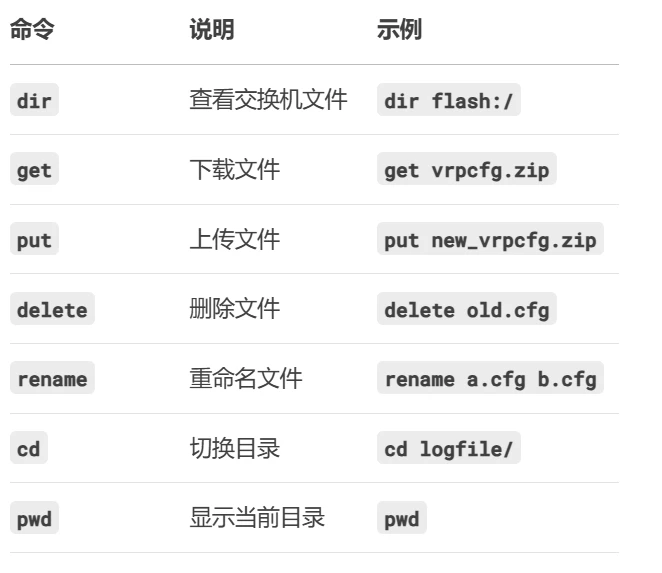
3. 文件下载实战示例
示例1:下载配置文件
sftp> cd flash:/
sftp> dir
Directory of flash:/
Idx Attr Size(Byte) Date Time FileName
0 -rw- 2,048 Sep 01 2023 10:20:11 private-data.txt
1 -rw- 12,345 Sep 02 2023 14:30:45 vrpcfg.zip
sftp> get vrpcfg.zip
Downloading file /vrpcfg.zip to ./vrpcfg.zip
100% 12,345 12.3KB/s 00:00:01
sftp>
示例2:下载日志文件
sftp> cd logfile/
sftp> dir
Directory of flash:/logfile/
Idx Attr Size(Byte) Date Time FileName
0 -rw- 256,000 Sep 03 2023 08:15:30 log1.log
1 -rw- 128,000 Sep 03 2023 12:30:15 log2.log
sftp> get log1.log
sftp> get log2.log
sftp> cd logfile/
sftp> dir
Directory of flash:/logfile/
Idx Attr Size(Byte) Date Time FileName
0 -rw- 256,000 Sep 03 2023 08:15:30 log1.log
1 -rw- 128,000 Sep 03 2023 12:30:15 log2.log
sftp> get log1.log
sftp> get log2.log
四、常见问题与解决方案
1. 连接被拒绝
现象:Connection refused
排查步骤:
检查交换机SSH服务是否开启:display ssh server status
检查VTY线路配置:display current-configuration | include user-interface
检查网络连通性:ping 交换机IP
2. 认证失败
现象:Authentication failed
解决方法:
确认用户名密码正确:display local-user
检查用户服务类型:display ssh user
尝试重置密码:local-user admin password cipher NewPassword
五、安全加固建议
1、修改默认端口:
[Switch] ssh server port 2222
2、启用ACL限制:
[Switch] acl 2000
[Switch-acl-basic-2000] rule permit source 192.168.1.100 0
[Switch-acl-basic-2000] quit
[Switch] ssh server acl 2000
3、禁用弱加密算法:
[Switch] ssh server cipher aes128-ctr aes256-ctr
[Switch] ssh server hmac sha2-256 sha2-512
4、启用日志记录:
[Switch] info-center enable
[Switch] info-center loghost 192.168.1.100
六、典型应用场景
1.批量升级交换机软件
# 上传新系统文件
sftp> put S5700-V200R019C10SPC500.cc
# 在交换机上执行升级
<Switch> system-view
[Switch] startup system-software S5700-V200R019C10SPC500.cc
<Switch>reboot
建议在实际操作前做好配置备份,并在非业务时段进行重要文件传输操作。
