
我:给我写一个小游戏类似俄罗斯方块那种的,给我完整详细的代码,和一步步的过程
D:以下是使用Python和Pygame库实现的俄罗斯方块游戏完整代码,包含详细注释和实现步骤:
python
复制
# -*- coding: utf-8 -*-
import pygame
import random
import time
# 初始化Pygame
pygame.init()
# 定义颜色
COLORS = [
(0, 0, 0), # 0: 黑色(背景)
(255, 0, 0), # 1: 红色
(0, 150, 0), # 2: 绿色
(0, 0, 255), # 3: 蓝色
(255, 120, 0), # 4: 橙色
(255, 255, 0), # 5: 黄色
(180, 0, 255), # 6: 紫色
(0, 220, 220) # 7: 青色
]
# 定义方块形状(7种经典俄罗斯方块)
SHAPES = [
[[1, 1, 1, 1]], # I型
[[1, 1], [1, 1]], # O型
[[1, 1, 1], [0, 1, 0]], # T型
[[1, 1, 1], [1, 0, 0]], # L型
[[1, 1, 1], [0, 0, 1]], # J型
[[1, 1, 0], [0, 1, 1]], # S型
[[0, 1, 1], [1, 1, 0]] # Z型
]
# 游戏区域尺寸(单位:方块)
GAME_WIDTH = 10
GAME_HEIGHT = 20
# 方块大小(像素)
BLOCK_SIZE = 30
# 窗口尺寸
WINDOW_WIDTH = BLOCK_SIZE * (GAME_WIDTH + 8)
WINDOW_HEIGHT = BLOCK_SIZE * GAME_HEIGHT
# 创建游戏窗口
screen = pygame.display.set_mode((WINDOW_WIDTH, WINDOW_HEIGHT))
pygame.display.set_caption("Python 俄罗斯方块")
# 游戏时钟
clock = pygame.time.Clock()
class TetrisGame:
def __init__(self):
# 初始化游戏区域(0表示空)
self.game_area = [[0] * GAME_WIDTH for _ in range(GAME_HEIGHT)]
self.score = 0
self.level = 1
self.current_shape = None # 当前下落方块
self.next_shape = None # 下一个方块
self.current_x = 0 # 当前方块x坐标
self.current_y = 0 # 当前方块y坐标
self.game_over = False
# 生成第一个和下一个方块
self.new_shape()
self.new_shape()
def new_shape(self):
"""生成新方块"""
self.current_shape = self.next_shape or random.choice(SHAPES)
self.next_shape = random.choice(SHAPES)
self.current_x = GAME_WIDTH // 2 - len(self.current_shape[0]) // 2
self.current_y = 0
# 检查是否游戏结束
if self.check_collision(self.current_shape, (self.current_x, self.current_y)):
self.game_over = True
def check_collision(self, shape, offset):
"""检测碰撞"""
off_x, off_y = offset
for y, row in enumerate(shape):
for x, cell in enumerate(row):
if cell:
px = x + off_x
py = y + off_y
if px < 0 or px >= GAME_WIDTH or py >= GAME_HEIGHT:
return True
if py >=0 and self.game_area[py][px]:
return True
return False
def rotate_shape(self):
"""旋转方块"""
rotated = [[self.current_shape[y][x]
for y in range(len(self.current_shape))]
for x in reversed(range(len(self.current_shape[0])))]
if not self.check_collision(rotated, (self.current_x, self.current_y)):
self.current_shape = rotated
def move(self, dx, dy):
"""移动方块"""
new_x = self.current_x + dx
new_y = self.current_y + dy
if not self.check_collision(self.current_shape, (new_x, new_y)):
self.current_x = new_x
self.current_y = new_y
return True
return False
def drop(self):
"""快速下落"""
while self.move(0, 1):
pass
self.place_shape()
def place_shape(self):
"""固定当前方块到游戏区域"""
for y, row in enumerate(self.current_shape):
for x, cell in enumerate(row):
if cell:
self.game_area[y + self.current_y][x + self.current_x] = 1 # 颜色可以改为不同
self.clear_lines()
self.new_shape()
def clear_lines(self):
"""消除满行"""
lines_cleared = 0
new_area = []
for row in self.game_area:
if 0 not in row:
lines_cleared += 1
else:
new_area.append(row)
self.score += lines_cleared * 100
self.level = 1 + self.score // 500
# 补上空行
self.game_area = [[0]*GAME_WIDTH for _ in range(lines_cleared)] + new_area
def draw_block(self, x, y, color):
"""绘制单个方块"""
pygame.draw.rect(screen,
COLORS[color],
(x * BLOCK_SIZE, y * BLOCK_SIZE,
BLOCK_SIZE - 1, BLOCK_SIZE - 1))
def draw(self):
"""绘制游戏界面"""
screen.fill(COLORS[0])
# 绘制游戏区域
for y in range(GAME_HEIGHT):
for x in range(GAME_WIDTH):
if self.game_area[y][x]:
self.draw_block(x, y, 1)
# 绘制当前方块
if self.current_shape:
for y, row in enumerate(self.current_shape):
for x, cell in enumerate(row):
if cell:
self.draw_block(self.current_x + x, self.current_y + y, 2)
# 绘制下一个方块预览
next_x = GAME_WIDTH + 2
next_y = 2
if self.next_shape:
for y, row in enumerate(self.next_shape):
for x, cell in enumerate(row):
if cell:
self.draw_block(next_x + x, next_y + y, 3)
# 绘制分数和等级
font = pygame.font.SysFont('arial', 24)
text = font.render(f'Score: {self.score}', True, (255, 255, 255))
screen.blit(text, (BLOCK_SIZE*(GAME_WIDTH+1), BLOCK_SIZE*6))
text = font.render(f'Level: {self.level}', True, (255, 255, 255))
screen.blit(text, (BLOCK_SIZE*(GAME_WIDTH+1), BLOCK_SIZE*8))
if self.game_over:
font = pygame.font.SysFont('arial', 48)
text = font.render('GAME OVER!', True, (255, 0, 0))
screen.blit(text, (BLOCK_SIZE*2, BLOCK_SIZE*8))
pygame.display.update()
def main():
game = TetrisGame()
fall_time = 0
fall_speed = 0.5 # 初始下落速度
while not game.game_over:
# 计算下落时间
delta_time = clock.tick(60) / 1000
fall_time += delta_time
# 处理事件
for event in pygame.event.get():
if event.type == pygame.QUIT:
pygame.quit()
return
if event.type == pygame.KEYDOWN:
if event.key == pygame.K_LEFT:
game.move(-1, 0)
elif event.key == pygame.K_RIGHT:
game.move(1, 0)
elif event.key == pygame.K_DOWN:
game.move(0, 1)
elif event.key == pygame.K_UP:
game.rotate_shape()
elif event.key == pygame.K_SPACE:
game.drop()
# 自动下落
if fall_time >= fall_speed:
fall_time = 0
if not game.move(0, 1):
game.place_shape()
game.draw()
# 游戏结束循环
while True:
for event in pygame.event.get():
if event.type == pygame.QUIT:
pygame.quit()
return
game.draw()
time.sleep(0.1)
if __name__ == '__main__':
main()
实现步骤说明:
环境准备:
安装Python(需要3.6以上版本)
安装pygame库:pip install pygame
游戏结构解析:
TetrisGame类管理游戏状态
使用二维数组game_area表示游戏区域
7种经典方块形状存储于SHAPES数组
核心机制:
碰撞检测:check_collision()方法检测方块是否超出边界或与其他方块碰撞
旋转逻辑:通过矩阵转置实现方块旋转
消除行:clear_lines()方法检测并消除满行
自动下落:通过计时器控制下落速度
控制方式:
←→键:左右移动
↑键:旋转
↓键:加速下落
空格键:直接下落到底
游戏特性:
分数系统(消除行得分)
等级系统(每500分升一级)
下一个方块预览
游戏结束判断
运行说明:
保存代码为tetris.py
在终端执行:python tetris.py
使用方向键和空格键进行操作
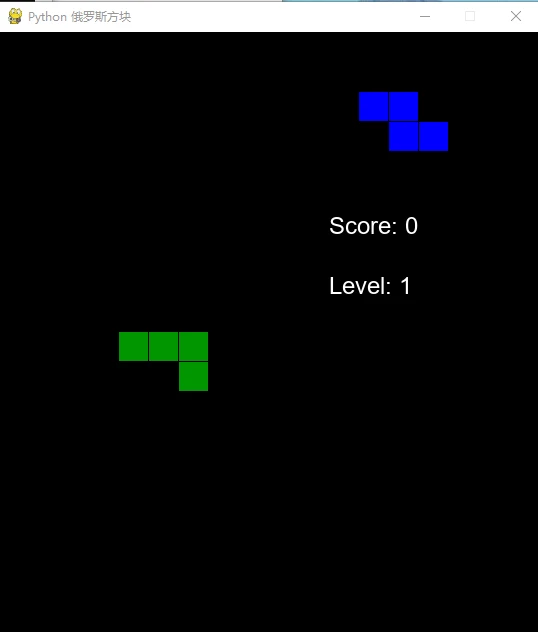
游戏界面左侧为游戏区域,右侧显示下一个方块预览、分数和等级。当方块堆叠到顶部时游戏结束。
可以通过调整以下参数自定义游戏:
BLOCK_SIZE:修改方块大小
fall_speed:调整初始下落速度
GAME_WIDTH/GAME_HEIGHT:修改游戏区域尺寸
COLORS数组:自定义颜色方案
这个实现包含了俄罗斯方块的核心机制,可以作为基础版本进行扩展(如添加音效、更多游戏模式等)。
