

1.前言
上期我们介绍了[[dif案例分享-免费使用微软edgettsAPI]],文末我们介绍了使用dify自带的Text-to-Speech,文本转语音工具。生成语音格式是WAV格式的,不支持在线直接点击播放,效果不是太好。本期给大家实现一个自定义工作流实现tts语音播放功能。下面我们看下两个工作流对比效果。
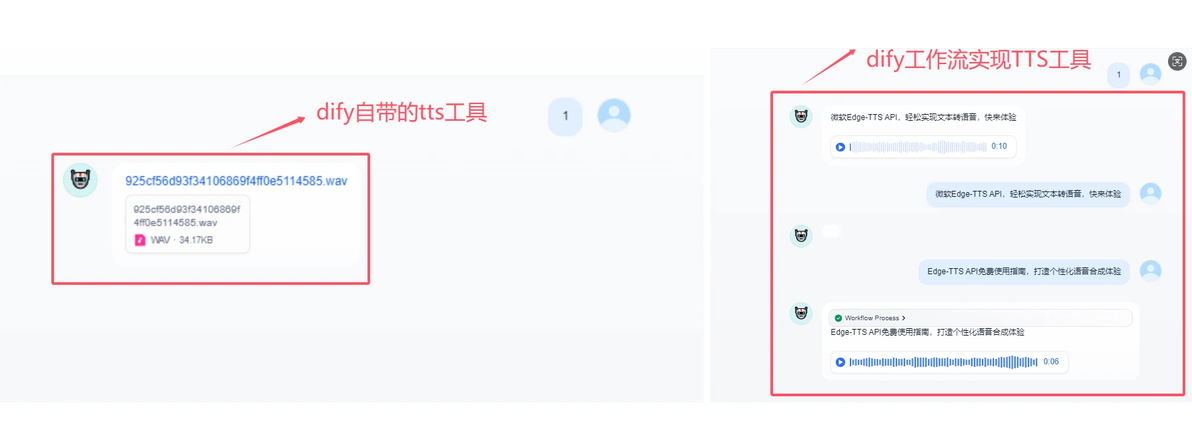
我们从上面图可以看出 右边的明细效果会好一些。可以支持播放按钮在dify 工作区里操作。
下面我们看一下工作流如何实现的。先看一下工作流截图。
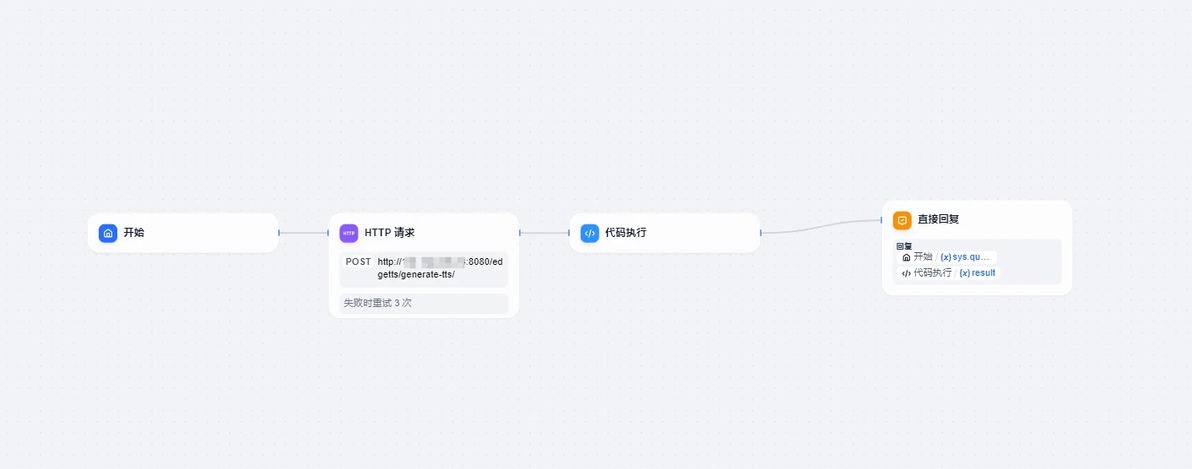
以上工作流其实也非常简单总共就4个部分,开始、HTTP请求、代码执行、直接回复。
下面我们介绍一下如何实现的。
2.自定义TTS语音工作流
2.1 开始
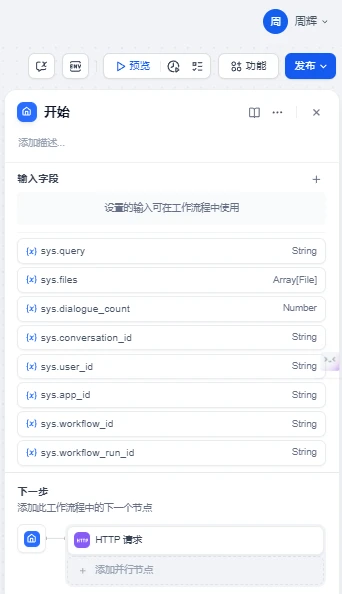
这个开始节点没有具体配置,我们这里插入到http请求就用到sys.query,节点贴一下图
2 http请求
这个http请求我们调用服务端转发一个fastapi接口服务。这个fastapi 接口服务主要的功能就是调用我们之前文章中。配置的Cloudflare 代理转发edge-tts,在这个转发的代码基础上增加了音频文件下载转发到腾讯云OSS存储中。
服务端代码如下:
from fastapi import APIRouter, HTTPException
from openai import OpenAI
import os
from pydantic import BaseModel
from utils.cos_utils import generate_timestamp_filenameforaudio, save_audio_file, upload_cos
from utils.config import load_edgetts_config, common_config

router = APIRouter()

# Load configuration
config = load_edgetts_config()
configcommon = common_config()
api_key = config["openai_api_key"]  # Default to "zhouhuizhou" if not found
base_url = config["openai_base_url"]  # Default URL
output_path = config["output_path"]  # Default output path

# Tencent Cloud COS configuration
region = configcommon["region"]
secret_id = configcommon["secret_id"]
secret_key = configcommon["secret_key"]
bucket = configcommon["bucket"]

client = OpenAI(
   api_key=api_key,
   base_url=base_url
)

# 定义请求体模型
class TTSRequest(BaseModel):
   input_text: str
   voice: str = "zh-CN-XiaoxiaoNeural"
   model: str = "tts-1"
   speed: float = 1.0
   response_format: str = "mp3"

@router.post("/edgetts/generate-tts/")
async def generate_tts(request_body: TTSRequest):
   """
   Generates text-to-speech audio using the edge tts API and uploads it to Tencent Cloud COS.
   """
   try:
       data = {
           'model': request_body.model,
           'input': request_body.input_text,
           'voice': request_body.voice,
           'response_format': request_body.response_format,
           'speed': request_body.speed,
       }
       response = client.audio.speech.create(
           **data
       )
       # Save the audio file
       filename, output_path2 = save_audio_file(response.content, output_path)
       # Upload to COS
       etag = upload_cos(region, secret_id, secret_key, bucket, filename, output_path)
       if etag:
           audio_url = f"https://{bucket}.cos.{region}.myqcloud.com/{filename}"
           return {
               "audio_url": audio_url,
               "filename": filename,
               "output_path": output_path2,
               "etag": etag
           }
       else:
           raise HTTPException(status_code=500, detail="Failed to upload audio to COS")
   except Exception as e:
       print(f"An error occurred: {e}")
raise HTTPException(status_code=500, detail=str(e))主程序 main.py
from edgetts_service import router as router_edgetts
from fastapi import FastAPI
import uvicorn
app = FastAPI()

# Include routers from service modules
app.include_router(router_edgetts)

if __name__ == "__main__":
   uvicorn.run(app, host="0.0.0.0", port=8080)
配置文件config.ini
[edgetts]
openai_api_key=cloudfare配置秘钥
openai_base_url=https://edgettsapi.duckcloud.fun/v1
output_path=D:\工作临时\2025\2月\2025年2月10日以上代码发布对外提供一个服务即可。我的是放到公网上,没有服务可以在本地启一个服务 http://127.0.0.1:8080/edgetts/generate-tts/
dify工作流截图如下
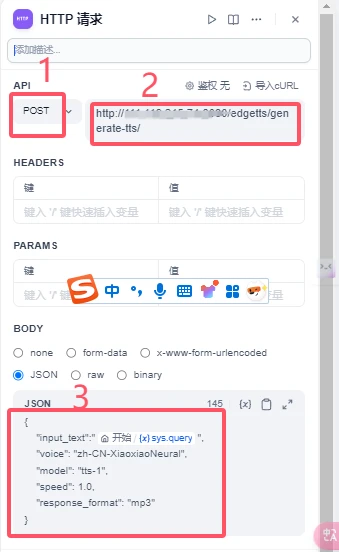
其中bady部分是一个json字符串,内容如下
{
   "input_text":"{{#sys.query#}}",
   "voice": "zh-CN-XiaoxiaoNeural",
   "model": "tts-1",
   "speed": 1.0,
   "response_format": "mp3"
}3 代码执行
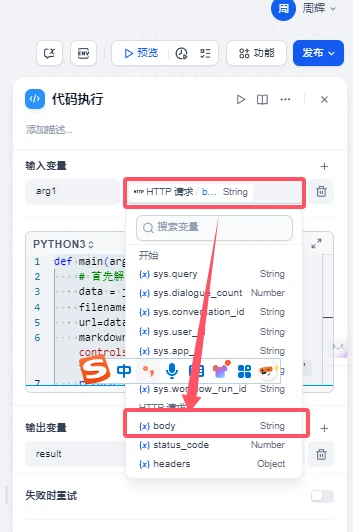
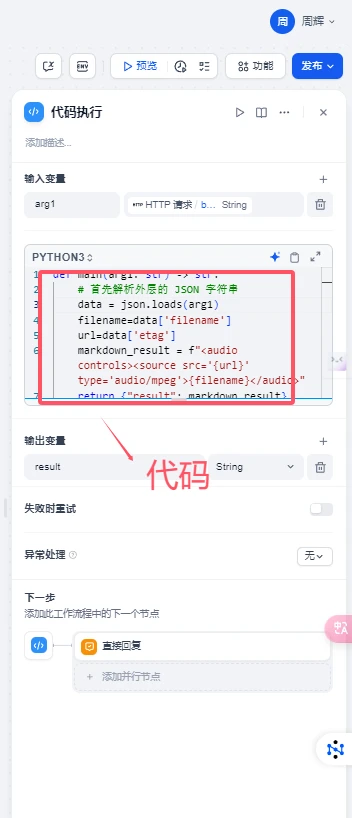
这个代码执行主要目的是获取上面http请求body返回的内容,其核心的内容就是获取上传到腾讯OSS存储中的mp3结尾后缀音频URL地址,代码如下
def main(arg1: str) -> str:
   # 首先解析外层的 JSON 字符串
   data = json.loads(arg1)
   filename=data['filename']
   url=data['etag']
   markdown_result = f"<audio controls><source src='{url}' type='audio/mpeg'>{filename}</audio>"
return {"result": markdown_result}输入参数,这里就是上个节点的http请求body部分
完整的代码处理截图如下:
返回值result ,其它的值是 字符串
4 直接回复
这里为了方便理解我们输出2个内容,1个是用户输入的文本内容,2是生成的TTS语音部分。
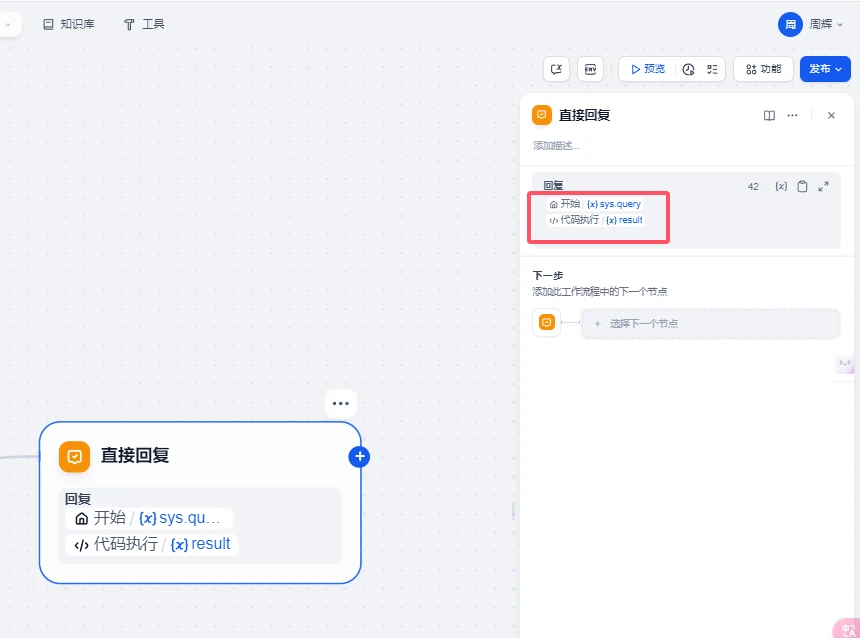
以上我们就完成了自定义TTS语音的工作流。
我们对比一下2个工作流。
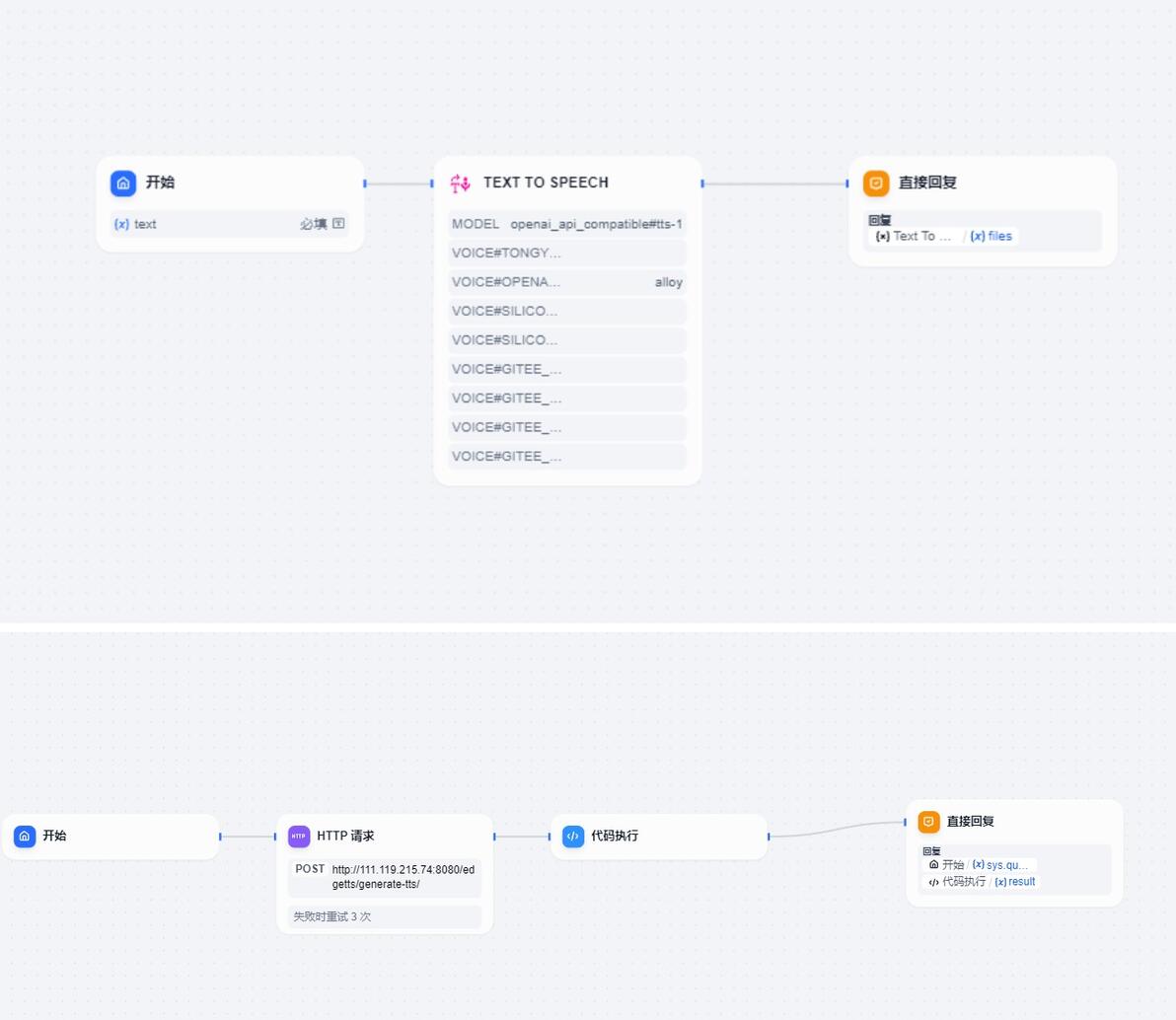
通过以上对比我们就很容易掌握2个TTS语音工作流了。
3.2个工作流 DSL
dify自带语音播报工具
app:
 description: ''
 icon: 🤖
 icon_background: '#FFEAD5'
 mode: advanced-chat
 name: 自带edgetts
 use_icon_as_answer_icon: false
kind: app
version: 0.1.5
workflow:
 conversation_variables: []
 environment_variables: []
 features:
   file_upload:
     allowed_file_extensions:
     - .JPG
     - .JPEG
     - .PNG
     - .GIF
     - .WEBP
     - .SVG
     allowed_file_types:
     - image
     allowed_file_upload_methods:
     - local_file
     - remote_url
     enabled: false
     fileUploadConfig:
       audio_file_size_limit: 50
       batch_count_limit: 5
       file_size_limit: 15
       image_file_size_limit: 10
       video_file_size_limit: 100
       workflow_file_upload_limit: 10
     image:
       enabled: false
       number_limits: 3
       transfer_methods:
       - local_file
       - remote_url
     number_limits: 3
   opening_statement: ''
   retriever_resource:
     enabled: true
   sensitive_word_avoidance:
     enabled: false
   speech_to_text:
     enabled: false
   suggested_questions: []
   suggested_questions_after_answer:
     enabled: false
   text_to_speech:
     enabled: false
     language: ''
     voice: ''
 graph:
   edges:
   - data:
       isInIteration: false
       sourceType: start
       targetType: tool
     id: 1738911112498-source-1738916723971-target
     source: '1738911112498'
     sourceHandle: source
     target: '1738916723971'
     targetHandle: target
     type: custom
     zIndex: 0
   - data:
       isInIteration: false
       sourceType: tool
       targetType: answer
     id: 1738916723971-source-1738915493027-target
     source: '1738916723971'
     sourceHandle: source
     target: '1738915493027'
     targetHandle: target
     type: custom
     zIndex: 0
   nodes:
   - data:
       desc: ''
       selected: false
       title: 开始
       type: start
       variables:
       - label: text
         max_length: 256
         options: []
         required: true
         type: text-input
         variable: text
     height: 89
     id: '1738911112498'
     position:
       x: -105
       y: 254
     positionAbsolute:
       x: -105
       y: 254
     selected: false
     sourcePosition: right
     targetPosition: left
     type: custom
     width: 243
   - data:
       answer: '{{#1738916723971.files#}}'
       desc: ''
       selected: false
       title: 直接回复
       type: answer
       variables: []
     height: 103
     id: '1738915493027'
     position:
       x: 566.1674246342023
       y: 254
     positionAbsolute:
       x: 566.1674246342023
       y: 254
     selected: false
     sourcePosition: right
     targetPosition: left
     type: custom
     width: 243
   - data:
       desc: ''
       provider_id: audio
       provider_name: audio
       provider_type: builtin
       selected: false
       title: Text To Speech
       tool_configurations:
         model: openai_api_compatible#tts-1
         voice#gitee_ai#ChatTTS: null
         voice#gitee_ai#FunAudioLLM-CosyVoice-300M: null
         voice#gitee_ai#fish-speech-1.2-sft: null
         voice#gitee_ai#speecht5_tts: null
         voice#openai_api_compatible#tts-1: alloy
         voice#siliconflow#fishaudio/fish-speech-1.4: null
         voice#siliconflow#fishaudio/fish-speech-1.5: null
         voice#tongyi#tts-1: null
       tool_label: Text To Speech
       tool_name: tts
       tool_parameters:
         text:
           type: mixed
           value: '{{#1738911112498.text#}}'
       type: tool
     height: 297
     id: '1738916723971'
     position:
       x: 196
       y: 254
     positionAbsolute:
       x: 196
       y: 254
     selected: false
     sourcePosition: right
     targetPosition: left
     type: custom
     width: 243
   - data:
       author: 周辉
       desc: ''
       height: 178
       selected: false
       showAuthor: true
       text: '{"root":{"children":[{"children":[{"detail":0,"format":0,"mode":"normal","style":"","text":"dify自带的TTS语音播报工具配置的工作流","type":"text","version":1}],"direction":"ltr","format":"","indent":0,"type":"paragraph","version":1,"textFormat":0}],"direction":"ltr","format":"","indent":0,"type":"root","version":1}}'
       theme: blue
       title: ''
       type: ''
       width: 435
     height: 178
     id: '1739194503738'
     position:
       x: -119.76128007867453
       y: 559.2615088356799
     positionAbsolute:
       x: -119.76128007867453
       y: 559.2615088356799
     selected: true
     sourcePosition: right
     targetPosition: left
     type: custom-note
     width: 435
   viewport:
     x: 442.9805005079934
     y: 45.671073105207256
zoom: 1.17714668852388642.自定义d语音播报工作流
app:
 description: ''
 icon: 🤖
 icon_background: '#FFEAD5'
 mode: advanced-chat
 name: 自定义edgetts工作流
 use_icon_as_answer_icon: false
kind: app
version: 0.1.5
workflow:
 conversation_variables: []
 environment_variables: []
 features:
   file_upload:
     allowed_file_extensions:
     - .JPG
     - .JPEG
     - .PNG
     - .GIF
     - .WEBP
     - .SVG
     allowed_file_types:
     - image
     allowed_file_upload_methods:
     - local_file
     - remote_url
     enabled: false
     fileUploadConfig:
       audio_file_size_limit: 50
       batch_count_limit: 5
       file_size_limit: 15
       image_file_size_limit: 10
       video_file_size_limit: 100
       workflow_file_upload_limit: 10
     image:
       enabled: false
       number_limits: 3
       transfer_methods:
       - local_file
       - remote_url
     number_limits: 3
   opening_statement: ''
   retriever_resource:
     enabled: true
   sensitive_word_avoidance:
     enabled: false
   speech_to_text:
     enabled: false
   suggested_questions: []
   suggested_questions_after_answer:
     enabled: false
   text_to_speech:
     enabled: false
     language: ''
     voice: ''
 graph:
   edges:
   - data:
       isInIteration: false
       sourceType: start
       targetType: http-request
     id: 1739156953706-source-1739156974731-target
     source: '1739156953706'
     sourceHandle: source
     target: '1739156974731'
     targetHandle: target
     type: custom
     zIndex: 0
   - data:
       isInIteration: false
       sourceType: http-request
       targetType: code
     id: 1739156974731-source-1739157745365-target
     source: '1739156974731'
     sourceHandle: source
     target: '1739157745365'
     targetHandle: target
     type: custom
     zIndex: 0
   - data:
       isInIteration: false
       sourceType: code
       targetType: answer
     id: 1739157745365-source-answer-target
     source: '1739157745365'
     sourceHandle: source
     target: answer
     targetHandle: target
     type: custom
     zIndex: 0
   nodes:
   - data:
       desc: ''
       selected: false
       title: 开始
       type: start
       variables: []
     height: 53
     id: '1739156953706'
     position:
       x: -40
       y: 282
     positionAbsolute:
       x: -40
       y: 282
     selected: false
     sourcePosition: right
     targetPosition: left
     type: custom
     width: 243
   - data:
       answer: '{{#sys.query#}}

         {{#1739157745365.result#}}'
       desc: ''
       selected: false
       title: 直接回复
       type: answer
       variables: []
     height: 122
     id: answer
     position:
       x: 959.6006955562395
       y: 266
     positionAbsolute:
       x: 959.6006955562395
       y: 266
     selected: false
     sourcePosition: right
     targetPosition: left
     type: custom
     width: 243
   - data:
       authorization:
         config: null
         type: no-auth
       body:
         data:
         - id: key-value-8
           key: ''
           type: text
           value: "{\n    \"input_text\":\"{{#sys.query#}}\",\n    \"voice\": \"\
             zh-CN-XiaoxiaoNeural\",\n    \"model\": \"tts-1\",\n    \"speed\": 1.0,\n\
             \    \"response_format\": \"mp3\"\n}"
         type: json
       desc: ''
       headers: ''
       method: post
       params: ''
       retry_config:
         max_retries: 3
         retry_enabled: true
         retry_interval: 100
       selected: false
       timeout:
         max_connect_timeout: 0
         max_read_timeout: 0
         max_write_timeout: 0
       title: HTTP 请求
       type: http-request
       url: http://127.0.0.1:8080/edgetts/generate-tts/
       variables: []
     height: 135
     id: '1739156974731'
     position:
       x: 263
       y: 282
     positionAbsolute:
       x: 263
       y: 282
     selected: false
     sourcePosition: right
     targetPosition: left
     type: custom
     width: 243
   - data:
       code: "def main(arg1: str) -> str:\n    # 首先解析外层的 JSON 字符串\n    data = json.loads(arg1)\n\
         \    filename=data['filename']\n    url=data['etag']\n    markdown_result\
         \ = f\"<audio controls><source src='{url}' type='audio/mpeg'>{filename}</audio>\"\
         \n    return {\"result\": markdown_result} "
       code_language: python3
       desc: ''
       outputs:
         result:
           children: null
           type: string
       selected: false
       title: 代码执行
       type: code
       variables:
       - value_selector:
         - '1739156974731'
         - body
         variable: arg1
     height: 53
     id: '1739157745365'
     position:
       x: 566
       y: 282
     positionAbsolute:
       x: 566
       y: 282
     selected: false
     sourcePosition: right
     targetPosition: left
     type: custom
     width: 243
   - data:
       author: 周辉
       desc: ''
       height: 88
       selected: false
       showAuthor: true
       text: '{"root":{"children":[{"children":[{"detail":0,"format":0,"mode":"normal","style":"","text":"使用自定义的TTS语音播报的工作流","type":"text","version":1}],"direction":"ltr","format":"","indent":0,"type":"paragraph","version":1,"textFormat":0}],"direction":"ltr","format":"","indent":0,"type":"root","version":1}}'
       theme: blue
       title: ''
       type: ''
       width: 240
     height: 88
     id: '1739194558669'
     position:
       x: -35.736300499986726
       y: 406.18673396019653
     positionAbsolute:
       x: -35.736300499986726
       y: 406.18673396019653
     selected: true
     sourcePosition: right
     targetPosition: left
     type: custom-note
     width: 240
   viewport:
     x: 222.4954409031062
     y: -92.19009875155416
zoom: 1.6647368032157754相关资料和文档可以看我开源的项目 https://github.com/wwwzhouhui/dify-for-dsl
4 总结
今天主要带大家结合上期文章中使用的cloudfare代理免费的edgetts项目实现语音播报功能,并通过对比方式展示了2个语音工具的,方便大家学习和使用。本次工作流难度不大稍微学习一下即可掌握,感兴趣的小伙伴可以支持关注,今天的分享就到这里结束了,我们下个文章见。
