笔记:给阿里云函数计算网站添加SSL证书(基于CertBot+Let's Encrypt)

收录于文集
共21篇
不知道怎么用函数计算建站的看这里:笔记:如何使用阿里云函数计算部署静态网页
首先安装certbot:
代码块
Shell
自动换行
复制代码
# APT:
sudo apt install certbot

# SNAP:
sudo snap install core
sudo snap refresh core
sudo snap install --classic certbot

sudo ln -s /snap/bin/certbot /usr/bin/certbot  # 这一步是为了确保 certbot 命令能全局使用

# CentOS/RHEL
sudo yum install epel-release
sudo yum install certbot

# MacOS
brew install certbot
复制成功
如果是挂在wifi棒子上,可能会因为certbot版本过低而不能使用新功能,所以需要使用python3.9或者更新版本的certbot:
代码块
Shell
自动换行
复制代码
sudo apt install python3.9-full pyhton3-pip
python3.9 -m pip install certbot
whereis certbot # 会弹出来certbot的可执行路径,这里以/usr/local/bin/certbot为例子
sudo ln -s /opt/certbot/bin/certbot /usr/bin/certbot
复制成功
申请证书:
代码块
Shell
自动换行
复制代码
sudo certbot certonly -d *.example.com --manual --preferred-challenges dns --server https://acme-v02.api.letsencrypt.org/directory --key-type rsa

# 记得把example.com换成你自己的域名
复制成功
然后继续操作:
代码块
Shell
自动换行
复制代码
Saving debug log to /var/log/letsencrypt/letsencrypt.log
Enter email address (used for urgent renewal and security notices)
 (Enter 'c' to cancel): example@email.com # 这里填你的邮箱

- - - - - - - - - - - - - - - - - - - - - - - - - - - - - - - - - - - - - - - -
Please read the Terms of Service at
https://letsencrypt.org/documents/LE-SA-v1.4-April-3-2024.pdf. You must agree in
order to register with the ACME server. Do you agree?
- - - - - - - - - - - - - - - - - - - - - - - - - - - - - - - - - - - - - - - -
(Y)es/(N)o: y # 输入 Y

- - - - - - - - - - - - - - - - - - - - - - - - - - - - - - - - - - - - - - - -
Would you be willing, once your first certificate is successfully issued, to
share your email address with the Electronic Frontier Foundation, a founding
partner of the Let's Encrypt project and the non-profit organization that
develops Certbot? We'd like to send you email about our work encrypting the web,
EFF news, campaigns, and ways to support digital freedom.
- - - - - - - - - - - - - - - - - - - - - - - - - - - - - - - - - - - - - - - -
(Y)es/(N)o: y # 输入 Y
Account registered.
Requesting a certificate for *.example.com # 记得换成你的域名

- - - - - - - - - - - - - - - - - - - - - - - - - - - - - - - - - - - - - - - -
Please deploy a DNS TXT record under the name:

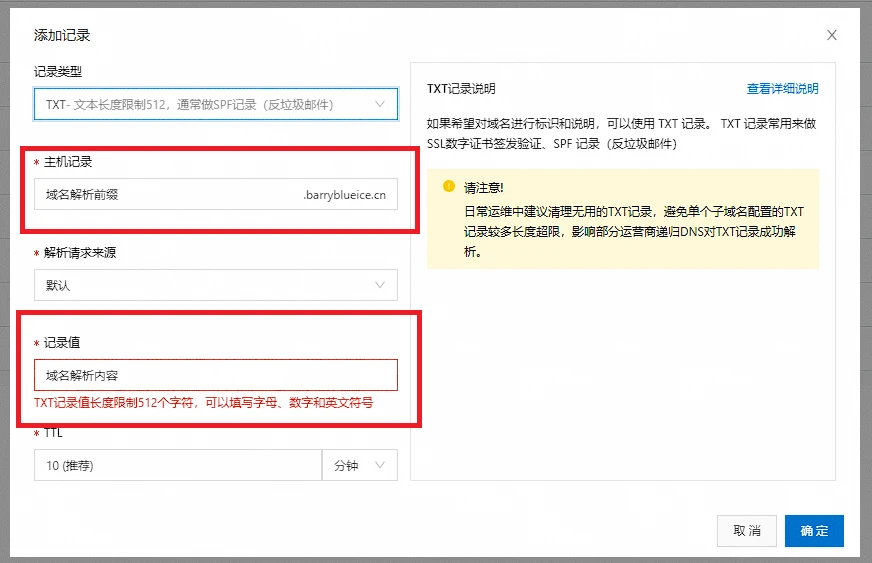
_acme-challenge.example.com # 这里需要设置域名解析,需要到域名后台填写信息

with the following value:

xxxxxxxxxxxxxxxxxxx # 这里是域名解析的内容

Before continuing, verify the TXT record has been deployed. Depending on the DNS
provider, this may take some time, from a few seconds to multiple minutes. You can
check if it has finished deploying with aid of online tools, such as the Google
Admin Toolbox: https://toolbox.googleapps.com/apps/dig/#TXT/_acme-challenge.example.com.
Look for one or more bolded line(s) below the line ';ANSWER'. It should show the
value(s) you've just added.

- - - - - - - - - - - - - - - - - - - - - - - - - - - - - - - - - - - - - - - -
Press Enter to Continue # 参考下图设置完域名解析后,按回车就可以生成了,记住一定要先解析设置完成后再回车

Successfully received certificate.
Certificate is saved at: /etc/letsencrypt/live/example.com/fullchain.pem
Key is saved at:         /etc/letsencrypt/live/example.com/privkey.pem
This certificate expires on 2025-05-04.
These files will be updated when the certificate renews.

NEXT STEPS:
- This certificate will not be renewed automatically. Autorenewal of --manual certificates requires the use of an authentication hook script (--manual-auth-hook) but one was not provided. To renew this certificate, repeat this same certbot command before the certificate's expiry date.
复制成功
首先去阿里云-云解析DNS-你的域名解析,添加TXT解析:
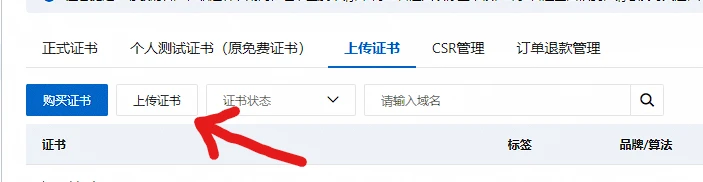
接着去阿里云-数字证书管理服务控制台-SSL证书管理-上传证书。
点击上传证书:
然后点击证书标准选择国际标准,证书名称、证书文件、证书私钥需要编辑:
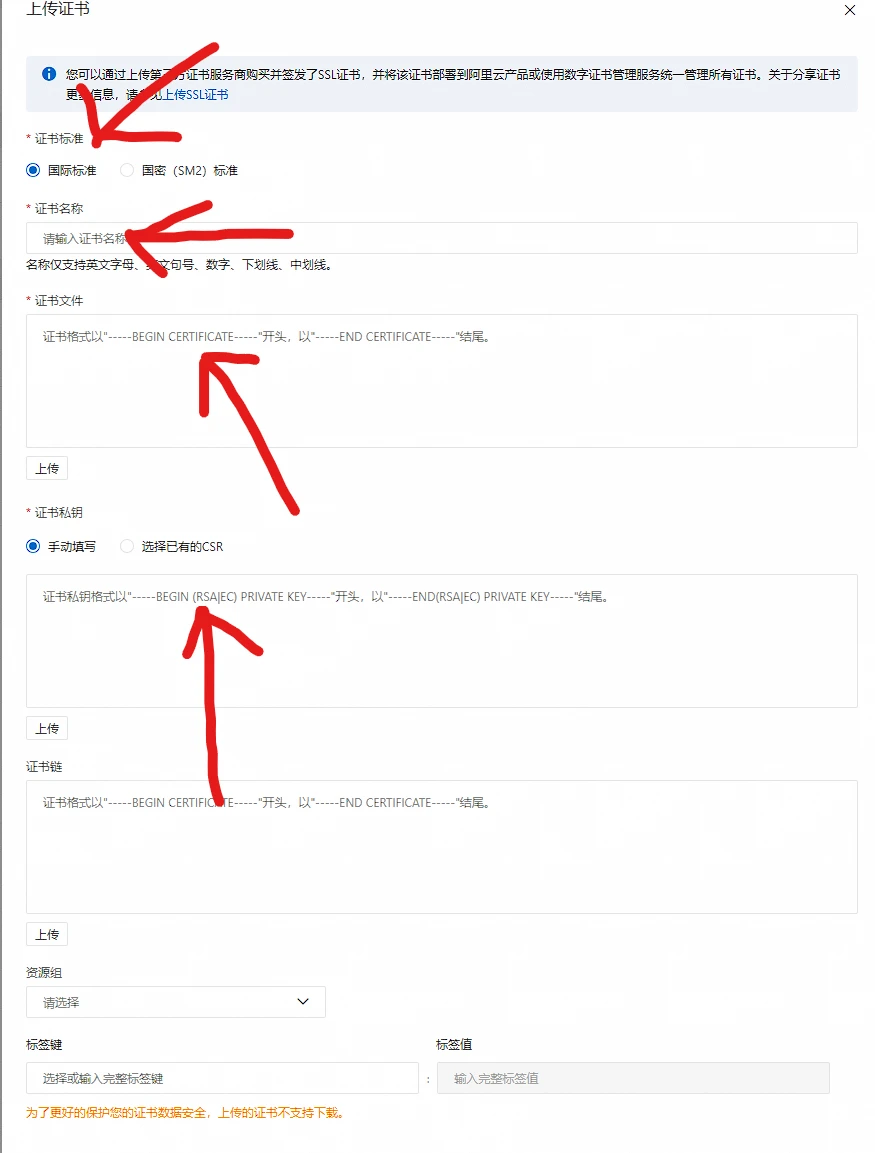
证书名称随便填。
证书文件为fullchain.pem中的全部内容:
代码块
Shell
自动换行
复制代码
sudo cat /etc/letsencrypt/live/example.com/fullchain.pem # -----BEGIN CERTIFICATE----- # xxxxxxxxxxxxxxxxxx # -----END CERTIFICATE----- # -----BEGIN CERTIFICATE----- # xxxxxxxxxxxxxxxxxx # -----END CERTIFICATE-----复制成功
证书私钥为privkey.pem中的全部内容:
代码块
Shell
自动换行
复制代码
sudo cat /etc/letsencrypt/live/example.com/privkey.pem # -----BEGIN PRIVATE KEY----- # xxxxxxxxxxxxxxxxxx # -----END PRIVATE KEY-----复制成功
注意,由于阿里云的函数计算支持问题,PEM密钥需要转换成PKCS#1格式(certbot默认为PKCS#8格式,会用不了)。
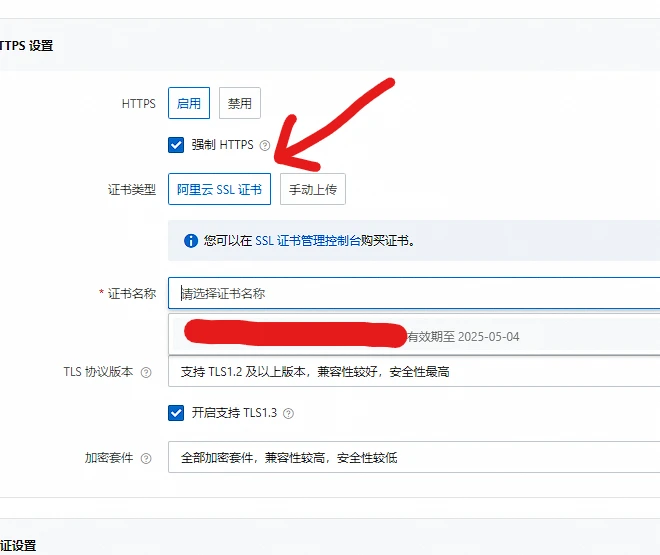
最后去阿里云-函数计算控制台-域名管理-目标https域名,编辑详情。看到下面的https详情:

勾上HTTPS启用和强制HTTPS,TLS选择支持TLS1.2、开启TLS1.3的支持,加密套件随便。
证书类型选择阿里云SSL证书,证书名称为我们刚才上传的自定义名称:
保存之后,不出意外的话,就能默认使用https了。
这个方案有一个美中不足的是:Let's Encrypt的SSL证书每隔90天过期,到期需要重新续期,目前没有什么比较好的解决方案,只能手动更新。
自动续期方案已经成功实现了:https://github.com/barryblueice/aliyun-fc-https,自动计算证书的过期时间,过期前一天会自动续期。
CertBot的安装和使用大部分参考了菜鸟教程:https://www.runoob.com/http/ssl-certbot.html
cv40586489
分享至
投诉或建议
